Help us make the Firewalla Switch
Pinned Featured
Please see installation guide https://help.firewalla.com/hc/en-us/articles/52393670198675-Firewalla-Switch-Installation-Guide
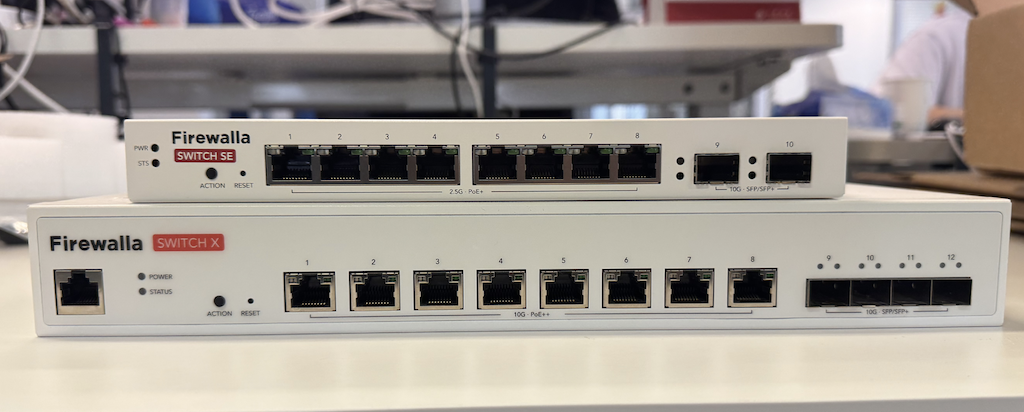
Firewalla App 1.69.1 Will Support Both Switches
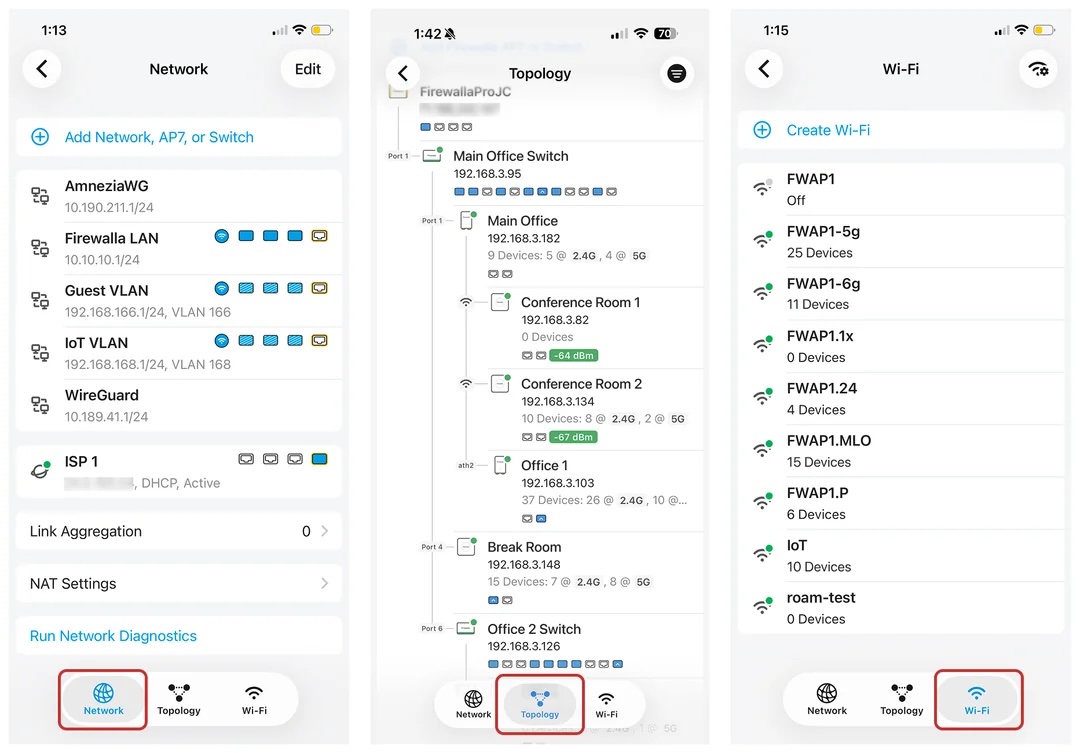
-
The problem is really "heat" + "port density". There are many ports, if you line them up, you are wider than 10 inch. If you stack them, then heat becomes an issue. The 10g switch for example, it wiill need to have fans and a much bigger power unit to push 400+ watts ... you can't really make that into a 10 inch.
And yes, we fully understand the 10 inch look, the gold pro fit in a 10inch (wide) rack.
-

Ryan, I've scoured the switch mine-fields too, NetGear, QNAP, UniFi, ... generics. I narrowed the contender for a 10GbE / RJ45 / SPF+ option to the same model: QNAP QSW-M3216R-8S8T-US. At some point I need a POE switch to run a few things but that's not as imperative. I've kicked my 10GbE can" down the road" since Summer 2025. I am unsure how much longer I can hold out for a Firewalla-based eco-system switch. Each player has strengths.
-

I have had several 8 port sfp+ switches which would fit in a 10in rack and have had all of the ports running with SFP rj-45 transceivers with no issues. Also, I have several 8-port SFP+ from mikrotik which also meet this requirement and have fully loaded with RJ-45 transceivers. Not sure what port density you are looking for here as originally I asked about the target switches and they were going to be 5-8 ports of 10gb. Of course if you go to 12-24 port then yes 10 inch is an issue as well as needing fans and a higher power consumption.
Mikrotik CRS309 8 port SFP+ 10gb and no fans would draw about 55W with all SFP+ ports full with the higher wattage transceivers and would be pushing the limits of 57W power supply fully loaded. But with the lower power transceivers would be about 35W. Note: That this switch is just slightly over 10" but can fit in a 10" rack with 3D printed ears.
However, the mikrotik CRS326-24S+2Q+RM has 24 SFP+ 10gb ports, 3 fans, 2 redundant power supplies would be the following:
- Switch base draw: ~30-35W
- 24x copper SFP+ transceivers: 24 × 3-5W = 72–120W
- 2x QSFP+(40gb) (if populated): add another 3-10W each
- 2x 130w power supplies redundant
So fully loaded that is like 175-180W meaning like a 200-225w power supply not 400+. I use >2w RJ45 transceivers which brings that down to about 103W totally loaded.
Heat is an issue but with the lower power SFP+ RJ-45 transceivers that is less of an issue. Even in the lower end 8-port SFP+ switches with the lower power RJ-45 transceivers I did not have a heat issue. Also, for 10" rack I would use DACs not transceivers which is even less power and less heat.
I use 19" racks so I don't have this issue but for your market it would seem a 10" footprint would be better served for at least one model of the switch. Along with a rack kit for both 19" and 10" racks.
-
Update:
- Paid a huge deposit to pre-purchase memory and storage for the pre-sale Switch (or Switches)
- This will also lock the pre-sale (likely in June/July) price to be as low as possible.
- Post-Pre-Sale price is likely to be much higher (given the current trend)
Software() already started
-

Exciting times. Can you tell us or minimally me, what the net advantage of these switches will be over using a current managed switch utilizing isolated ports forcing aligning all traffic to a single port connected to a FW Box port? I would assume ease of traffic isolation would be at the top of the list. Thank you.
-

I think most people would like the switch to just "blend in" (almost unmanaged with Firewalla hierarchy) with the current software. Keep it simple as if you were adding someone to the AP7, where the Vlan's and Vqlan's are easy as before.
Will there a be a link for buying one pre-sale? I am in -
I might suggest more colors available to denote types of devices attached to each port of the switch perhaps? Something similar to below - but not necessarily this exact color scheme just documented and able to configure on the switch I see you have the uplink port color coded. should add AP's as well.
Commonly Used Network Cable Color Conventions:- Blue: Standard workstation data connections, LAN, or desktop computers.
- White/Gray: General patching, voice connections, or IP phones.
- Yellow: Power over Ethernet (PoE), such as cameras or Wi-Fi access points.
- Green: Network security systems (IP cameras), POTS lines, or crossover connections.
- Red: Critical links, firewalls, routers, or cameras.
- Orange: Demarcation points (ISP/outside connections) or sometimes servers.
- Purple: Inter-switch links or terminal servers.
- Black: Audio/Visual equipment or standard equipment interconnections
-
Many replies:
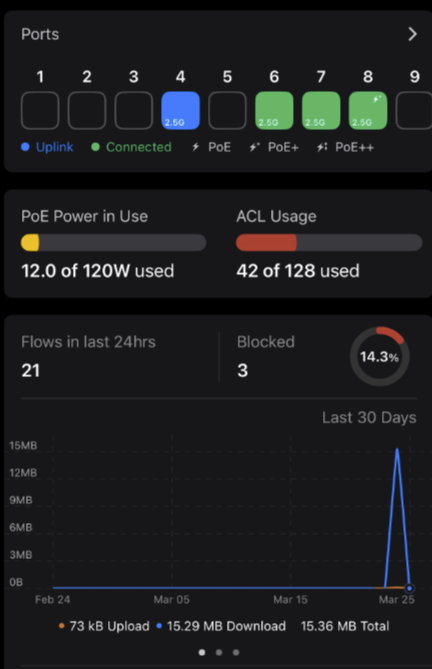
Peak power usage for AP7C is 25W (PoE+)
2.5G unit is 8 RJ45, 2 SPF+
Forward the color idea to our developers.
Disclaimer: Since these are made in Taiwan units (foreign), if FCC classifies them as routers, we may not be able to launch the unit, since our vendor can't make them in the USA in 18 month.
-

My current plan is to buy (at least) two switches. Then, replace my Gold Plus with a Gold Pro, connect the fiber jack to one 10G port, connect the downstairs AP7 to the other 10G port, and connect one of the 2.5G ports to the downstairs switch. Then connect the MoCA adapter to the switch. Upstairs I have two MoCA adapters in two separate rooms. One plugs directly to the AP7 in that room. The other will plug into the second switch which will connect to the wired devices in my office. I'm just saving enough money to buy a Gold Pro. The Gold Plus works fine with a 1GB fiber connection, but I want to upgrade to 3GB (or possibly 8GB) and I have no interest in using the Google router - I want a router where I have full control.
-

https://help.firewalla.com/hc/en-us/community/posts/28643907379091/comments/50260082880275
😢😢 Sadly I will remain waiting for the 10gig option 😥😥
-

Firewalla Switch Update
We started looking at the Firewalla Switch many, many months ago. Even with current distractions, we are very close to a summer launch. (Or at least planning to)
The Firewalla Switch will be tightly integrated into your Firewalla network, extending VLAN/VqLAN + visibility on the LAN, protecting your wired network. We are hoping (fingers crossed) to get two switches out: a 10Gbit unit (rack mountable with ears) and a 2.5Gbit unit (desktop). Both should have PoE.
There will still be some risk with part shortages; we will know more in a month or two. But we're doing our best to secure some discounts for our early pre-sales.
While we wait for the manufacturing process, the app is getting ready. Here is a quick screenshot of the running code.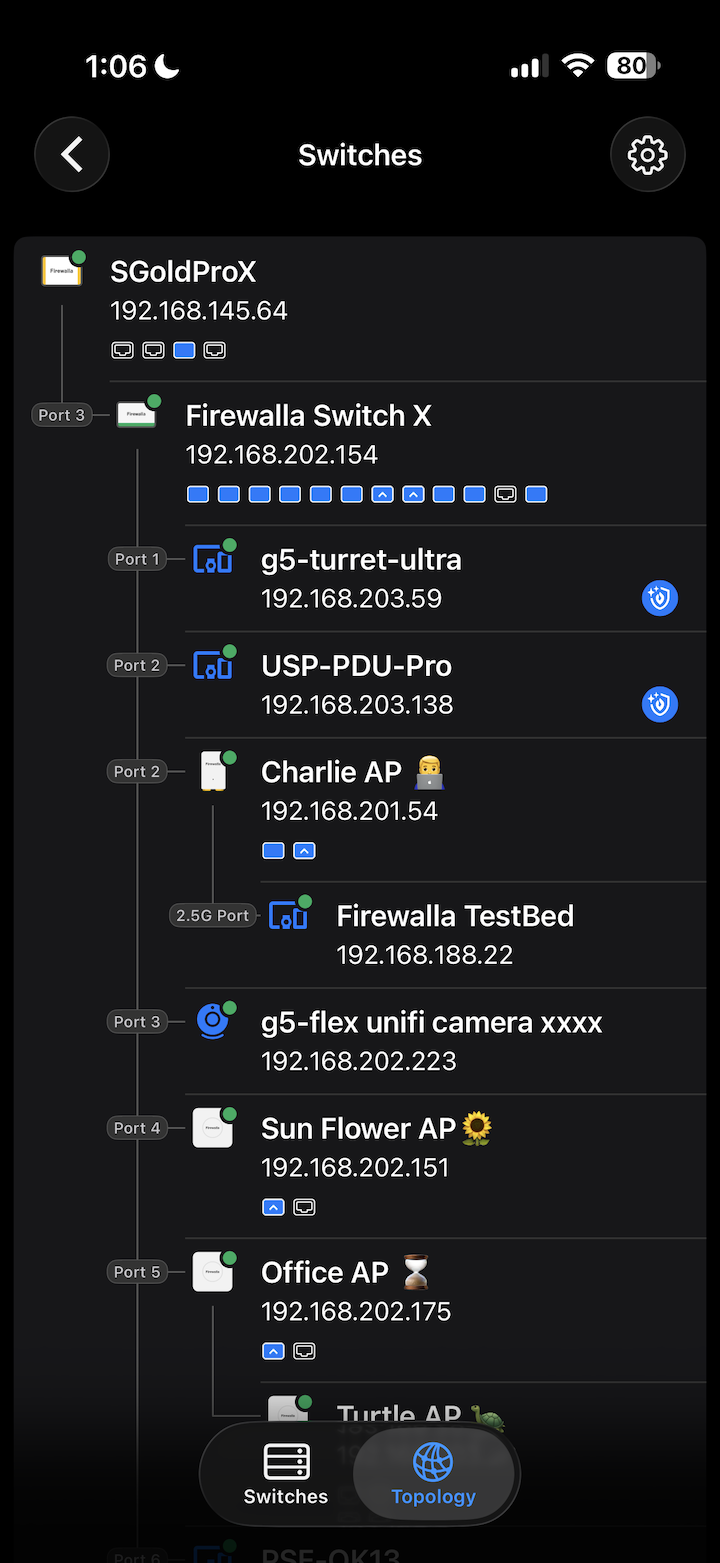
Please follow us here for updates: https://help.firewalla.com/hc/en-us/community/posts/28643907379091-Help-us-make-the-Firewalla-SwitchAnd if you are interested in the switch, please answer our survey here: https://forms.gle/iuCZGmchSshjsTkb7
-

I have some Poe camera mounted inside the house, and I need them to be powered only when nobody is home in case somebody breaks into. So, will this switches have this feature, to be able remotely power on/off each individual Poe port?
Right now I use unifi switch for that, but I would want to have just one multiport switch from Firewalla




Please sign in to leave a comment.
Comments
522 comments