Help us make the Firewalla Switch
Pinned Featured
Please see installation guide https://help.firewalla.com/hc/en-us/articles/52393670198675-Firewalla-Switch-Installation-Guide
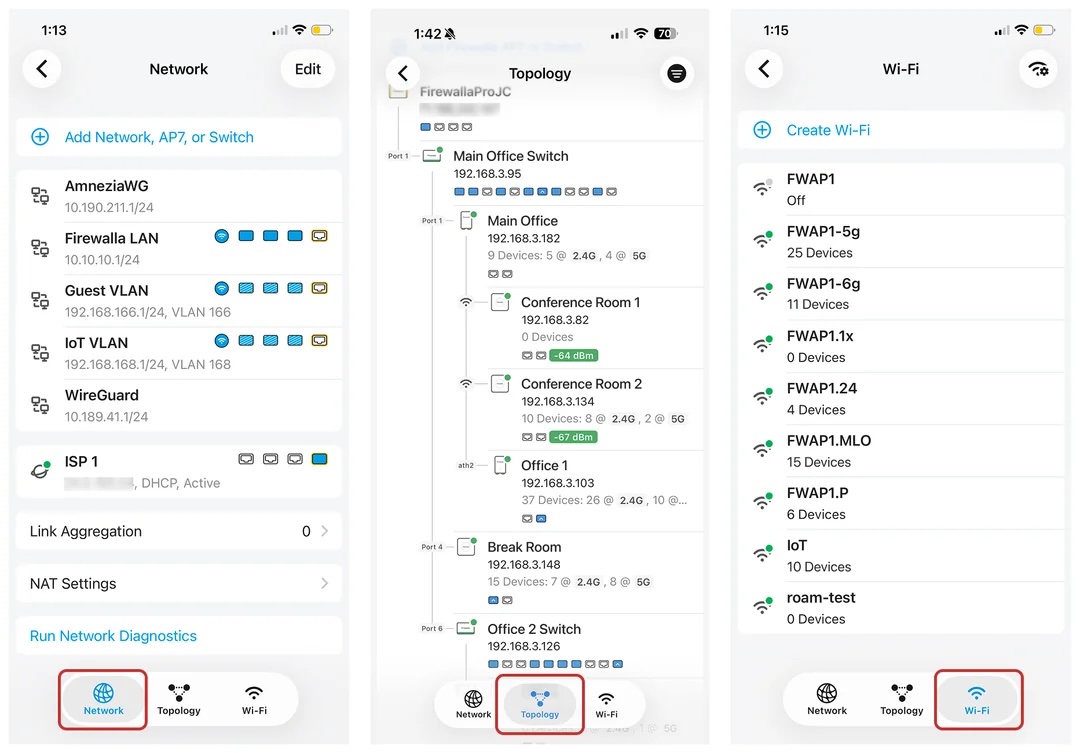
Firewalla App 1.69.1 Will Support Both Switches
-

my dream unit would be a semi-managed unit aka vi toggle switches
12port 110watt Poe unit with per port auto Poe volt switching (12v/24v/36v/48v)
(10x2.5gb Poe's with dedicated on/off power switch in two 5 port sections) &
(& 1 auto vlan switch per group to work with/without Poe option)
(&2x10gb sfp ports) &
(a vlan toggle switch option that ties either 1 or 2 10gb spf ports to 1 2.5gb group)
finally a large copper heatink an twin 40mm noctua exhaust fans in the chassie
with a small power brick an a usb-c power option
for a max of 250$
-

How do you recover from a VqLAN equipment failure, either the router, the switch or an AP7 access point? I am getting excited by the potential release of switches but want to know what spares I must buy versus using my existing backup routers, switches and eero’s.
Are all of the ACL’s duplicated in each Firewalla device; router, switch and AP7? And are the ACL’s based on MAC addresses? Can I unplug a device from one Firewalla switch and plug it into another Firewalla switch or AP7 and expect VqLAN to work without any reconfiguration?
- Firewalla Router failure: Can I use a Peplink router that I have on hand as a backup to replace my Firewalla router as long as all devices are going through a Firewalla switch or AP7 rather than being connected directly to the Firewalla router? And can I expect VqLAN to be working 100% with the Firewalla switches and AP7 restricting devices on the internal network as if the router was Firewalla? (Yes, I know that I have to have the same network segmentation rules like VLAN's in my Peplink.)
- Firewalla Switch failure: One option would be for me to have an extra Firewalla switch that is live but is a spare with no connected devices which hopefully has all of the ACL’s in it so I can just swap it with the failed Firewalla switch with no reconfiguration. If I don’t have a spare, can I move Firewalla switches around without reconfiguration, perhaps unplugging one on the edge of my network to become a core switch hooked up to my Firewalla router without the Firewalla router having to reconfigure anything (or do this when I am running my backup Peplink router)? And then plug in a non-Firewalla switch into the edge of my network recognizing I will lose some VqLAN protection (unless I try something like port isolation or maybe even configure some ACL’s on the non-Firewalla backup switch if I get paranoid enough).
- Firewalla AP7 failure: AP7’s will be connected to Firewalla switches to communicate with the Firewalla router. No current plans to hook any hardwired devices or switches on the other side of the AP7. My backup are eero’s. So I have to live without some VqLAN protection being provided by the AP7, making use of the eero guest network isolation when appropriate.
Note: My configuration has two core switches hooked up to two LAN ports on my Gold Plus with a rule to completely block all traffic between them. That hopefully will have no bearing on switch configuration if all ACL’s are resident in all switches.
-
If you want full VqLAN functionality, your devices need to connect to Firewalla units. (switch or AP7). Since everything is within our "scope of influence", the experience will be seamless. So, in the failure cases you mentioned, you should expect a freeze of Layer 2 policies. (including VLAN configuration, VqLAN rules) Your network should be operational. Enough to get you by until replacing the faulty part.
-
Sounds like VqLAN is another great design from Firewalla. I would appreciate more information though.
I am interpreting that a “freeze of Layer 2 policies” means no changes of ACL’s in the switches and AP7’s can be done unless there is VqLAN policy change made via a Firewalla router. I am also interpreting this to mean the ACL’s are MAC based, not IP address (layer 3) based. Thus, VqLAN continues to work if another router (like Peplink) temporarily replaces the Firewalla router since there is no need for reconfiguration of the ACL policies.
However, what happens if there is a second failure that occurs on a Firewalla switch or AP7 if I am on a backup non-Firewalla router? Can I swap the positions of switches, perhaps moving a live edge switch with a few devices to replace a failing Firewalla core switch without a Firewalla router because every switch and AP7 has all the ACL’s to implement the existing VqLAN policies? Can I move a device with from one port to another on a switch, or to another switch, or change a PC from hardwired Ethernet to/from WiFi? Another way of looking at this, is anything ACL related done dynamically, perhaps because there isn’t enough memory in a Firewalla switch or AP7 to hold all ACL’s?
The answer to this also affects if I would keep a spare Firewalla switch on the shelf or keep it live connected to the network to make sure it always has the latest policy ACL’s.
-
Think of your firewalla as a controller; it stores states, and when implementing access control, it will need to push that configuration down to the network. And when the controller is gone (disconnected, power outage ..), end devices will maintain the state as is. (no new configuration until the controller is up) Some functions may break, for example, if you add a new device, since there is no controller, firewalla can't really do VLAN-based quarantine.
If you want to change configuration, the best way is to get Firewalla back, otherwise, running headless + a network topology change will not be a good way to run your network. (hence, I can't really answer all the different possible ways of running headless)
This behavior is pretty much the same for all controller based network devices.
-
Does anyone care if the switches are FCC Class A? (FCC Class A represents a certification category for electronic devices designed exclusively for industrial, commercial, or business environments.)
We are still trying to secure CPU/memory for both units, memory/emmc shortage still there. Likely getting initial limited build summer ... (before kids going back to school)
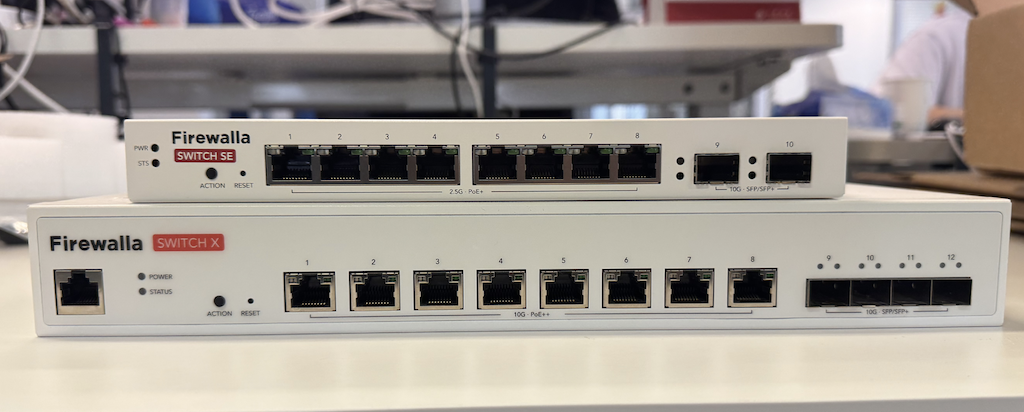
Firewalla Switch 10G
- 8x10G RJ45 With POE++
- 4x10G SFP+
- Rack mountable
Firewalla Switch 2.5G
- 8x2.5G RJ45 with PoE+
- 2x10G SFP+
- Not rack mountable
-

"Does anyone care if the switches are FCC Class A?" => No. I wouldn't care either way if it only added a few dollars per switch; if adding that feature broadens your audience and only costs me, say $10 more, that's fine--do what you gotta' do.
Caveat: I assume the quality will be the same either way, but you just don't have to pay for a certification, which means you won't have to pass on added costs. If the certification means the hardware is better, then I'd need more information.
-
who need 4 SFP , well for me
the sweet spot would defiantly be for me just 3x10SFP/1x2.5gbSFP im my
home-network layout is so i dont run cables all over the place i use three
multi gig switches & one basic gig as followed1
main 8port (6x2.5gb-2x10gb SFP+) for the main office and outdoor shed mass
storage nas + 6x2.5gb-2x10gb SFP+ mostly for the main office nas , & network
printersone 6 port 4x2.5gb - 2x10gb SFP multi gig switch on one side of my home for
two pc an local nasone 6port 4x1gb - 2xSFP 2.5gb to the ht room for the
tv,apple tv , receiver , and game consoleone 6port 4x1gb 2x2.5gb sfp Poe in the attic for the Poe house cams
but the main + the 2nd office & ht room switch both have two sfp port and they
plus the Poe cam switch are far enough plus with the cable route needed that a
sfp cable and port was neededi used a 10Gtek 10G SFP+ AOC Cable - 10GbE SFP+ to
SFP+ Active Optical Fiber Cable between themid llove if firewalla would make some custom unit s
with these options
big
8x2.5rj45/3x10SFP+ non-poe
8x2.5rj45/3x10SFP+ poemedium
5x2.5rj45/3x10SFP+ non-poe
5x2.5rj45/3x10SFP+ poesmall
4x2.5rj45/2x10SFP+ non-poe
2x2.5rj45/1x2.5gb sfp 1x10SFP+ non-poe
4x1gb rj45/1x2.5gb SFP+ non-poe
and a accessorie unit for poe cama large
10 port 1gb rj45/1x2.5gb-SFP poe
10 port 1gb rj45/1x2.5gb-SFPnon-poeand small
6 port 1gb rj45/1x2.5gb-SFP poe
6 port 1gb rj45/1x2.5gb-SFP non-poe
3 port 1gb rj45/1x2.5gb-SFP non-poe (ht unit)for me the sweet spot would be a combo
of app managed switches from firewalla to cover me like8x2.5rj45/1x2.5gbSFP/2x10SFP+ non-poe with the
(1x10SFP-2nd office&nas)
(1x10SFP to outdoor shed mass nas)
(1x10SFP to main office nas)
(1x2.5gbSFP to the ht room)for the ht room (3 port 1gb rj45/1x2.5gb-SFP non-poe (ht unit))
(6 port 1gb rj45/1x2.5gb-SFP poe ) unit to the house cams
i currently have the cams connected
to custom server in shed with a SFP network card




Please sign in to leave a comment.
Comments
537 comments