Windows 2000 best setup?

After a week or so I am finally up and running, this was all new to me. Got all my Macs and Windows computers, printers, etc working like I like. My problem child as I knew was going to be my Windows 2000 PC that is needed to run a very old piece of hardware. It is an art scanner. Since Windows 2000 OS had little to none security I need it to be blocked completely from the outside world. But I need it to be able to do one thing Monday - Friday 8:30am - 5pm, allow others on our network to access it to transfer files from it. I have a software called Flight FTP server set up so we can access it via FTP. It works fine. I use Mac Transmit app on the Macs to do that. Any suggestions on a good strategy to create a rule, or rules, to make this happen? I have the Firewalla Purple. Thanks!
-

Hi Mark, how is your network set up? Is your Windows 2000 on the same local network as your other devices?
If it doesn't need any internet access at all, you can start by creating a new rule to block all traffic to & from the Internet on your Windows 2000 PC.
Depending on your network topology, you can place your Windows 2000 on a separate local network from your main network, then create additional Rules to further block LAN access and allow specific traffic on a schedule.
Some docs that may be helpful:
- Manage Rules: https://help.firewalla.com/hc/en-us/articles/360008521833-Manage-Rules
- Network Segmentation: https://help.firewalla.com/hc/en-us/articles/4408644783123-Network-Segmentation
-
To use VLANs, you will need additional hardware, like VLAN-capable switches or access points, in order for devices to be assigned to the VLAN (see here: VLAN-based segmentation).
You can set up rules on either the VLAN or the PC itself. Then, you can create a rule to:
- Allow traffic to & from your "master" LAN at the schedule you specified, so devices can access it.
- Block all traffic to & from local networks to prevent all other local access outside of the schedule.
Network segmentation is optional, and only needed if you want more granular control over the local network. If you don't care if local devices access your Windows PC at other times of the day, the simple Internet Block on the Windows PC will work just fine.
Let me know if this helps. If you're new to segmentation, this guide explains the pros & cons of each method: Groups, Segmentation, and Microsegmentation with Firewalla
-
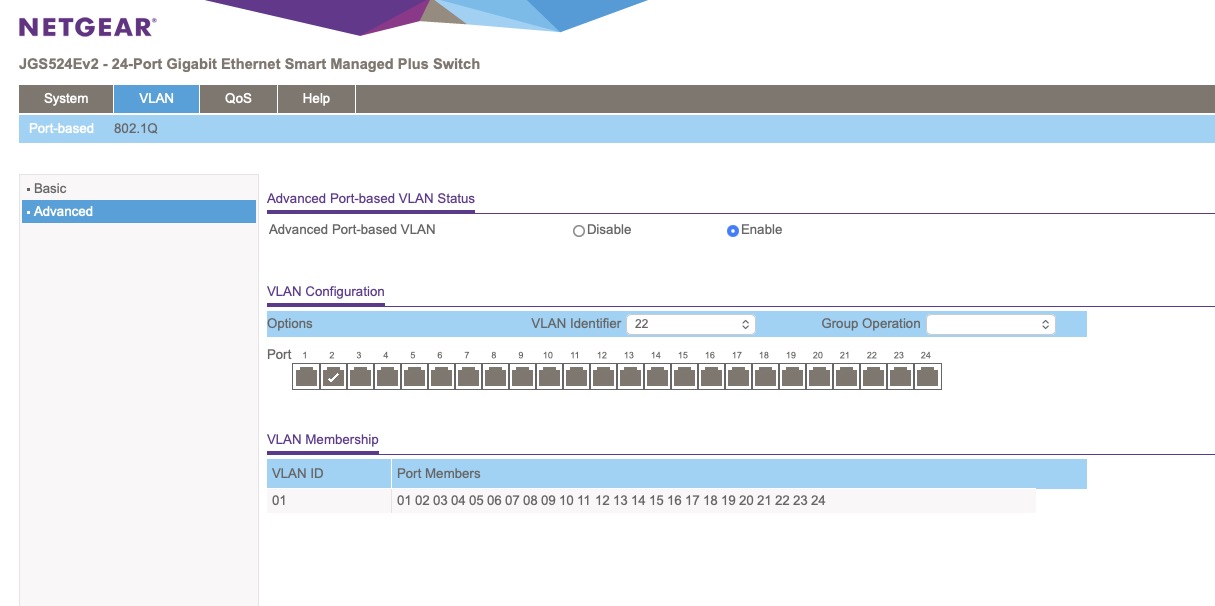
I happen to have a Netgear 24 port smart switch. But I do not see all the options shown in the documents screenshots. I do not see those options on left side panel. I created the VLAN labeled 22 in Firewalla and want to assign it to port two on the switch.
Here is what I am seeing.
Please sign in to leave a comment.
Comments
6 comments