Comments

876 comments

  • Avatar
    mikehuxley

    @Manny

    It is just a top command.

    Log on and type

    top

    1
    Comment actions Permalink
  • Avatar
    XRaptor29

    Just received mine through USPS. Box was slightly dented in the corner, but the Firewalla Gold Pro had no damage or issues.

    Migration worked flawless on my Pixel 8 Pro.

    2
    Comment actions Permalink
  • Avatar
    Eibensl

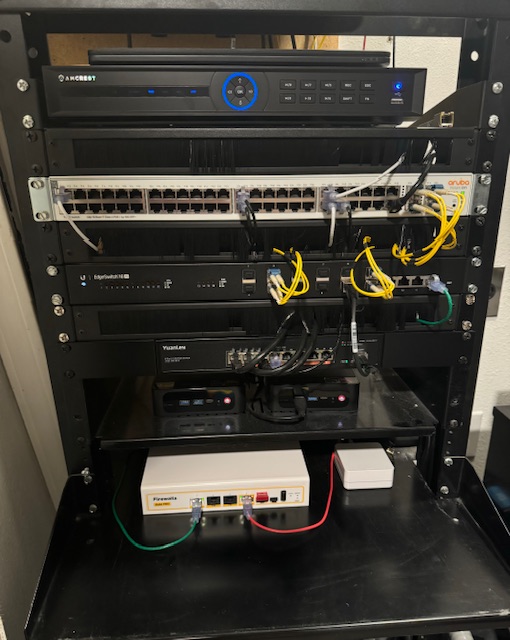
    The FWG Pro arrived today via USPS; no issues with packaging and the unit looks great.  The initial installation under transparent bridge mode was very fast and easy, took less than 10 minutes to adopt it using my Samsung Galaxy S22 Ultra and creating 3 bridges for my VLANs. Am achieving full line rate of 5gbps up/down.  Just need to create rules now along with re-naming ~80 devices.  I'll be running it in transparent bridge mode for awhile and then change it to router mode and putting it out in front of my network and testing that for awhile.
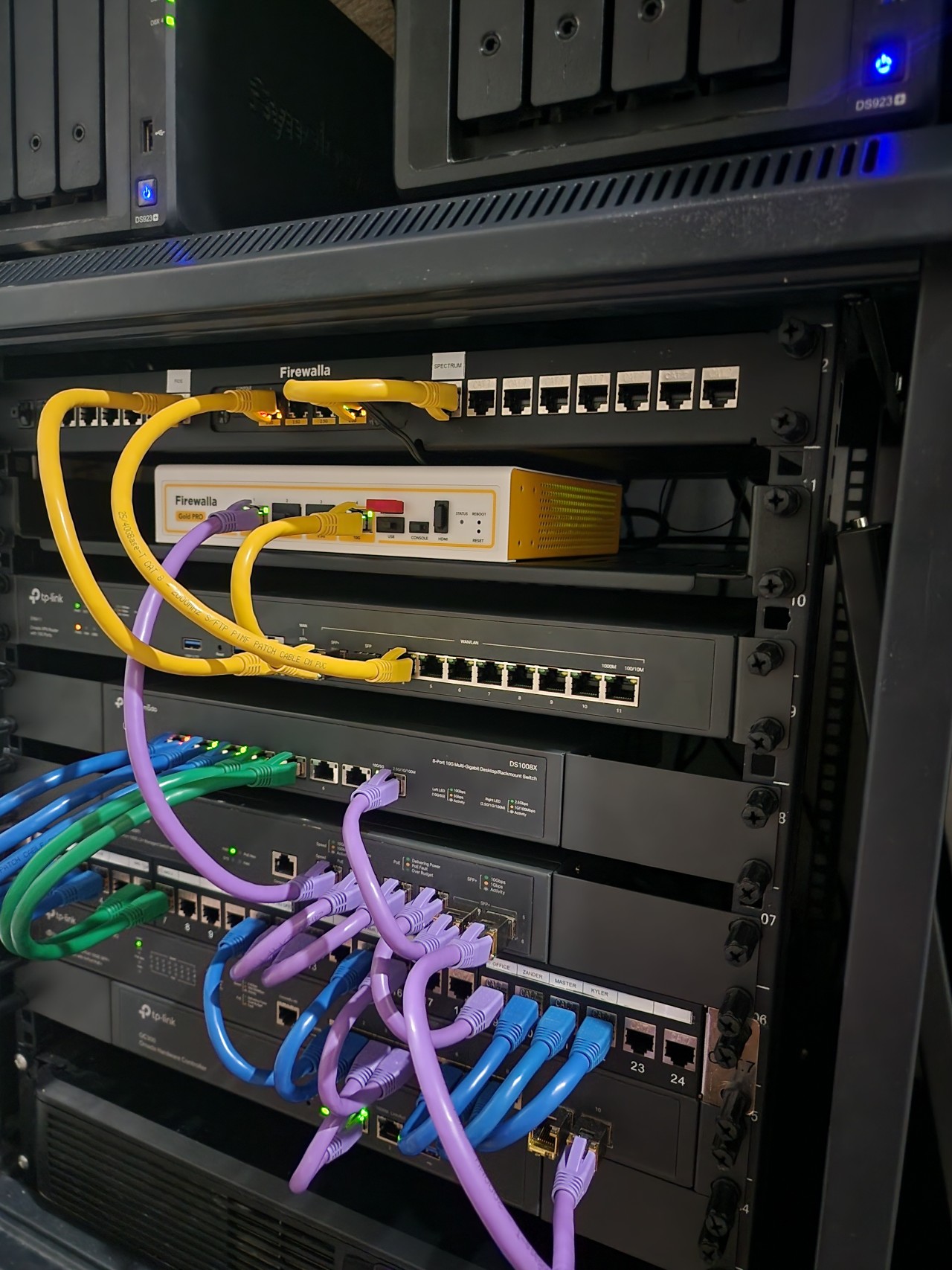
    .  

    3
    Comment actions Permalink
  • Avatar
    Benjamin Achtenberg

    If we pre-ordered, can we beg anyone to be considered for beta testing?

    0
    Comment actions Permalink
  • Avatar
    M

    Nice @Eibensl! That was my initial plan too once I get mine, to run it in transparent bridge mode ahead of my network for a bit, until I can get time to re-setup a lot of the network and firewall rules to make it my main router.

    2
    Comment actions Permalink
  • Avatar
    Firewalla

    @eibensl, forwarded to our rack mount project manager; hopefully, she gets it from the picture.


    2
    Comment actions Permalink
  • Avatar
    Gavin

    @Benjamin Achtenberg

    After you purchase you fill out a survey. It is then a weighted process based on when you preordered and how you answered the preorder survey. From there it is still “random” per se and hence folks that ordered later could still get selected from someone that ordered day 1 when the preorder went live. It is also dependent on how many preorder units are available too obviously.

    If you look back on this thread I am pretty sure they explain it. 

    2
    Comment actions Permalink
  • Avatar
    Zero Cool

    I'm having issues connecting to an AnyConnect VPN client on Firewalla Gold Pro. It fails to connect, and when trying to view logs, it stays stuck on trying to view the logs, so I have to completely close the Firewalla beta app Version 1.62 (67) on iOS. The client I'm connecting to has 2FA enabled. Perhaps that's what is causing the issue.

    Like everyone who received their device, the setup process was a breeze. Migrating the configuration was no issue, and I was up and running in about five minutes.   

    1
    Comment actions Permalink
  • Avatar
    Firewalla

    @zero, I've created a ticket for you. 

    2
    Comment actions Permalink
  • Avatar
    Veli Pekka Nousiainen

    @Firewalla I have an idea!
    What if I let your people to remotely config the Gold Pro and run tests as you please?
    I can use my unlimited data plan on my phones and tablets
    and hotspot the laptop.
    Finland, Oulu, is yours!
    I can attach the old TP-Link Touch P5 first.
    Then the new Archer BE900.
    We will see what is the VPN speed of the Gold Pro? Was it 500-600Mbps? Then a 600M connection is sufficient.

    1
    Comment actions Permalink
  • Avatar
    Christopher Ferrante

    Powered up the box! Migration went smoothly, do you need to re-add the new gold pro to early access (alpha)?

    never mind - I enabled in app by tapping 10x on the join beta option


    pic (pardon the mess):

    https://imgur.com/a/v7FsX1e

    1
    Comment actions Permalink
  • Avatar
    Gavin

    I am looking at these pictures. Crazy network setups. With that being said only the 10 gig ports are used. It’s almost like Firewalla could have created a “Purple Pro” (using the same Gold Pro hardware) with just two 10 gig ports.

    1
    Comment actions Permalink
  • Avatar
    Andre

    How about honeypot feature, are you planning to make it? Just asking…

    1
    Comment actions Permalink
  • Avatar
    mikehuxley

    I like your thinking there Andre, but from using illumio, that's a lot of development. Also would a small business / home user benefit from it? Other to quench the curiosity thirst

    1
    Comment actions Permalink
  • Avatar
    Ram!

    Any idea when the wave 2 will start to ship ?

    1
    Comment actions Permalink
  • Avatar
    Andre

    mikehuxley
    Nowadays a lot happening in the world, lots of people can be under bad state actors surveillance. I don’t know how safe is Firewalla for that scenario. I'm just asking to understand better what is going on…

    1
    Comment actions Permalink
  • Avatar
    mikehuxley

    I get that Andre. It's a difficult world we live in now.
    I'll be interested to hear what they think about that threat area

    1
    Comment actions Permalink
  • Avatar
    nick

    Installed and impressed!


    1
    Comment actions Permalink
  • Avatar
    Firewalla

    Updates

    • Wave 1: completed
    • Wave 2: waiting for customs clearance. (should be this week) 
    • Wave 3: getting shipped to USA (likely next week)


    0
    Comment actions Permalink
  • Avatar
    Eibensl

    @Gavin:  I like the idea of a Purple Pro for those that only need two ports, but don't let my photo be representative of why.  For me, as I'm currently testing the Pro in transparent bridge mode, I'm only using the 10gbe ports since my LAN backbone is all 10gbe.  Once I switch to router mode and put it out in front, I'll use the 10gbe ports for both my WAN 1 link (5gbe service) and for the connection back to my core switch, and then one 2.5gbe port for my WAN 2 link (1gbe service). 

    1
    Comment actions Permalink
  • Avatar
    Gavin

    @Eibensl:
    I was more joking than anything. With that being said I will use all the ports on my Pro. I’ll swap the WAN to one of the 2.5 gig ports (I “only” have 1 gig fiber). I’ll then hang two of my access points off of the 10 gig ports so they will have the 10 gig backhaul between them. I have a third access point but it will be wirelessly connected. The final 2.5 gig I’ll connect to my powerline.

    2
    Comment actions Permalink
  • Avatar
    Mark9

    I like the idea of a Purple Pro with two 10Gbps ports as long as there is no fan.  (I continue to be uncomfortable with the Gold Pro with its fans in my dirty environment).

    -1
    Comment actions Permalink
  • Avatar
    Firewalla

    At the moment, it is NOT possible to run 10Gbps (with inspection) without a fan. The PCB can't be small either (due to heat). Big (to huge) heatsinks are possible, but they will cost significantly more

    1
    Comment actions Permalink
  • Avatar
    Manny Cavalier

    Hopefully, a two (or three) 2.5G ports for the Purple Pro version in the future. :-)

    1
    Comment actions Permalink
  • Avatar
    Firewalla

    @manny, isn't that just gold se? :) 

    1
    Comment actions Permalink
  • Avatar
    Manny Cavalier

    Well, I was referring more in particular to the physical size of a Purple as a pocket/travel router with all ports at 2.5G. Plus, with the same WiFi capabilities, and last but not least, within the price range of the Purple. :-D

    1
    Comment actions Permalink
  • Avatar
    Troy Dampier

    Okay received my unit - going to set it up tonight probably.  I see the USB-C console port - but it did not come with a console cable.  What type of cable can I use to connect to a laptop USB port for accessing the COM port?  I don't think a USB data cable will work will it?

    1
    Comment actions Permalink
  • Avatar
    Firewalla

    Any usb-c data cable will work. (please don't use a charging only cable)

    We do have an updated article coming on this, please wait 24 to 48 hours, will get it done. 


    1
    Comment actions Permalink
  • Avatar
    mikehuxley

    @firewalla

    When that article is ready can you let us know here please

    1
    Comment actions Permalink

Please sign in to leave a comment.