CONTEST: Show us your Firewalla setup! (2025)
Featured
UPDATE 8/11/2025: Contest closed! Thank you to everyone who participated and shared your unique setups! The Firewalla team is happy to announce the top submissions for the Firewalla Setup Contest 2025!
1st Place:
- Andy Camara https://help.firewalla.com/hc/en-us/community/posts/42589603312659-CONTEST-Show-us-your-Firewalla-setup-2025?page=3#community_comment_42710256813843
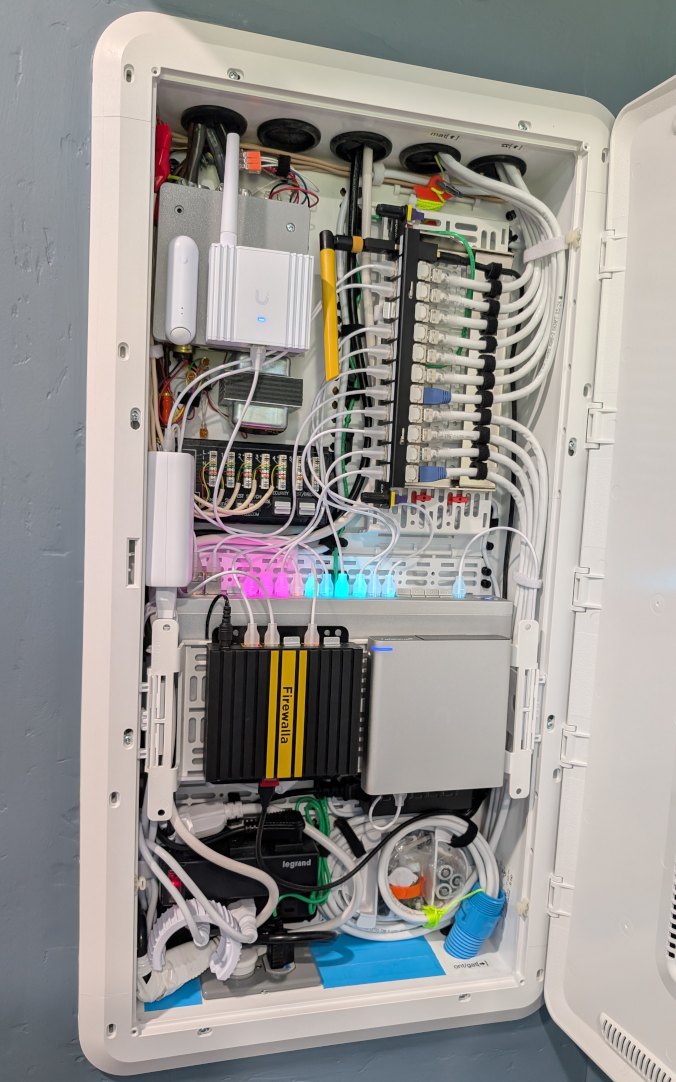
2nd Place:
- twiny2 https://help.firewalla.com/hc/en-us/community/posts/42589603312659-CONTEST-Show-us-your-Firewalla-setup-2025?page=3#community_comment_42677270637203
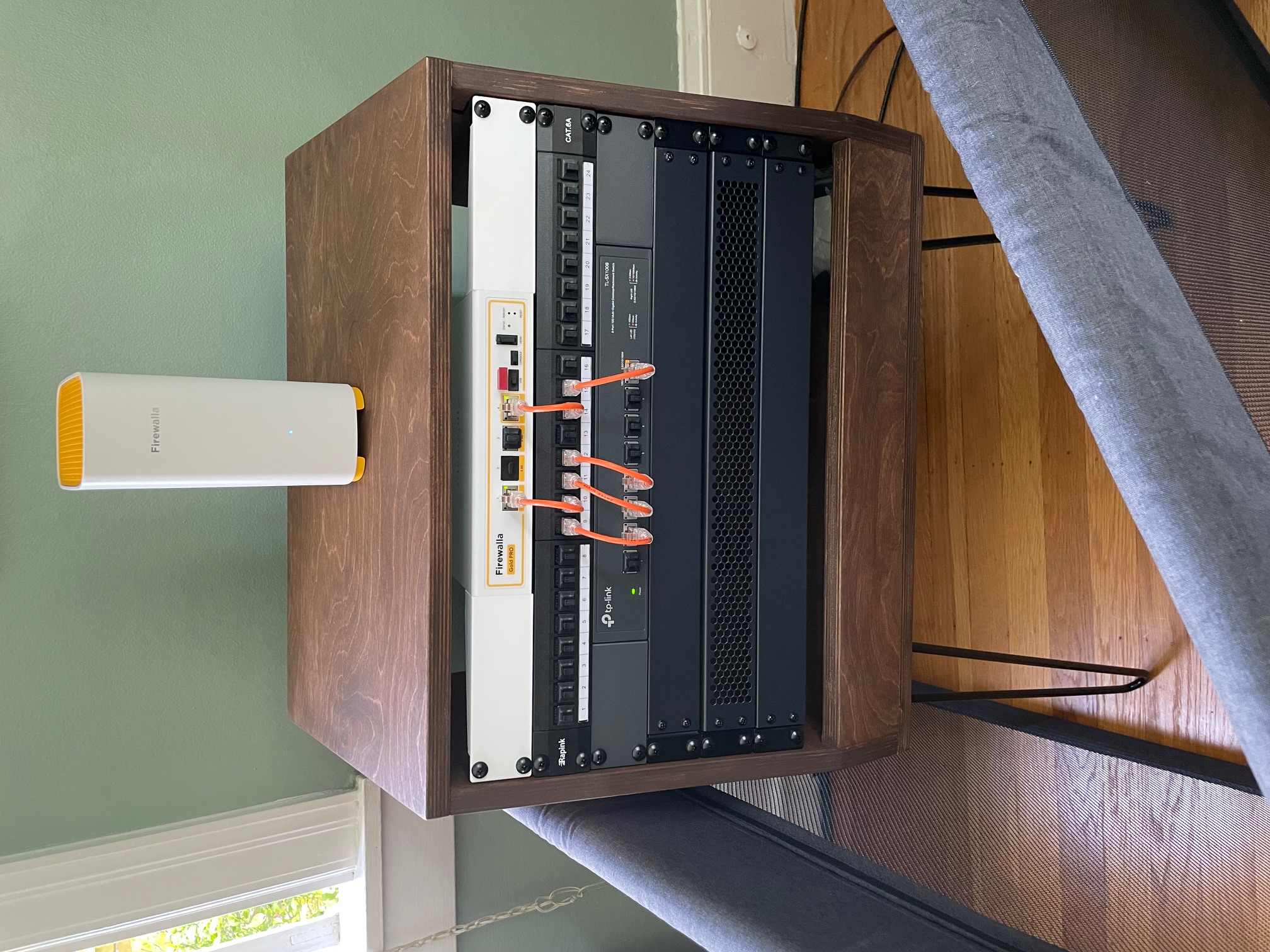
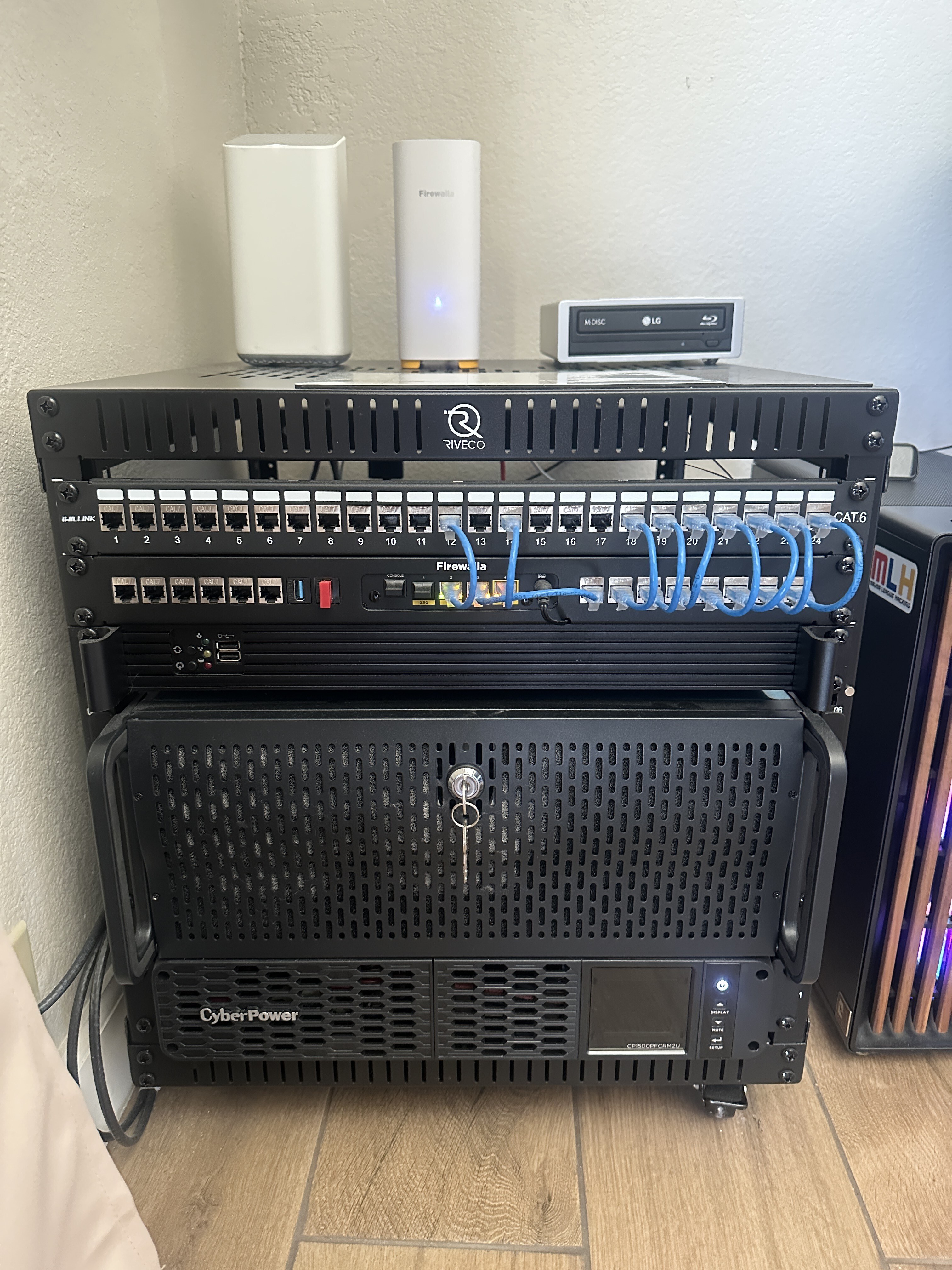
3rd Place:
- Gociu Mihai https://help.firewalla.com/hc/en-us/community/posts/42589603312659-CONTEST-Show-us-your-Firewalla-setup-2025?page=1#community_comment_42613941675795
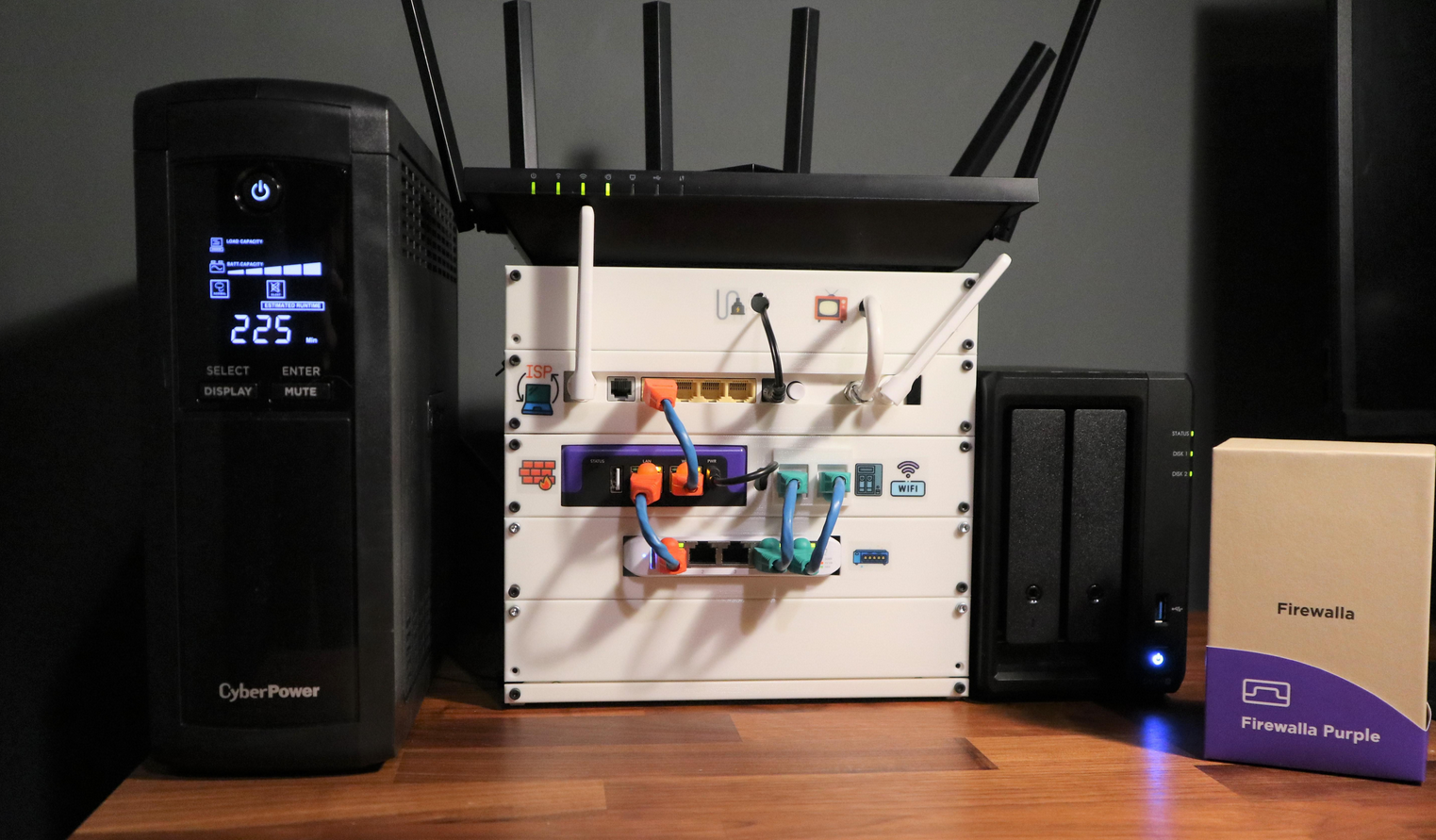
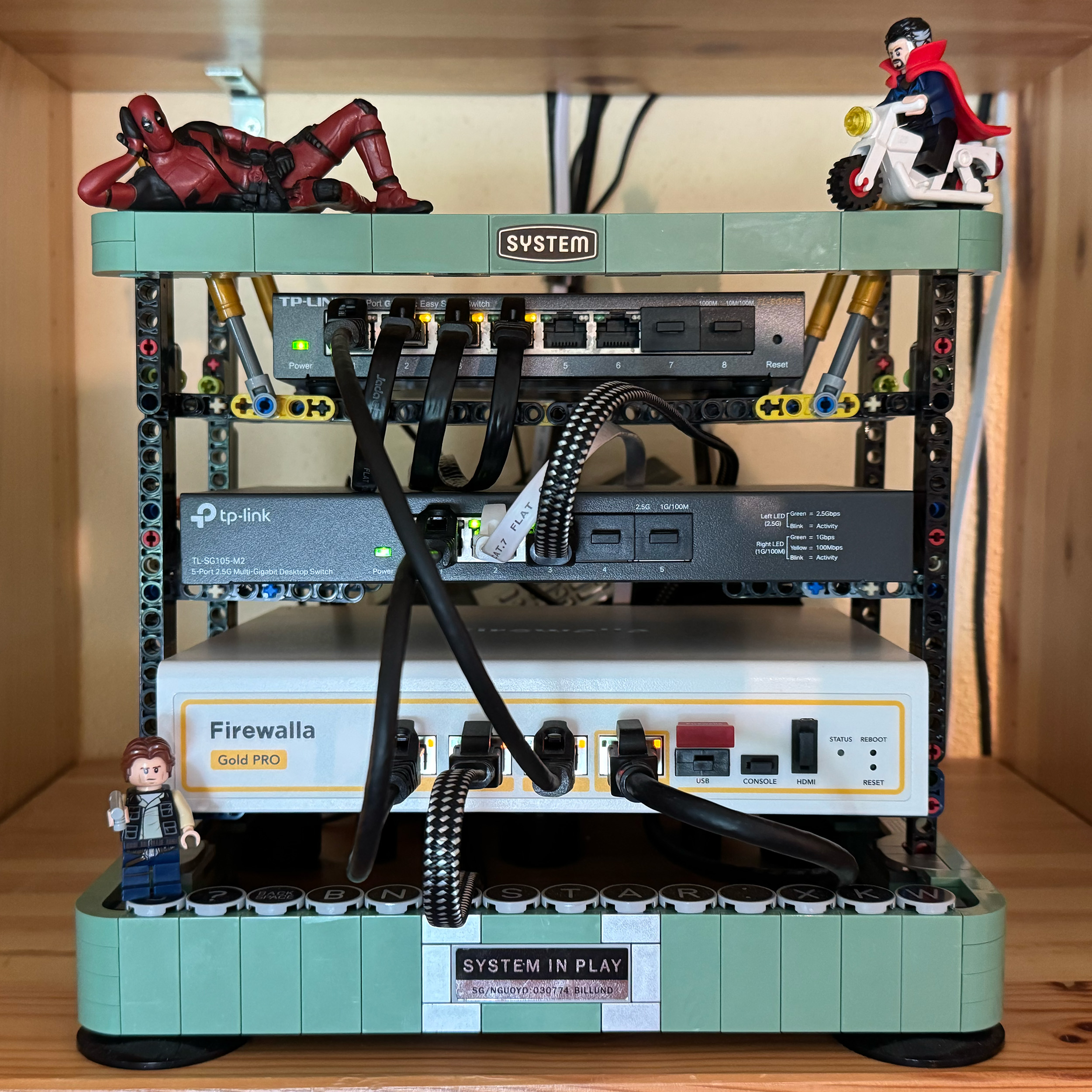
Winners have been contacted individually about their prizes.
---
We want to see how you’re using your Firewalla products! Whether you’ve placed them in a clever spot, built custom fittings, or just have an artistically messy setup…
Prizes:
- Grand Prize (1 winner): Firewalla Gold Plus + Gold Rack Mount + Wi-Fi SD
- Or 2 Firewalla AP7s instead (if based in the USA)
- Second Prize (2 winners): Firewalla Gold SE
- Or 1 Firewalla AP7 instead (if based in the USA)
- Third Prize (2 winners): Purple SE
Winners can choose alternate products of equal or lesser value. Top entries may be featured on our website and in Firewalla marketing materials!
How to Vote:
- Scroll down (there are multiple pages).
- Vote for your favorites by clicking the up arrow next to the comment (login required)

How to enter:
- Post a photo of your setup as a comment below (login required)
- Must include at least one Firewalla box.
- If you’ve entered a past Firewalla contest, please submit a new, original photo.
- If you're entering from a mobile device, you may need to request the desktop version of this site to see the option to add an image to your comment.
- We’ll also accept photos of a standalone AP7 Desktop or Ceiling if they are interesting!
- (Optional) Include a short paragraph describing your setup and one or two software features that made a difference.
Winner Selection:
- 10 finalists: 5 based on submission votes, and 5 chosen by the Firewalla team.
- Finalists will enter a final voting round through our communities.
- The top 5 submissions with the most votes will determine our winners.
- We have the right to remove submissions that don't meet the requirements or appear to have fraudulent votes.
Timing:
- Submissions & preliminary voting: June 30–July 15th, 2025
- Final voting round: July 21–July 31, 2025
- Winners will be announced and contacted via email starting on August 1, 2025.
Important:
- Please do not post any sensitive information. We reserve the right to remove unoriginal or offensive content.
- By entering, you agree to allow Firewalla to use your photos in future marketing materials (emails, articles, product pages, etc.)
- By posting or voting, you will automatically sign up for the Firewalla weekly newsletter; this is to notify you of voting times and winners.
- To keep contest entries clean, we will delete non-submission posts occasionally.
Check out our previous Firewalla contests for some inspiration!
- 2024: Show us your “lifestyle” Firewalla Contest https://help.firewalla.com/hc/en-us/community/posts/24294588856083-Show-us-your-lifestyle-Firewalla-Contest
- 2023: Show us your Network Rack and Win Big https://help.firewalla.com/hc/en-us/community/posts/18333572629267-Show-Us-Your-Network-Rack-and-Win-Big
-

This is going to be hard to beat. I don't have a fancy expensive setup unfortunately. But i am very happy with my Firewalla gold plus! It does a great job at protecting my home network which includes a NAS and even some game servers running in proxmox on a small mini pc. I would love a second Firewalla, to protect a familly member and try out site to site vpn's. Good luck to everyone!

-

Running a Firewalla Gold Pro on an 8-Gig Google Fiber connection, paired with a UniFi Flex XG 10-Gig switch for high-speed LAN performance. Also integrated are a Starling Home Hub, Philips Hue Hub, and two AC Infinity Multifan SP7-P for active cooling—all backed by a GoldenMate UPS 1000 for power stability.
The setup is on a custom-painted shelf and handles four Firewalla AP7 Desktops throughout the home, three of which are hardwired for optimal coverage. Cable management is still a work in progress, but the system runs flawlessly and reliably.

-

My humble little setup. DSL router into Firewalla Purple, going to a Netgear Managed 5 port POE switch. Not pictured is my WIFI 6 Netgear Insight WAP.
The biggest feature set I use is the VLAN support so I can segment out my home office devices from my home devices, and keep my IOT devices on a separate network. I also love the VPN client feature so I can connect to my VPN service and have my IOT devices run through the VPN tunnel. It's been running strong now for several years. I totally swear by my Firewalla device.

-

12u floor data cabinet from Data Comms Direct this year, scaled down from 18u open wall mount to simplify and lower my electricity bill! FWG connected to ISP modem using login credentials with PPPOE in Firewalla rack mount. 2.5 symmetrical fiber, Patch Panel, Meraki Go 24 port POE Switch with Meraki Go Wifi6 APs (#2 ceiling mounted in hall.and upstairs /, not in shot), Synology NAS, Philips Hue and SmartThings hubs right at the top, APC UPS on the bottom. Smart Things temperature sensor at the top. Not a network engineer, all self taught, first cabinet was a bookcase (!), and plenty of mistakes (I mean learnings!) along the way.

-


After moving to the new place, finally I could properly put them all onto the wall.
I have 3 different networks being created for different purposes, 2 of them to be managed by Firewalla Gold Plus, while the last one is monitored by the little old Firewalla Blue.
Yes yes I know Firewalla Blue was EOL since exactly last year, when it is still working properly, why not?
The picture was being taken using wide angle, as a result things might become a bit ... wired. -

Behold: The OG Gold that started it all. No bougie 2.5 Gbps, no swagger-soaked 10 Gbps - just four humble 1 Gbps ports that have never cried uncle. This is the One-G Gold, the Router of Theseus that’s watched more VLANs rise and fall than a soap-opera cast list (yes, I even hit the “Feeling Lucky” button… once).
It’s pushed more traffic than the George Washington Bridge sees cars at rush hour - Netflix marathons, Disney+ binges, and those cough unlisted streams the kids definitely didn’t learn from me.
Whats in the Rack?
-
Dual Zyxel switches (way more ports than I need, but the blinky LEDs are my night-light).
-
Raspberry Pi Stratum-1 GPS time server—because all the Tuya crap on my network needs microsecond accuracy
-
LoRaWAN & Zigbee gateways meshing
-
A Synology NAS doing the heavy lifting and an HP mini quietly automating my life.
"WAIT! - Where is all the compute?" Not in this rack. Its </gestures broadly> ... not in this picture
What’s with the 99 | 65?
That 1U LED matrix is a Pico-powered, self-playing Pong champion. It will play to 100, resets, flexes again. Sometimes it scrolls dad jokes or a bootleg version of Chrome’s Dino Runner. Because why not?Dual WAN Bulletproof
Upgraded from the USB dongle to a point-to-point WISP link on a travel router, backed by a totally different ISP. When the main line hiccups, my network doesn’t even flinch.In two years the Gold hasn’t so much as sneezed. If reliability were a super-power, this box would wear a cape. It has been held up like a hockey trophy cup when other engineers start bragging on how they bested OPNSense wedged into an AliExpress box. My little Gold has convinced more than a few folks to give up their dream of roll-your-own firewall and go with something that *just works*.
All that... I do have 2.5g and 10g in the network... would really be nice to get it all passing through the Firewalla (hint! bring on the Switches!). A Gold Pro would be <chefs kiss>

and... Potato quality to keep it under 2mb

-
-

Over Kill Home Network. Getting ready to retake my Network + so I built this new office to get my gear out of the dusty old basement. Did all the work my self and with the Help from my 4 year old son & Wife, all was inspected and passed inspection.
Starting from the top: Firewalla Gold + running all 2.5GB ports, Mikrotik CRS310-8G+2S+ running 2.5GB and SFP+ 10GB fiber to other building's on my property, Mikrotik CRS328-24P-4S+ running POE+ out to all ports in my home with SFP+ 10GB fiber as trunk port to agg switch and soon to other systems, Netbooter PDU so I can remote hard reboot gear if needed (ISP Modem), also hiding is the ISP modem, all is grounded, AC fan that can be remote powered off in the winter if needed.
Lower rack: Mikrotik RB3011 router configured as a switch for the time for monitoring, 2 EMC2 24TB servers with 2 4 core Xeon CPU's each running 64GB of ram each, one server runs True NAS that also runs a media server for local movies and tv shows, the other one is running Proxmox with, Ubuntu server, Free PBX, Kali Linux for testing & Netbox for network documentation, 2 3000VA APC UPS's, one runs the upper rack through a 30A twist lock port, other one runs the servers giving me days of run time on the main rack up top.
What you can't see are my U6pro AP's in my home and other buildings that I would like to swap for Firewalla AP7's, Unifi Cloud key, I have a Mikrotik RB5009UPR also with a 1300va APC UPS and other U6pro in other buildings on my property. Every thing is cabled with 10GB fiber or 10GB CAT6a although some ports are only 1GB at this time but have room for upgrade. I have many VLANs with many Networks for network separation helping to secure home/office devices from IOT & Guest devices, the Firewalla also is setup using FQ_codel and the guest network has traffic shaping setup per device to help with the load on the internet (keeping every one fair and happy)

-


My setup - Rack for Ants.
Minirack equipment:
-
ISP Line 1 GB - Huawei Echolife HG8143A5 (Bridge Mode)
-
Firewalla Purple 1 Gb (Main Router - PPPOE Connection)
-
Switch - Ubiquity USW-Flex-Mini
-
TP-Link AX73 (AP Mode)
-
UPS CyberPower VP1200ELCD
-
Synology DS720+ (2x6TB, 10 GB Ram - Backups, Docker etc)
Never been in a firewalla contest so posting this picture - setup is the same as we speak.
-
-

Looking at the other posts, I can see some impressive home network setups! Congrats to y’all, amazing to see this much networking nerdery in one place :)
---
My modest contribution: Behold: The Gold Pro Life.
I know it’s more horsepower than my entire neighborhood, but hey... someone has to keep the bits flowing.
Connected to the WWW via Sonic 10 Gbps Fiber Internet.
Overkill just to run Speedtest every 5 minutes? No, you know you w̶a̶n̶t̶ need it.Firewalla Gold Pro: My set-it-and-forget-it network guardian.
Has more stamina than I do after a double espresso.Firewalla Desktop AP7 ×2: Because those pesky little IoT trolls aren’t going to auto-assign themselves into the IoT VLAN.
Wireless Backhaul: Because I hate my attic, and I hate the crawl-space even more.
(Don’t ask about the time a rat jumped on me from the insulation... Last time I ever went down there. Ever.)
LEDs: Stay off, because I value my retinas and the last thing I need is another mini rave in the living room at 2 a.m.Bonus WTF points (Wife Tolerance Factor) :
All of this is tucked away behind actual furniture, so my guests never suspect I’m secretly running a home network that could rival with the startup next door.LEDs off. VLANs on. Crawl-space trauma unresolved, but the packets are happy.


-

My Firewalla Purple initially allowed me to relegate my Archer AX5000 to an access point. Over time, this evolved to a setup with VLANs, TP-Link EAP773s, Jetstream managed switches, and an OC200. This is just a hobby; I can stop any time. Really. My wife has a different opinion but what does she know about networking?

-

I don't have the luxury of a rack; what I've got is an open shelf in the basement for all of our network equipment, and I have to make the most efficient use of space as possible.
Is that an Ooma hanging off the battery backup? You bet! I am the hardware Tetris king, and my weapon of choice is Velcro strips. I also use them to hang my Gold SE on the far right. In between is my main network switch, bridges for my smart home devices all lined up, and of course my modem.
As a dad, I don't have a lot of time to invest in my IT hobbies these days. I decided to invest in a Gold SE and a pair of desktop AP7 APs because I wanted family network security to be simple - and it is! Using VqLAN and Adblock, I got everything segmented and filtered in very little time. Browsing network flows to see how "chatty" many IoT devices are clues me in to how necessary these Firewalla features really are!

-

Structured Media Cabinet install at my house:
Firewalla Gold in 3d printed wall mount with a 3d printed 120mm fan mount/fan setup to turn fan on when temp on my firewalla gets too warm to passively cool down via homebridge docker setup
Orbi wifi (hope to win that AP7!)
Temperature monitor
Cord concealing box at bottom

-


My Setup:

10-inch rack/cabinet (9 HE) with:
- 16-Port Patchpanel
- Zyxel 16-port Managed Switch
- Synology Diskstation 218+ 16 TB
- Raspberry Pi4 and external 2 TB SDD with Home Assistant Installation
- Philips HUE Bridge
- 8 TB Backup HDD

AVM Fritz!Box 7590 (Router Mode)
Firewalla Gołd (in Simple Mode) -

My setup which is a work in progress having just moved halfway across the country, includes a Verizon Home 5G Gateway, Firewalla Purple, Eero 6 pro, a MikroTik 24 port switch, TP Link 8 port POE switch, 4 RPi, Apple Time Capsule, MinisForms MS-01 as a Proxmox node, a BeeLink mini-PC as a Proxmox Backup Server, a UGreen 2 Bay NAS and a Synology NAS as the data store for Proxmox. All housed in a 20U open frame rack.

-

Here’s our Firewalla Gold setup installed at the headquarters of Vector Electronics & Technology, Inc. in North Hollywood, CA. We run a lean, high-efficiency network to support our ISO-certified manufacturing operations in aerospace, defense, and medical industries.
This wall-mounted rack system includes:
-
Firewalla Gold (centered in our layout) as our primary gateway and threat monitoring system
-
CAT6 patch panel, managed switch, and custom-labeled power distribution
-
Fan for rack health (homemade by our company)
-
Structured cable routing and power separation for serviceability
-
All powered and protected by Tripp Lite PDU and UPS
Key Firewalla Features We Rely On:
-
Site-to-site VPN — connects our home network securely to the office for remote access to Synology and cameras
-
Smart Routing & Policy Management — separate VLANs for IoT, engineering, and admin, all managed from the app
-
Threat Detection — real-time alerts and visibility keep our small business network tight and protected
We’re proud of our clean and compact build — proving even a small rack can deliver enterprise-grade capability.
Let’s go, Firewalla team!

-
-


My tidy little setup with Firewalla at top and center. Has been a great integration with UniFi switching and power delivery, home assistant via lenovo mini pc, Synology, and more. Also using MSP to more easily manage and see the Firewalla details. Have been so happy with the setup and stability of the system.
-

This is my main rack, that contains my Firewalla, WAN switch, CORE switch and distribution switches (to other parts of my home).
The two 10G ports on the Firewalla are used for east/west traffic, as I do not have an Internet connection that would require one of them.
The two WANs have their own VLAN IDs (VWAN?), and there are 18 VLANs.
The WAN managed switch is used to assign VLAN IDs to both Internet connections. Each Internet connection gets its own VLAN ID. This allows for one port on the Firewalla to use both Internet connections. WANS are used in a primary/failover configuration. Primary is a Starlink Internet connection. Failover is an AT&T hotspot.
The CORE managed switch is a 12-port 10G switch that is between the Firewalla and all other switches. The four SFP+ ports connect the four managed distribution switches with their corresponding SFP+ ports.
The four managed distribution switches connect to other rooms (and sometimes individual devices).
The PC next to the rack is a camera server running Blue Iris.
All network connections go to the patch panel in the wall behind the rack... which goes throughout my home.
I have multiple WiFi systems for isolation. Would love a couple of AP7s to replace my old WiFi systems and compliment my Firewalla setup!


 Firewalla Gold Pro, pre-order to make use of 10G Internet. Love the blocking of apps feature like Roblox / TikTok.





Post is closed for comments.
Comments
152 comments