Local DNS Resolution In DHCP Mode

-

Yes, please check the dot lan addressing here https://help.firewalla.com/hc/en-us/articles/360041946313-Firewalla-Box-Release-1-966-iOS-Release-1-36-Android-Release-2-49.
See this one
4) Device Local Domain
This feature will be in 1.966, as of the time of this message, should be released very very soon to production. (or you can just try beta out today)
-
Hi, and thanks for your response.
On reviewing the release notes that you indicate above I am not clear whether this addresses my issue. Using the examples from the release note - my issue is that I cannot resolve 'raspberrypi', rather than that I cannot resolve the FQDN of 'raspberrypi.lan'. Essentially, since moving to DHCP mode, DNS does not work on my network at all. For example, from my Ubuntu desktop:
myname@MyDesktop:~$ ping vero2osmc
ping: vero2osmc: Name or service not knownIn the above, VERO2OSMC is what Firewalla knows the target device as (in the Device Name field)
Regards,
Tony
-
Local domain is 'vero2osmc.lan'
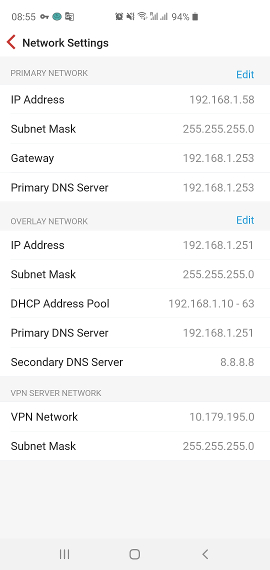
Potentially stupid question(s) - in 'cog'->Settings->Advanced->Network Settings what should I put in 'Primary Network/Primary DNS Server', and 'Overlay Network/Primary DNS Server'?
For info, here is some nslookup output. My Firewalla Primary IP Address is 192.168.1.58, and Overlay IP Address is 192.168.1.251
myname@MyDesktop:~$ nslookup
> set type=a
> microsoft.com
Server: 127.0.0.53
Address: 127.0.0.53#53Non-authoritative answer:
Name: microsoft.com
Address: 40.112.72.205
Name: microsoft.com
Address: 40.113.200.201
Name: microsoft.com
Address: 104.215.148.63
Name: microsoft.com
Address: 13.77.161.179
Name: microsoft.com
Address: 40.76.4.15
> vero2osmc
Server: 127.0.0.53
Address: 127.0.0.53#53** server can't find vero2osmc: SERVFAIL
> vero2osmc.lan
Server: 127.0.0.53
Address: 127.0.0.53#53** server can't find vero2osmc.lan: NXDOMAIN
> server 192.168.1.58
Default server: 192.168.1.58
Address: 192.168.1.58#53
> vero2osmc
;; connection timed out; no servers could be reached
> vero2osmc.lan
;; connection timed out; no servers could be reached
> server 192.168.1.251
Default server: 192.168.1.251
Address: 192.168.1.251#53
> vero2osmc
;; connection timed out; no servers could be reached
> vero2osmc.lan
;; connection timed out; no servers could be reached
> -
OK, progress.
I had 'MyDesktop' excluded from DNS Booster. When I included it and refreshed DHCP on MyDesktop, ping works - though initial resolution of vero2osmc.lan to the IP address is very slow (~2 seconds):
myname@MyDesktop:~$ ping vero2osmc.lan
PING vero2osmc.lan (192.168.1.43) 56(84) bytes of data.
64 bytes from Vero2OSMC (192.168.1.43): icmp_seq=1 ttl=64 time=0.276 ms
64 bytes from Vero2OSMC (192.168.1.43): icmp_seq=2 ttl=64 time=0.279 ms
64 bytes from Vero2OSMC (192.168.1.43): icmp_seq=3 ttl=64 time=0.273 ms
64 bytes from Vero2OSMC (192.168.1.43): icmp_seq=4 ttl=64 time=0.275 ms
64 bytes from Vero2OSMC (192.168.1.43): icmp_seq=5 ttl=64 time=0.265 ms
^C
--- vero2osmc.lan ping statistics ---
5 packets transmitted, 5 received, 0% packet loss, time 4064ms
rtt min/avg/max/mdev = 0.265/0.273/0.279/0.018 msThis seems to solve the issue for DHCP devices - but not for devices with static IP. Any thoughts on the configuration for static IP devices - what is the appropriate DNS server address for these devices to resolve xxxxxx.lan names?
-
Hi,
Some background. All my devices use DHCP, with the exception of my WiFi access points and the Internet facing router - which have static IPs for ease of administration. These devices have IP addresses in the 192.168.1.200-254 range (outside of the overlay range 10-63 below).
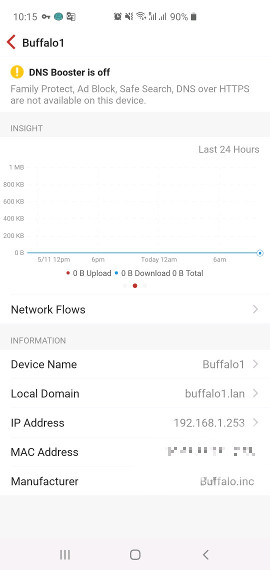
I have followed the guidance in https://help.firewalla.com/hc/en-us/articles/360021737793 (Method 2: Keep one Subnet (seamless migration)) and set my overlay 192.168.1.10-63 (see attached image). As my original and overlay addresses are in the same address range I don't see any 218.x addresses. The access points and Internet router appear in the Devices List, and when I click into them have been assigned Local Domain names. The Internet router has a warning at the top of its device page "DNS Booster is off" (see attached image), and does not appear in the DNS Booster page at all (ie not listed as opposed to listed but not selected). The WiFi access points are listed in the DNS Booster page, and are shown as enabled.
After some experimentation, if I set the local DNS server in the WiFi access points to the Overlay Address of Firewalla (192.168.1.251) then if I ssh into these access points I can resolve/ping other devices by name . However, if I take the same steps for the Internet facing router I still *cannot* resolve/ping devices by short name (vero2osmc) or FQDN (vero2osmc.lan) - I can however resolve/ping Internet addresses (eg www.firewalla.com).
Given that the Internet facing router is a 'special case', is this just a fact of life I am stuck with?
-
After several days of DNS instability (and so my network apps/devices periodically failing to function) I have given up and gone back to Simple Mode.
BTW, in DHCP mode, despite DoH saying it was working and applied to all devices (Cloudflare only) - visiting the Cloudflare test site (1.1.1.1) from any device yielded a 'No' in 'Using DNS over HTTPS' field. I'll give a few hours for Simple Mode to settle down and try again in Simple Mode.
Please sign in to leave a comment.
Comments
9 comments