IP address unknown for Hyper-V VMs

VMs are configured to use an "external" virtual switch. They are able to use DHCP to obtain a IP configuration from Firewalla. The Firewalla App notifies when new VMs boot and displays the IPaddress. When viewing the list of devices on Firewalla app, the VMs show up with green (online) icon, but have no IP address. When viewing the device details, in the Firewalla App, there is a warning that the device is not online (even though it is online).
Block Internet, VPN, Safesearch, etc are not applied to the VM device. It appears that rules applied to the VM host (the machine running HyperV) are also applied to all the VMs.
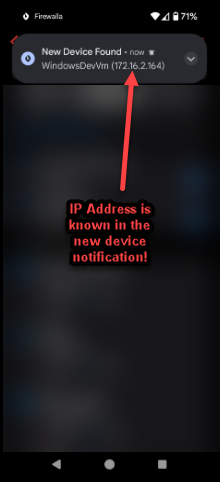
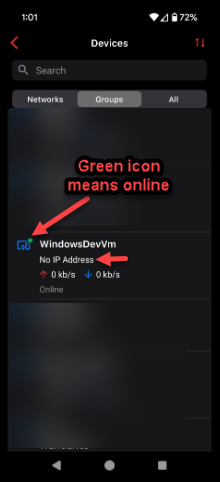
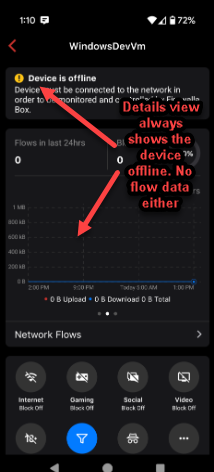
The following settings are used for the virtual switch in Hyper-V
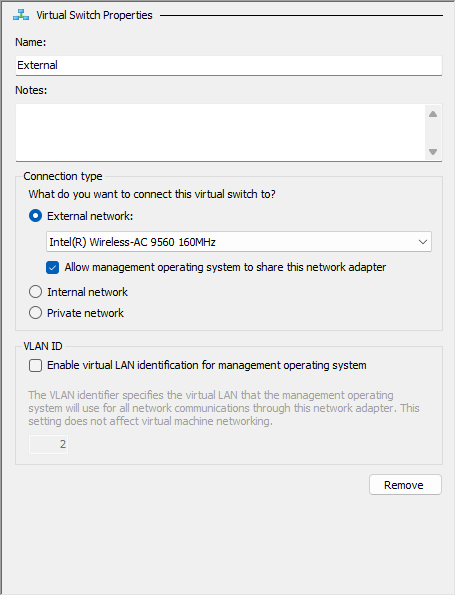
-

This is exactly what I was talking about in the other thread Virtual Machines Disappearing From Device List – Firewalla
-
@MB, You're correct. The other thread (Virtual Machines Disappearing From Device List – Firewalla) is exactly what I'm experiencing. I'll add additional detail to that thread rather than start a new one here
-

I did find this from our internal note on how to resolve the MAC address issue
"Problem was solved by running SET (Switch Independent mode with Dynamic distribution) on Hyper-V. Some traffic is sent having no source MAC address replacement done. Causing Firewalla to detect VM's using multiple interfaces, including the host's."
Please sign in to leave a comment.
Comments
4 comments