Virtual Machines Disappearing From Device List

I have several virtual machines (VMs) running on VMware Workstation Pro 14. When I first power up a VM or reset the virtual NIC, the VM shows up under Devices in the Firewalla app. However, after about 3-5 minutes, the VM completely disappears from the device list. The only way to get the device to show up again is to reboot the VM or reset the virtual NIC. Despite the VM disappearing from the device list, the VM is still pingable from the firewall and accessible from other computers on the network.
Two of the VMs are Linux based (Ubuntu and RHEL) and one VM is running Windows XP. This issue is occuring with all three of the VMs, so it doesn't appear to be OS dependant. I've considered upgrading VMware Workstation from 14 to 16, but I'd rather avoid this if at all possible, since this is a big expense.
Any ideas on how to keep the VMs in the device list? Any help would be greatly appreciated. Thanks!
-
I'm using the Bridged option for the network adapters, meaning each virtual NIC has a unique IP address and MAC. I can further confirm this when the device shows up in the device list for a short time. The IP address and MAC is unique and different than the host machine. For all intensive purposes, the virtual machine should just appear as any other physical device on the network from the perspective of Firewalla.
-
I did some more investigative work on my end. I did a tcpdump on the Firewalla and viewed the ARP table. Although unique MACs are assigned to the VMs on the VMware Workstation side, it appears the same MAC (host MAC) is presented to other devices on the network, including the Firewalla.
I believe this is causing issues with Firewalla being able to correctly identify the virtual machines on the network. Is there any way to have Firewalla take into account this use case? I host my website on a virtual machine, and when the virtual machine disappears from the device list, the port forwarding rules disappear along with it. As long as the virtual machine shows up in the device list, the web server is accessible from the Internet. As soon as the virtual machine disappears from the device list, it is no longer accessible.
-
I finally got this to work by first changing the network adapter for the VM in VMware Workstation from Bridged to NAT. Second, I had to allow the necessary ports through Windows firewall on the host itself. Third, I had to forward these ports to the VM by editing the NAT settings through the virtual network editor in VMware Workstation.
Although this works, I don't think it's an ideal solution. First, you can't control the VM directly through Firewalla. Second, this configuration is more cumbersome to implement. Third, it's not as secure, because you have to open up the ports destined for the VM on the VMware host itself.
So just to reiterate, it would be nice if Firewalla could distinguish between devices with the same MAC but different IP addresses in the case of virtual machines. Or, and maybe easier to implement, allow for the configuration of port forwarding to an IP address on Firewalla without the need for the device to be present in the device list. This is how most WiFi routers function, as I've configured port forwarding to virtual machines on multiple WiFi routers without issue.
Thanks for your time and a great product! I look forward to seeing how the functionality on the Firewalla evolves through continued user input and software development :)
-

Have you tried to set a static MAC or configure VMware to use a dynamic MAC per VMware instance? For example https://kb.vmware.com/s/article/219
Not sure if this applies to the workstation or not.
-

Thanks for investigating this Jason.
I'm currently experience the same using Hyper-V clusters running both Windows and Linux Vm's. All VMs using their own ip as well as static MACs.
In Firewalla this appears as two devices showing up and disappearing, both having the same ip. The MAC's on these are of course different - one related to the VM and the other is the host's MAC.It's very unfortunate as my rules and NAT Port Forwarders disappears when the device is "gone". Should at least have an option in both rules and Port Forwarders to be able to see inactive rules. (In addition to solve the issue)
-

Old thread, but has this been resolved??
I'm still experiencing this using Virtualbox to manage virtual machines. These are my findings:
Use Case: On a Host with two physical network connections
- Create a VM with a bridge using the primary Wifi device, the VM and IP address will disappear in Firewalla.
- Create VM with a bridge to the secondary Ethernet device, IP address are issued to both network cards and the VMs and stays listed in Firewalla.
It sounds like there are workarounds as listed in this thread but I'm hoping for a fix as I otherwise really love my Purple device!! This use case worked on my current Orbi (now access point) and on all my other routers owned since the dawn of home networking :) (Linksys, Netgear, DDWRT, etc.)
-

My FWP does the same with VMWare Fusion, MacOS guest on MacOS host. The VM is bridged and has its own MAC address.
A few things to note:
* Initially, the VM device will get put into Quarantine with its own IP Address. When it is released from Quarantine, the device entry is there without an IP Address. The host device then gets updated with the VM’s IP Address. It seems the last host or VM to request an IP Address through DHCP (initial boot or hitting “Renew”) will update the host device with the given IP Address.
* While both IP Addresses work from a second real device on the network, the host name will resolve to the last IP Address given on the host/VM.
* You cannot assign (I was trying to “pin” it) an IP Address to a device with no IP Address. I was hoping it would solve the host name resolving correctly.
* IF my memory serves me, this was not an issue with Proxmox 8.X since I was able to run a VM and assign the FWP’s DMZ to it by name.
How can I debug things?
**EDIT**
Disabling NordVPN on the host machine seems to put everything back to what is expected from FWP! NordVPN also tinkered with the pf rules as reported by Murus. Time to haunt their forums.
-

I'm still having this issue as well.
VM in bridged mode. Boots up, gets a unique address on the network. Dropped into quarantine. I move it to the proper group, and it loses its IP address and I can no longer do much with it. The device itself however continues to work just fine with the IP address it was given. If I search for that IP address within Firewalla, it doesn't show that it even exists even thought it is most definitely passing traffic just fine. I've also triple checked, it is most definitely bridged.
It's like it acts bridged when it first connects, but then Firewalla starts to see it as NAT or something. I searched for the hostname "ubuntu" which was the default Firewalla came up with when it first discovered it, deleted it, and it actually deleted the host machine instead.
It's confused about something with bridged. I do have NordVPN as well, however, it isn't enabled on my device (meaning not connected), although it is installed.
-
Few more tests...
I removed NordVPN entirely from the machine and it still happens. I was able to grab it while in quarantine and statically assign/pin the IP address, but the IP disappeared shortly after again. I would remove the device (without the IP), it would pop back up in quarantine with the pinned IP, but then it would lose the IP again shortly after. I also did a speedtest from the VM and it showed no traffic on the device in firewalla.
I also noticed that a couple of times, it actually would take the name of the VM and apply it to the main host the VM is running on. Basically, renaming my host device without any prompt. I also see that on the main screen the "recent" device switches to the host, even though my last device was the VM.
-

Hello Firewalla,
This thread describes a significant problem for people that use VMs on their network. In my case, I use Hyper-v, but I suspect that anyone that uses a VM host will experience the same problem.
In a nutshell, the problem is the inability to create IP (layer 3) routing rules on the Firewalla router for a device that responds to ARPs for multiple IP addresses. In my case, I would like to turn "internet block" on for VMs, but NOT for the HyperV server itself.
SSHing to the firewalla router and dumping the ARP cache shows that on a Hyper-V host, the MAC address for the physical NIC on the HyperV server *and* for the IP addresses of the VMs.
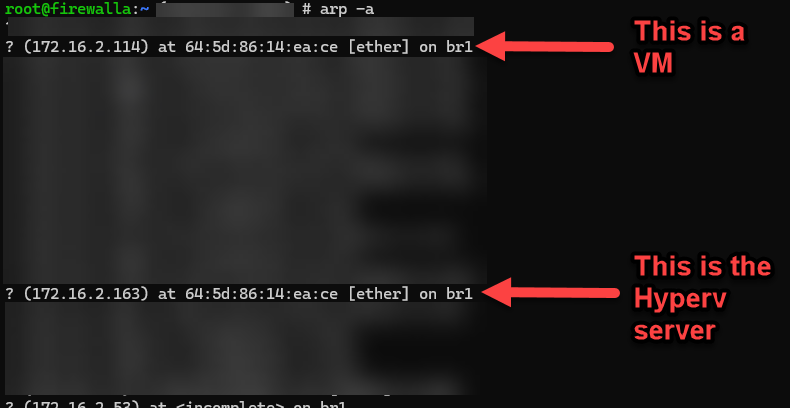
It's important to note that *both* the Hyper-v host and the VM IP addresses (172.16.2.114 and 172.16.2.163) were assigned by the Firewalla router in response to separate DHCP requests. The following screen shots are the tcpdump output from the Firewalla router showing DHCP request for the Hyper-v server a VM.
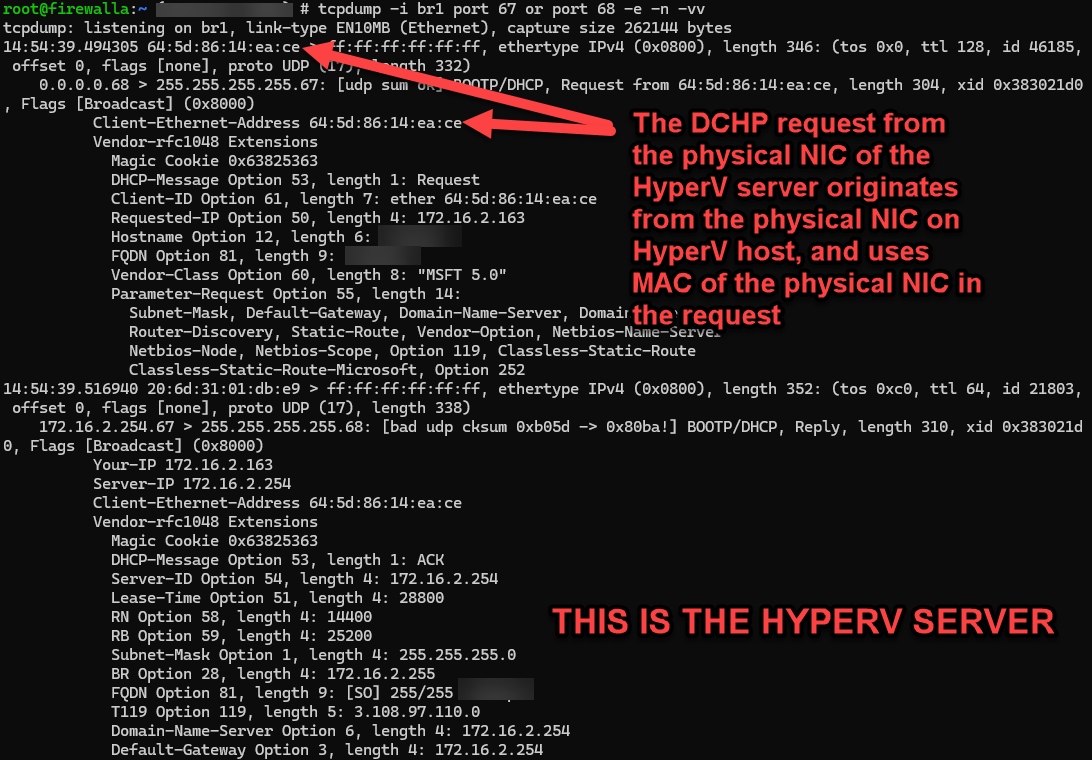
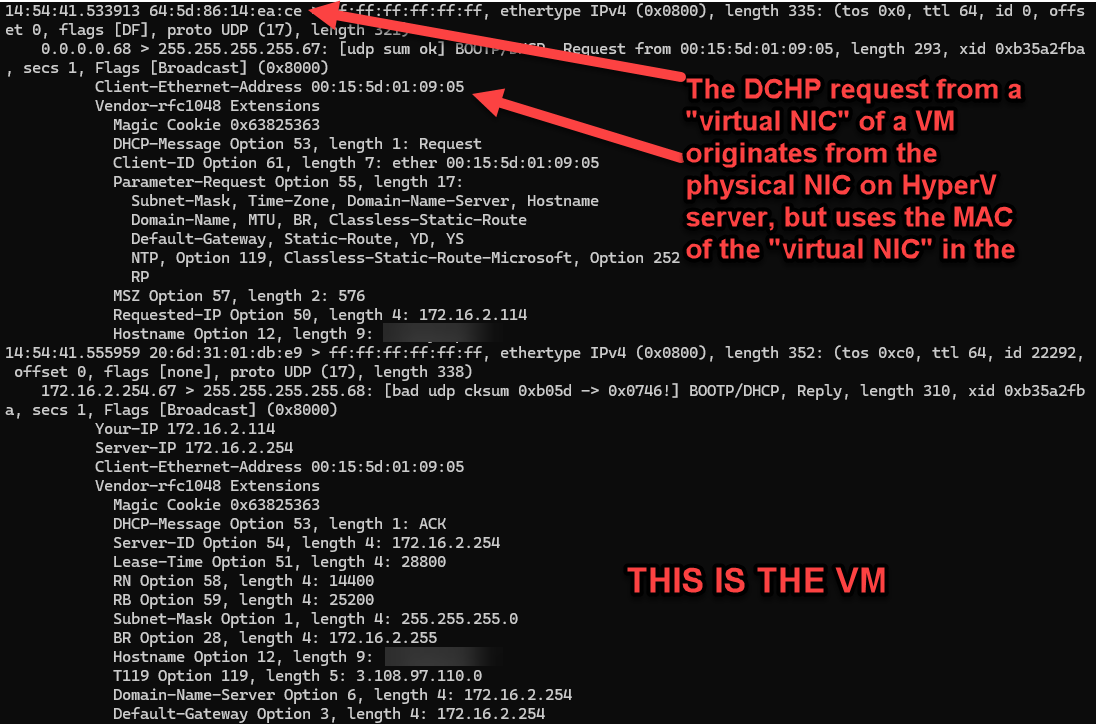
What is frustrating is that Firewalla knows about both IP addresses (they're in the ARP cache), but the Firewalla app assume that there is a 1:1 correlation between MAC address and IP address (e.g. the key in the device database is the MAC address?).
Please investigate a fix for this issue. Without it, firewall use will be significantly limited for (technical) work at home people that use VMs. Despite how much I love all the other features of Firewalla, I can't recommend it to my engineering teams because of this issue.
-

@Matt. Yes. Firewalla identifies devices based on MAC address.
I read your post (https://help.firewalla.com/hc/en-us/community/posts/35697990521363-IP-address-unknown-for-Hyper-V-VMs? ) The VM MAC address was detected by Firewalla, but likely all real connections of VMs were still coming from your host MAC address outside the machine. The VM MAC address is not really used outside the machine. (As you can see in ARP, it claims both ips are at the Host MAC address.)
Even if Firewalla blocks the internet on the VM, the rule won't really work on the VMs' real connections since connections are from the host from an outside perspective. As my colleague shared in your post, better to use SET(switch embedded teaming) with Switch Independent Mode on Hyper-V.
-

Hi there!
I can confirm that configuring a hyper-v host (in a cluster) using SET solves most of these issues.
However - it would be nice if we where able to configure some sort of static objects. I have experienced issues when migrating an VM from one cluster to another, where all rules where deleted due to the object being merged to a new one. -
Firewalla,
Thanks for the response. Not what I was hoping for though, but I discovered some good news today:
If I add the VM devices to a group and then apply rules to the group... Tada! all the rules work (Internet Block, Safe Search, VPN, etc) for the VM devices. However, the VM devices still show as having "No IP Address" (the VMs DO have an IP address). And... no data is shown for "Flows in the last 24hrs" (the VMs clearly are generating network traffic).
I don't have time to sort through the iptables rules on the router to find out what exactly happens when a group is made v.s. a device is referenced individually, but something about grouping creates a usable workaround for me.
Summary from me: Grouping the VMs (the devices that show as having "No IP Address") and then applying rules to the group is a suitable workaround.

Please sign in to leave a comment.
Comments
21 comments