Wi-Fi clients cannot connect to internet

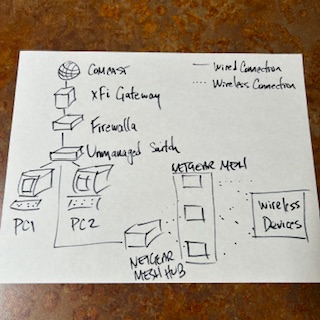
Can anyone tell me what's wrong with the setup in the attached diagram that would prevent the wireless clients downstream of the Netgear mesh wi-fi to be unable to connect to the internet? The Firewalla iOS app seems to see all of them.
-

You should be doing something like
Xfinity (Bridge Mode) -> FW (Router mode) -> Netgears (Bridge Mode)
More topic on this here https://help.firewalla.com/hc/en-us/articles/4411167832851-Firewalla-Router-Mode-Configuration-Guides
-
I switched the FW to router mode but now the setup in iOS is hanging at "Verifying app access...". It's been there for 45 minutes now. It has intermittently prompted me that I don't have an internet connection and to switch to cellular. I have switched back and forth at least 5 times now, but it is still hung.
Suggestions?
By the way, the FW box is flashing blue twice with a pause between the set: B . B ... B . B ... B . B ...
-
Two things you will need to watch out
1. make sure you reboot the modem without anything plugged into it, and only plug the firewalla in after it is fully connected.
2. make sure your phone has internet access during pairing. (you can connect to LTE if needed)
If you can't fix it, please send help@firewalla.com an email, we will help you out.
Please sign in to leave a comment.
Comments
6 comments