Help us make the Firewalla Switch
Pinned Featured
Please see installation guide https://help.firewalla.com/hc/en-us/articles/52393670198675-Firewalla-Switch-Installation-Guide
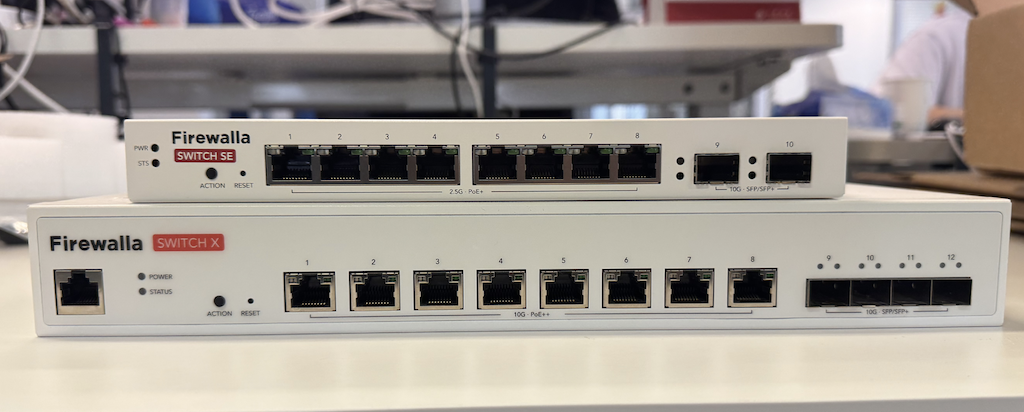
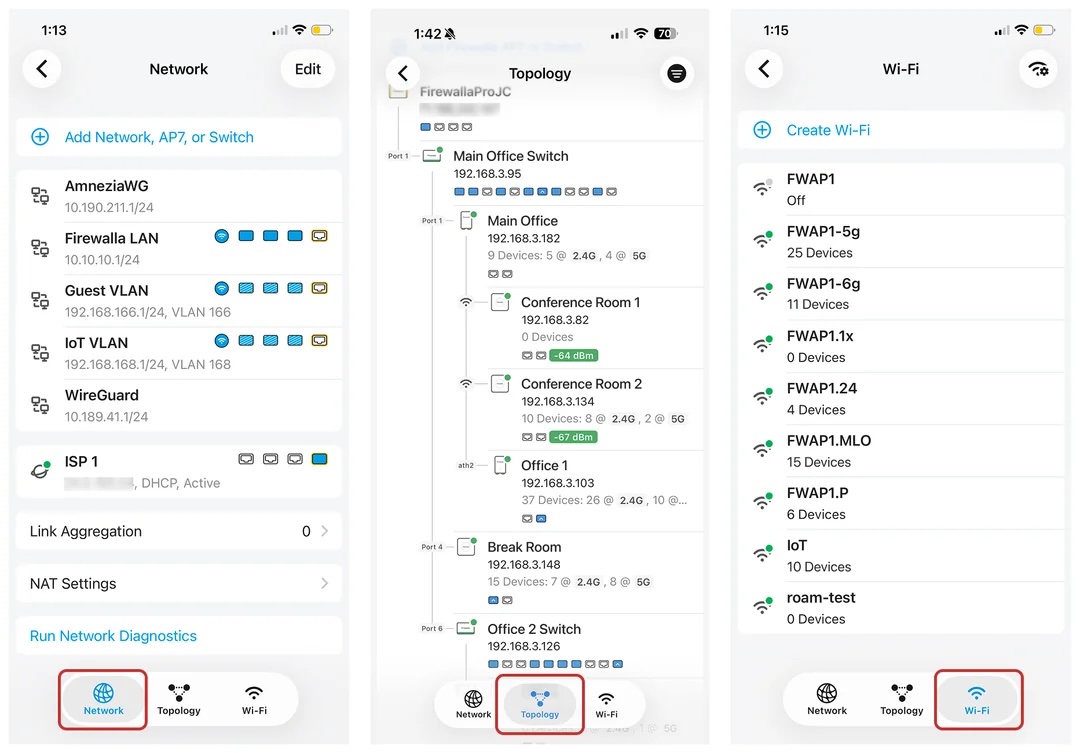
Firewalla App 1.69.1 Will Support Both Switches
-

Hello, I recently read the updated link clarifying how devices connected to a switch will or may not be able to take advantage of FW's microsegmentation. I must have misinterpreted the full capability of device isolation, but it makes sense.
Link: VqLAN: Firewalla Microsegmentation – Firewalla
Link to my post in another response: AP7 vqlan and microsegmentation Ethernet – Firewalla
Believe this discussion really belongs here to better understand microsegmentation and switch configuration.
Hoping the wonderful FW team can provide a solution which will allow home run connected devices to a switch to take advantage of microsegmentation.
My first thought are either I/we need multi RJ45 port AP7's or smaller managed 2.5 GB FW switches which can apply microsegmentation instructions to home run connections.
Thank you
-
If you are talking about VqLAN, please see the end of this article, there are some examples, of how "wired devices" interact with it https://help.firewalla.com/hc/en-us/articles/38425011667091-VqLAN-Firewalla-Microsegmentation
-

Key Design Considerations
-
Positional Relevance & Traffic Flow
- The switch’s placement within a network is crucial.
- The capacity between the switch and the firewall—handling inbound/outbound traffic—is different from that required for connections to internal devices.
- This distinction is especially important in environments with multiple high-speed devices distributed across various segments.
-
Interface & Port Configuration
- 10Gb Ports:
• Intended for uplink or stacking purposes.
• Ensure high-speed connectivity between the switch and the firewall and among multiple switches when stacking is used. - 2.5Gb Ports:
• Designed for local device connectivity.
• Cater to the demands of internal traffic. - Configuration Example:
• An 8-port switch with 3 ports at 10Gb and 5 ports at 2.5Gb can serve scenarios from high-performance home networks to small business environments, offering scalability.
- 10Gb Ports:
-
Integration with IoT, Network Storage, and Other Network Components
- IoT Devices & Network Storage:
• Increased reliance on IoT devices and centralized network storage requires a flexible switch that can handle diverse traffic types.
• These devices often have unique connectivity and power needs compared to typical office or home setups. - AP7 Access Point:
• Although wireless access remains important, the self-powered AP7 unit (with its own 10Gb and 2.5Gb ports) is just one part of a broader ecosystem. - Targeted PoE Implementation:
• A selective PoE strategy (with only one or two designated ports supporting PoE, similar to Cisco Catalyst or Ubiquiti UniFi configurations) provides power to specific devices such as IoT sensors, cameras, or wireless access points.
• This approach avoids significantly increasing overall cost or complexity.
- IoT Devices & Network Storage:
-
Practical Use Cases
- High-Performance Home Networks:
• A 10Gb uplink might connect to a Firewalla router, while 2.5Gb ports support wired devices, IoT sensors, and network storage.
• This configuration supports robust data handling for smart home applications without overcommitting resources to full PoE on all ports. - Small to Medium Business Environments:
• The switch configuration effectively serves workstations, VoIP phones, IoT devices, and network storage solutions.
• In segmented networks, stacking multiple switches via 10Gb ports provides strong interdepartmental connectivity, while 2.5Gb ports serve local endpoints efficiently.
• Selective PoE ensures that only critical devices receive power without overextending the switch’s power budget.
- High-Performance Home Networks:
-
Conclusion
- A design that balances process control with a mix of 10Gb and 2.5Gb ports is well-suited for various network scenarios.
- This approach addresses current network demands—especially with the rise of IoT devices and network storage—while providing a scalable foundation for future expansion, optimizing both performance and cost.
-
-
My summary reading so far, is some customers want one switch to cover all of their usages, and some want a few together. And some also want a big one for a home lab type of setup. Honestly, we still don't have a good feel for what our majority of customers and the cost associated with the number of ports and PoE ports. (hopefully, our survey will help answer that)
One thing for sure, the units won't match the pricing of 'no brand' cheap switches via Amazon or even TPLink;
-
The proposal above outlines a possible new switch for Firewalla’s ecosystem. It’s designed as an 8-port unit with 3×10Gb ports for uplink/aggregation and 5×2.5Gb ports for local connectivity—capable of enhancing connectivity for all Firewalla routers. While no single solution will satisfy every use case, even with comprehensive survey feedback, this option provides a robust foundation for diverse deployments. To keep costs and complexity down, managed PoE could be limited to one or two ports or none; additional PoE needs can be met externally using injectors or midspan solutions. This approach delivers essential performance improvements while remaining flexible enough to evolve alongside customer demands.
-

While the 8 port switch might be great for someone with a small apartment or running 95% wireless is that it won't serve most of the community here that has wired their homes. I have a small 2000 sq ft house but have run ethernet to every room/entertainment/ceiling AP location and looking at a whopping 40 ports (not all used but available). Anything that has a LAN connection is plugged in so my wireless can be used by roaming or WIFI only devices. I do agree that if we have to sacrifice POE on the ports an injector can be installed.
My last comment would be that no way only 3x10GB ports will be enough. My situation I'm looking at 4 AP's and then still need an uplink to the Firewalla Gold Pro or else I'm compromising my available speed.
-
The modular approach of using multiple 8‑port switches can actually be more cost-effective and flexible than a single 40‑port solution. In a wired home setup like yours, deploying several units allows you to meet high port counts without paying the premium of an enterprise-grade switch. Each unit’s 3×10Gb ports provide robust uplink capacity—even if one unit doesn't meet all the needs, combining a few ensures ample aggregate bandwidth. Plus, external PoE injectors can handle power needs without integrating full PoE management into every port, keeping costs lower. Essentially, stacking these switches delivers the performance and port density required for larger networks while remaining a more economical solution.
-

My own experience is that I like using relatively quiet compact switches with 8 x 2.5 GbE PoE+/++ RJ45 ports and 2 x SFP+ ports. All ports should be multispeed capable so either 2.5 Gb/1Gb/100Mb for RJ45 and 10/5/2.5/1 Gb for SFP+ ports. I use a mixture of CAT6 RJ45 patch cables and SFP/SFP+ DAC cables. I also use multispeed transceivers where required. I'm currently using a UniFi Enterprise 8 PoE switch, unfortunately it only does PoE+.
I have been using Thunderbolt docks for a couple of years to connect workstations to the local network. These are capable of connecting to switches at relatively high speeds. It would be logical to put a couple of USB-C ports on a network switch. Netgear's Nighthawk M6 Pro travel router has a 5Gbps USB-C port for fast connections. -

Guys 8 points is a ridiculously small number of points, I’m expecting at least 16 Managed points, 3 or 4(for symmetry) 10G non PoE, rest 1G PoE+ ports. 10G points are for connectivity between Gateway to Switch and between Switches, and for stuff like Local Cloud Storage or Desktop or AP. Rest of the 1G ports can be for multiple PoE Cameras, people have lots of them around the house, and other Room to Room devices.
The Switch should be 1U half, to be mounted side by side two of the Switches in 1U size Rack mount. My idea of a half size is to lower the price. About Poe, to be honest I will need just one switch to be PoE, the other one can be non PoE, but that adds complexity. -

Firewalla:
"My summary reading so far, is some customers want one switch to cover all of their usages, and some want a few together. And some also want a big one for a home lab type of setup. Honestly, we still don't have a good feel for what our majority of customers and the cost associated with the number of ports and PoE ports. (hopefully, our survey will help answer that)"
Honestly I think the only way you will capture a lot of customers is to produce the small switch for those who are looking for that, and a large(ish) switch for those looking that way. An 8 port and a 24 port. There are just too many people with all different setups. Either that, or just target a specific small portion of your customer base and know the rest will be wanting something else and hoping you release another product down the line.
Your forums also REALLY needs a quote feature...
-

I wonder if it might be possible to reduce the variety of switches you are being requested to sell by utilizing Port Isolation. In a reddit comment, I observed that on paper, it seems like Port Isolation mode on other manufacturer’s managed switches can be used to achieve full Firewalla Microsegmentation. For example, Cisco’s Port Isolation means all traffic through a particular port is forwarded through the switch to an upstream router or intermediate switch which in turn can also have Port Isolation. So, none of the downstream traffic is switched between Port Isolation device ports leaving Firewalla to handle switching/routing. In essence, a switch with Port Isolation enabled basically expands a Firewalla port to many other ports.
For example, let’s take a simple 5 port switch which is located several rooms from the Firewalla with 4 devices on it and Ethernet back to the Firewalla. In Port Isolation mode, the 4 devices cannot talk to each other through the switch. They can only talk to the Firewalla which may or may not switch/route traffic between the 4 devices depending on the Microsegmentation configuration.
If Port Isolation works with Firewalla Microsegmentation, then it seems like we can mix and match some other manufacturer’s managed Port Isolation switches with a powerful Firewalla switch model, thus reducing the variety of models that Firewalla is being asked to sell. Netgear calls this Protected Ports (GS305EP). Perhaps just give us a 8 or 16 port switch with at least 2-4 10Gbps ports along with POE for example.
In fact, if Port Isolation works, we can use an overprovisioned Firewalla router without a Firewalla switch (hey, I have a Gold+ still running a 1Gbps network and don’t have a lot of LAN to LAN traffic, mostly device to Internet traffic).
Crossing my fingers… What say you @Firewalla? And should you consider adding this to your Microsegmentation documentation?
-

Well you need to consider also the features and price we get from this new switch the Mikrotik CRS304-4XG-IN a managed 10Gbps switch for 199$
-

Management all through a single interface, ease of deployment and visibility of network flows in a single app. There's nothing you couldn't do with a third party switch, just as there's nothing that you couldn't do with a third party access point. The selling point is integration into the Firewalla ecosystem and ease of management. At least that's my opinion and why I'd buy one.
-
Currently, I make extensive use of switch port profiles to simplify switch configuration and assist in debugging issues. I would like to see such capability in the Firewalla environment.
For the last few years there has been tendency for laptops/workstations to have Thunderbolt ports or connect via Thunderbolt capable docks. Ethernet over Thunderbolt is an established technology, mostly involving a dongle. It would be logical to have a switch with some TB ports.
For power, my preference would be a USB-C port.


Please sign in to leave a comment.
Comments
537 comments