Help us make the Firewalla AP

Order Firewalla AP7 here: https://firewalla.com/products/firewalla-ap7

-

I think the only down side of this initial release is no MLO is enabled for wireless backhaul and currently the AP is using 6G radio to do the backhaul which is not a good idea if there are mutiple walls between APs. Well, I guess at this point, wired connection will get best result.
-

I know Firewalla has pushed back on discussion about the design, but this is the first ‘visible’ product. Slick colors are awesome for us techies, but I can’t imagine suggesting this color scheme to a client. Everyone who doesn’t mind the colors please buy so we keep the product around long enough for a more subtle iteration :)
-
If you signed up, we will notify you first about availability (the date the sale will start). We are still working out how to deliver the units and when the first batch will arrive in LA. Please follow the top of this thread; we will communicate via that and post here.
The first batch of mid- to end-December still holds. If anything changes, we will let you all know. Since it is Christmas, the worst case may be early January.
-

@Firewalla Is Firewalla open to shipping early access units to social media/bloggers as review units? I've blogged a lot about WiFi this year, and did a whole series on Ruckus configuration. I'd be open to writing a review of the APs, but don't need them for my personal use as I'm full up with Ruckus WiFi 7 APs.
-

A few questions. I do apologize if these have been answered. Hopefully these will spark additional questions and comments.
- The product is the FWAP7 Desktop Unit. There is mention that there is going to be a ceiling mount that is offered to convert the Desktop unit to a ceiling mounted AP. Is the Desktop unit the only foreseeable unit, or will there be a follow up ceiling only FWAP7 version that has a different design that is more flush mount to the ceiling?
- Is there only 1 x 10GB port and 1 x 2.5GB port? Are the ports only used for the AP communication to a switch / router or can you plug in other devices. Example 10GB back to the Firewalla Gold Pro and a computer/device plugged into the 2.5GB port?
- 8 Spatial Streams, tri-band, low power indoor unit. Assumption is the AP will be a 2.4GHz, 5GHz and a 6GHz bands.
- How many total internal antennas are within the unit?
- Are there any specifications on the WIFI Data Rate for the 2.4 /5 and 6G? Assumption is that the specifications will be around 2.4G - 4x4 (Tx/Rx) 4096 QAM 20/40MHz, 5 - (4x4 (Tx/Rx) 4096 QAM 20/40/80/160MHz) and 6G (4x4 (Tx/Rx) 4096 QAM 20/40/80/160/320MHz).
- What are the processor and memory specifications?
- Is there a min / max operating temperature of the unit?
- What WIFI encryption will be supported? Assumption that is will be at least WPA/WPA2/WPA3-Personal and hopefully enterprise with support for AES and TKIP-AES with the ability to independently choose based on Band.
- Will there be support for modification of the channel bandwidth and control channel?
- Are there options for roaming assistant to disconnect clients with RSSI lower than specified dBM?
- Is there going to be support for RASIUS server?
- Is there the ability to pin clients to certain APs to ensure clients do not roam between access points?
- How many SSIDs does the unit support? Hoping that there will be at least 1 x per channel and hopefully additional SSIDs for guest, IOT devices that can be routed externally WAN only traffic.
- Will there be vlan segmentation and vlan tagging?
-
Answers
1. FWAP7D is the desktop version, coming to sale soon. There will be a FWAP7C, which is a different unit optimized for your ceiling, coming likely after 1/20+2months.
2. Yes, FWAP7D has two ports, 10Gbit and 2.5Gbit. You can connect a computer to either of these
3. triband, yes
4. i believe 8 or 9 anteanas
5. We don't quote theoretical measurements. We did measure in a shielded room, 3 feet from the unit, a oneplus (the fastest phone we can find), can easily get >3Gbit. If AP to AP, can get much higher.
6. We don't quote processor or memory. It will be Qualcomm chipset
7. temperature coming soon
8. Standard WiFi 7 encryption, nothing special
9. Depending on the need, we can make anything visible.
10. Same as above, if needed we can expose roaming, for now, everything is internal.
11. Radius is TBD
12. No idea on the pining part, if it is useful, we can build it.
13. We will limit to 10 WiFi networks to start, the unit can support up to 16 SSID per frequency, the software limit is to ensure your system don't collapse. We can increase this after beta if needed.
14. vlan is supported, dynamic VLAN is supported.
-
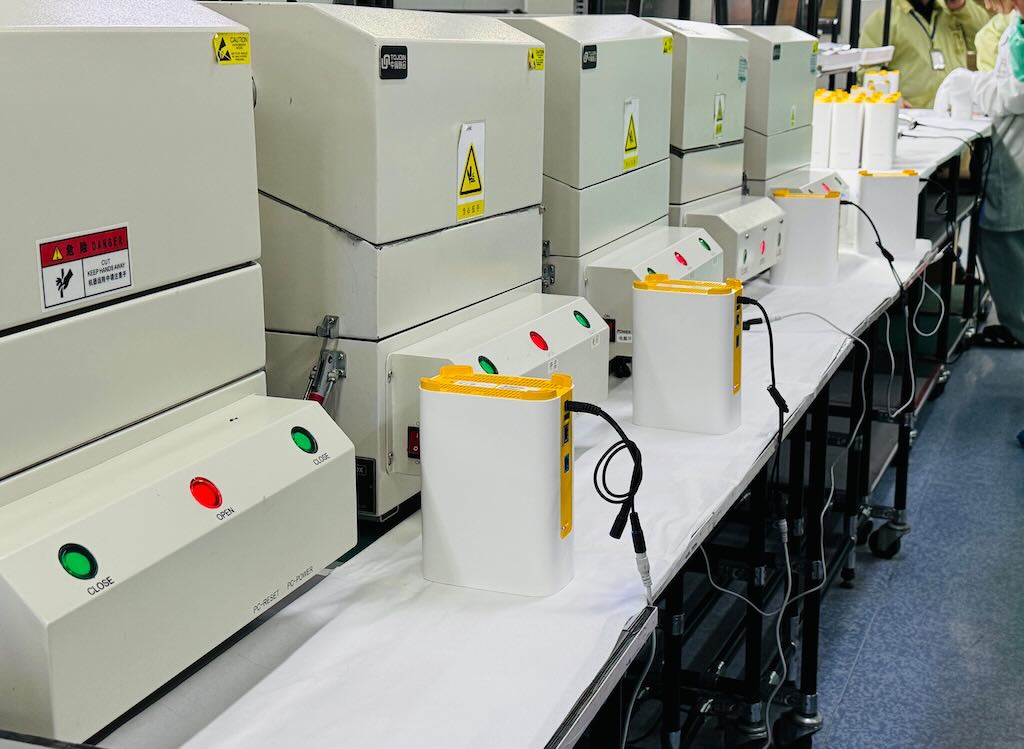
The initial batch production is already underway (and nearly complete). We expect to airlift some units, making them likely available by the end of December and certainly by early January. We don't have a good sales date now; we are still following air freight pricing. The tentative beta unit pricing will hover around $299. The final production pricing is likely much higher due to the potential tariff after 1/20/2025
-
The desktop version is a 2x2x4 (8 streams). The Ceiling version can be 222 or 444, depending on the final negotiated price/value/tariff. The major difference between the desktop and the ceiling version is the antenna positioning. (444 is huge and hot ...) As of bit performance, you are unlikely to see anything major, unless you have the right test equipment.
-

I think it is important to have 4 stream on the backhaul band. So if the choice is only 222 or 444 then I vote 444. But if you can do 224 again that would be best IMO.
Phones and tablets are only 2 stream, and that is the majority of wifi devices people want to use. IoT devices are often 1 stream on 2.4ghz, occasionally 2 stream. Only desktop PCs and laptops with really high end adapters are usually 4 stream. But for back haul, you want the most bandwidth possible. So a 4 stream backhaul is a must to me.
-

Firewalla, Will these work in a mesh setup? IE will the clients automatically swap between the Firewall AP with the best signal strength if you have say 2 units?. I intend to replace the two Tp-link Wifi 6 Deco's that i have in wired backhaul (one upstairs and one downstairs). Do you envisage just one Firewalla AP per house or several for best coverage on average? Thanks
-
You want to mix other mesh with firewalla AP? You certainly can; you will have to use a different SSID; firewalla can't roam or redirect roams to no firewalla units. (same way other units can't redirect to us)
The firewalla units are no different than standard WiFi 7 AP's, The coverage depends on how big your house is, and what's your requirements. How many units you need really depends on how your place is laid out and what's your requirements. For example, my place, in order to get >500mbits every where nicely, I need 3 of these units. (While one unit works, but I won't get the speed every where)
-

The price point for beta units should be under 300 for sure. Usually, people in single family home - need like 2 to 3 AP to cover the whole home and other comparable APs are priced around the same price or lower. Maybe I'm not comparing exactly with all features. Even for final retail product should be priced same. I know, seeing 299 appears right compared to other Firewalla products but this is for a single AP. Hope there was enough market comparison done. I bought a Gold Pro last month, very happy and can't wait for a AP too.
-

Retail price for Ruckus APs
- R350 - $695
- H350 - $595
- R550 - $860
- H550 - $795
- R750 - $1,510
- R770 - $2,595
None of my clients have any issues paying $3,500+ for a well-designed wireless networking infrastructure because it's the most important technology in their home. Ruckus APs have a ton of technology in them that no one will every use in a residential environment. Hopefully, they release cheaper versions in 2025 with the IoT features removed or disabled.
Firewalla could move into that sweet spot if they were priced 30% cheaper, but had almost all the features that an average person uses.It would also be wise for the Firewalla team to have their APs added into Ekahau, so we can properly heatmap a home with the Firewalla APs.


Please sign in to leave a comment.
Comments
651 comments