Blue+ Slow web connections, email sending timeouts, unresponsive wifi printer.

A new installation of Blue+ does most things very well but has intermittent trouble with connecting to websites. The following is on Windows 10 with the Brave browser, usually running "shields up," both at latest levels.
In those cases, a link from another web page or RSS posting is followed, the "loading" screen displays for up to 10 seconds, followed by a short flash of the ERR_TIMED_OUT screen, and then with no intervention, successfully loads the intended site. Note well that the symptom is intermittent, not with all sites, and that after a site is reached, subsequent pages on that site act normally. BTW, I've also cleared all Brave browser cache (since the beginning of the universe) and rebooted one of the several Windows systems on the local network; to no avail.
Another similar symptom: When sending mail from a Thunderbird client, connection to the SMTP sending server times out about 3/4 of the time. A quick second hit of the send button often works, but not always.
Third symptom, maybe not related: the wifi connected printer (Brothers, definitely in the found devices list) refuses to wake up to a print request. Resolution for that is an annoying power-down and restart procedure.
The Blue+ box reports version 1.9742 with App version 1.51.84.
Enabled features are: Active Protect, Device Port Scan, Open Ports, Routes. All are using out-of-the-box defaults. I had Ad Block on for a while and turned it off to diagnose this problem. Same with DDNS.
Lastly, I've run the suggested 4 diagnostic lines several times and saw only once saw a failure with "ping fire.walla":
C:\WINDOWS\system32>ping fire.walla
Pinging fire.walla [192.168.1.121] with 32 bytes of data:
Reply from 192.168.1.121: bytes=32 time=2ms TTL=64
Reply from 192.168.1.121: bytes=32 time=2ms TTL=64
Request timed out.
Reply from 192.168.1.121: bytes=32 time=2ms TTL=64
Ping statistics for 192.168.1.121:
Packets: Sent = 4, Received = 3, Lost = 1 (25% loss),
Approximate round trip times in milli-seconds:
Minimum = 2ms, Maximum = 2ms, Average = 2ms
C:\WINDOWS\system32>ping 1.1.1.1
Pinging 1.1.1.1 with 32 bytes of data:
Reply from 1.1.1.1: bytes=32 time=24ms TTL=54
Reply from 1.1.1.1: bytes=32 time=22ms TTL=54
Reply from 1.1.1.1: bytes=32 time=22ms TTL=54
Reply from 1.1.1.1: bytes=32 time=27ms TTL=54
Ping statistics for 1.1.1.1:
Packets: Sent = 4, Received = 4, Lost = 0 (0% loss),
Approximate round trip times in milli-seconds:
Minimum = 22ms, Maximum = 27ms, Average = 23ms
C:\WINDOWS\system32>nslookup firewalla.com
Server: spectrum.router.lan
Address: 192.168.1.1
Non-authoritative answer:
Name: firewalla.com
Address: 23.227.38.32
Lastly, that router is a Spectrum supplied Askey SAC2VIK and the Blue+ box is running in Simple mode.
THANKS in advance for advice.
P.S. The first attempt tp post this report resulted in an ERR_CONNECTION_CLOSED screen. :(
-

If you are using simple mode, tap on devices, navigate to your current router (and all access points) makes sure monitoring is off for these. Also check https://firewalla.com/compatibility, make sure your unit is compatible.
Another thing to try is to switch DHCP mode, if that mode is stable, very likely your router (router's firmware) is not compatibile with simple mode
-
Two points:
1. Know how your own device works. Firewalla doesn't monitor the Router and monitoring can't be turned off. Tapping on the router device shows info about the router, and no controls for monitoring it. Every other device, yes, but not the router.
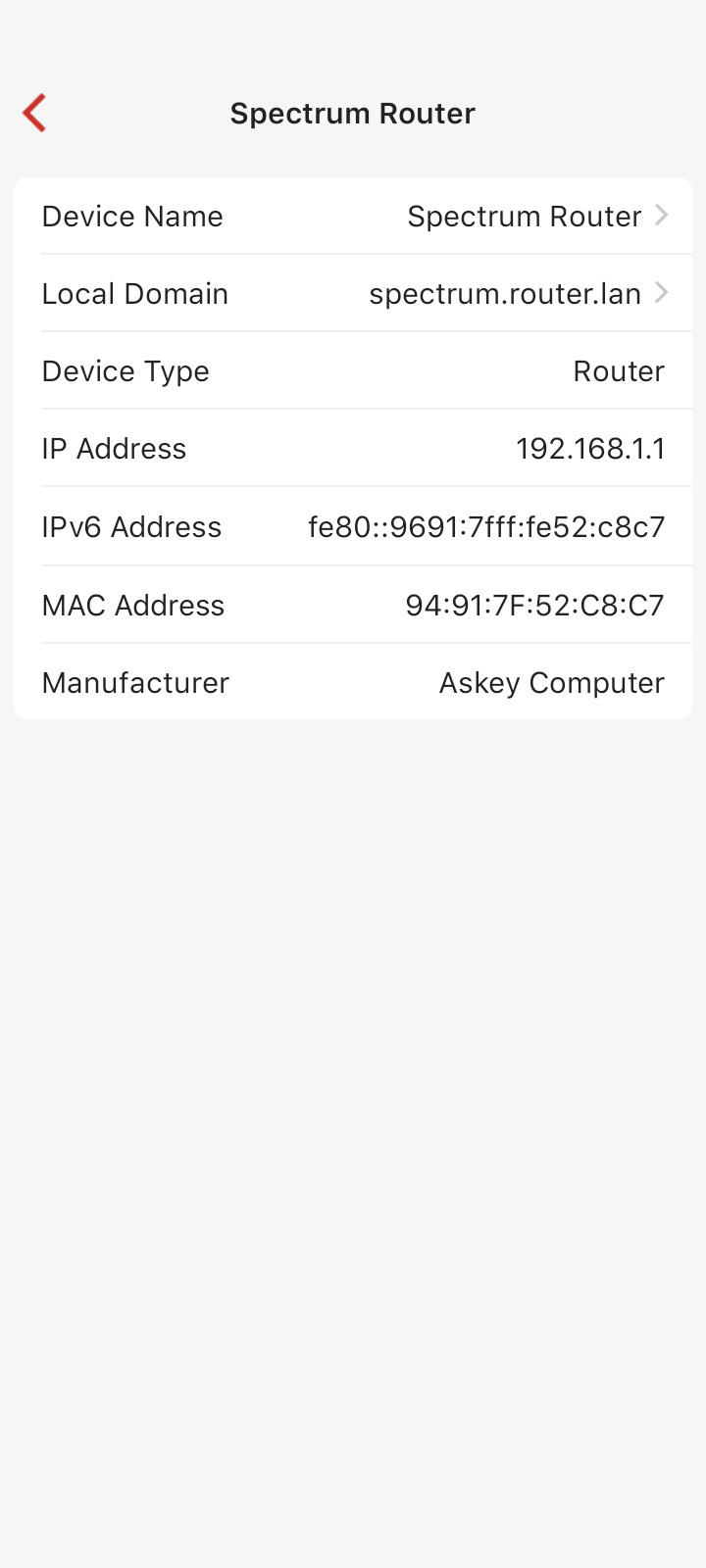
2. Your own list of compatible routers (consulted before I purchased Firewalla) does not list the ASKEY routers.
more after I try DHCP...
-
Bad news: The Askey SAC2VIK router supplied by Spectrum is a low cost router that offers NO method for turning off DHCP. Therefore, Firewalla's DHCP mode can not be used with this router.
Good news: Firewalla's "Experimental Simple" mode does work with the Askey SAC2VIK router, and that mode solves all 3 of the symptoms I reported.
I reset the Firewalla Blue+ box to factory settings, rebooted, and reconfigured for "Experimental Simple" mode. For now, everything is much faster, some things even faster than without Firewalla, and the problems are resolved.
Please sign in to leave a comment.
Comments
3 comments