How can I block an intruder using Gold?

Hello Firewalla community,
I have been having issues recently were I find intruders on my network and my question is how to kick them off.
Say an Unknown device with a only an IP address, which for some reason is able to bypass quarantine. Pretty sure it is my non-working neighbor or girlfriend in the apt below me.
The "IT" guy I was using for the complicated stuff is his uncle and I am pretty sure he gave them the credentials necessary.
I have since changed my SSID and password but it showed me I dont know how to kick someone off. I know I know how to block a website or domain but not a specific device. I dont think its via a rule or a target list so I am turning to the community.
Please see the attached screenshot of my UI, it's the bottom unknown device, which was online when I got home from work tonight, but was offline before I could figure out how to block them or kick them off.
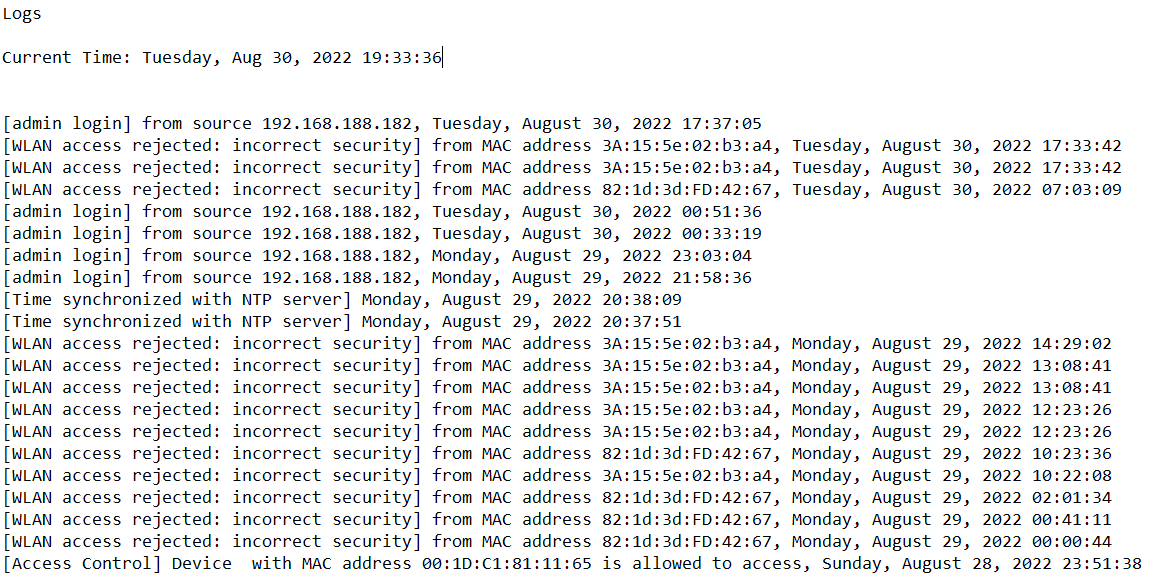
This device also showed up on my Netgear AP, so I accessed the logs and two devices have been trying since last nite to get onto my network. The MAC address's are the same as I have seen recently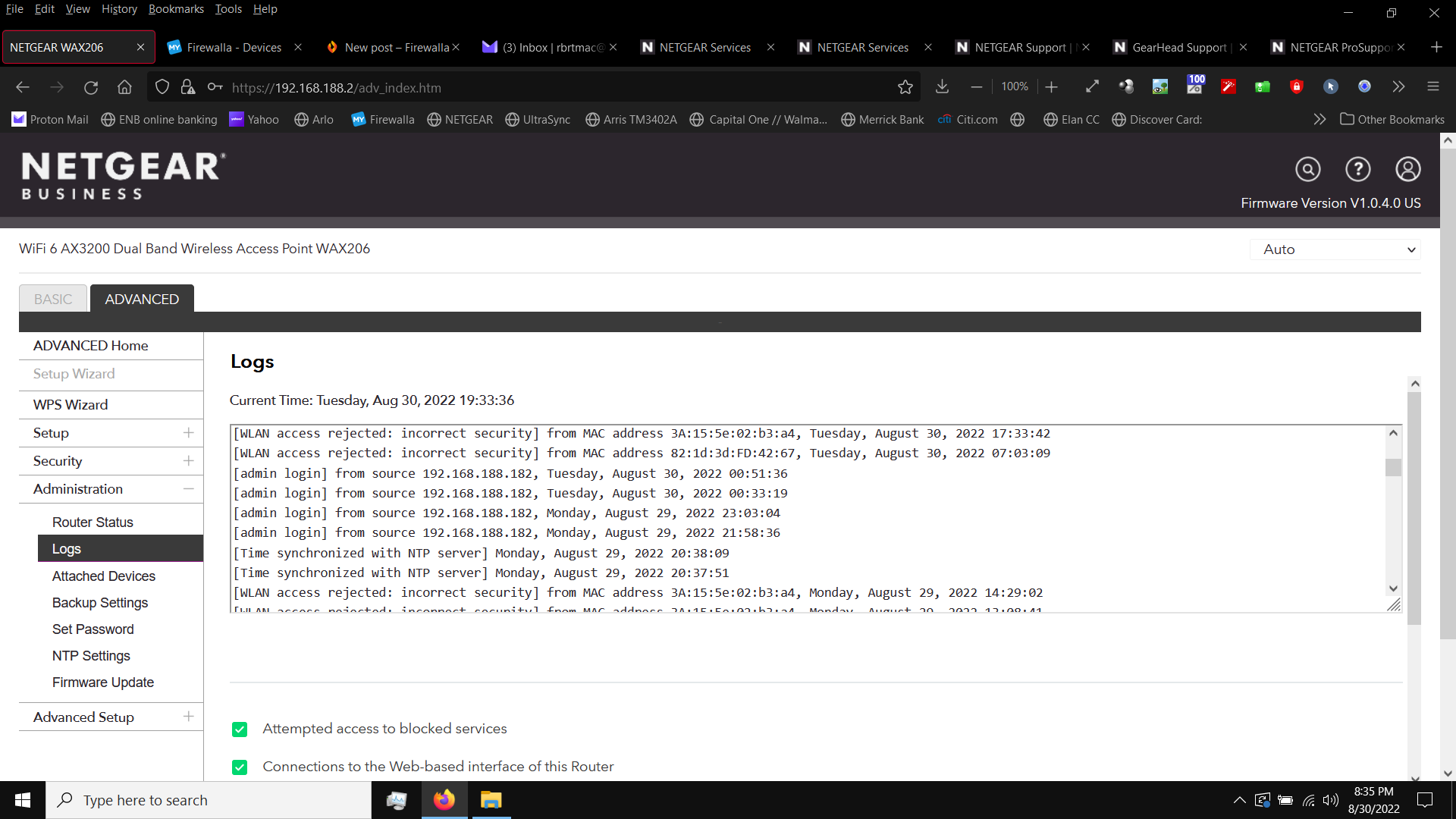
Having all this technology at my disposal is not really doing me any good, knowing after the fact sucks. Blocking new devices or quarantining them has been problematic, I leave for work in the morning with one IP address for my cell and when I pull up after work I immediately get an alert from Firewalla of a new unknown device, my cell phone which has new IP address and is now in quarantine....... I tried shutting off my SSID broadcast and immediately got disconnected, and was unable to connect because I never had my laptop connected via ethernet and was locked out for 6 hours Sunday evening till I could get the router reset and have Netgear tech support remote in to help with the 5ghz devices...
I am seriously considering turning my old desktop into a radius server and paying someone to set it up in my apartment.......
-

From the screenshots you posted, it appears as if you are successful keeping the two interlopers off your network. The Netgear log shows that they attempted to get on the WLAN, but did not have the correct passphrase ([WLAN access rejected: incorrect security...]).
The Firewalla screen cap shows the unknown device is offline, not connected to your network. Firewalla will continue to show that device for quite a while, unless you delete it.
The only thing that concerns me a bit is the several admin logins to the Netgear. If that was you, ignore it. If it was not you, your admin password on the Netgear needs to be changed. It might be a good idea to change it anyway, to keep your "IT guy" out of it until you allow him in.
Your last problem, where you get a new, different IP address each time you come home, can be fixed by either of two methods, turning off MAC address randomization or reserving an IP address for your phone. The first needs to be done in your phone WLAN settings. The second is done in the Device details for your phone on the Firewalla. Check out these links for more information.
How to turn off MAC Address Randomization? – Firewalla
Everything about Firewalla DHCP Mode – Firewalla
-

MAC starts with x2:xx, x6:xx, xA:xx xE:xx, are all private MAC addresses, that are randomly generated. In a typical home, these are mostly from MAC randomization, you should turn off here https://help.firewalla.com/hc/en-us/articles/360055342613-How-to-turn-off-MAC-Address-Randomization-
-
Hi Bob O' & Firewalla
Thanks for the quick reply's and the good info on the MAC randomization, I'll work on that shortly
Though the Firewalla screenshot shows the intruder offline, when I pulled up out front it showed he was online, thus the flurry to finally put a stop to this, and by the time I was making this post up it showed as offline but I have no doubt he had been on my network prior to me coming home from work.
So, does DELETING a device remove it from the network, or just from being monitored by Firewalla?
If I can learn how to do it, I should be good security wise since I was finally able to get my SSID turned off and get all my wireless devices connected back up. I turned on wireless # 2, also with the broadcast off, as a backup and will get the admin passwords changed.
This is definitely a learning process, and can be time consuming, but i shudder at the alternative.
Please sign in to leave a comment.
Comments
3 comments