DNS Booster dropping devices

Hi,
I have enabled DNS Boost for all devices and everything works fine. But one particular host is always somehow repeatedly excluded from DNS Boost after just a few minutes. I don't know how to troubleshoot it. Any ideas?
DNS Booster (before - Apply To: All Devices)
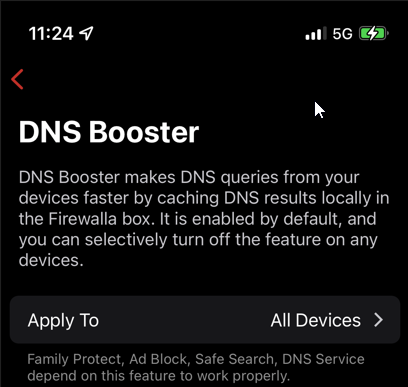
DNS Booster (after - Apply To: 34 devices; with the one device missing)

Running netcat from the impacted device, I see it just suddenly failing.
$ while true; do date +"%R:%S - `nc -w 5 -vz 192.168.0.1 53 2>&1`"; sleep 5; done
11:24:17 - Connection to 192.168.0.1 53 port [tcp/domain] succeeded!
11:24:22 - Connection to 192.168.0.1 53 port [tcp/domain] succeeded!
11:24:27 - Connection to 192.168.0.1 53 port [tcp/domain] succeeded!
11:24:32 - Connection to 192.168.0.1 53 port [tcp/domain] succeeded!
11:24:37 - Connection to 192.168.0.1 53 port [tcp/domain] succeeded!
11:24:42 - Connection to 192.168.0.1 53 port [tcp/domain] succeeded!
11:24:47 - Connection to 192.168.0.1 53 port [tcp/domain] succeeded!
11:24:52 - Connection to 192.168.0.1 53 port [tcp/domain] succeeded!
11:24:57 - Connection to 192.168.0.1 53 port [tcp/domain] succeeded!
11:25:02 - Connection to 192.168.0.1 53 port [tcp/domain] succeeded!
11:25:07 - Connection to 192.168.0.1 53 port [tcp/domain] succeeded!
11:25:12 - Connection to 192.168.0.1 53 port [tcp/domain] succeeded!
11:25:17 - Connection to 192.168.0.1 53 port [tcp/domain] succeeded!
11:25:22 - Connection to 192.168.0.1 53 port [tcp/domain] succeeded!
11:25:27 - Connection to 192.168.0.1 53 port [tcp/domain] succeeded!
11:25:32 - Connection to 192.168.0.1 53 port [tcp/domain] succeeded!
11:25:37 - Connection to 192.168.0.1 53 port [tcp/domain] succeeded!
11:25:42 - Connection to 192.168.0.1 53 port [tcp/domain] succeeded!
11:25:47 - Connection to 192.168.0.1 53 port [tcp/domain] succeeded!
11:25:52 - Connection to 192.168.0.1 53 port [tcp/domain] succeeded!
11:25:57 - Connection to 192.168.0.1 53 port [tcp/domain] succeeded!
11:26:02 - Connection to 192.168.0.1 53 port [tcp/domain] succeeded!
11:26:07 - Connection to 192.168.0.1 53 port [tcp/domain] succeeded!
11:26:12 - Connection to 192.168.0.1 53 port [tcp/domain] succeeded!
11:26:17 - Connection to 192.168.0.1 53 port [tcp/domain] succeeded!
11:26:22 - Connection to 192.168.0.1 53 port [tcp/domain] succeeded!
11:26:27 - Connection to 192.168.0.1 53 port [tcp/domain] succeeded!
11:26:32 - Connection to 192.168.0.1 53 port [tcp/domain] succeeded!
11:26:43 - nc: connect to 192.168.0.1 port 53 (tcp) timed out: Operation now in progress
11:26:53 - nc: connect to 192.168.0.1 port 53 (tcp) timed out: Operation now in progress
I have no idea why this could be happening.
-

Is this device used as DNS server to the network? Firewalla will automatically disable DNS booster on the device if it's used as local DNS server.
The "Operation now in progress" may be a different issue, it's more like a client side issue. Can you try dig instead of nc?
-
Hi,
thanks. This is likely the problem.
"...Firewalla will automatically disable DNS booster on the device if it's used as local DNS server..."
The device being disabled is running pihole in a container. I wanted the impacted host to use local pihole as primary and Firewalla as secondary DNS. Even though it runs pihole and can resolve through pihole, it is useful to have a secondary DNS for when I want to update the pihole container. In fact, that is how I discovered Firewalla wasn't working.
Let's hope over time, configuration options for DNS Booster (which others have expressed concerns about as well) will be enhanced to give *us* more control. I am definitely not happy about Firewalla making decisions on my behalf that I can't influence.
The netcat error comes from the fact that I provided a 5 second timeout (-w) because I lack patience.
$ dig @192.168.0.1 www.test.com +short

; <<>> DiG 9.18.1-1ubuntu1.1-Ubuntu <<>> @192.168.0.1 www.test.com +short
; (1 server found)
;; global options: +cmd
;; connection timed out; no servers could be reached
$ telnet 192.168.0.1 53
Trying 192.168.0.1... -
Is the device configured as DNS server in Firewalla network settings? This is how it determines, and this is to prevent DNS loop, it has to be disabled in dns booster.
You can run Pihole container using macvlan network, this will use a new IP address with a new Mac address to run container, so that only Pihole container will have dns booster off, the hosting device will still have dns booster on.
https://docs.docker.com/network/macvlan/
Also even if dns booter is off, it should still be able to use DNS service, instead of having error like this. You may send email to help@firewalla.com, we can help debug that.
-
Hi,
Thanks. I'll consider sending an email.
"...Also even if dns booter is off, it should still be able to use DNS service, instead of having error like this. You may send email to help@firewalla.com, we can help debug that..."
In the interim, I've simply removed Firewalla as Secondary DNS on the impacted device.
Your help has been much appreciated.
Please sign in to leave a comment.
Comments
5 comments