Verizon WiFi Calling Help

Comments

31 comments

  • Avatar
    Support Team

    Is this box in bridge mode or router mode?

    0
    Comment actions Permalink
  • Avatar
    Ryan

    Router

    0
    Comment actions Permalink
  • Avatar
    Support Team

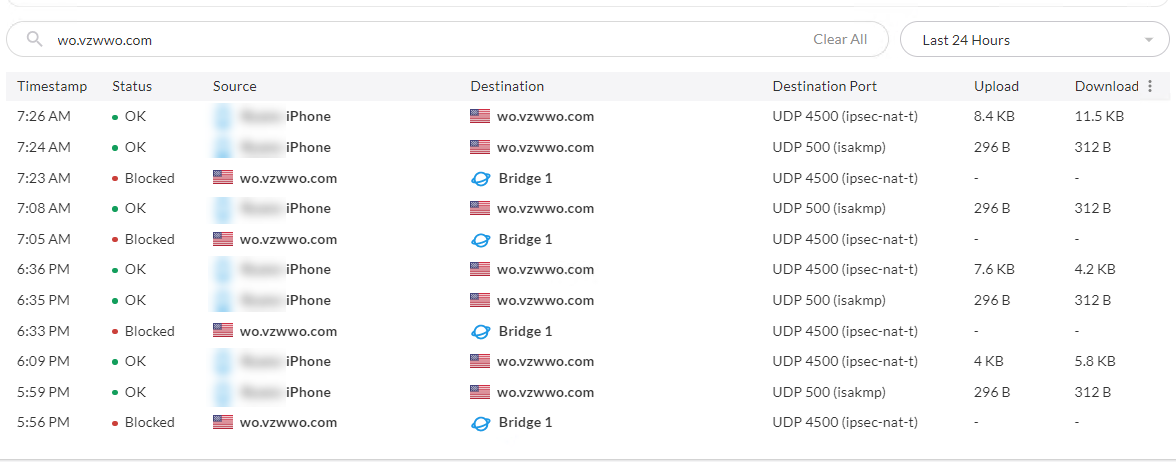
    I'll create a case from this post. Usually this port 4500 connection should be outbound, not inbound. We want to take a look if there is any bug.

    0
    Comment actions Permalink
  • Avatar
    Ephrayim

    I'm having the same issue for a while. I even put in a bidirectional rule allowing traffic from the Verizon domain but I am still seeing the domain blocked on the inbound. I've been in contact with support for a while but I am still having problems with wifi calling. One thing to remember to do is enable IPsec but even with it on I am still having this problem. 

    0
    Comment actions Permalink
  • Avatar
    Wes Thurmond

    I was having this issue with this feature (Verizon, Pixel 5). I updated the NAT Passthrough settings (Firewalla Gold) and I'm able to use wifi calling now.  Before updating the settings the my phone just said "Verizon" at the top. Now it says "Verizon Wi-Fi Calling"

    1
    Comment actions Permalink
  • Avatar
    Firewalla

    What settings did you turn on?

    0
    Comment actions Permalink
  • Avatar
    Wes Thurmond

    IPSEC is toggled on, the rest are off.

    1
    Comment actions Permalink
  • Avatar
    Ephrayim

    For me, the issue with Wi-Fi calling is not that the call does not go through but that the phone goes offline and therefore all phone calls go straight to voicemail. It seems like Firewalla closes the port whereas Verizon expects it to be open and pings the phone intermittently to see that it's still there. I have even whitelisted all the necessary domains completely opened up the port and still firewalla blocks the traffic. Outgoing phone calls sometimes fail but the most part they work.

    0
    Comment actions Permalink
  • Avatar
    Wes Thurmond

    I haven't noticed missed calls, but I get very few calls any way.  Sorry I can't be more helpful. )-:

    0
    Comment actions Permalink
  • Avatar
    Ephrayim

    Wes, have you checked for blocked incoming connections from Verizon's domain?

    0
    Comment actions Permalink
  • Avatar
    Wes Thurmond

    I have not.

    0
    Comment actions Permalink
  • Avatar
    Ryan

    I turned on IPSEC (Network > NAT Settings > NAT Passthrough > IPSEC) and let it sit overnight. The logs still show blocks:

    0
    Comment actions Permalink
  • Avatar
    Ephrayim

    I have literally tried everything, even creating a group for phones that had no firewall filtering at all; it was still blocked! I have been emailing support for a couple of weeks to get this fixed.

    0
    Comment actions Permalink
  • Avatar
    Wes Thurmond

    I also have UPnP enabled, but the only ports opened by UPnP are for xbox.

    0
    Comment actions Permalink
  • Avatar
    Ryan

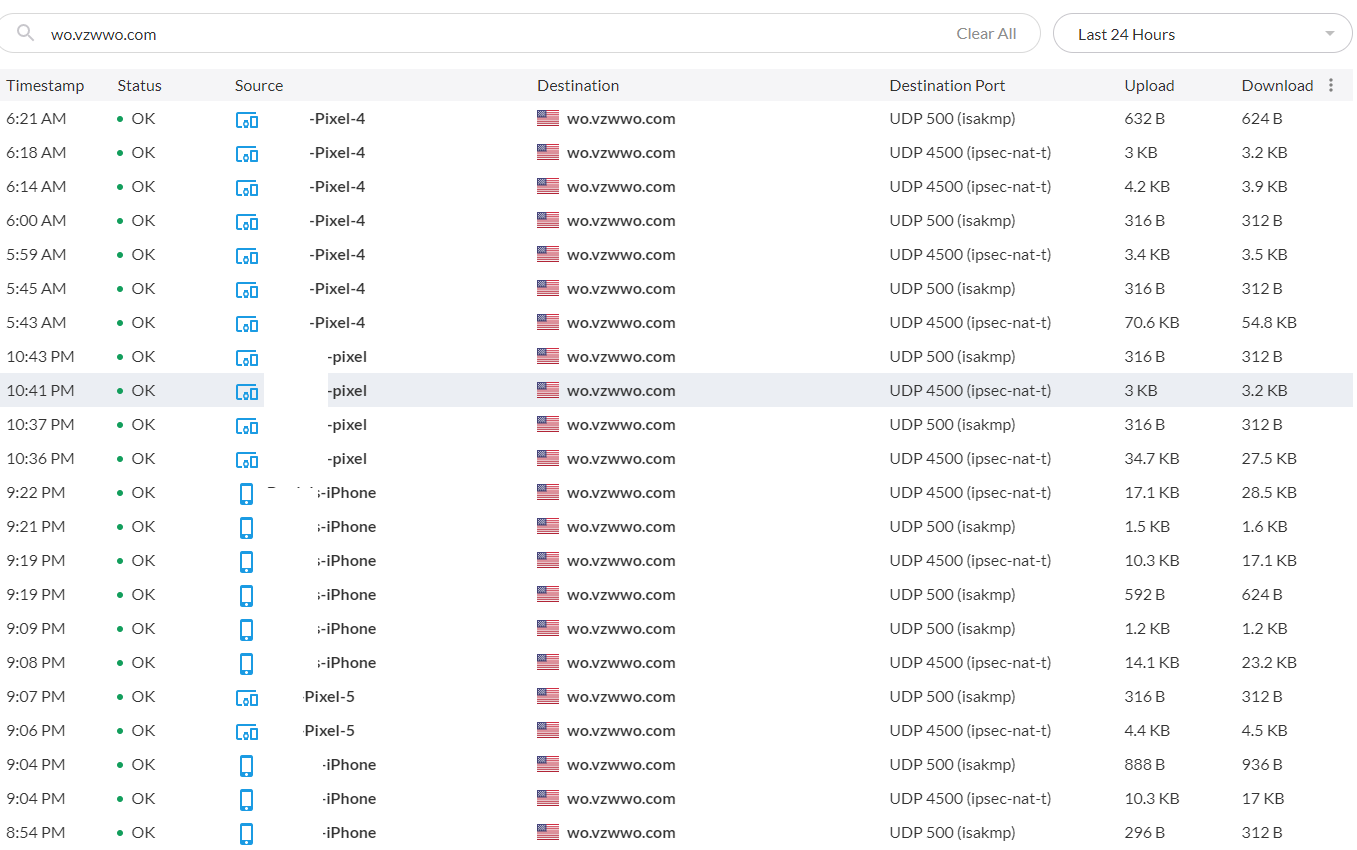
    Interesting that you do not have any inbound traffic from wo.vzwwo.com like I do

    0
    Comment actions Permalink
  • Avatar
    Wes Thurmond

    I thought that was weird too. I verified that I'm able to make outbound calls and I am able to receive calls. 

    0
    Comment actions Permalink
  • Avatar
    Wes Thurmond

    I found something a little weird below. When the destination is a device instead of the router it seems to work. Both flows in the screen shot are inbound.

    0
    Comment actions Permalink
  • Avatar
    Ryan

    Well, now I am thoroughly confused. I am also able to make and receive calls, with or without the IPSEC passthrough enabled. This wasn't always the case, but I will likely need to give it time and see if it stops working now that I've disabled IPSEC again. The inbound traffic from Verizon is still being blocked, so I'm guessing that's some kind or persistence or keepalive on their end. If their IPSEC tunnel goes down, then maybe it will not be able to come back up and it will break again. Will report back in a few days.

    0
    Comment actions Permalink
  • 0
    Comment actions Permalink
  • Avatar
    Firewalla

    Looks like wifi calling is via a VPN tunnel! Thanks for sharing.

    -2
    Comment actions Permalink
  • Avatar
    Ephrayim

    Firewalla S
    Seriously? Someone enabled every protocol port opening on the router including IPsec and you are attributing it to a VPN tunnel?

    0
    Comment actions Permalink
  • Avatar
    Firewalla

    Not just a port. if NAT pass-through works for IPSEC, it is IPSEC

    -1
    Comment actions Permalink
  • Avatar
    gstaylor16

    I found that Verizon Wifi calling needs only IPSEC passthrough enabled in Firewalla.  Interestingly Tello wifi-calling appeared functional without it.

    1
    Comment actions Permalink
  • Avatar
    gstaylor16

    Clarify my last point.  This is on a network where IPV6 is not functional.  I know from prior experience Wifi calling will prefer IPV6 if it is available, so then you would not need the NAT IPSEC passthrough feature.

    1
    Comment actions Permalink
  • Avatar
    Francisco Escobar

    Hello,

    I have the same issue but my setup is in Bridge mode, but NAT Settings are not available in this mode. I also don't see any attempt from my phone. I open a case with firewalls, so far their solution is to turn off "monitoring". For that I could have save that money.  In my case WIFI using verizon was working before I put the firewalla in place.

    0
    Comment actions Permalink
  • Avatar
    Wes Thurmond

    If you filter the flows, does anything show up with this filter:
    wo.vzwwo.com

    What about this filter:
    Destination:wo.vzwwo.com 

    0
    Comment actions Permalink
  • Avatar
    Francisco Escobar

    i see the traffic as being allowed or OK.  is there a logic behind the rules?  Normally firewalls rules work in a top down approach, I manage Cisco Firepowers and Palo Alto and both of those work in that matter.  This is the only thing I could think of but then again, I have no way of re-ordering the rules.  

    0
    Comment actions Permalink
  • Avatar
    Wes Thurmond

    I don't know. I'm sorry I can't be more helpful.

    0
    Comment actions Permalink
  • Avatar
    Firewalla Team

    @Francisco, if your Firewalla box is working in bridge mode, Firewalla box is like a switch and won't do NAT. Monitoring off is a troubleshooting step to test if it's blocked by a firewall feature. Our engineer may need to take a look from the inside. Can you please check the case and share access with us?

    0
    Comment actions Permalink
  • Avatar
    WHAT TF

    Verizon phone here. So just started this morning, similar issue if I make a wifi call it connects then immediately drops call. If I receive a call it rings 1x and then drops the incoming call, never get to answer it.
    Thought emergency mode allowed it to work and I think it did once or twice then wifi calling continued to fail.

    0
    Comment actions Permalink

Please sign in to leave a comment.