Wireguard Site to Site Issues

Hi all,
I've just recently purchased a Firewalla Gold, and I'm loving it so far, I just have one issue. I'm having trouble when connecting site to site using wireguard.
Direction Outbound: Firewalla to Remote Site (Wireguard on Ubuntu)
Essentially I'm finding that as soon as I enable the client VPN I start having internet issues on the devices I've enabled it on, for example: Microsoft Teams thinks I'm offline, Speed Test (Ookla) does not find a server but the page loads, for some reason the nvidia site wont load either, I only noticed that because I had driver updates to do and they failed to download. All of the above are resolved when I turn off the VPN Client in Firewalla.
The VPN seems to be working as expected other than the internet issues. I can access remote servers etc that I need to. I've checked my Wireguard config multiple times, the allowed IP's are the remote private subnets. I've turned off "Force DNS over VPN" and "Internet Kill Switch". I've tried changing the Primary DNS of the Wireguard network that was created to 1.1.1.1 (Cloudflare), I tried changing the DNS of the Wireguard network to my local DNS, none of the above helped.
I also don't have any rules in place that reference the Wireguard network.
Any help would be appreciated.
-

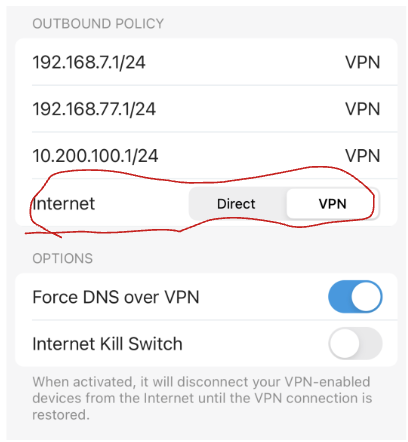
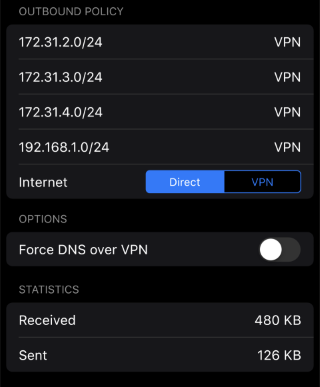
If I had to guess, you probably have the "internet" configuration for the site to site connection set to vpn, and on the remote side there's a firewall (or the gateway itself) that's blocking your local subnets from using it to connect to the internet effectively (either intentionally or from an unintended configuration) .
If you don't need "all" traffic to go through the remote server's gateway, I recommend flipping the "Internet" switch in your FWG to "Direct", which means that only traffic intended for the listed subnets will use the vpn, while everything else uses your local gateway as normal (ie a split-tunnel vpn).
If you do need all your traffic to go through the vpn (so it all appears to the internet as though it originates from the remote site), then you have some troubleshooting to do with the remote site to figure out where the blocks are occurring.
-
Hi Mason, appreciate the reply. That makes perfect sense, I'm used to Wireguard only routing to the remote subnets that I've set in the config, but if it's actually routing all traffic to the remote network then it makes sense why I'm having these issues.Unfortunately in my app I don't seem to have the toggle switch you circled, so I can't choose Direct. Unless I'm looking in the wrong location? I'm going into "VPN Client" then choosing my Wireguard profile. I just tried updating my app to the Beta on Android but that internet toggle is still missing.
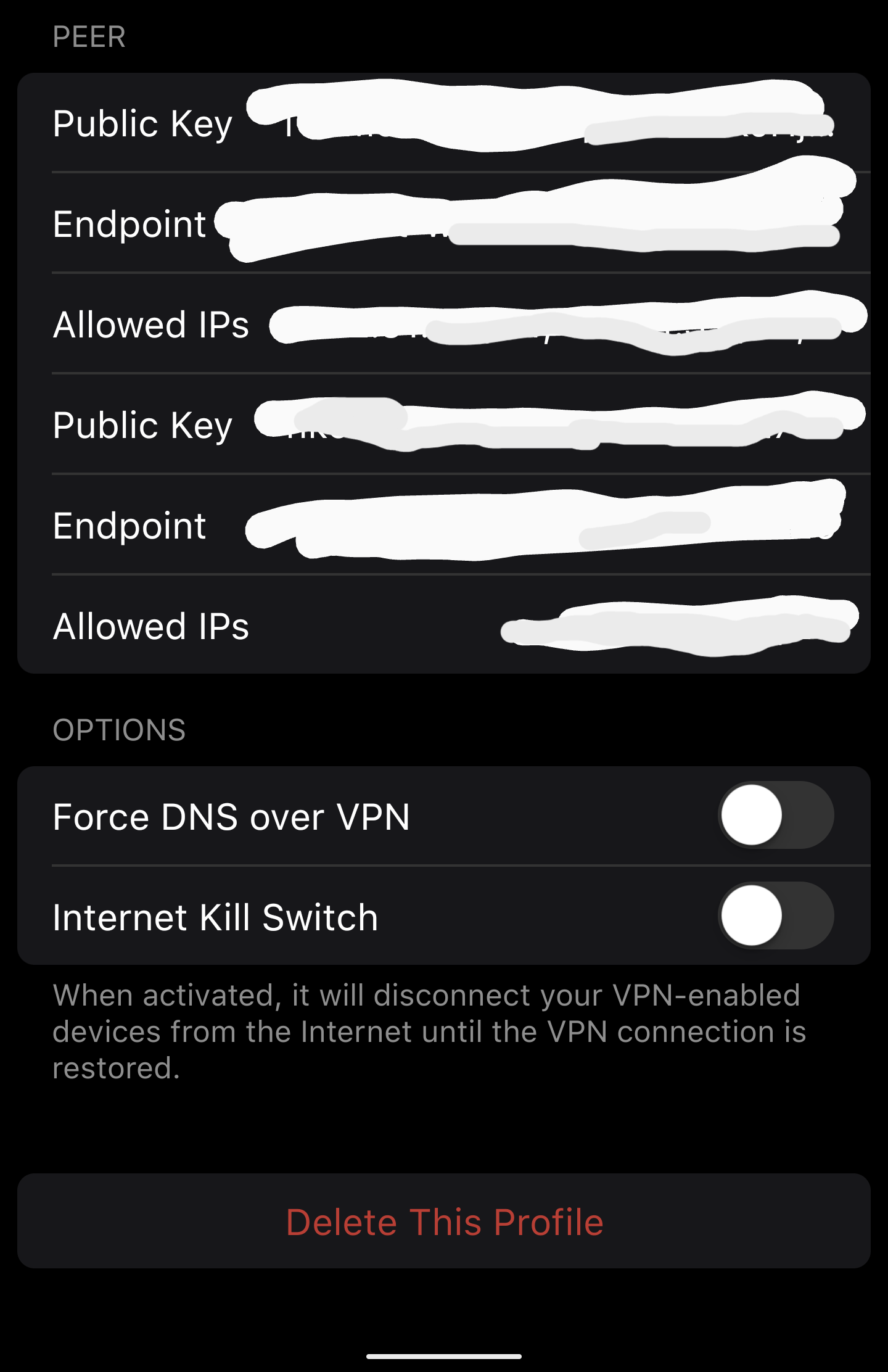
@Firewalla, yes that is correct, I'm just using the VPN Client with the 3rd Party VPN option using Wireguard. As discussed above with Mason, I expected only traffic to my specified remote subnets to route over the VPN, not all traffic. Any idea why I don't have the "Internet" toggle switch that Mason has, to change that?
-
Ah, ok, you're not using the 2 firewalla site to site, that's where you would see the above UI options.
For the more direct wireguard peer configuration like in your screenshot above, the configuration you're looking for is the "Allowed IPs" in the Peer section (not the Interface section). This AllowedIPs should be 0.0.0.0/0, ::/0 if you want a full tunnel (all traffic goes through the vpn), or a comma separated list of subnets for specifically the network on the remote side of the connection you want to access through the vpn for split tunnel.
-
That's exactly how I have it, the allowed IP's I have set are the remote private subnets e.g 192.168.1.0/24.
I can hit the servers in that IP Range, but I'm still getting the weird internet issues. It seems like a bug.
I do have 2 peers in the one config, which has never been an issue for me before but perhaps I'll split out each peer into their own profiles to test individually. That said this is the same config I used on my old router without issue.
I have a separate profile that is working perfectly for full internet passthrough (0.0.0.0/0), it just seems to be an issue with the split tunneling.
-

Is there way to select "Direct" on as a VPN client?
I'm fairly certain I'm encountering a similiar issue. I have a Wireguard tunnel between Firewalla and a pfSense device that mostly works. I can ping devices and most things like SSH connect properly. However Docker and Kubernetes seem to be having issues and I think it's because Firewalla insists on NATing the outbound traffic based on tcpdump's output.
-
@Douglas that sounds more like the docker/kubernetes subnets are blocked, as they are originating networks. Try updating firewall rules to allow traffic from the internal docker/kubernetes subnets your containers/pods are on, and if things start working, you'll have a starting point to research further.
-

@Douglas Hedges (DJ)
Since the other side is pfSense, it's likely your VPN connection in Firewalla is created as "Remote Access VPN", not a "Site to site VPN". The NAT is enabled for "Remote Access VPN", as the server side may not have route for the Firewalla local subnets.
And there is no configurable option on app for that yet.
But this should not cause issues on docker/Kubernetes. Any specific errors? are these running on pfSense's network or Firewalla's network?
-
I have hosts on both sides of the tunnel. When trying to join the hosts with microk8s I was seeing errors like the following when the manager was on the pfSense side of the tunnel. Where the IP was that of the Firewalla tunnel instead of the actual host IP. Moving the manager to a host behind Firewalla does work and might work for my use case. Alternatively I might just setup wireguard tunnels between the hosts directly.
Connection failed. The hostname (xx) of the joining node does not resolve to the IP "xx". Refusing join (400)
Most users work around this error by adding a static entry to /etc/hosts mapping the IP to hostname but that won't work in my case since there are multiple hosts on the Firewalla side.
Prior to experimenting with microk8s I had a docker swarm with hosts on both sides of the tunnel. I spent serveral days trying to troubleshoot the docker overlay network. The hosts on the Firewalla side worked flawlessly but any host behind pfSense was unable to forward traffic correctly.
-
The more I think about it, the more I'm finding that a single site-to-site tunnel isn't going to work for your use case. You really need all your hosts to be part of the same network, which you can achieve with one of several approaches for an overlay network. So basically as you've stated:
Alternatively I might just setup wireguard tunnels between the hosts directly
For anyone following this thread and curious, Wireguard is a good candidate for such a network, but instead of utilizing your site-to-site type connection (which is a NAT-ed setup, as it's basically a router at each end of the connection), like this:
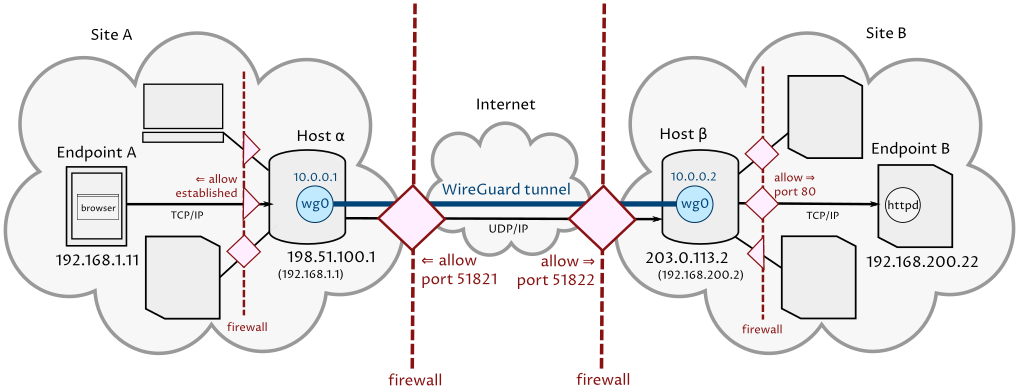
you want an approach where multiple hosts connect to a single wireguard server (so the wireguard server acts as the "router" presenting a subnet to which each host belongs). like this:
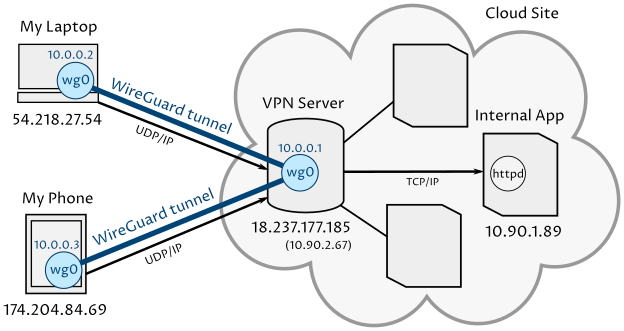
In the above setup, the simpliest configuration treats the vpn (wireguard) server as a "router", which still NATs connections between clients connected to it ("my laptop", "my phone") and the physical network it lives in ("Cloud Site", and the other hosts on that site), so there's one extra requirement to avoid the NAT, and that's to connect hosts on the same physical network as the vpn server (hosts that you want to avoid the NAT issue, anyway) to the vpn with wireguard just the same as external hosts, and use all connections based on everyone's assigned wireguard IP addresses.
-

@Goomba,
Are you using Firewalla on both networks? Or did you use Firewalla VPN Client on one side and a WireGuard Server on the other?On the VPN Client settings, do you have "Internet" set to VPN or Direct?
It sounds like you want traffic between the two sites to be over VPN but the Internet to be direct. If you choose "Direct" you should be able to connect to the remote site but all internet traffic will go direct. Does that solve the issue for you?See https://help.firewalla.com/hc/en-us/articles/4570608120979-Firewalla-DNS-Services-Introduction#h_01FYDNB0ES9W93ZANPZ6YTE1M9https://help.firewalla.com/hc/en-us/articles/4570608120979-Firewalla-DNS-Services-Introduction#h_01FYDNB0ES9W93ZANPZ6YTE1M9 for a good overview of DNS.


Please sign in to leave a comment.
Comments
22 comments