Firewalla Gold Plus – Configuration Backup and Disaster Recovery Questions

Hi Firewalla Support Team,
I upgraded from a Firewalla Gold to a Firewalla Gold Plus back in April 2026 and successfully migrated my configuration from the old Firewalla Gold to the new Gold Plus.
Recently, I was reviewing the disaster recovery process in case my current Firewalla Gold Plus fails and needs to be replaced.
I followed the migration procedure outlined in your documentation:
However, when I navigate to Migrate from Other Box, the only device listed is my old Firewalla Gold, with a date of April 21, 2026, at 6:50 AM, which is when I originally migrated to the Gold Plus.
My current Firewalla Gold Plus does not appear in the list. Please see the attached screenshot.
I have a few questions:
-
Why does the migration screen only show my old Firewalla Gold instead of my current Firewalla Gold Plus?
-
Is the configuration of my current Firewalla Gold Plus automatically backed up and available for recovery?
-
Is there a way to manually create a new backup of my current Firewalla Gold Plus configuration?
-
If my Gold Plus fails completely, can I restore its latest configuration to a replacement Firewalla without having access to the failed device?
-
Since I also have a Firewalla MSP account, is there an option to create, manage, or restore configuration backups through MSP?
-
How can I verify that my current Gold Plus configuration is properly backed up and available for disaster recovery?
My main concern is ensuring that I can restore the most recent configuration from my Firewalla Gold Plus, rather than the older configuration from my Firewalla Gold that was migrated back in April.
I would appreciate your guidance on the recommended backup and disaster recovery process.
Thank you for your assistance.
-

The "Migrate from Other Box" list on your Gold Plus shows other boxes you can copy data from into the current box, so your Gold Plus will not appear in its own list.
Your Gold Plus configuration is kept with its pairing in the Firewalla app, and it is updated each time the app connects to the box and syncs. To make sure the backup has your latest changes, open the Gold Plus in the app and refresh its main page. There is no separate manual backup, and MSP does not currently offer a backup or restore option.
If your Gold Plus ever fails and is replaced, the restore happens during setup of the new unit: on the Set Up Firewalla page, choose Replace or Restore and select your Gold Plus. This brings back network settings, devices seen within the past 7 days, rules and features, and the failed box does not need to be running. Please do not unpair the failed Gold Plus from the app before restoring, as that entry is what the restore reads from. Details: https://help.firewalla.com/hc/en-us/articles/360015356093-How-do-I-migrate-data-from-one-Firewalla-Box-to-another
A few things are not restored and are worth noting down: OpenVPN server configuration, past alarms and flows, usage and speed test history, MSP-related settings (the new box needs to be re-added to MSP), and any containers or privately installed packages.
-
Hi Firewalla Support Team,
Thank you for the clarification.
Just to confirm my understanding, it is normal that my current Firewalla Gold Plus does not appear in the "Migrate from Other Box" list, since this list only displays other Firewalla devices available for migration.
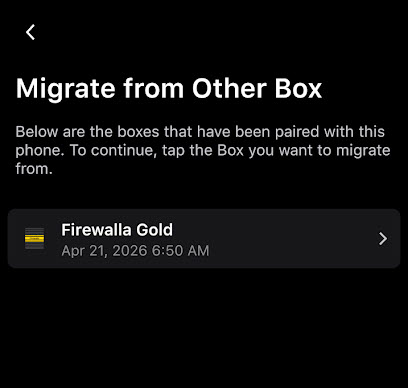
This is what my Firewalla Gold Plus shows on the Migrate from Other box list
If my Gold Plus fails and I need to replace it, I would select "Replace or Restore" during the setup of the new Firewalla device. At that point, my existing Firewalla Gold Plus should appear as an available device to restore from.
Will the restore screen also display the latest backup or synchronization date for my Gold Plus, rather than the original migration date from April 2026?
I just want to confirm that the restoration will use my most recent configuration, including any changes made since the original migration.
Thank you again for your assistance.
-
Thank you for your response.
Yes, my current Firewalla Gold Plus would be the device I would replace if it failed in the future.
Just to confirm, when I set up a replacement Firewalla and select "Replace or Restore," my existing Gold Plus should appear as an available restore source, provided I have not removed it from the Firewalla app.
I also wanted to clarify a few additional questions:
1. Configuration Backup and Synchronization Date
Will the "Replace or Restore" screen display the most recent configuration synchronization date for my Gold Plus?
For example, if I refresh my Gold Plus in the Firewalla app today, will the restore screen reflect today's synchronization date, or will it continue showing the original migration date from April 2026?
My main concern is ensuring that the replacement device restores my latest configuration, including all changes made since April.
2. Restoring from a Secondary Paired Phone
I currently have another phone paired with my Firewalla Gold Plus, which I use approximately once a week.
If my primary phone is lost or damaged, would I be able to use my secondary paired phone to restore all supported configurations to a replacement Firewalla Gold Plus?
Since I access the Firewalla app on my secondary phone weekly, I would expect it to have relatively recent configuration changes. Is that correct?
3. Missing Devices Under "Migrate from Other Box" on Secondary Phone
When I navigate to "Migrate from Other Box" on my secondary phone, the list is completely empty, as shown in the attached screenshot.
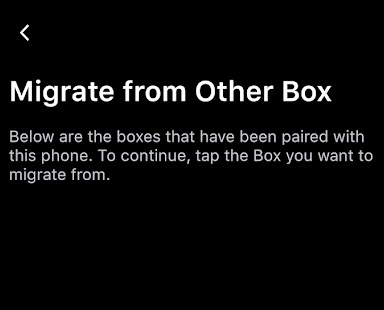
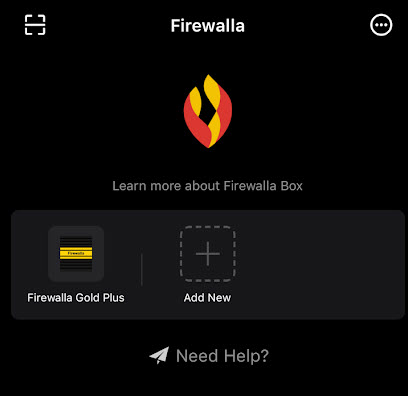
Is this expected behavior because my current Gold Plus is the only Firewalla device paired with that phone?
If my Gold Plus fails, will it still appear under "Replace or Restore" when setting up a replacement device using this secondary phone, even though the "Migrate from Other Box" list is currently empty?
4. Video Tutorial or Step-by-Step Recovery Procedure
Do you have a video tutorial demonstrating the complete "Replace or Restore" procedure, particularly when replacing a failed Firewalla device that is no longer operational?
It would be helpful to see how the existing device appears during setup, how the configuration is selected, and how the restoration process works.
If a video is not available, a detailed step-by-step guide with screenshots would also be appreciated.
I would appreciate it if you could address each of the four questions individually so that I have a clear understanding of the backup, synchronization, and disaster recovery process.
I would like to ensure that both my primary and secondary phones can independently restore my latest Gold Plus configuration in the event of a hardware failure.
My goal is to ensure that I can successfully restore my most recent Firewalla Gold Plus configuration using either of my paired phones in the event of a hardware failure.
Thank you again for your assistance and clarification.

Please sign in to leave a comment.
Comments
4 comments