Firewalla Gold stops internet access and requires a reboot daily

I have a Firewalla Gold setup in router mode. It is connected to an Asus router that is setup in AP mode. I have a public IP address issued by my ISP that the firewalla is routing to an internal DVR to view my cameras externally. The DVR is on a different subnet than my home network.
The issue:
The Firewalla seems to lock up daily, causing all traffic to stop including the internet. I will get a notification that Firewalla is offline. ISP is up because I can hard connect to the modem and everything works fine. Anything connected to the Firewalla loses its internet access. The only way to fix it is to physically reboot the Firewalla. I have changed out network cables on the Firewalla, no luck. I do not see any events in Network Performance that help in identifying the issue. I only see the power outage event, which is when I unplug and replug in the power cable to the Firewalla. That is the only way I can reboot it because the app cannot connect to it. I tried the new beta version and the stable version. The problem is more frequent in the stable version.
Is there something I am missing? It is really frusrating to reboot it daily, especially when I am not home and the wife has to troubleshoot it.
-

This morning, for example, several of my devices had really degraded performance, with 50%+ ping failures and really choppy internet access; the speeds, especially the upload, were 10-12 Mbps. I have fiber connectivity with 2048/2048 Mbps, if I run the speed test from firewalla, it confirms those speeds.
The device is connected via a LAN cable to a switch that connects to the Firewalla. I restarted the switch, but the problem persisted. I restarted Firewalla, and the problem disappeared. Yesterday I had a similar situation, and after restarting FireWalla, everything started working fine.
I have basic rules; I only have my kids' devices with more restrictions, everything else is default. I run with the default protection mode. My network topology is also simple; my Wi-Fi is a mesh using TP-Links, where the main node is acting only as an AP and connected to one of the Firewalla ports. Everything else runs on LAN connected to the other firewalla ports.Firewalla is set as the main router.
Let me know if you have any other questions. -

Please see this article to help troubleshoot speed issues. https://help.firewalla.com/hc/en-us/articles/360056875493-Speed-Tests-and-Speed-Optimization-with-Firewalla
The most common issues is likely related to your LAN or you have smart queue rules limiting traffic speed. Please follow the chart in the article to zoom in the problem
-
Followed the steps and got some interesting results.
Ran a speed test inside the Firewalla (SSH) and got the following:
pi@Firewalla:~ (LopesWalla) $ ./speedtest
Speedtest by Ookla
Server: Brightspeed - Rocky Mount, NC (id: 69531)
ISP: Ting Fiber
Idle Latency: 17.92 ms (jitter: 0.42ms, low: 17.34ms, high: 18.09ms)
Download: 2252.36 Mbps (data used: 2.8 GB)
19.61 ms (jitter: 0.48ms, low: 17.81ms, high: 20.98ms)
Upload: 2115.14 Mbps (data used: 2.9 GB)
17.81 ms (jitter: 0.40ms, low: 16.59ms, high: 19.77ms)
Packet Loss: 0.0%
Result URL: https://www.speedtest.net/result/c/b2b38fbb-b1d9-4195-a151-3beaa5e66281
Speedtest from a laptop connected via 2.5 Gbps through a 2.5Gbps switch to Firewalla, detecting that connection as a 2.5 Gbps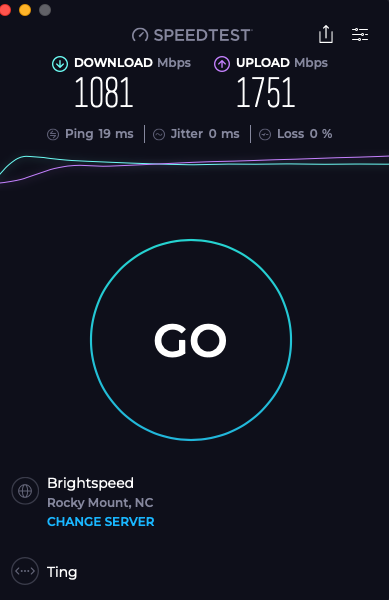
HTML 5 Speed tests for the local network
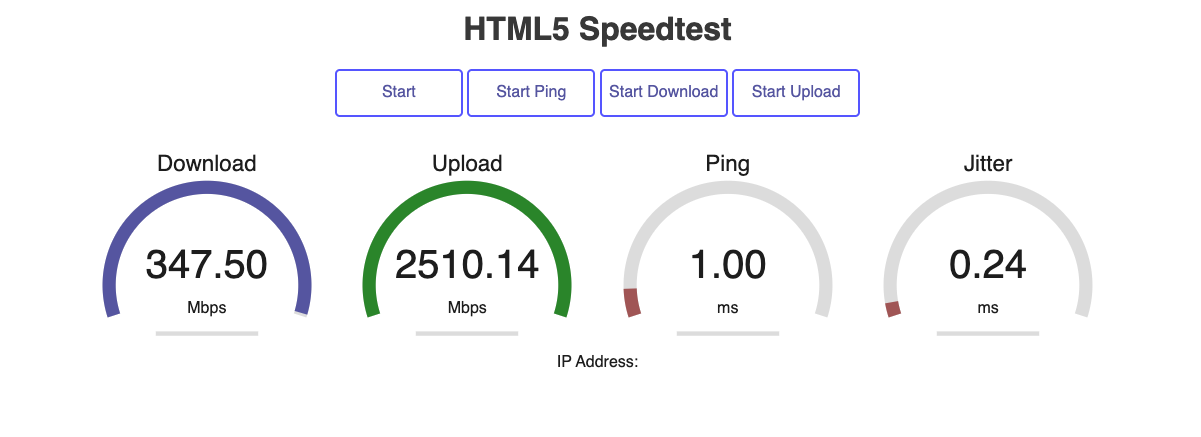 It doesn't make sense, the download LAN speed is slower than the internet speed from the same laptop?
Tried both smart queues on and off, and got the same results.
-
Connect your laptop directly to the firewalla, and make sure you are using a native ethernet connection. (USB-C to ethernet often don't perform well.)
My theory is very likely your switch is doing something. And the most common problem is switch flow control. For example, when you step up or down speed (1G to 2.5, or 10G to 2.5 ... etc), your switch may drop packets or do sometype of flow control. (direct connection will help you identify that).
-
Hello Team, thank you for the quick response.
I am using the power brick and cable that came with Firewalla. Everything works great and then randomly I will get a notification that Firewalla is offline. Cannot connect to it to troubleshoot (via phone). App says "Cannot connect to Firewalla". All my devices connected to Firewalla cannot access the internet. I have a few hard lines connected to my cable modem directly, those work fine.
I have to reboot the firewalla to fix the issue. A reboot always fixes it.
-
I have an MBP without a native LAN port, I am using an iVanky dock with a 2.5Gbps Realtek port.. Tried with a Windows laptop with a 1GB native port connected to the same switch, and it worked fine for the LAN and WAN speed tests.
Even with reduced performance, the internet works fine right now. This morning, there were tons of ping failures, and nothing was working for internet access; it also affected more than this laptop.. I guess I have to wait until tomorrow to see if the same thing happens. If it does, I will update you.
-
So the issue is your iVanky dock?
ping failures can be so many things, you can use this to debug https://help.firewalla.com/hc/en-us/articles/360053534593-How-do-I-debug-network-connectivity-issues
-
I don't think the issue with the internet is my dock, I think while troubleshooting the Internet issue we found that my iVanky might have a performance issue. The reason I say this is because there were other devices connected via Wi-Fi that also did not have internet access until I rebooted the Firewalla box. Anyway, let's wait until tomorrow to see if it happens again. If it happen what info should I collect to help you troubleshoot before I reboot the box?
-
You just need to follow the speedtest article (I assume your major issue is speed) and focus on the LAN side. (WAN is fast, as I can understand) The flow chart can be very helpful;
If your network is gone, you can also look at this article to test connectivity, and make sure your LAN is not the issue, https://help.firewalla.com/hc/en-us/articles/360053534593-How-do-I-debug-network-connectivity-issues
I'd focus on the LAN first. If you want to reboot, reboot your LAN unit (Switch / WiFi) first before rebooting the firewall. After rebooting (LAN devices) do a simple ping and see which part is broken and not connecting.
The firewalla network events is also helpful to identify WAN problems, if you don't have anything there, you also have a LAN problem.
-

Just experienced this myself with Gold SE. Been operational for 1-week on just two direct ethernet attached devices. Added in wireless AP direct attached two days ago and all was functioning well until today. There is no switch in this topology. The Firewalla quit passing traffic although all ports had link lights. I was unable to the ping it via Gateway IP for each of the 3 different interfaces. Unit was also unreachable on the its WAN port via the App. Checked a device that is hooked direct to the ATT fiber router and Internet was fine. Only a reboot of the Firewalla was able to restore connectivity. Opened a ticket as would like to understand what occurred. I am coming from a Sonicwall that was expiring on its security services and did not experience this issue. All power is under UPS and no loss of power was experienced prior to or during outage.
-

I have been experiencing the same thing for the past month. Firewalla Gold purchase 2 years ago. No configuration changes or additional devices added to LAN. Firewall is connected to a AT&T fiber modem configured with WAN pass through to the Firewalla. Internet traffic stops completely and only a power off/on fixes the Firewalla. Devices connect to AT&T modem work fine.
-

This just happened to me as well. The Firewalla Gold SE, had to reboot go get back online. It was like the dhcp server crashed as the computers weren't getting a IP address. Power cycled the switch to have the same result. Plugged in to the ATT modem and internet was good. Power cycled the Firewalla and it was back up and running. Would love to know what happened.

Please sign in to leave a comment.
Comments
26 comments