Moving docker to SD card on Firewalla Purple

I was running Portainer and Home Assistant in the default location /var/lib/docker. On the Purple, there's only 2 gigs on that partition, so I was running out of room.
Here's how I set up an SD card and configured docker to run from it. I've only been running this for a few hours, but the only difference I've noticed is that it takes a bit longer to extract images when I download them.
Prepare SD card with an ext4 filesystem
Basically follow the instructions from Firewalla support
sudo parted -s /dev/mmcblk1 mklabel gpt
sudo parted -s /dev/mmcblk1 mkpart primary ext4 2 100%
sudo parted -s /dev/mmcblk1 align-check optimal 1
sudo mkfs.ext4 /dev/mmcblk1p1
Mount the SD card and create directory for docker
sudo mount /dev/mmcblk1p1 /mnt -o defaults
sudo mkdir /mnt/docker
Default mount options match those of the other block devices of FWP (rw,relatime,data=ordered)
Stop docker, copy docker info to new location
sudo systemctl stop docker
sudo rsync -aP /var/lib/docker/ /mnt/docker
Create executable script to mount SD card and configure docker to use it on reboot
mkdir /home/pi/.firewalla/config/post_main.d
vi /home/pi/.firewalla/config/post_main.d/sdcard_docker.sh
Use :set paste to paste the following into vi
sudo mount /dev/mmcblk1p1 /mnt -o defaults
sudo bash -c 'cat << UPDATECONFIG > /etc/docker/daemon.json
{
"data-root": "/mnt/docker"
}
UPDATECONFIG'
sudo systemctl restart docker
*see the updated script in the comment below*
Set the script to executable
chmod 774 /home/pi/.firewalla/config/post_main.d/sdcard_docker.shReboot or just run the script to try the new config
Test any existing containers/volumes to make sure they work as expected
Especially check that
sudo docker info
shows 'Docker Root Dir: /mnt/docker', and that it persists through reboots.
Optionally clean up old docker
Remove the config pointing to the new location, so cleanup operations happen on the original docker root location.
sudo rm /etc/docker/daemon.jsonRestart docker for the old root to be used.
sudo systemctl restart dockerClear out that docker (/var/lib/docker) per Firewalla support instructions
Finally, reboot or run the script to point docker back to the SD card.
Note this doesn't remove previous docker volumes
-
My /var/lib/docker has stayed at low utilization since I've moved my docker root.
Uneducated guess is that your docker came up sometime when the config file wasn't in place and/or the mount point wasn't available so it defaulted to the original location.
I would think about updating the script to re-check the mount point is actually mounted before starting docker. (e.g. if [ -z "$(findmnt -n /mnt)" ] ; then)
-

Thanks David,
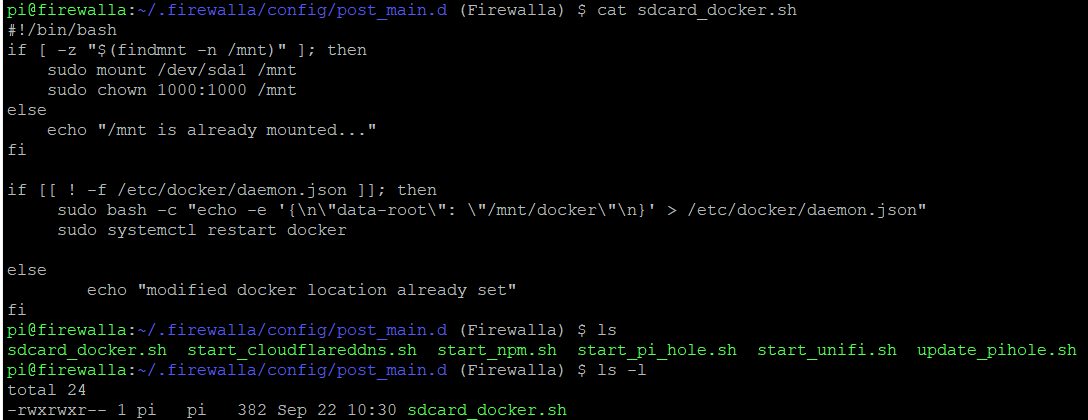
From your recommendation of modifying the script, isn't this doing that already?pi@firewalla:~/.firewalla/config/post_main.d (Firewalla) $ cat sdcard_docker.sh
#!/bin/bash
if [ -z "$(findmnt -n /mnt)" ] ; then
sudo mount /dev/sda1 /mnt
sudo chown 1000:1000 /mnt
else
echo "/mnt is already mounted..."
fiif [[ ! -f /etc/docker/daemon.json ]] ; then
sudo bash -c "echo -e '{\n\"data-root\": \"/mnt/docker\"\n}' > /etc/docker/daemon.json"
sudo systemctl restart docker
else
echo "modified docker location already set"
fi -

I have a disaster on my hands.
I recently successfully moved Docker to another drive in my Firewalla Gold. I had created the necessary daemon.json file to redirect data-root, but unfortunately I hadn't created a script such as yours David to update the path on boot, and my FWG rebooted.
This meant the daemon.json was removed and Docker switched back to the default /var/lib/docker. I figured I would just re-point it and restart docker, but when I checked, the volumes created on my other drive had disappeared, despite being marked as external volumes.
I am now panicking and wondering where the data went, why it was removed in the first place and whether I can retrieve it!
This was the scenario:
- Docker was moved from /var/lib/docker to /sata-drive/docker and running fine there
- The directory /sata-drive/docker/homeassistant_data existed and contained my HA config
- This is my HA docker-compose.yaml:
version: '3'
services:
homeassistant:
container_name: homeassistant
image: "homeassistant/home-assistant:latest"
environment:
- TZ=Europe/London
volumes:
- homeassistant_data:/config
- /etc/localtime:/etc/localtime:ro
restart: unless-stopped
network_mode: host
volumes:
homeassistant_data:
external: true4. Firewalla rebooted, daemon.json removed
5. Docker is now trying to run from /var/lib/docker again
6. /sata-drive/docker/volumes/homeassistant_data no longer exists at all
I can understand the daemon.json being removed and Docker not being able to run the HA container properly because it's looking for the data in the wrong place, but why on earth would my external volume be removed?
-
@Adam,
I had a similar situation where I started seeing weird sizes of my external volumes. It turns out the script hadn't run for some reason, and docker-root was still pointing at /var/lib/docker.
Set up your daemon.json and restart docker (sudo systemctl restart docker). That made my external volumes start looking right again.
-
@David
Thanks... I figured out what was going on! The Docker data-root was a red herring.I had mounted the drive by adding an fstab entry, which of course was cleared on reboot. So the data was still there but simply needed remounting.
I'm annoyed for being silly enough to not think of that but overjoyed that the data is still there!
Thanks for helping! -
Revisiting this as i can't seem to keep this pointed to the right volume after a reboot. Keeps defaulting.
pi@firewalla:~/.firewalla/config/post_main.d (Firewalla) $ df -h
Filesystem Size Used Avail Use% Mounted on
udev 3.9G 0 3.9G 0% /dev
tmpfs 790M 91M 700M 12% /run
/dev/mmcblk0p3 3.4G 2.8G 492M 85% /media/root-ro
tmpfs-root 200M 34M 167M 17% /media/root-rw
overlayroot 200M 34M 167M 17% /
tmpfs 3.9G 36K 3.9G 1% /dev/shm
tmpfs 5.0M 0 5.0M 0% /run/lock
tmpfs 3.9G 0 3.9G 0% /sys/fs/cgroup
/dev/mmcblk0p2 477M 77M 371M 18% /boot
/dev/mmcblk0p8 3.9G 1.2G 2.6G 31% /data
/dev/mmcblk0p9 253M 242K 252M 1% /boot/efi
/dev/mmcblk0p7 976M 406M 504M 45% /log
/dev/mmcblk0p4 3.4G 17M 3.2G 1% /var/lib/docker
/dev/mmcblk0p5 2.0G 947M 887M 52% /media/home-ro
/dev/mmcblk0p6 2.0G 868M 966M 48% /media/home-rw
overlay 2.0G 868M 966M 48% /home
/dev/sda1 469G 4.3G 441G 1% /mnt <--------volume that should be used.
tmpfs 20M 596K 20M 3% /alog
tmpfs 790M 0 790M 0% /run/user/1000
tmpfs 30M 704K 30M 3% /bspool
pi@firewalla:~/.firewalla/config/post_main.d (Firewalla) $ cat sdcard_docker.sh
#!/bin/bash
if [ -z "$(findmnt -n /mnt)" ] ; then
sudo mount /dev/sda1 /mnt
sudo chown 1000:1000 /mnt
else
echo "/mnt is already mounted..."
fiif [[ ! -f /etc/docker/daemon.json ]] ; then
sudo bash -c "echo -e '{\n\"data-root\": \"/mnt/docker\"\n}' > /etc/docker/daemon.json"
sudo systemctl restart docker
else
echo "modified docker location already set"
fi
pi@firewalla:~/.firewalla/config/post_main.d (Firewalla) $ ls -l
total 24
-rwxrwxr-- 1 pi pi 384 Nov 21 2022 sdcard_docker.sh
pi@firewalla:~/.firewalla/config/post_main.d (Firewalla) $ sudo docker info
Client:
Debug Mode: falseServer:
Containers: 1
Running: 1
Paused: 0
Stopped: 0
Images: 4
Server Version: 19.03.6
Storage Driver: overlay2
Backing Filesystem: extfs
Supports d_type: true
Native Overlay Diff: true
Logging Driver: json-file
Cgroup Driver: cgroupfs
Plugins:
Volume: local
Network: bridge host ipvlan macvlan null overlay
Log: awslogs fluentd gcplogs gelf journald json-file local logentries splunk syslog
Swarm: inactive
Runtimes: runc
Default Runtime: runc
Init Binary: docker-init
containerd version: b34a5c8af56e510852c35414db4c1f4fa6172339
runc version: 3e425f80a8c931f88e6d94a8c831b9d5aa481657
init version: fec3683
Security Options:
apparmor
seccomp
Profile: default
Kernel Version: 4.15.0-70-generic
Operating System: Ubuntu 18.04.3 LTS
OSType: linux
Architecture: x86_64
CPUs: 4
Total Memory: 7.709GiB
Name: firewalla
ID: CGLX:UPLU:GQDX:TQCD:5OZI:A65N:YCHY:QXC5:P2WX:W5AJ:AU3G:FB26
Docker Root Dir: /mnt/docker
Debug Mode: false
Registry: https://index.docker.io/v1/
Labels:
Experimental: false
Insecure Registries:
127.0.0.0/8
Live Restore Enabled: falseWARNING: No swap limit support
-

I think there were a couple of small problems with the snippet provided above. Try this:
if [[ ! -f /etc/docker/daemon.json ]]; then
     sudo bash -c "echo -e '{\n\"data-root\": \"/mnt/docker\"\n}' > /etc/docker/daemon.json" sudo systemctl restart docker else echo "modified docker location already set"
fi -
Thanks Michael,
Are you saying to replace the entire script with just what you suggested or that portion needed fixes?
I looked over it but didn't see any differences between what i had and your suggestion unless I'm loosing my eye sight.Update: NVM, i'm blind. I see i had an extra space. Trying the updated script.
-
Sadly, no change after reboot.
/var/lib/docker was at 1% prior to reboot and now is at 3%.
pi@firewalla:~ (Firewalla) $ df -h
Filesystem Size Used Avail Use% Mounted on
udev 3.9G 0 3.9G 0% /dev
tmpfs 790M 42M 748M 6% /run
/dev/mmcblk0p3 3.4G 2.8G 492M 85% /media/root-ro
tmpfs-root 200M 67M 134M 34% /media/root-rw
overlayroot 200M 67M 134M 34% /
tmpfs 3.9G 36K 3.9G 1% /dev/shm
tmpfs 5.0M 0 5.0M 0% /run/lock
tmpfs 3.9G 0 3.9G 0% /sys/fs/cgroup
/dev/mmcblk0p8 3.9G 1.2G 2.5G 33% /data
/dev/mmcblk0p2 477M 77M 371M 18% /boot
/dev/mmcblk0p9 253M 242K 252M 1% /boot/efi
/dev/mmcblk0p7 976M 400M 509M 44% /log
/dev/mmcblk0p4 3.4G 69M 3.2G 3% /var/lib/docker
/dev/mmcblk0p5 2.0G 947M 887M 52% /media/home-ro
/dev/mmcblk0p6 2.0G 868M 966M 48% /media/home-rw
overlay 2.0G 868M 966M 48% /home
tmpfs 30M 296K 30M 1% /bspool
/dev/sda1 469G 4.3G 441G 1% /mnt
tmpfs 790M 0 790M 0% /run/user/1000
pi@firewalla:~ (Firewalla) $ -
That's what findmnt should do
See https://help.firewalla.com/hc/en-us/articles/360053441074-Guide-How-to-run-UniFi-Controller-on-the-Firewalla-Gold-Series-Boxes for a script on starting docker you shold be able to add a delay there.
-

this is what i did
# stop docker
systemctl stop docker

# unmount docker file system
umount /var/lib/docker

# if you have files in the docker directory, you want create a backup first before executing this rm command
rm -rf /var/lib/docker

# create soft link, point /var/lib/docker to the already mounted sd card
cd /var/lib
ln -s /mnt/docker/docker_root_dir ./docker

# create the director on the sd card
 mkdir -p /mnt/docker/docker_root_dir

# validation 1, link creation
ls -l /var/lib/docker
lrwxrwxrwx 1 root root 27 Mar  9 11:35 /var/lib/docker -> /mnt/docker/docker_root_dir

# start docker
systemctl start docker

# validation 2, docker should create new directories on the sd card
ls -l /mnt/docker/docker_root_dir/
total 44
drwx--x--x 4 root root 4096 Mar  9 11:39 buildkit
drwx--x--- 2 root root 4096 Mar  9 11:39 containers
drwx------ 3 root root 4096 Mar  9 11:39 image
drwxr-x--- 3 root root 4096 Mar  9 11:39 network
drwx--x--- 3 root root 4096 Mar  9 11:39 overlay2
drwx------ 4 root root 4096 Mar  9 11:39 plugins
drwx------ 2 root root 4096 Mar  9 11:39 runtimes
drwx------ 2 root root 4096 Mar  9 11:39 swarm
drwx------ 2 root root 4096 Mar  9 11:39 tmp
drwx------ 2 root root 4096 Mar  9 11:39 trust
drwx-----x 2 root root 4096 Mar  9 11:39 volumes
i think /var/lib/docker is going to get remounted when firewalla reboots. . now i just need to figure out how to stop that



Please sign in to leave a comment.
Comments
51 comments