Configuration Vlans on TP-Link TL-SG108PE managed switch

Hello


-

Did you try creating and assigning VLAN20,30,40 as Tagged on Port 5 of the switch? Also you have to create Networks in FW for each of the VLANs.
If you already have an Omada Controller(In your diagram) Consider getting an omada capable switch like the SG2008p or SG2210P. In fact you may want to return the controller and run the docker controller on FWG.
-
Thanks Charles!
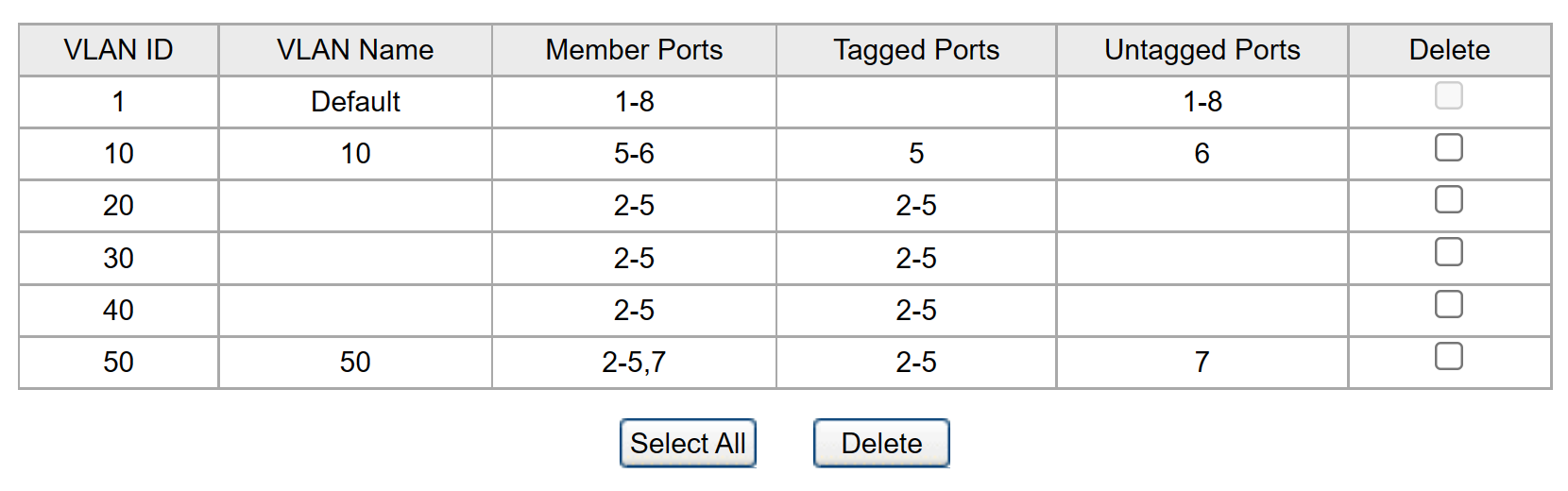
Following you suggestion I got it to work! I basically have to configure the ports and tag correctly which was a little confusing to me at first. But to get it to work I have to tag all Port 2, 3, 4 and 5 as tagged ports for Vlan 20,30,40 so that I can have all 3 access points to use different SSIDs for those Vlans.
Switch SG2210MP will arrive this Thursday so I will try that out with the OC200 controller. I like the controller since I was thinking that it could enable fast roaming features for all the 3 access points (TP link EAP245 V3) and easier to make changes to all 3 access points at once.
Below are the configurations on the TP link switch for those of you who have similar vlan setup as me.
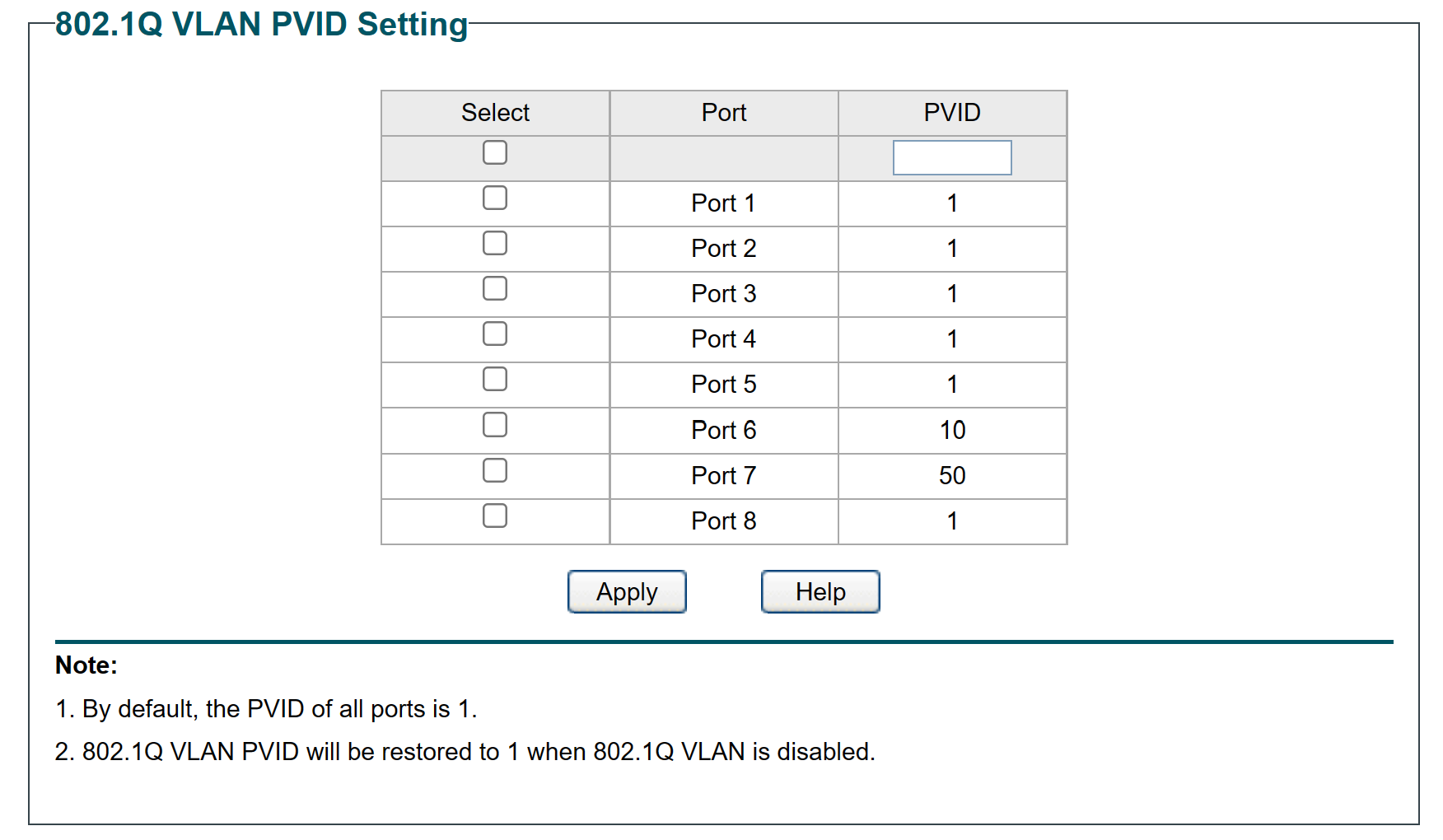
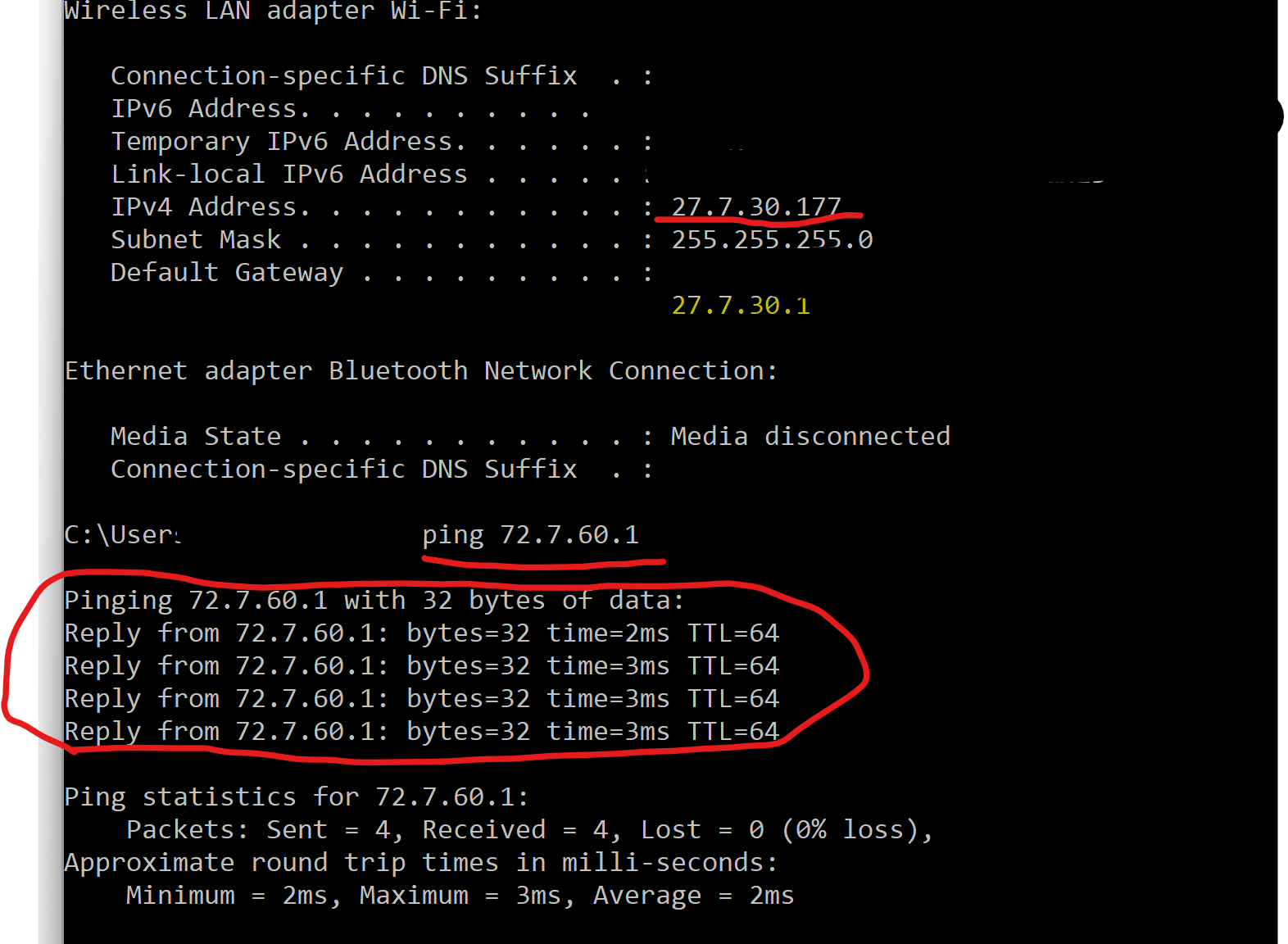
As a follow up question. I have isolated all the Vlans from each other using the rules in the Firewalla Gold to block all traffic from and to all local networks for each Vlan. Which works because I can't access other devices from different vlans. However I am a little confused why when use ping Vlan60 72.7.60.1 from source Vlan30 (from wifi network) 72.7.30.x it receives replies... I would expect it timing out since I have isolated the two Vlans using firewall rules from Firewalla Gold unit.
Any ideas?
Thanks again for the advice! -
I'm not sure about that, I tested it and it seemed to work for me(pings blocked from my iot VLAN to other VLANs). But sometimes when I test, I forget I have a wired and wireless connection on my laptop and the ping might go through one network(wired for example) when I'm on the iot VLAN via wireless.
Also, about the controller. I agree, it's much easier to use the controller software to set up all the networks/VLANs/Profiles and do firmware updates. I just meant that you don't need to run a dedicated Hardware OC-200. I'm running the Omada docker directly on my Firewall Purple which is also always on and should support Fast Roaming and AI Roaming.
After a little testing, I do see a security hole. I can ping and access the gateway from the iot VLAN so that means I can access the omada controller since it's running off of the gateway. I guess you can't really block devices from gateway or nothing will function. I'll have to look into running the docker in something other than host mode.
-

You are Pinging the Firewalla which is set up to allow ping requests, You would have to turn that off under Box Settings (Gear icon on Home Screen) -> Advanced -> Configurations -> Block ICMP (Ping) -> turn off VLAN xx that way it doesn't respond.
Edit: For me, if I have the Block Turned off on the network my laptop is connected to, it allows the ping request to go through to my other network, if I block the network I'm on, then it does not allow it. So if you are on the IoT network and the block is turned on, then the request will fail.
-

If you want this sort of vlan segmentation and multi SSID to vlan mapping, all while allowing wired and wireless client on the same vlan to communicate, would you strictly require a Omada SDN capable switch? I just bought a tplink TL-SG1016DE switch, it is managed and vlan capable but does not have SDN integration. Will I be ok with this switch, a firewalla purple, and EAP225 or EAP245 (or better) access points? I guess i mean to ask what do I lose/gain with or without a SDN capable switch in the mix?
-
Ok there was another switch that was SDN capable that I was looking into but it was $77 more. I was hoping I would still be able to configure the APs and still get the mesh (fast roaming) functionality with out a SDN switch. didn't know if the switch connecting the APs had to be SDN for those feature to work. The SDN switch I was looking at was a L2+ managed switch and was much more complicated and had more features than i ever thought I would use. I just didn't want to lose functionality in the AP by no having it if that was the case.
Hard to know what will/won't work without buying into the whole omada sdn ecosystem
for reference I was between the
TP-Link TL-SG2218 (SDN integrated, more expensive)
and
TL-SG1016DE (basic easy smart managed switch)
-

I know this is 3 years old now but I just wanted to show some appreciation as this discussion perfectly solved a problem I was having last night.
Right now I'm running a Firewalla Purple into a TL-SG108PE, distributing wifi via Eero6+ meshed APs. Everything is scattered around a single flat /22 subnet. I intend to upgrade everything behind the Purple to a 2.5Gbps wired network using KeepLiNK switches and Omada controlled EAP650 APs, then subnetting my various networked things off into more appropriate smaller dedicated VLANs with multiple SSID's for our stuff, IoT, guests, etc.
I tried some tinkering without any success at first, but this initially appeared quite difficult thanks to the FW Purple only having one LAN port. Here I was thinking I'd have to disconnect the entire existing network, delete the old LAN config from the Purple and only then run VLANs into the LAN port. But I then discovered I could retain the existing /22 LAN config and point all the new VLANs through the same LAN port on the Purple, so I thought I'd stick my head into the TP-Link's management page and see what I'd need to do to make that uplink a trunk port instead of access and potentially spin up the new AP's over the old switch - but that's where I was stumbling. My clients weren't getting DHCP from the Purple. This post explained the problem with the dot1Q tagging and got me working straight away.
Oh and it turns out that the TL-SG108PE's webgui is almost identical to these KeepLiNK things, so it will be super simple to transfer this config to the new equipment now too!
Please sign in to leave a comment.
Comments
10 comments