block rules on All devices level Do not Work for IP addresses only domains

Here’s one more Quite simple issue that I’ve not been able to get Support to understand. Anything other than this being a bug in the endless correspondence fortunately. Anyway the problem is quite simple, all device rules are policy rules that are supposed to override any rules that apply to net work in group, as these are supposedly higher security level rules even though in the hierarchy of group is not necessarily above net work. If there is an allowed rule In group or in network level, and then network with override group and allow would over ride block, But at the same time though all device group lists such as Domains in active protect rules, That I blocked, with override any allowed in the networking group as a policy matter just as blocking Apple really would be more important than allowing a group to enable any Rule that overrates it.
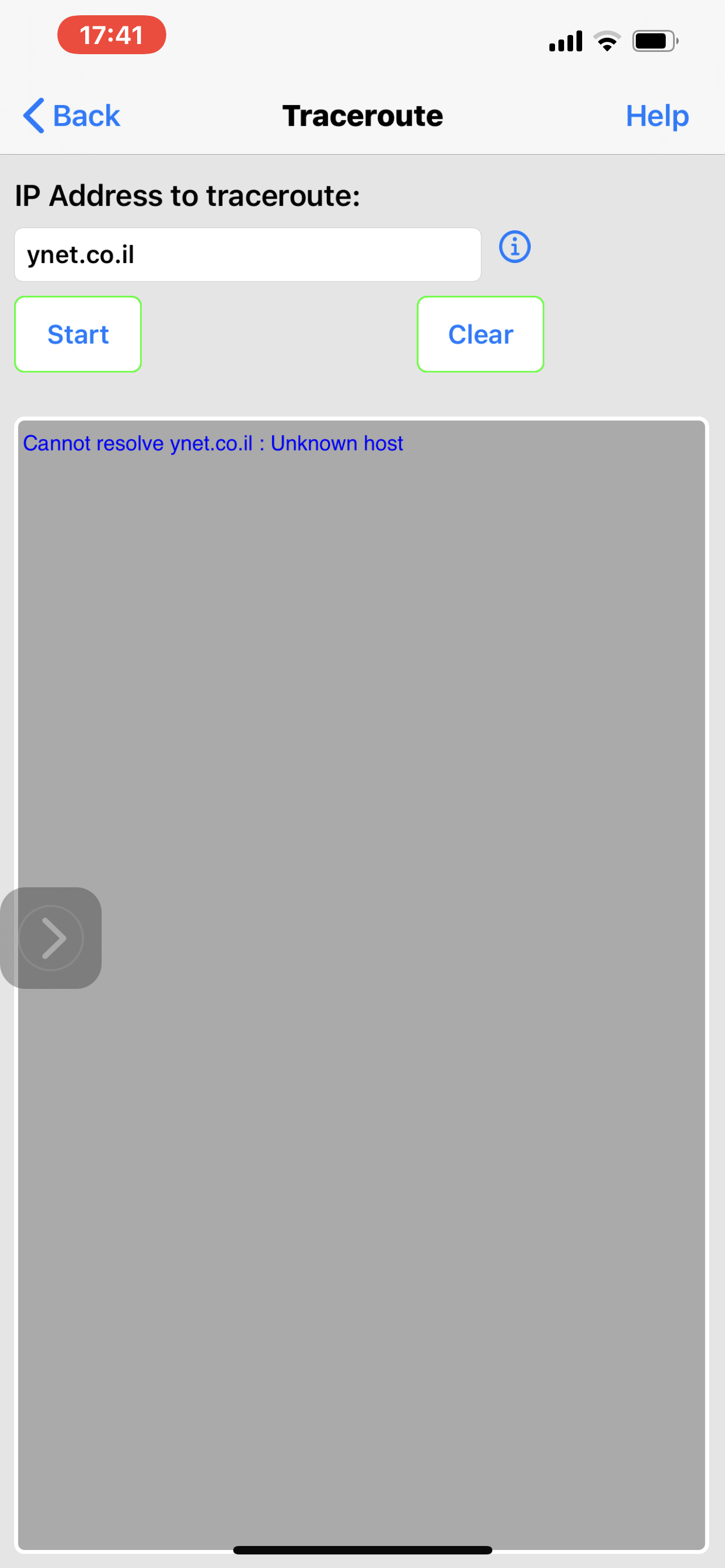
However the way this is implemented apparently is by not resolving the DNS domain Querrey for the blocked target. This means that there in is no DNS resolution, there is no Block. That is there is a block until there is an allow which overratedes it. It seems to me like someone cut corners and instead of creating heuristics that apply across-the-board and we’re all devices override the principle of specificity with the principle of overall policy, and coming up with a result that does not override anything that is non-resolution assuming there would be no cases where it wouldn’t work.
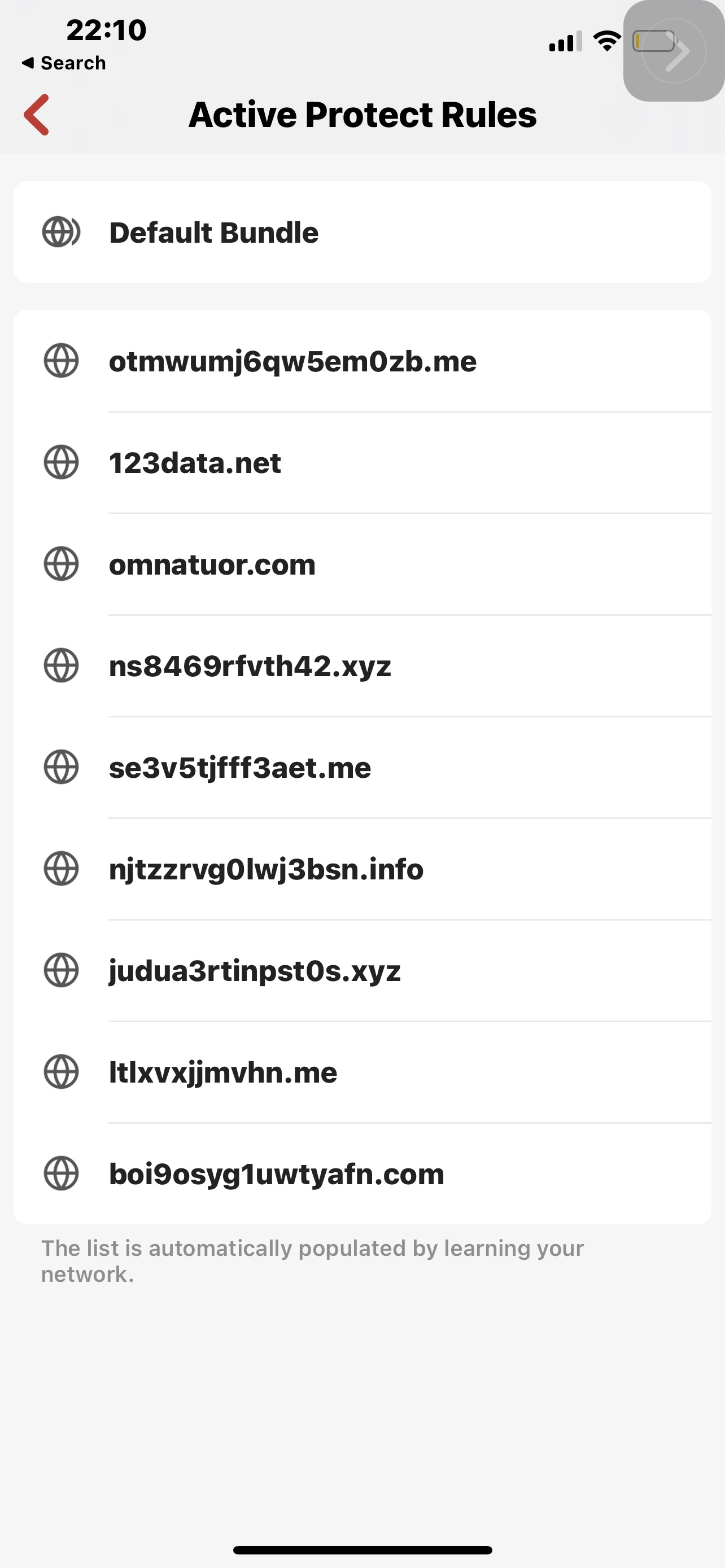
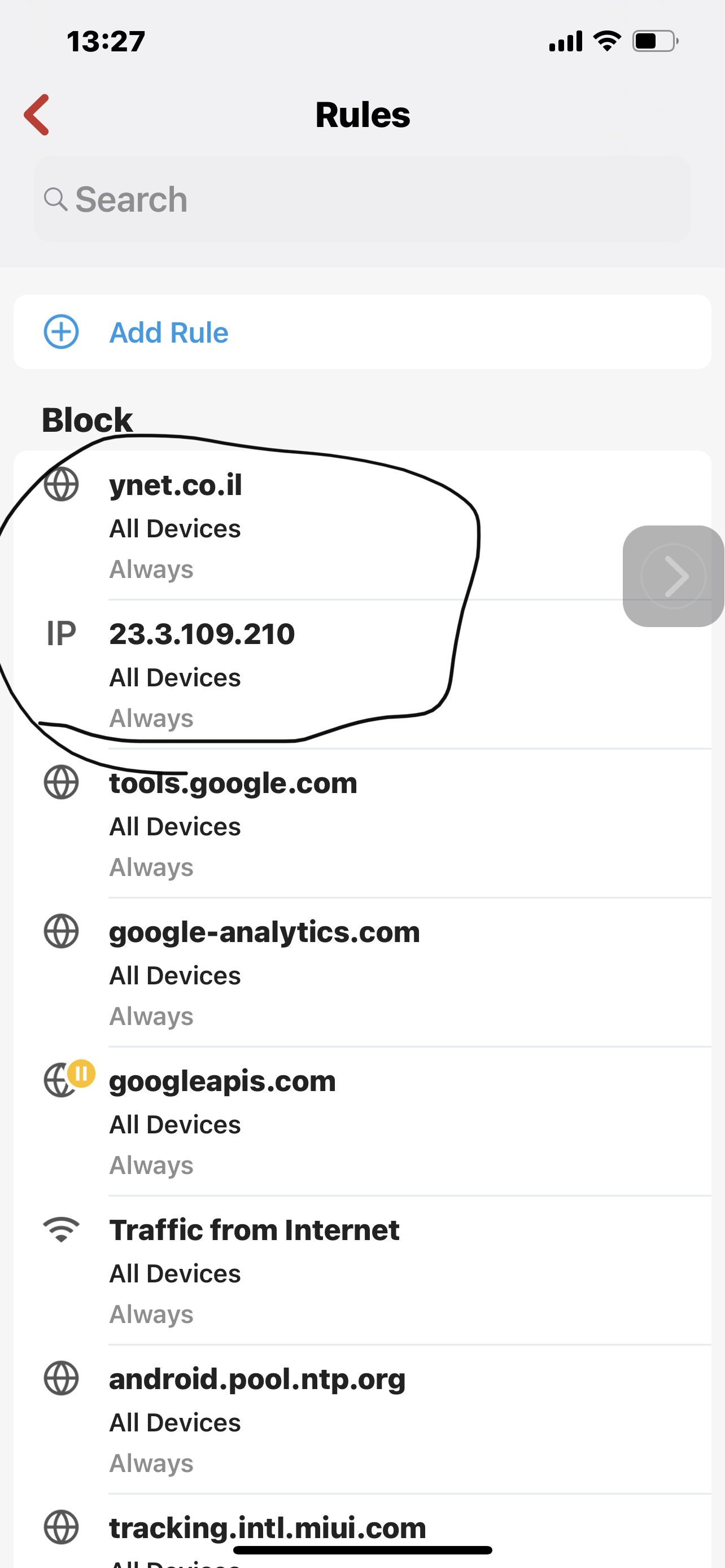
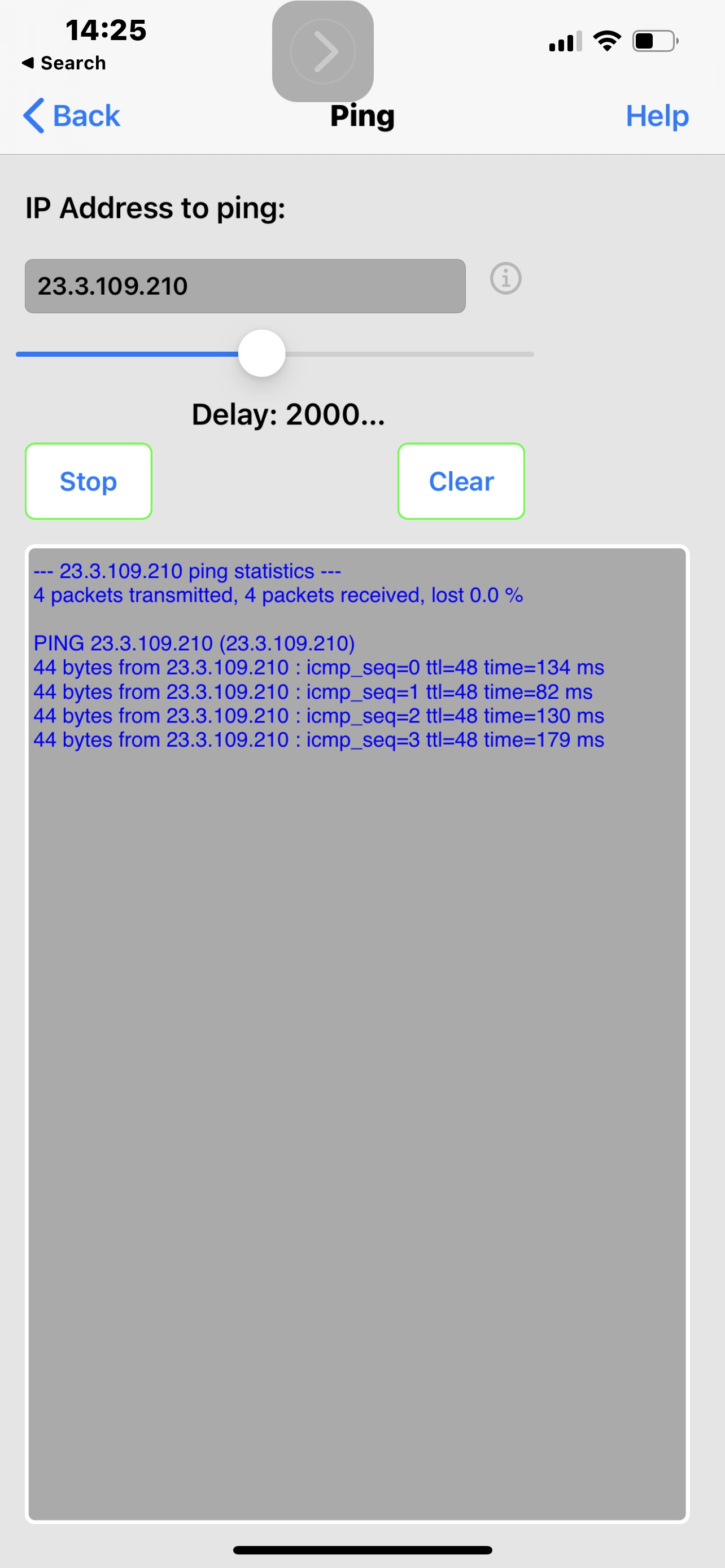
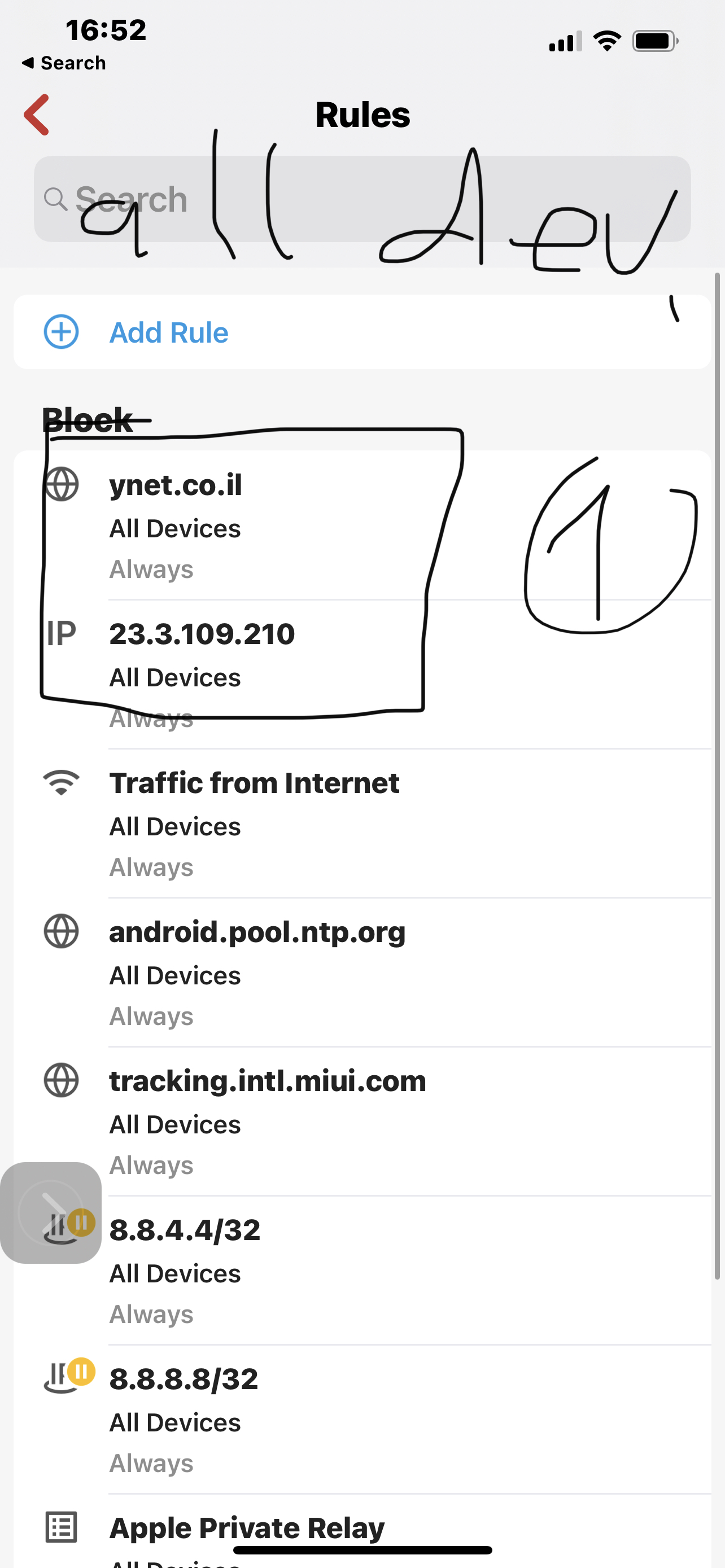
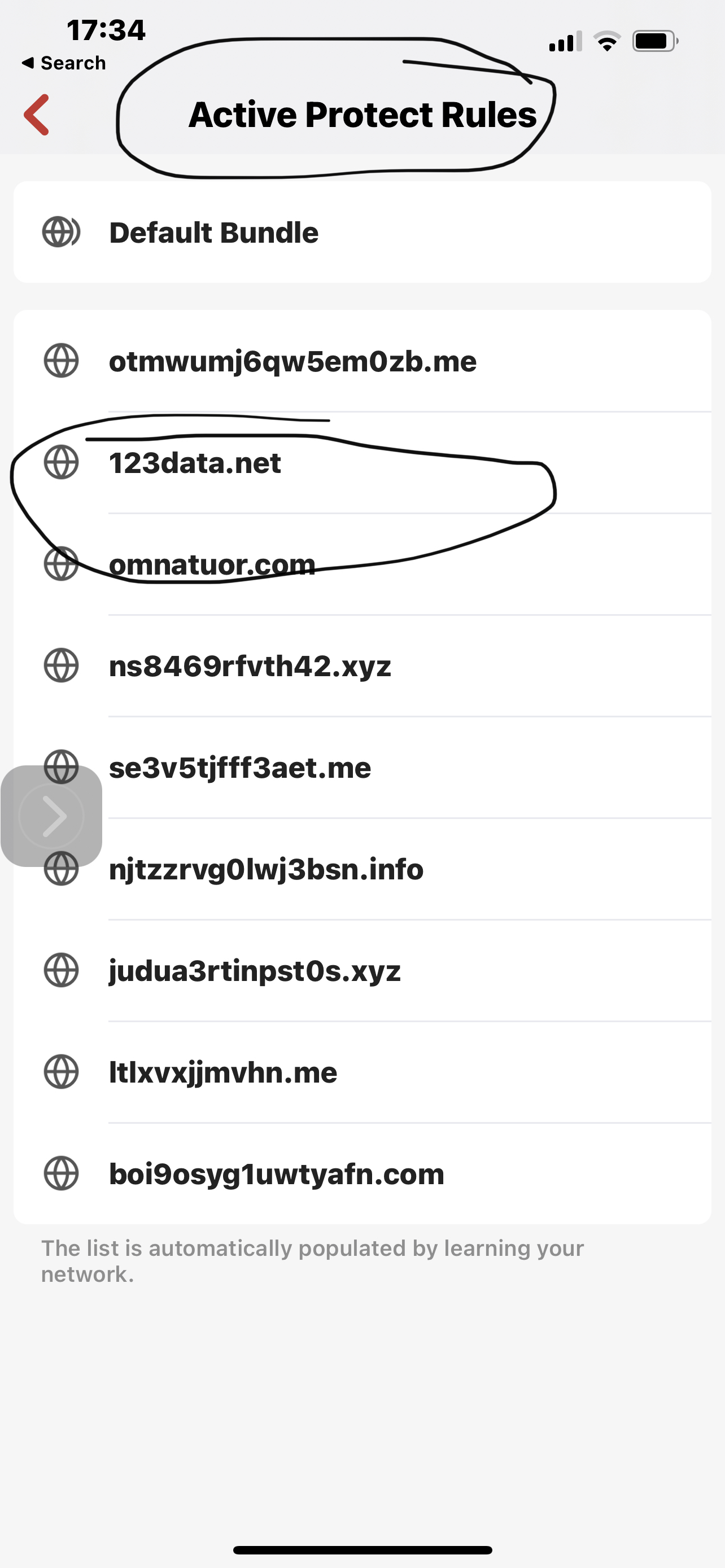
No this is the assumption of a non-technical person looking at the attached screenshots of tracing The route to a blocked domain for example ynet.co.il, Even when there is a rule to allow traffic to the Internet on the net work level, I believe in this case vlan3. Results show that there is no DNS resolution Which is the same as the example Taken from active protective rules. However when I use the IP that saying website After it’s been resolved, and block that, and the allow rule renders this block meaningless.
To me this is quite straightforward and I am hardly technical however perhaps over 10 emails and the response that I get from Support is at the bug is actually went firewall or does not resolve ynet.co.il As a Laura should just disregard the block. This before true would render the whole lists For blocking useless. In my case I was driving to block specific DNS server on all devices level But I had to do it on individual groups and remember to keep it always there when I need it, because there is no way to do it Or acknowledge it’s an issue. Also if there was something like aliases perhaps that would block the resolution and would save some kind of quarters efforts, And do forgive me if I am misinterpreting what I’m seeing in the responses that I’m getting When I find anything wrong at least from whoever is talking to me and never uses a name I can respond to. I’m not exactly sure how to go about this perhaps someone has an idea or enlighten me how stupid I am mistaken this for a problem
In the attached screenshots walla.co.il Just an example of Unblocked domain



-

Hi Yoav,
There is a great deal of flexibility in the current Rules that Firewalla lets you build.
Sometimes hard to see a flaw when you are working on a problem for a while.
My suggestion is to step back and restate the problem from an objective perspective as in, tell us your objective, and I'm sure that someone here or from Firewalla can suggest a solution for you.
Perhaps you could layout as simply as possible, what you need to do and see if someone can help? Don't mention how you went about it so far or what didn't work. Just focus on what you want to accomplish (not how). For example:
I have a device Group on a network (ABC) and I want to block it from accessing X and I want to allow everything else.
Or
I want to block everything except Y for a group of devices...
By the way, the rules you provided in screenshots show a BLOCK traffic from internet. Do you also have that on All Devices as you should? Make sure you don't have duplicate rules, as that will cause issues.
-
Well unfortunately it feels to me as if the party that should take a step back is not so much me. I stayed at a very simple and obvious problem and I’ve had a really hard time getting it through because of the assumption that everything is Working flawlessly. I describe the issue above, However I missed a couple of screenshots.
Key takeaway: block rules for all devices must Override All of our rules on all levels other rules, not as some exception that does not always apply but as a matter of principle. The correct hierarchy should be in my opinion the opposite in block rather than allow,But without getting to philosophical he definitely should apply to all devices
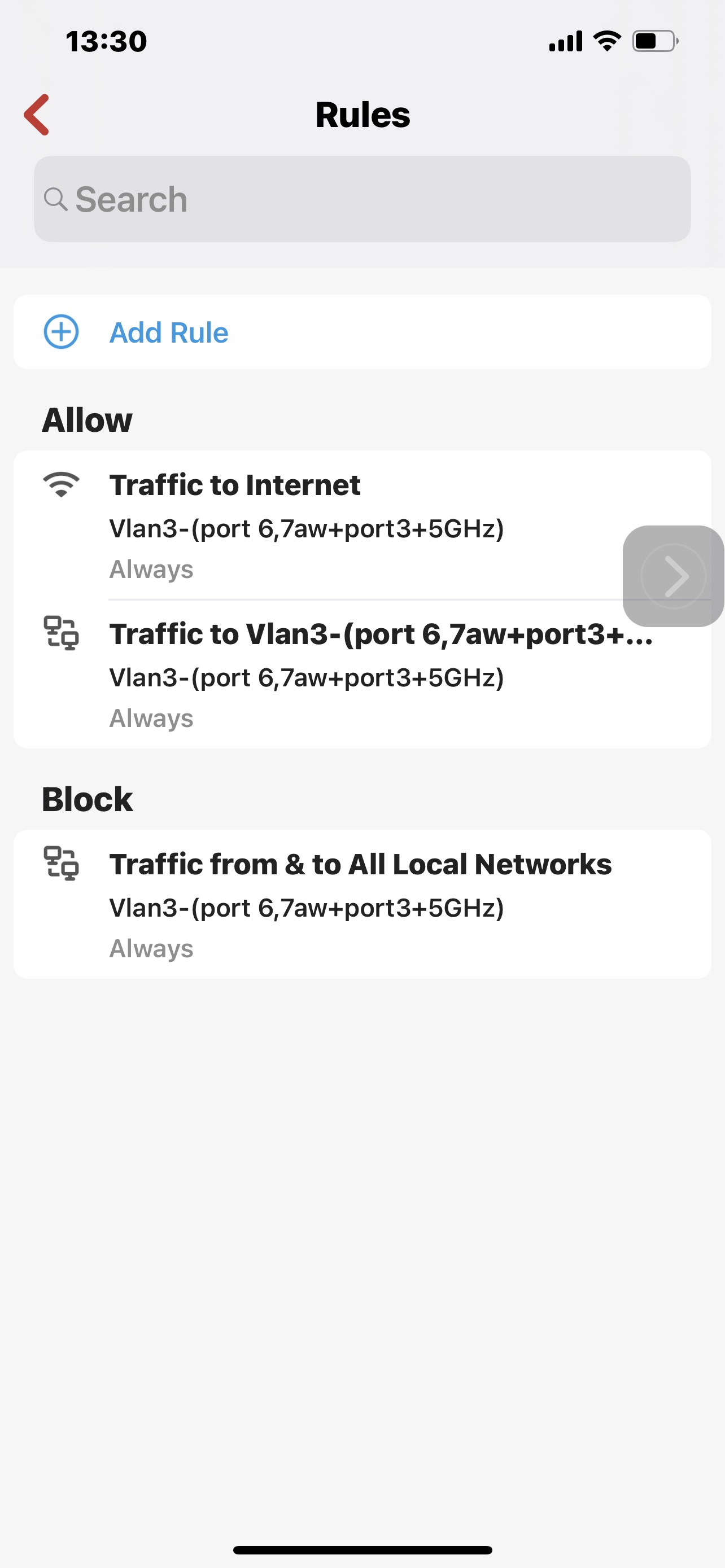
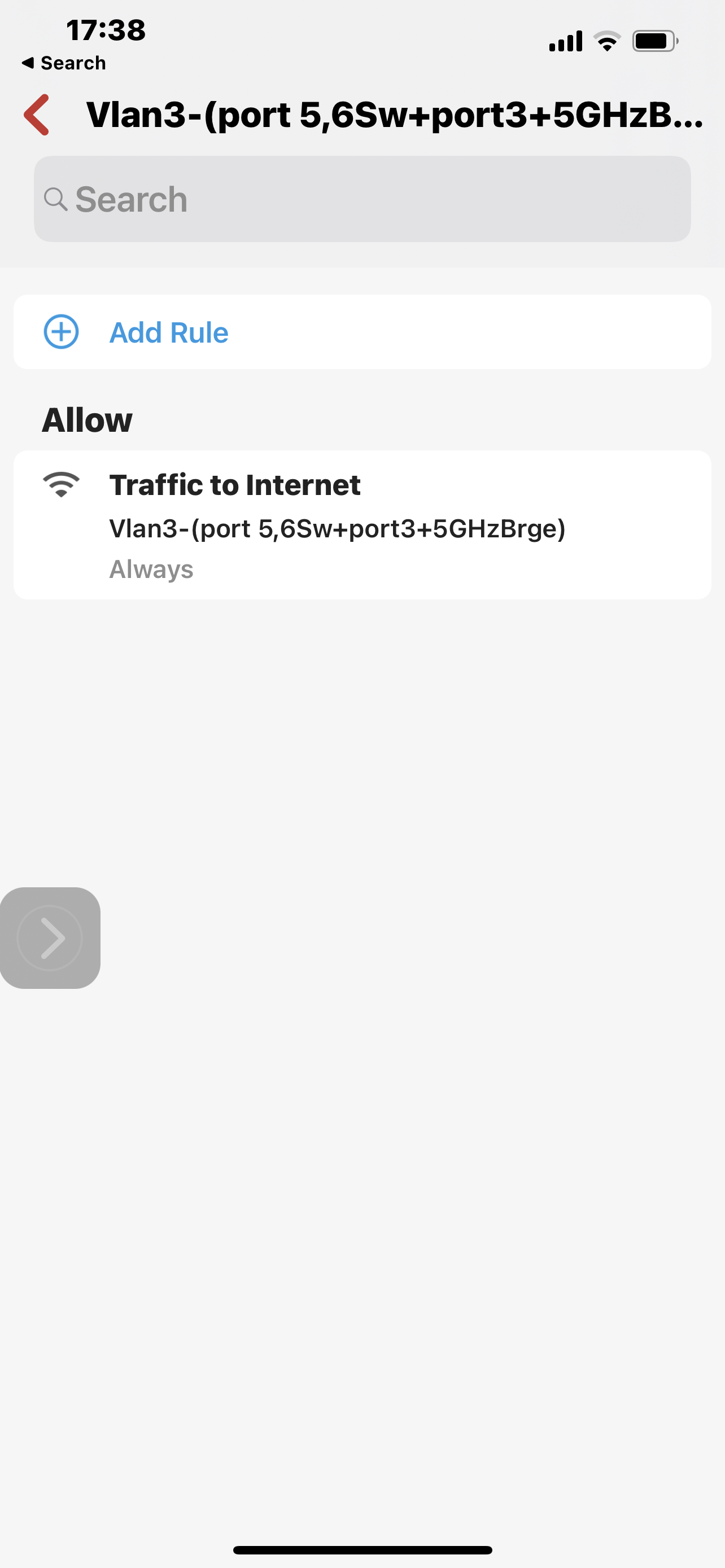
And I will elaborate. the way firewalla rules are configured, And the as they were articulated to me by your support, allow group>block group>allow network>block network>Allow all devices>block all devices. This logic is both flawed and does not Actually get Applied correctly. One of the screenshots that for some reason did not upload, is an allow rule for Netwerk VLAN 3 for traffic to the Internet. This may not be necessary at this case but it could be a combination of block outgoing traffic to Internet and allow certain country. In any case there could be an allow somewhere between all devices and individual devices. According to your support, this with me that this allow rule would override any block rule set for all devices. That completely conflicts with the idea of Setting policy that is universal, such as active protect rules, blocking Apple relay call and block lists. Example above blocking ynet.co.IL according to Support with a low in the network level, is a bug And should not be blocked. On the other hand ip That I blocked which represents the address for this domain, does not get locked because the AllowRule for Net work Overrides the block rule for all devices. However it is completely the other way around, otherwise there would be no point in all the lists I stated above. However why does damin gets blocked on All device level and an address representing it does not, based on the allow rule in the supposedly higher hierarchy, that is simply a result of a Wrong design of the hierarchy of rules and creating an exception that seems like cutting corners to me. What I mean to say is that the way the system works is that a fact all device block rules are the very last and they should be the very first. However since somebody realized there should be a way to create a policy that is universal or higher security level or whatever you call it, He or she performed a little trick in order to enable this irregularity to take place instead of creating it as a uniform policy. This is done by simply not resolving domains whether they are my blocked domains or your lists or any other. The moment express this exact Domain in terms of IP address, the problem arises as it is impossible to create a block for all devices if you’re not using domain. You are welcome to look at my personal correspondence with Support and see repeatedly I beinf told That actually when I have an allowed roll on the group or network level, there should not be a block for domains configured on all devices As it supposedly lower priority. You don’t even need examples to understand this is completely wrong, but I do have some for example I wanted to block 8.8.8.8 and 8.8.4.4 for all devices and I simply was not able to because of some allow rules for networks and devices. So unfortunately I had to repeat again and again this role for every group that it was necessary for, and always make sure there is no allow rule on the group level that would supersede it with it happen. It’s very unfortunate that I have to obtain this kind of simple universal block in a very haphazard way just because somebody haphazardly decided that only domains will be blocked on all devices, not because they should be limited to domain bad because I’m not resolving domains was the tool. Therefore the implementation of all block lists is an exception to the principle that all device block is defeated by any allow on a level, instead of being an absolute principal. Unfortunately it took endless numbers of emails and I’m still stuck there were there are more critical issues of security that I located. And again I’m far from being engineer but I do apply some logic. So below you can see the full set of screenshots that are repeated in mind I’ll cases where the allow for vlan3 to the Internet creat an impossibility of being able to block by ip For all devices, And I explain the issue that, And how do means either ones that I put or on your list just don’t get resolved. It’s very simple block for all devices overcomes any other allow rule. Allow for all devices Does not. With my limited technical knowledge, very limited, an egress firewall Is configured from the perspective of traffic leaving. In this kind of environment is absolutely essential That block outgoing traffic Does not become a dogmatic following of the principle of More specific is stronger, but without knowing any of the theory I would imagine that the observation of networks and groups should be such that whatever is determined for them, is done so as a proxy over and all mighty administrator that should be able to safely and effectively block any outgoing traffic for everything, you obviously agree with that or else he would not Have any kind of block list for all devices, and this is a straighter to be able to use domains just the same as IP addresses. It’s different for allow , You said the minimum standard and all device level and then from there you can Decrease it. I think it’s very clear from the screenshots but if I still am not, I write it again. When you read about the security issue before experienced in VPN clients, I was even more surprised at the lack of willingness to listen. I am concerned that there is some overconfidence.
By the way as I can imply above, And I can I am not in network engineer, but I think that if you really want to follow logic then if policy to block all devices is hierarchically above any allow, then It is perhaps worthwhile thinking of how this rolls down further.
Without any academic knowledge on the subject if I think about the idea of a good egress and the point of outgoing traffic then I am not sure if he’s consistent to have hierarchy that is not opposite with allow and block Hierarchically. From the little life read, A higher security domain is by default allowed out to lower security domain, such as lan to wan. So allow rules I don’t need to be aded between lower to higher security domain. However block rules are the opposite you actually need to aggregate them, so for example on all device level you can block all incoming traffic from the Internet. If you could override that on the net work in group level, you could very easily mess big security issues. It took me a long time to figure out that I was getting messed up because 8.8.8.8 For example on all devices was doing nothing. Making sure that it works is a headache. I don’t see why the black policy would not be completely opposite. Putting on the side it is opposite on all device level but implementing wrong
see How with allow on the vlan3 Makes it impossible to block same address representing the domain that doesn’t really get blocked it just does not resolve. I wonder how the person that made this exception, did nothing perhaps there is a logical issue here. I’m not an engineer but I am a product person without technical background in a different area in tech and beyond anything, I think this device which is supposedly handled by consumers, should be extra safe and secure not vice versa. It’s very easy to get rid of all the blocks at the group level and it makes no sense at all. Again that is a more fundamental discussion but I think this is kind of it’s of tip the iceberg.And hopefully at some point my VPN concerns will be addressed because well that is another thead
So below The first and third screen are blocks for all devices domain and address set by me and domain set by firewalla. Second screenshot is the allow rule That exposes the problem with all devices block.After that is very clear to see the implications. The more I think of it the more I realize that there is no logic even in fixing this issue and Allowing any allow rule To Completely nullify any block rule sets at a higher level. And of course taking this to the next step which I did not, egress higher security level group by default allowed out therefore you can say That the security level of the group means it will have higher preference for allow else and others in the hierarchy above it.
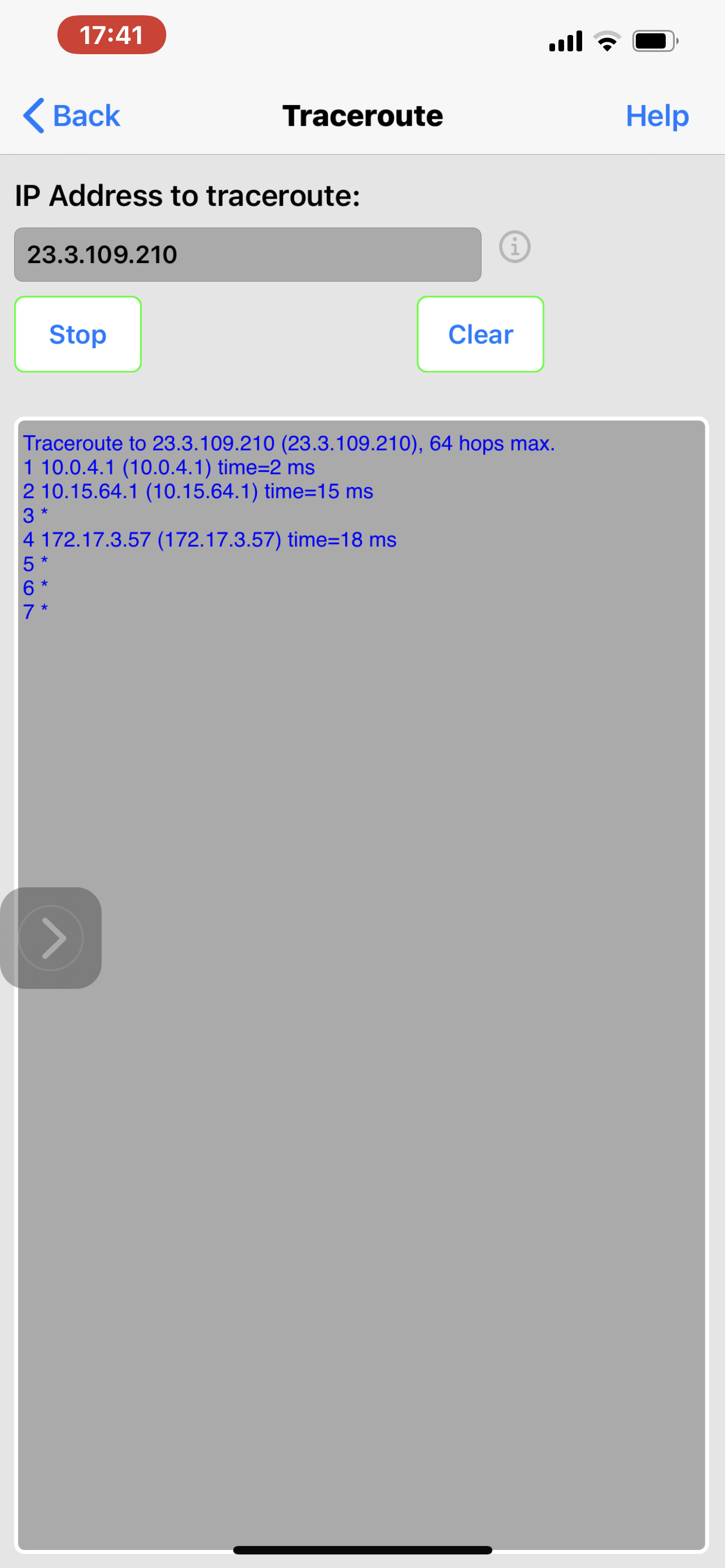
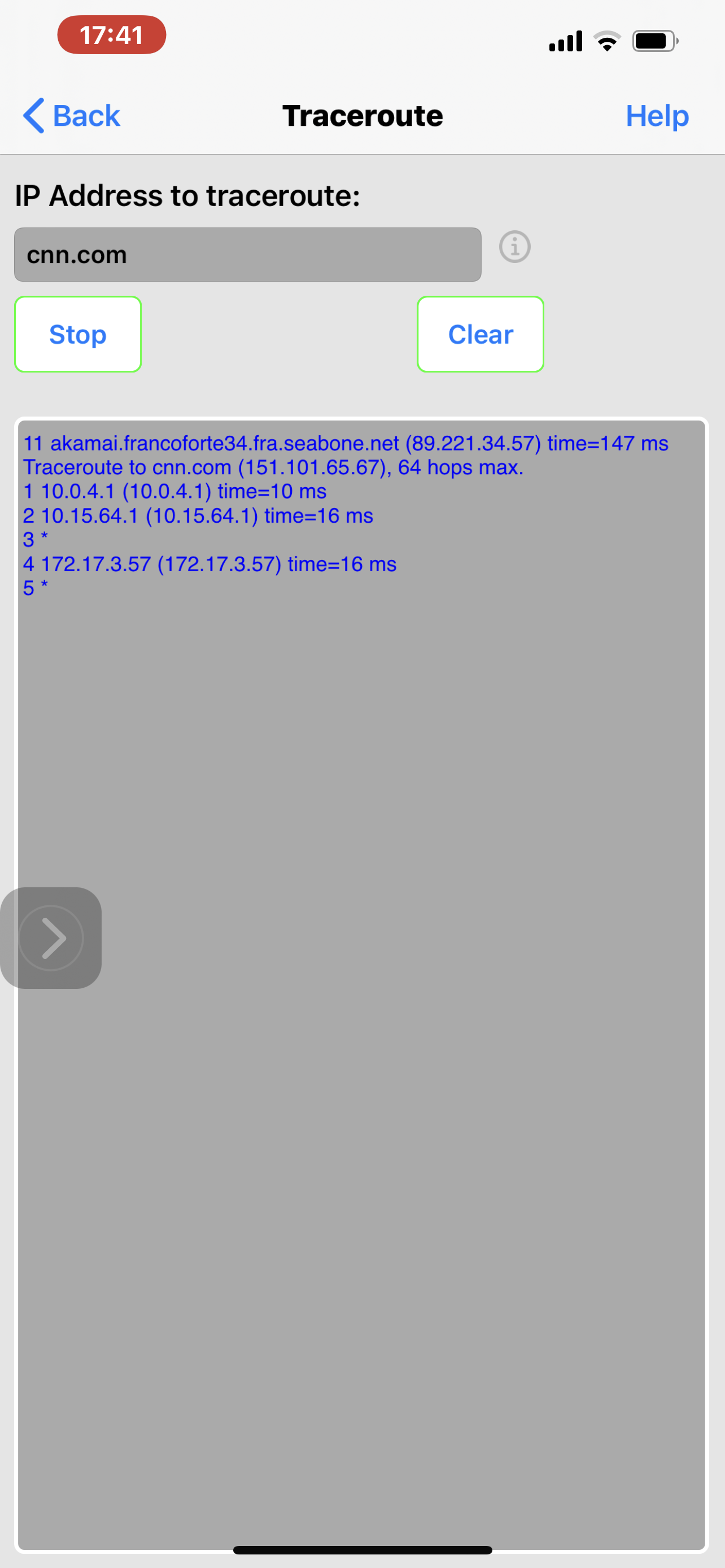
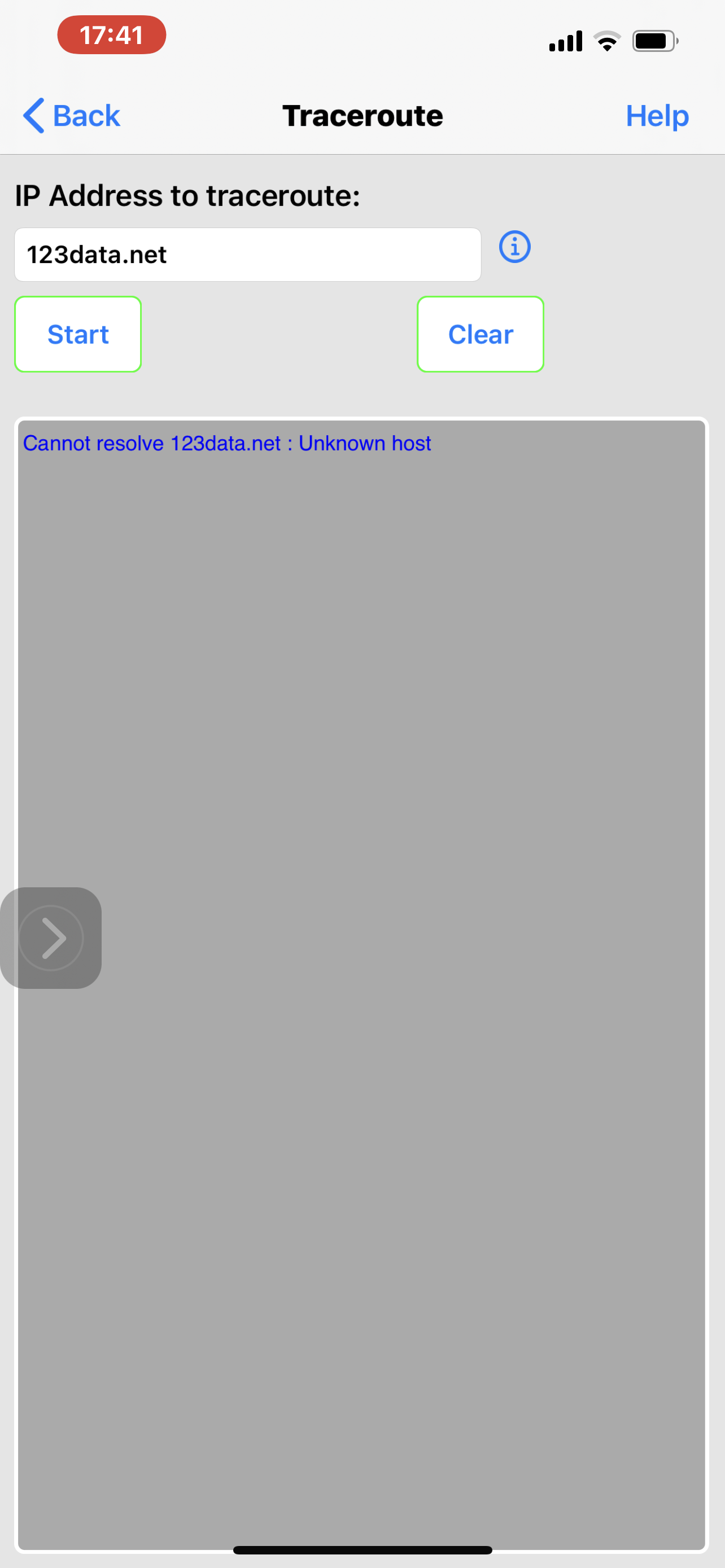
-
Bit more thinking on the issue and it’s obvious that the order of a law rules should be opposite of block. If allow is by definition are security domain or let’s code group overrides Netwerk overrides all devices, and simple logic demands that in order to make this effective the block should be a completely the other way around. And the examples that show that by blocking a Domain on all device levels you need to create an exception that will not resolve and when you put in an IP it doesn’t do anything it should’ve raise some lights. It’s very easy to miss the fact that I have blocked a certain IP for all devices yet nothing actually monitors if the rules are effective Then there will be a lot of blocks that will never be implemnted. Too much coolness way too little security and not enough thought into what it actually implied. Since most people use this is a toy they will never know but actually goes on which is kind of frustrating for me since I have been trying to Treated this is something serious this
-
- actually and I’ve had a lot of conversations about this both with users and with support, unfortunately nobody’s following through with the idea that this may be the wrong hierarchy and it is. If you really think about it through you will understand that creating allow rules that always supersede block in our in the same hierarchical structure than every small allow on every device will always have the potential of breaking any net work or all device level block. That is why you had to create exceptions for domains which doesn’t make any sense at all as I showed before. Personally I’m having serious issues because I’m trying to block certain IPDNS addresses for all devices sometimes I am able to sometimes I’m not it depends what I have in my rules above but it always boils down to having to block everything on the group level and having to do all the preparation so that there is not a single allow not at the group level because then the block could be ineffective for example I want to block Google DNS but I am allowing US . By allowing US locking Google the address in the US will not be in affect so allow US has to go to level up. That’s possible we need to fix group it’s not possible when it’s changing group and given that a lot of the blocks cannot happen on all devices for incoming. The bottom line is that there is zero value in seeing that block all devices is overridden by allow all groups. It’s already overridden by allow all devices why should be out also really over it in by the hierarchies that are on top of it. There is not a single use case a single one where if you reversed the order in a way that block all would override block Netwerk would override block groups and only allow put over a block in the opposite direction, not a single case that it would not solve huge issues and create one minor tiny issue at all. More than that would correspond with every exception that you have which is always going to be ports and domain and should be IP‘s and pretty much everything else that allows block all to override block everything else and if you just take that logic and say OK it’s just not just blocks and blocks then networks then groups and that is it I do hope someone realizes it at some point because one is additive the other is subtract it if you add and subtract in the same exact order then you are in fact I’m doing yourself in any possible way. By the way this has implications on multiple other problems that are developed when you create certain hierarchies it to not evolve that way I’m just going to send you a couple of screenshots one from that work another is from a group and the group is not a stationary one so it cannot create that block it’s simply is not does not have enough levels above it. I do hope someone realizes it’s very easy to draw a little picture and realize that I’m right
Look at how I waste my hierarchy to allow traffic to the US but not all the Internet and then in the computer group I have to bypass this and by doing that I am unable to use or get to the blocked all I want IOT is fixed, Alexa is under that it’s a fix one as well, and
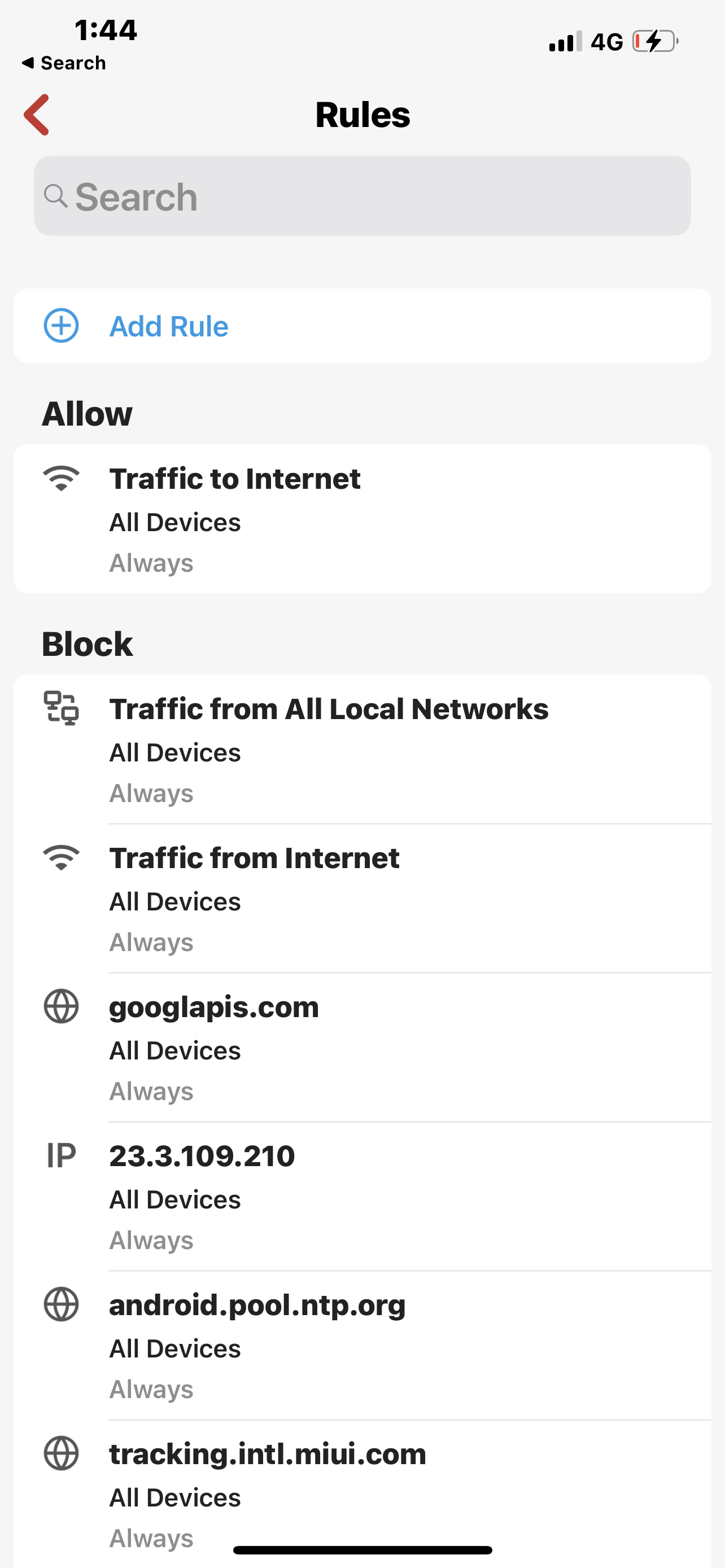
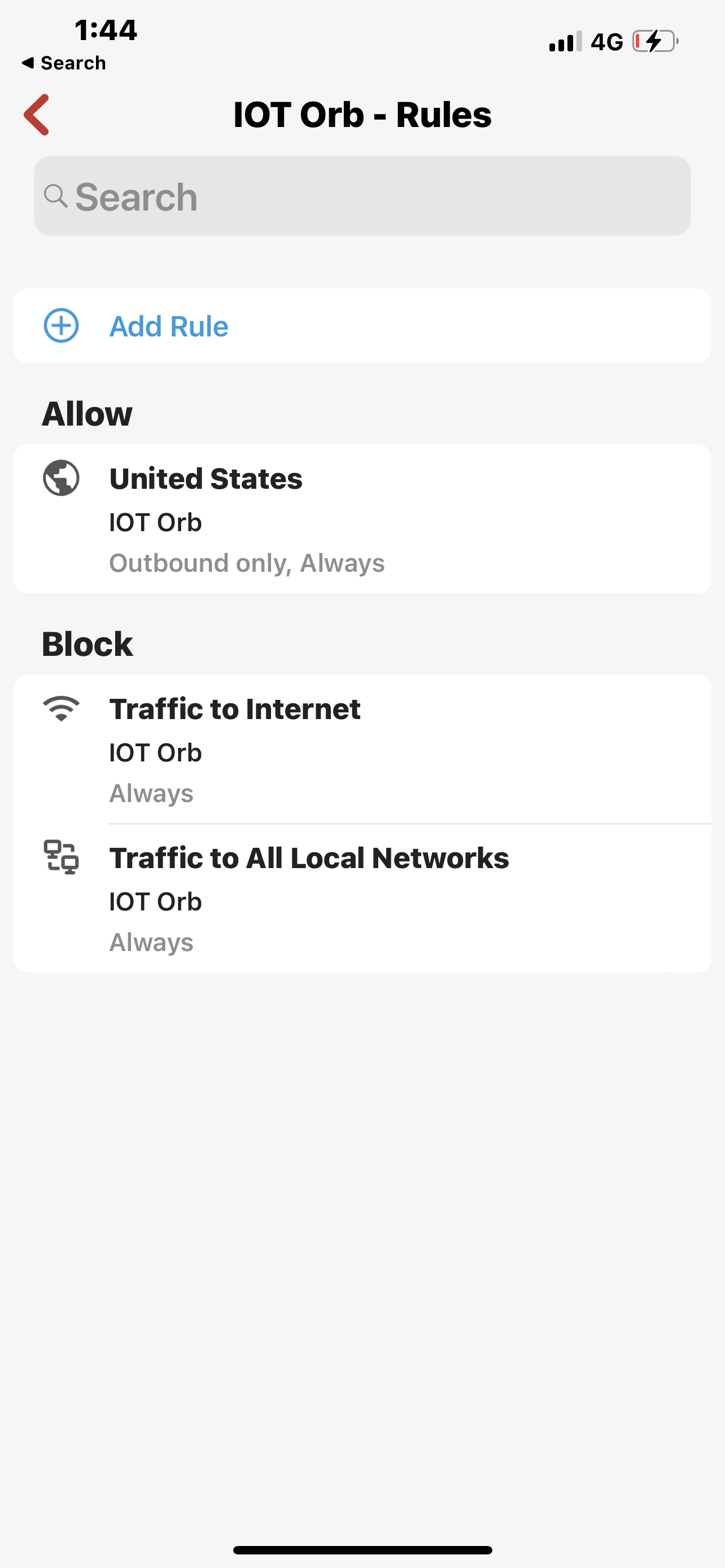
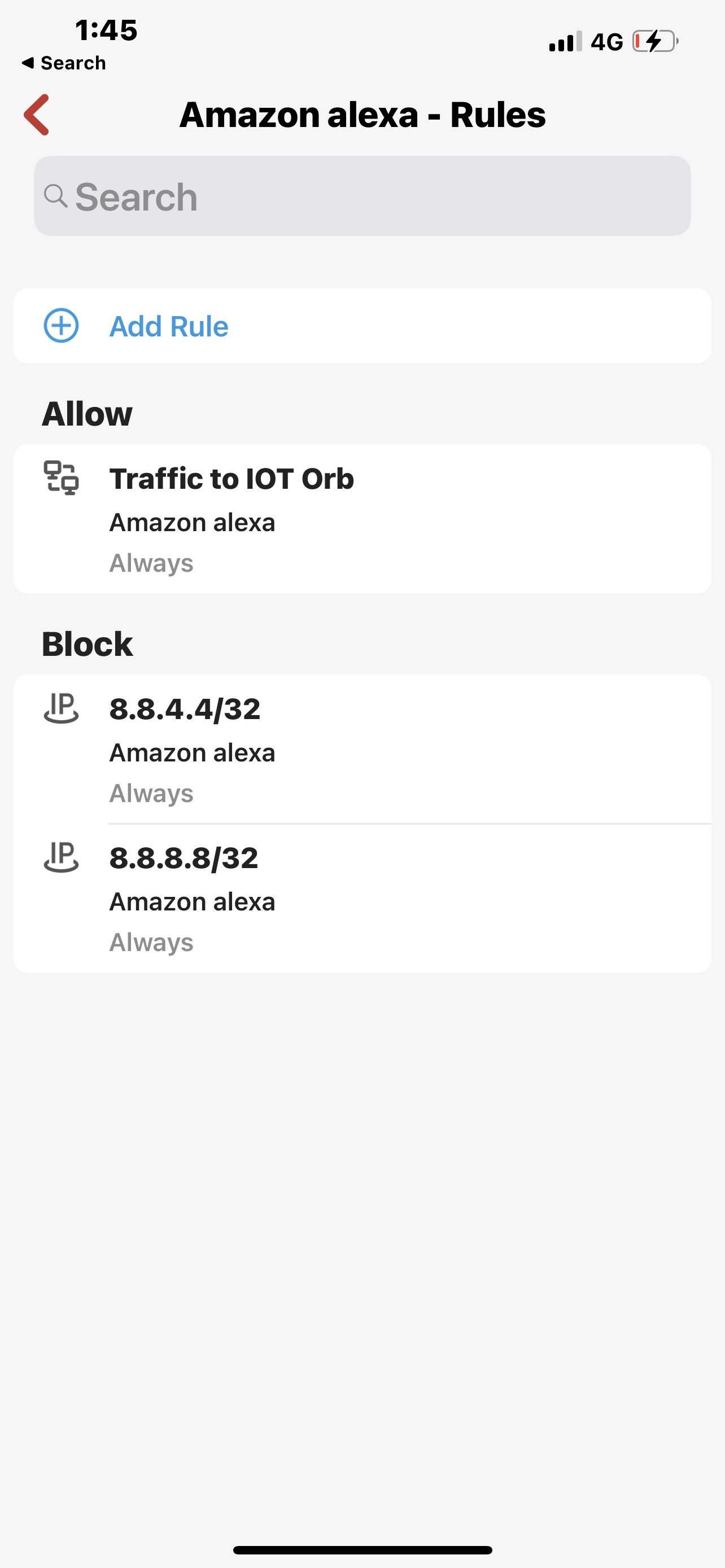
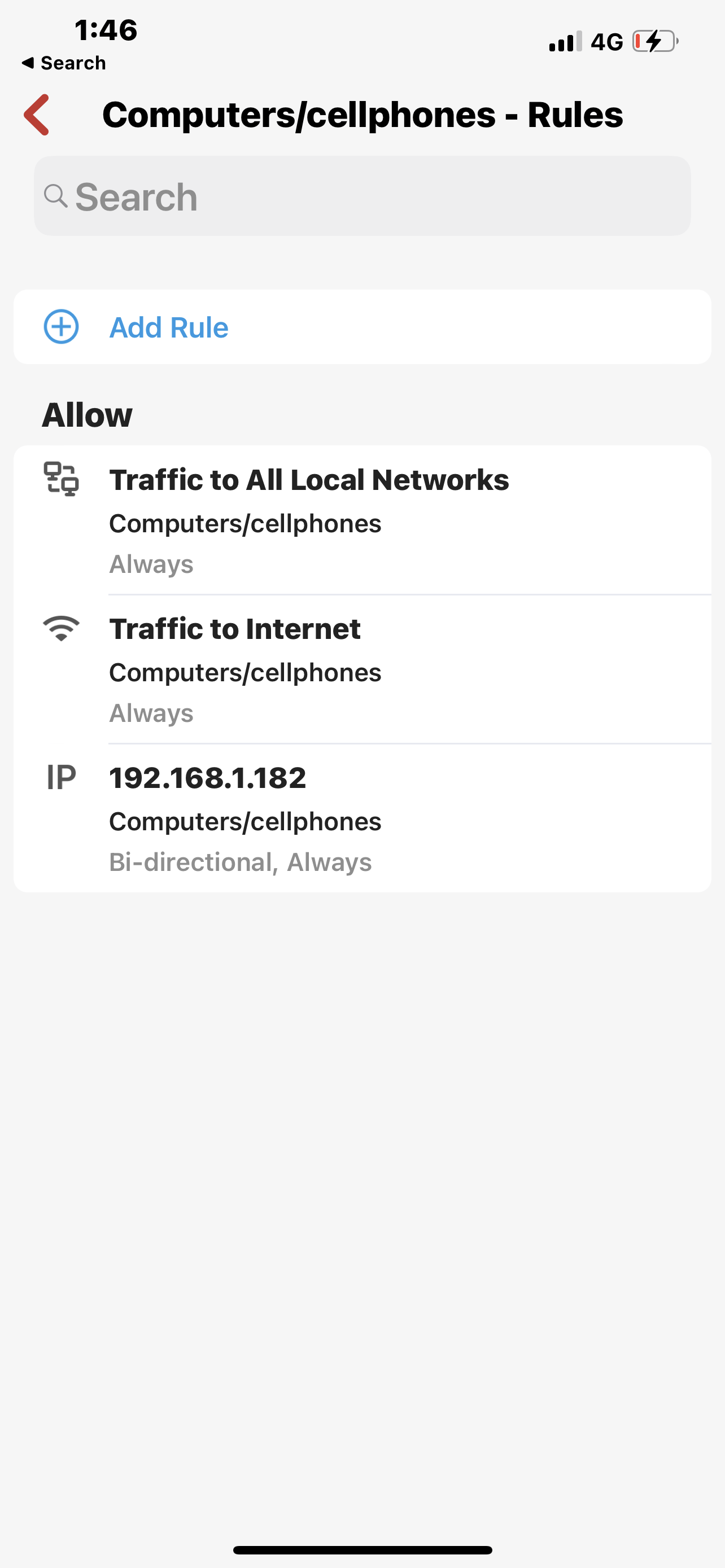
-

Rules from Network and Device(or group, if member) are layered. You can see this if you look at the device itself.
I will agree that Firewalla is a bit of a different animal, than a traditional firewall. It is what network and security folks would call a 'default allow' vs a 'default deny' platform. You may have to think about if from a different perspective.
At least a few of us on here have a very good handle on how the rules are applied, if you explain what you are after, most of us are happy to help.
..ct
-
@networker5,
The following 'should' work, depending on what you have applied at the Network level.
ACTION allow
MATCHING domain "iotdomain.com:443"
DEVICE YourSmartOutlet
DIRECTION outbound-only
SCHEDULE alwaysACTION block
MATCHING Traffic to Internet
DEVICE YourSmartOutlet
SCHEDULE alwaysACTION block
MATCHING Traffic to All Local Networks
DEVICE YourSmartOutlet
SCHEDULE alwaysYour 'device' will still inherit any rules you have applied at the Network level, you need to be mindful of what is applied there. I generally only apply a "Block Traffic to All Local Networks" at the network level, then if I need to allow a specific device, or group, to communicate to another network, I apply that rule at that device or group.
...ct
-
@Networker5 Chris's suggestion is the right approach. The order of the rules doesn't matter. It is possible you need more than one allow. For Tuya smart plugs, for example I needed to allow several domains. I chose a Target List for that. Before you create the rules review the Flows and find what it is doing. Some devices are easy because they use just a few domains.
Only use bi-directional if you are certain that inbound traffic should be allowed. -
I just saw this and I'm laughing. New Yorker 5 you're absolutely right and you have an easy case with the situation. When you're trying to block a domain for all devices you can do it because it's an exception to the rule Resulting from this strange hierarchy which would otherwise not allow any kind of generic policies. One allow for one device overcomes all blocks for all devices and yes there is nothing ad hoc that can bypass it. Someone is forgetting this is not a real firewall Where rules are flexible and can be configured in a much more accurate way. Yes this could be similar to an egress default allow, but they're the rules would be complex and specific. In this case you can't even include routes in the rules or any other component that is presented in a flat list. Try to set different rules for VPN and not VPN traffic for the same device and you'll find out that you're using the DNS server of the VPN provider for everything. So yes ad hoc Would help something like Google cloud services ad hawk rule we're also things are a little bit simplistic a lot less than here, but I think that just reversing the order of blocks and saying that blocks for all devices are the ruler for blocks and allow is always going to overcome block therefore it cannot also rule hierarchy which strike a balance.


Please sign in to leave a comment.
Comments
12 comments