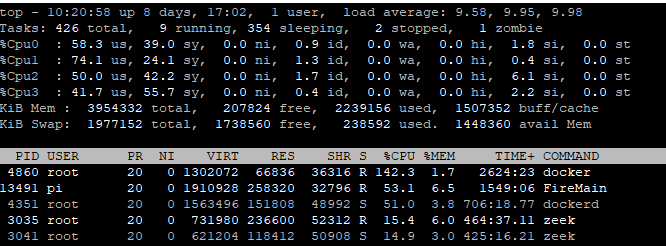
High CPU for Docker Process even with no activity

Comments

6 comments

  • Avatar
    Michael Bierman

    Those numbers are for Firewalla itself. They don’t look unusual to me.

    0
    Comment actions Permalink
  • Avatar
    Firewalla

    Tripple make sure the containers are all removed/stopped. very likely something is still running in the containers

    0
    Comment actions Permalink
  • Avatar
    Bernard King

    This continues even after all containers are stopped and removed.

    @michael docket process isnt even ranking in tops list prior to loading first container.

    0
    Comment actions Permalink
  • Avatar
    Bernard King

    Thought I'd a couple before and afters - note no load on containers

    After remove all containers, virtually no change if any:

    After kill docker process, dockerd seems fine, no CPU pegging.

    0
    Comment actions Permalink
  • Avatar
    Firewalla

    You probably need to prune the images a bit. Also, do a df and see if your partition is full due to container images. If everything fails, I think there are ways in docker to remove everything and start fresh. 

    1
    Comment actions Permalink
  • Avatar
    Bernard King

    That did it... sudo docker containers prune  was the magic command. Must have been an old container that was not working properly in the past.


    Thanks for all the suggestions!

    0
    Comment actions Permalink

Please sign in to leave a comment.