Firewalla Gold/Purple VLAN and managed switch

I’m having the hardest time getting Firewalla VLAN configured correctly on a managed switch!
My setup is
cable modem —> FWP —> Netgear GS105EV2
My goal is 2 vlans, internal (10) and IoT (20)
No problem with the FW config
How should a managed switch be configured?
I think "basic" port based 802.1Q should do it. All I really need is VLAN 20 to handle port2 (from there to AP). Port 5 is my link port to the FWP
The problem I'm running into is that no matter how I configure the link port (no VLAN, VLAN 10, "all"), the switch is not receiving an address from any FWP DHCP.
When I plug into a port for testing, I get a WAN address.
I also tried a standard LAN for internal and a VLAN for IoT. Same issue.
Any ideas?
Thanks in advance for the help!
Sean
-

There are only two ways to segment network
1. Port-based. You give each port on the gold a network segment, and plug your device to it.
2. VLAN-based. You use the same port for many different segments.
Here is a good article on this topic, please let me know if it is helpful https://help.firewalla.com/hc/en-us/articles/4408644783123-Building-Network-Segments
-
From the Purple side, VLAN config was straightforward. No issues at all.
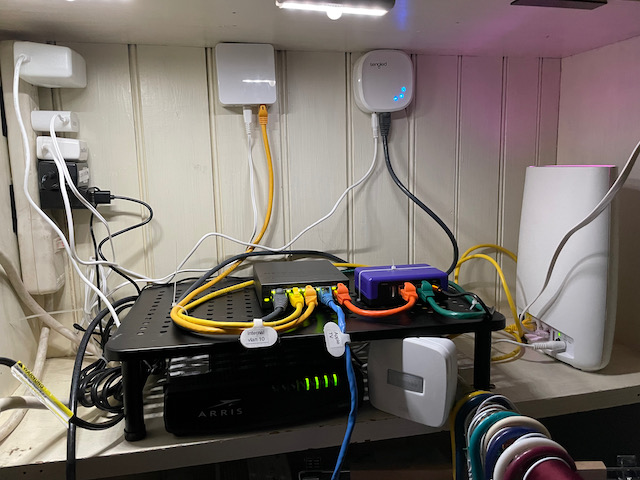
The managed switch is a Neatgear GS105Ev2. To configure, I set the switch IP address on the internal VLAN (for web-based config), a tagged port (port 5, far right in the pic) for all traffic from Purple and VLAN ports. I used the basic VLAN config that defines VLAN per port. The switch has an advanced config that allows for multiple VLAN / port but I don't need that. At the far right on the shelf is my Netgear Orbi mesh base which is connected to the internal VLAN and operates in AP mode. (This unit is not VLAN aware.)
The mDNS reflector appears to be handling Homekit traffic without issue as all the lights and cams are on the IoT VLAN and my devices are on the internal VLAN. (I plan to do more testing to confirm that the IoT VLAN cannot access the internal VLAN.)
Bottom line-- loving the Purple as much as the Gold. Excellent tools for shaping and controlling network traffic.
Sean
-

I also added a managed switch netgear plus model GS308E For access ports But in my case also for forwarding traffic to wear remote wireless bridge Where I have my problem. In this case I am using Firewalla router mode for three to generate 3 VLAN subnets configured on the port (vlan 2, 3,4). Initially I had this connected to a wireless vlan bridge , Formerly a nighthawk router converted similarly to the guide That is part of the manuals her. In my case I use the two wireless bands (2.4 and 5ghz) to bridge vlan 2 and 3, and one more ethernet port on the nighthawlk to which I connected another wireless access point for vlan4 network. However because these devices are remote from Firewalla centrally located so they can have enough coverage but it with only one ethernet cable at my disposal, I wanted to have access ports next to Firewalla for these networks. That was the purpose of the switch. So i added the switch in between firewalla and the bridge. Port 1 for firewalla, port 2 for the bridge and ports 3 to 8 access ports two for each network.Configuring the access ports was not a problem, And this time I use the 802.1 advance configuration, Because I also needed a second trunk port Going to the bridge. I’m not able to get the bridge to show up any network for some reason. I haven’t been figured the following way: recap- Port 1 is fireWalla, port 2 for the bridge, and thr rest are access ports.for 4 vlan id I have ports 1,2 Untagged (unused switch default management access port). For vlan 2-4 ports 1,2 are T- tagged trunk ports for firewalla and the bridge, both being vlan aware devices. for vlan IDs 2,3,4, the access ports They are untagged(U) For each ports relevant neteorks vlan id And unmarked for all other VLAN IDs.j. This works with the access ports, but again the bridge though using the same tags as firewalla and working when Previously It was directly connected to it, fails. Perhaps i am wrong in configuring both source and destination (firewalla and the bridge) of the vlan segments created in firewalla in the same truked manner? I guess if someone was able to use the simple configuration perhaps firewalla should not be trunked for all vlan aware networks or perhaps i am missing something on the bridge side? Any advice would be most appreciated.
Please sign in to leave a comment.
Comments
7 comments