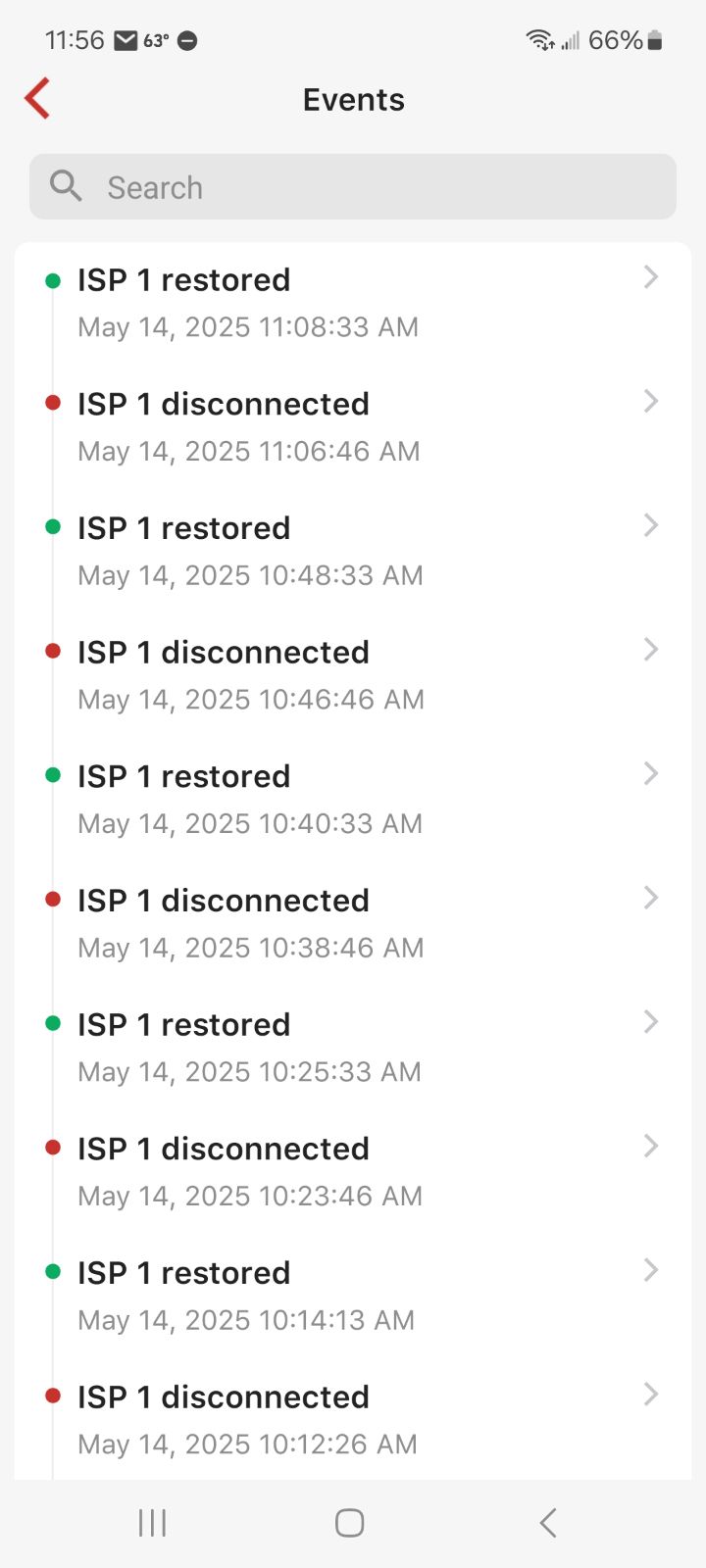
Network performance shows disconnects and reconnects 5 to 10+ times a day

y network performance screens shows many disconnects and they are always almost exactly 2 minutes long. I checked with my ISP and they didn't see any problems and also replaced the cable to my residence just to be sure. They checked my modem and they haven't seen any downtime in the last 7 days and the signal looks great.
I can't tell when this started occurring because only the last 7 days of events are listed. I have tried restarting all my equipment but the problem persists.
The disconnection definitely doesn't last 2 minutes, I notice hiccups if I am streaming something and whenever I check it always corresponds to an event, but the stream continues in about 2 seconds.
It feels like the Firewalla is doing some sort of maintenance or some process is running that is tying up the device and then clearing. I don't see any pattern to the times that it happens either. I also don't have a spare router to hook up to make sure it is the Firewalla causing the issue.
Any ideas on where to go from here?
Thanks
-

Best look at this article https://help.firewalla.com/hc/en-us/articles/360053534593-How-do-I-debug-network-connectivity-issues
I think the best way is trace if the problem is your LAN or WAN. See if you can run a ping from LAN to firewalla router LAN IP, and see if any disconnect there
-
"See if you can run a ping from LAN to firewalla router LAN IP, and see if any disconnect there"
I didnt see any problem pinging it but it is very intermittent and the duration is very short so I wouldnt be able to try anything when I notice the connection down.
I did notice that I didnt have any disconnects this weekend when one of my computers was off. As soon as it came online today I noticed a disconnect. Im not sure what that computer could possibly be doing to the Firewall to cause disconnects though. Also it doesnt stop immediately after the machine is shut off, I have noticed disconnects after it was turned off. So possibly not related.
-
you can run a long lasting ping, just get a terminal and keep the ping there.
If you feel the computer is an issue, check and make sure it is not running anything (like antivirus) that may be scanning your network or doing anything on the network. Once we found one PC was doing a scanning and it was disconnecting another PC running antivirus
-
I have tried everything up to this point. Spectrum was easy to get to come out and do a service call. They have now replaced the cable to the house. Then came out again and replaced a splitter. The issue still occurs.
The problem is so sporadic that unless they are testing at exactly the time of the issue they would not be able to see it happening.
SomeGuy (Ken Adams) Do you know what they actually did that I could possibly relay it to the technician to look at?
-

@Marcus do you have an extra switch (or router) to put in between the Spectrum modem and Firewalla?
Firewalla support tells me they suspect this is a "port compatibility" issue, introduced on the Spectrum side with a firmware update, and that at least one of us customers has seen the issue go away with an indirect WAN connection through a switch.
-

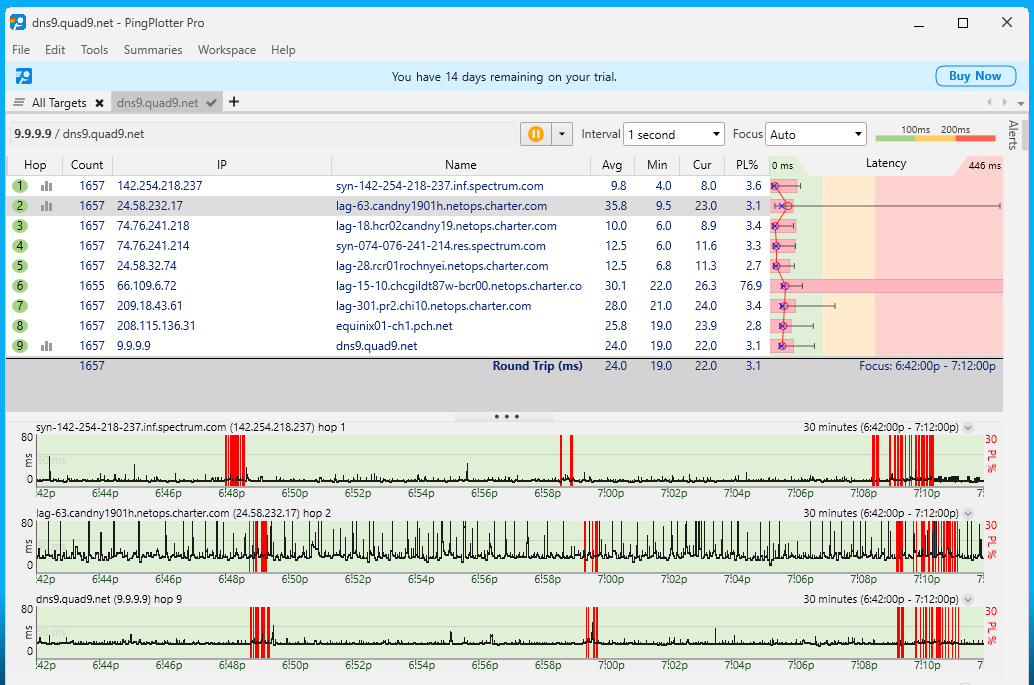
I think the most convincing troubleshooting step was that I connected my laptop to the modem and saw the drops there, that ruled out the router (which they were very quick to blame in the live chat) I'm pretty sure that swapping out the modem was the fix for me - they replaced connectors, inside, out and at the pole, but I really think it was something with the modem. Also, my upload speed jumped from 80Mb/s to about 230Mb/s with this new modem!
-
I asked them to send me a new modem and it will be here in a few days.
"do you have an extra switch (or router) to put in between the Spectrum modem and Firewalla?"
I cant feasibly take the whole house offline to run a ping test. Jeff Barca-Hall How does putting a switch between the modem and firewalla work? How would the device hooked up to the switch be able to ping something, it would still have to go through the router.
-
I don't think you can connect a device to that switch Marcus, you would need to reboot the modem to get an IP and then it would be potluck to see who gets assigned the 1 IP address, the laptop or the firewalla.
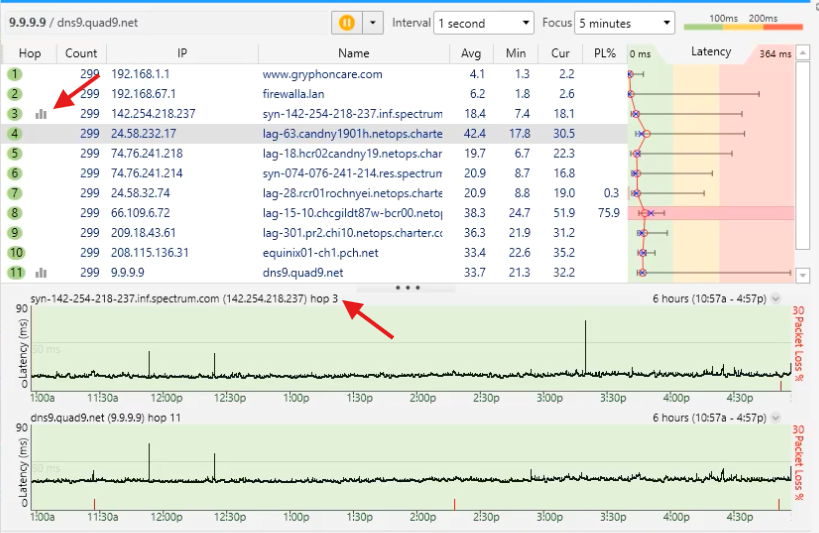
You can run the same pingplotter test from a machine on the other side of the firewalla, just note that the 2nd or 3rd hop might be the "first" hop once it gets out of your network - in my screenshot below Hop 3 is actually the modem connecting to the outside world:
-
"I don't think you can connect a device to that switch Marcus, you would need to reboot the modem to get an IP and then it would be potluck to see who gets assigned the 1 IP address, the laptop or the firewalla."
Agreed, that is why I was wondering about what he was suggesting.
Yeah I wanted to avoid this issue that you mentioned but I think the only way would be to just plug straight into the modem. "I think the most convincing troubleshooting step was that I connected my laptop to the modem and saw the drops there, that ruled out the router (which they were very quick to blame in the live chat) "
-
Update. Thanks to what SomeGuy (Ken Adams) reported, I resolved to re-run the same test (PC direct to Spectrum, with no Firewalla) for as long as needed to record the problem in isolation.
I was fortunate enough to a) have this problem occur after only five hours; and b) to be in an active chat with Spectrum when it did.
I finally have a Spectrum tech visit scheduled. SomeGuy (Ken Adams) what model modem did they install for you? My current one (installed in 2021) is an ES2251.
-
Glad I was able to help Jeff, according to my account online I have almost the same model ET2251. Hopefully they updated the record there - it LOOKS the same as the one they swapped out, but maybe it has different internals - I'll try and remember to take a look at the sticker on it tonight.
-
Thanks for that info. Unfortunately, the tech who did my visit today only had an EN2251 with him, so that's what I have now. Speedtest doesn't show an improvement (neither up nor down), but let's hope the intermittent connection loss is gone. He tested all the cabling from my network closet back out to their line at the street, said it looked pretty good, but replaced some connectors and even a short section of one of the cables, just to be sure. Fingers crossed this problem won't recur.
-

Just wanted to put a post here in case it helps someone in the future. I was battling with similar ISP disconnect randomly throughout the day. I have a Firewalla Gold with Spectrum Internet. The same setup had been working fine for over 1 year. The disconnect issues started a few weeks ago. I replaced all the cables. Spectrum came and re-terminated all the coax cables. They said all the wiring and signal were good. The cable modem was fine. They even swapped out and replaced the cable modem (EN2251) just in case. But the problem persisted. Finally, what fixed the issue was putting a switch between the cable modem and Firewalla Gold. (I don't remember which post but this was mentioned by someone in one of million posts I searched here and on Reddit.) Instead of connecting the Firewall Gold directly to the cable modem through an ethernet cable, I put in a 5 port Netgear switch between. Don't know what the exact root case is as the same setup was working fine before. Possibly firmware/software changes on Firewalla? Cable modem?
-
Good to hear that using a switch like this fixed it for you. My EN2251 pretty quickly started showing the same problems as the ES2251 it replaced. Maybe I should have tried a switch first, but, instead, I purchased an Arris S34 to try out since none of the Spectrum stores within an hour's drive have had one of their "ET" modems in stock when I've gone there to check.
The Arris has worked flawlessly for the past 10 days (i.e. PingPlotter running continuously shows no occasions of the 100% packet loss that was occurring frequently before). I also like that I can access its log, should any problems occur. Not sure, though, if that's worth the $200 for the Arris vs. going back to a Spectrum modem and adding a $16 switch instead.
-

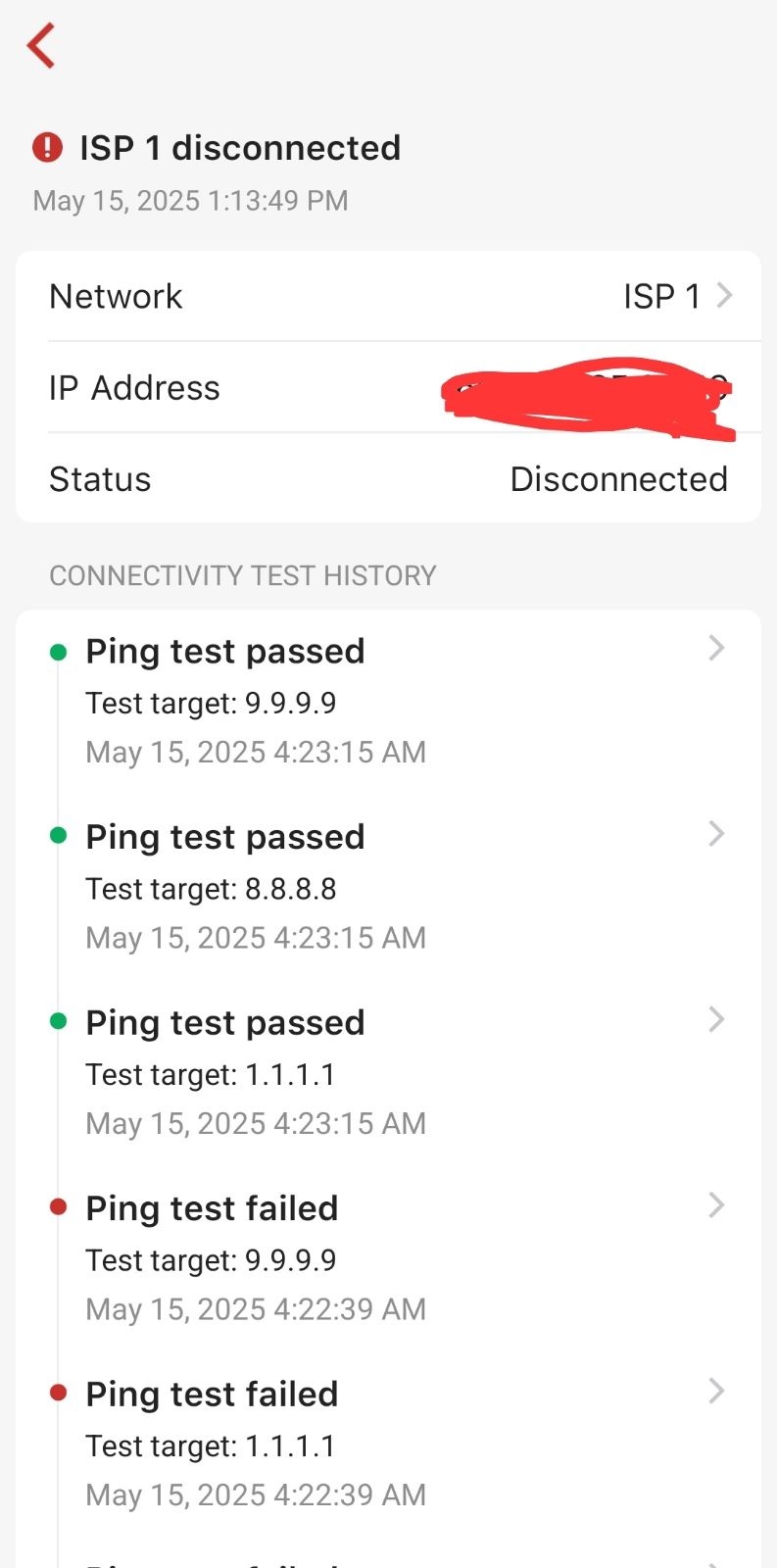
Hello! Frontier user here in Florida and started sewing up to 20.drops daily starting 9/13 at 1am. I've been round and round with their support and finally dug in here. I just added a switch in front of the purple and will let y'all know if that fixed me as well. Signal to ONT has perfect logs apparently but Firewalla keeps dropping.
-
What do you mean "Firewalla keeps on dropping"? If you mean after you put a switch between purple and your modem, and purple still says the ethernet side is dropping, then send help@firewalla.com an email.
If after the switch is in, you don't see ethernet dropping, and now see other connectivity errors, then likely your modem may be reseting or rebooting on the other side.

Please sign in to leave a comment.
Comments
29 comments