AP backhaul speed?

Is there a mechanism to determine the backhaul (speed between 2 AP's) speed? I currently have 2 AP's, first one wired directly to the FW, second one is on the second floor where i have the possibility of 1G wired connection but it that network goes through 2 switches before getting to the FW and aggregates other wired devices so that 1G is impacted. I'd like to determine if wifi backhaul is providing sufficient bandwidth before moving to wired where i'd have to look at adding a VLAN to segment the AP traffic to keep the existing network design.
-

Try the wifi test first, this will test from your phone -> AP -> backhaul -> AP -> Firewalla
If you need better testing, connect ethernet to AP's 10G port, and then visit https://fire.walla:8833/ss using a chrome browser (it is faster) and run test there.
If you know how to SSH into the firewalla, you can run iperf3 -s -D there, and then iperf3 client on a PC connecting to the 10G port on the AP.
-
I understand what your saying, but this doesn't take into account any traffic on the network that could impact the test. Additionally making sure I'm connected to the wireless backhaul AP, connecting at the best speed and other variables does not really answer the question. On the wired AP it indicates that the connection is via Ethernet and the port speed is 2.5G. The wireless AP indicates that the connection is wireless but does not provide connection speed, only the signal strength. If it's connecting at 2.4GHz that's significantly different than if it's connecting at 5 or 6GHz. Add to that the usable bandwidth of the connection at any on of those freq's means that there's no real detail. Indication of the connection speed between the AP's (not devices connecting THROUGH the AP) is the data needed for me to be able to make an educated decision.
John
-
I'd pick a time when your network is fairly silent to do the test, and while doing the test, you can try multiple times.
I do not understand your comment on the indicated speed. If you just want to do raw speed test just plug in a device and have a run. I know this is not scientific, but should get you some numbers in your ballpark.
If you want scientific results, the tests need to be done in a shielded room ... and that room is not cheap to build.
-
Not intending to be argumentative, but I think the simple answer to the original question is "no, there is no current mechanism for the display of the current connection speed between AP's when using wireless backhaul" While you are correct that I can conduct tests, I was hoping that Firewalla's AP or some other method could be used to understand the connection speed between the 2 AP's when Wifi is used vs a wired connection. I'm assuming that as with most wireless connections the freq and speeds would/could change due to distance or other wireless interference factors. Having this information readily available via the App or MSP page would be extremely helpful in determining implementation and placement.
-
Firewalla, could you please clarify, is there a way to tell the connection rate BETWEEN the AP's, not through them? Looking for the max speed that the wireless AP can provide when using wireless backhaul to the primary wired AP. This sounds like it's getting contentious and I'm not sure why, this should be a simple question.
-
Now, I am confused. The best way to get that speed is to test it.
@Larry said @JR want the Rx/Tx rate, and I asked, is that the Phy rate from the WiFi side?
@JR, can you give me an example, say the "max speed", is that the phy rate you are after? or realistic testing? or you want to test it?
-
Sorry, lemme add pic's and see if it helps.
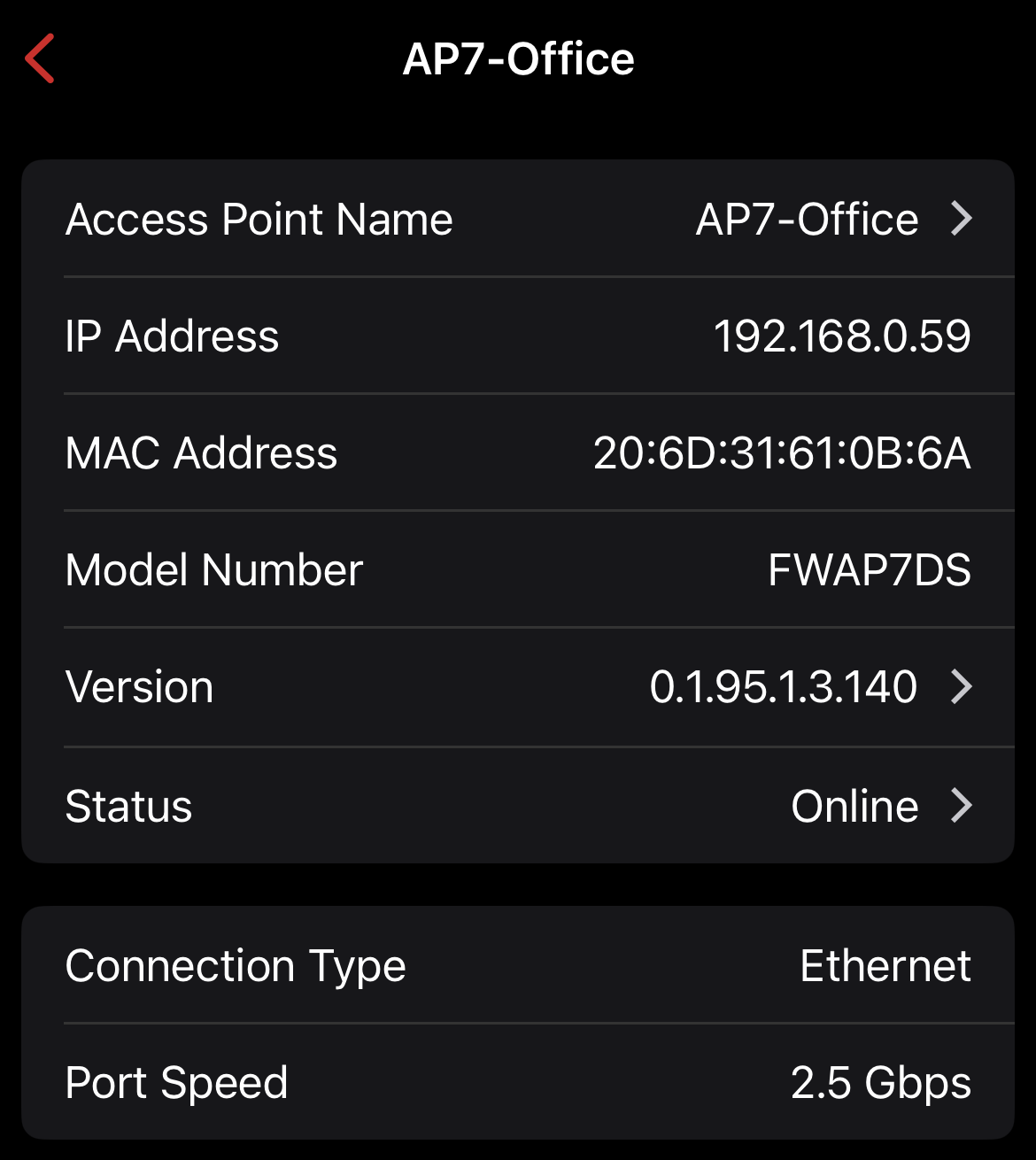
(from the IOS App) this shows the connection on the primary AP with an ethernet connection to the FW. It indicates Ethernet with a port speed of 2.5 Gig so the MAX throughput from any connected device(s) would be 2.5 Gig.
The second pic is from the second AP, which currently uses a wireless backhaul to the primary AP. It shows that it is a Wireless connection to the primary AP and shows signal strength
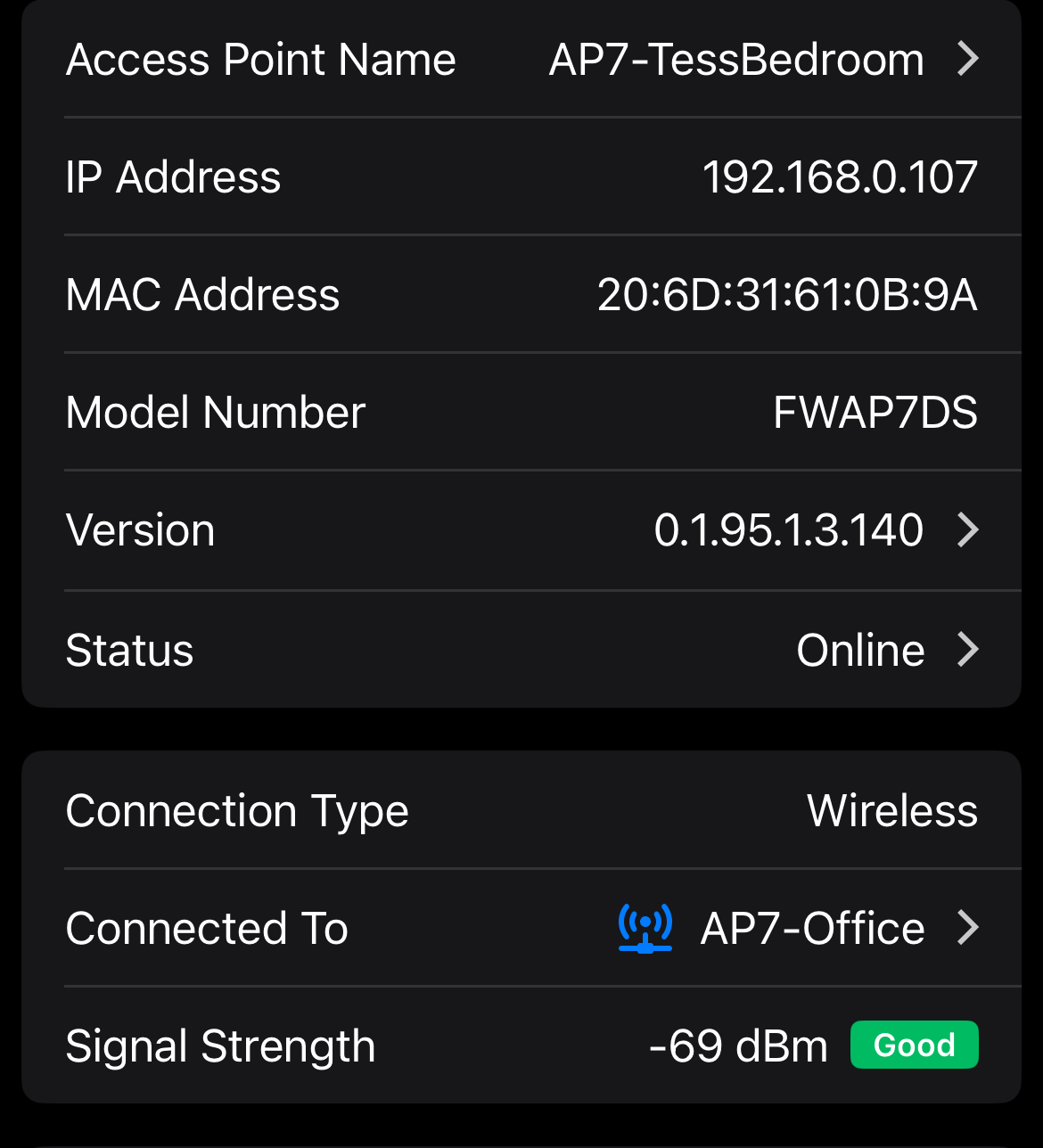 .What this second pic does not show is the band (2.4 Ghz, 5 Ghz or 6 Ghz) and the negotiated speed between the wired AP and the Wireless AP. Depending on the band used and negotiated speeds between the AP's this could be between 11M and 9G (rough numbers for the sake of conversation) so this becomes a limitation for any device connected to the Wifi AP. A device could be connected to the 6G band and have 9G to the AP but would be limited to 54M if the Wifi backhaul was not great. (again, all numbers for discussion purposes only) Knowing the connection speed between the wired and wireless AP would help me decide if i wanted to stay with the wireless backhaul or move to a wired connection. Since the switch that the second AP would connect to is a 1G switch (only the primary switch does 2.5 or 10g) I couldn't take full advantage of the 2.5G ethernet port if there are multiple connected devices all fighting for bandwidth.
 I hope this helps
-

This has been a long series of comments for something that seems pretty straightforward. If displaying the Phy Rate and Mode is useful enough to show for wireless devices attached to the AP7, how can it be "useless" when showing the AP7<->AP7 wireless backhaul? Sure, it is dynamic, but so are the connected devices.
If the AP7<->AP7 backhaul connection is poor and speed limited (say extreme case ~100Mbps) this constrains all devices connected to the remote AP, but wouldn't every device connected to the remote AP will show the Phy rate to the remote AP (say 1000Mbps)? Without seeing that the backhaul rate is limiting factor doesn't that make it that much harder to debug the throughput discrepancy?
Is there a better or more accurate way to tune positions of wireless backhaul APs?
-
@Larry, the best way is to use "WiFi testing", or "Ethernet based tests", see https://help.firewalla.com/hc/en-us/community/posts/39073246956947/comments/39073754839187
-
When the ceiling versions are available mine will be hardwired, so I don't have any skin in the wireless backhaul game, but WiFi testing tests TWO connections: device<->wireless AP and wireless AP<->wired AP. How does the end user determine if a slowdown is in the first connection or the second?
Hooking up to the wireless AP's ethernet port removes one of those connections, but seems pretty impractical for a site survey.
While I don't disagree that the Phy rate is variable and/or inaccurate, if this is Firewalla's position why is it fine for all other wireless device connections beside the backhaul? Is it particularly inaccurate or variable for the 6Ghz backhaul?
-
@Firewalla, I've been thinking about this and while I'm interested in the data for my own edification you may not want to expose this data as a general rule, let me explain. I've spent 40 years in the cable industry, specifically on the CPE and provisioning side of the house. Lots of time doing CPE testing, firmware testing with vendors and a HUGE amount of time supporting residential and commercial customers with high visibility issues and concerns and one of my personal mantras was "support the customer, resolve the issue, listen and learn, but never give them the stick to beat you with". (not a company philosophy, just a personal one) Exposing this as a general rule may well drive customers who may not have an "actual" issue to voice concerns that are perceived but not specifically service affecting. If Firewalla wants to proceed maybe something that suggests "relocating the wireless AP or consider a wired backhaul" instead of supplying the actual AP to AP speeds. This isn't an About Face, more of a sense of reality as to the potential impact.
(I'd still like to know the info, but that's because I understand the reality and that resolution is up to me)
John
-
@JR, we are totally okay exposing the PHY speed; it is just one of the parameter statistics that's already there. (tap on any wifi devices, and in the end, you will see Rx/Tx rate)
My main point is, that rate is not useful if you really want to know the real performance. (On the other hand, yes, that number can be useful relatively speaking)
-
I give up. The last response has appears to totally miss the point of all of my previous comments in this thread. I am NOT asking about the rx/tx rates between a phone/laptop/other Wireless device and the AP, I was asking if there was a way to tell the rx/tx between the AP wired to the Firewalla and the remote AP using wireless backhaul
Firewalla <--("1" Ethernet)--> AP#1 <--("2", wifi backhaul)--> AP#2 <--("3" wifi)--> phone.
I was asking if there was a way to tell what the wifi speeds are on number "2" above, the WIFI LINK BETWEEN THE TWO AP's. I would have thought this a pretty straight fwd question and I've done my best to be clear.
-
 @JR, I apologize for the confusion throughout this thread. We completely understand that you're asking about the Rx/Tx rates specifically for the wireless backhaul between the AP7s, and we've already relayed this request to our developers.Our previous comment about the Rx/Tx rates between other wireless devices and the AP7 was a response to your earlier comment:
@Firewalla, I've been thinking about this and while I'm interested in the data for my own edification you may not want to expose this data as a general rule, let me explain.
We just wanted to clarify that we're open to exposing this data, as it's already available for other wireless devices connected to the AP7.
I hope this helps clear up the misunderstanding. We truly appreciate your patience and feedback :-) -

I just ordered four AP7s and then went to this forum (wrong order of operations, that's on me). But after reading this ridiculous back and forth about AP <--> AP speed, I'm hesitant to commit to Firewalla on the wireless side; I will be quite careful to keep all packaging and have things in "ready to return mode".
Firewalla's expertise and development/engineering prowess are tested and proven on the WAN IPS/IDS/NGFW front. Great product. But this whole conversation regarding LAN/WiFi is somewhat disconcerting.
Providing ANY SPEED TEST is variable based on thousands of conditions and variables, so why provide any at all?? If your objection/hesitation is, "Well, they won't really be accurate," -- stop providing current VPN, WiFi, and WAN tests, too. They are subject to FAR more variables.
The most concerning piece to me is the seemingly sharp turn away from what is currently a very open-source, open-book, "come SSH in and break it, but if you do that's on you" company culture.
Firewalla engineers know EXACTLY how fast two APs can talk. Give us the "shielded room, 3-foot" number, give us literally any number. Firewalla engineers know exactly what the guts of these devices are capable of, yet won't disclose RAM or CPU Cores.
@Firewalla, you know a YouTuber is going to rip this thing apart, binwalk and reverse engineer everything inside right??? You must know that. So I guess you want us to find out from Matt Brown on YouTube, and not you? Obviously, we'll get our answer either way... I would just want to control the narrative, if I were Firewalla. -

Other vendors provide this capability to test / verify / monitor the backhaul links between APs. It becomes very relevant in cases where there are a large number of APs in the mesh. When 6 is congested, clients can be steered to 5 in order to make more room for the backhaul traffic on 6.


Please sign in to leave a comment.
Comments
24 comments