Amazon Echo/Tap Flash Briefing not working

-

I have two Echos and don’t need to do anything special to get them to work. My flash briefing works.
If you disable monitoring does the briefing work? Let’s make sure this is an Firewalla issue as opposed an Amazon issue
My hypothesis is that one of the selected Flash Briefing sources is malicious and dangerous (maybe Fox News is in your list 🤪) and is being blocked.
Can you please list your Flash Briefing sources?

-
@Firewalla, thank you for your suggestion. I don't have DNS over HTTPS enabled. Are there any logs I can dig through to see if anything jumps out? Since this is Linux should I look in /var/log or something?
The odd thing is that both the Tap and Echo can stream content. There are a couple of things in my feed that do play. I am also able to play podcasts and stations directly. If I say, "Alexa, play my flash briefing", I get, "X is not available right now" for MOST of the sources in the feed.
Is there a better (more direct/hands on) forum for getting support? I'd really like to get to the bottom of this and get my news back. :)
-

The only thing you can look is "do something first" then look at the network flows under that device. See what it is trying to access.
But usually, when this type of things happen, the emergency mode will help, since it disables all controls from firewalla. (Also, note, some of the controls are DNS based, so you need to be aware that you may need to flush the client DNS cache <go to airplane mode for example>)
As of support, you can just keep on posting here. The reason is, even we try our best to help, we may not have all the devices or may not be in your location, some of the 'stranger' things may be related to that. (For example, the webex issue, took us 3 or 4 days to discover it is simply DoH not seen that host and ... only happen at the user's side)
-
@Firewalla, I couldn't find a way to flush the DNS cache on the Tap.
To recap, here's what I've tried:
- Remove and re-add Tap.
- Add a rule to the Tap to allow both inbound and outbound traffic.
- Emergency mode for Tap.
- Disable monitoring for Tap and Firewalla.
- Disable Active Protect on Tap and Firewalla.
- Reboot Firewalla.
I don't really know what else to try, but if I remove Firewalla everything works. Is there anything else that might block traffic to/from specific sources or interfere with Tap traffic?
-

Hi, it looks like your situation is somewhat the same with me.
In my case, all of Amazon Echo Shows and Echo Dot are unable to connect the internet, but the only other client (MacBook) is can do it. Those all devices are located on same network 192.168.10.0/24 (VLAN ID:10) managed by main router (UniFi Dream Machine), and the network is connecting to Gold's #1 LAN port. Because of I intended to monitor two VLAN networks by Gold, I created both Gold's WAN port (surrounded by yellow square) and Gold's #1 LAN port as WAN Connections according to official friendly instruction.
When I finished initial setting of WAN Connection on #1 LAN port and beginning to monitor the network, my amazon devices are disconnected from the internet immediately (if they are playing amazon music, they can keep playing and finished it because its already cached on the device, but cannnot start to play next music). The disconnection was occurred only amazon devices, but my MacBook (located on same network with amazon devices) can keep connecting to the internet. Ping from MacBook to the amazon device is also work.
So far, I found that the disconnection is recovered when Emergency Access is activate, or unplugged LAN cable from Gold #1 LAN port. I still have no idea why only amazon devices are affected. I took more than 20 hours for the matter but cannot reach the fundamental solution. I would post if I get more relevant information.
p.s. I noticed many Network Flows History about communication with DNS are reccorded on amazon devices (e.g. destination: 1.1.1.1, direction: inbound) during the disconnection.
-
When you guys have problems with Amazon Devices, can you please check these things
1. Regional block, which countries you are blocking
2. Under rules, do you have any subnet, or individual sites that may be blocking
3. Try to turn off DoH. (we have seen one case, when DoH is pointing to 1.1.1.1, one of the webex domain names won't resolve. This is not an issue with firewalla)
4. Disable ad blocking
-
@Firewalla, yes I'm running in Advanced Simple Mode. Gold's two ports, #4 port and #1 port, are monitoring different network. For testing, those ports are assigned IP by DHCP, but the result is same when I assigned static IP address.
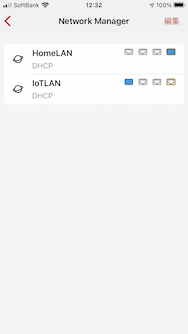
Gold's #4 port: connected to a router's untagged VLAN port (VLAN:30) and monitoring 192.168.100.0/24 as bellow. All devices on the segment are monitored without any trouble.
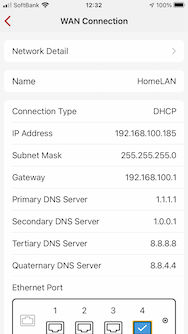
Gold's #1 port: connected to a router's untagged VLAN port (VLAN:10) and monitoring 192.168.10.0/24 as bellow. Amazon devices are located on this network and they cannot connect to the internet, but it work well when the Emergency Access on this connection is activate.

-

@K. This is likely a known issue of advanced simple mode in the current stable release, which leads to DNS outage. This should be fixed in the early access release. Do you want to switch to early access release and have a try? Firewalla 1.971 (Early Access) Multi-WAN, Smart Queue + Rate limit, Device Quarantine


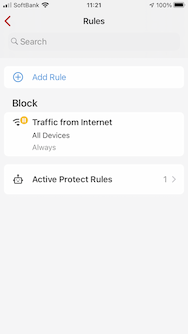
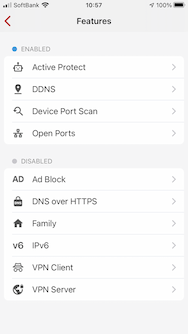

Please sign in to leave a comment.
Comments
16 comments