Gold FW router speed

-

Are you testing via wireless or wired connection? I too have the Gold in router mode. If I do a speed test on my 2Ghz network I can only achieve a speed of about 75Mbps, but if I test on my 5Ghz network I got a speed of 240Mbps. I have xFinity and my subscription is for only 200Mbps. What are you using to test? I use speedtest.net. Sometimes you have to try a few different servers from speedtest.net as not all are the same.
You might also look at your wireless speeds from your AP. Mine are rated for
- Simultaneous 450Mbps on 2.4GHz and 1300Mbps on 5GHz totals 1750Mbps Wi-Fi speeds
Also, if I was paying for 1Gbps speed and all I was getting was 200Mbps I would be calling my provider and asking them why........
-

- I can confirm that gold should not be limiting your throughput at 100Mbps, (in my case I am hitting 330Mbps for a 300Mbps subscription)
- ideally to test, you want to use an ethernet cable plugged straight into the firewalla, and compare it with the same cable bypassing the firewalla plug straight into internet entry point (your cable modem or isp router...).
- you might want to provide more details on your setup and your testing methodoly something like this:
- PC, windows 10, connected over CAT6e into cable modem (netgear) = 330Mbps/37Mbps
- PC, windows 10, connected over CAT6e into firewalla gold = 330Mbps/37Mbps https://www.speedtest.net/result/10336034049
- testing against https://www.speedtest.net/ (note my ISP host its own speedtest server)
- any "unusual" settings on your firewalla?
- etc...
a simple explanation could be if you just grab a random cable which happened to be an old school 100Mb! :-) or if your firewalla gets connected into an ISP router which for some weird reason negociate a 100Mb connection... etc...
-

if the mentioned fixes do not help: Also, since your speed is when you connect it to a router/access point make sure the gold is plugged into a LAN port, not the WAN port. Doing so guarantees you bypass the router/access point built in features (sometimes they can't be turned off and on some routers it has been documented that it will massively decrease your speed. I'm not sure why firewalla suggests plugging into the WAN port and When I pointed out that error they said they were going to add something to the help documents about Wi-Fi speed not reaching what it should...
Anyways As far as top speed goes I can submit that my gold was able to achieve full connection speed on a gigabit connection (980ish hardwired into a standard switch that then connects to the only LAN port of the gold I'm using, it also achieves full 802.11ac speeds that my pixel supports when that (former)wireless router is plugged from LAN to one of the other ports on the switch to ensure it functions as an access point 😂.)
-
@james yes, I'm referring to connecting the gold to his wireless, The official instructions say connect gold to the WAN port of existing routers that are now going to be used as access points. I'm saying you might get a speed decrease if you do it that way so instead of using the WAN port of the AP plug it into a LAN port on the AP. You always need to plug from whatever modem is feeding you an internet signal into the WAN port of the gold.
-
@James edited my post to make it more clear what I am referring to (it was the end of a long night and I could have been clearer.) It's unlikely that is the OP's problem but It was worth mentioning in case your suggestions didn't find them any satisfaction. I can definitely say that this is the best router I've used so hopefully the OP can get it to meet their needs.
-
@Spblhedeam same here. I have been really happy with my Firewalla! There was a post HERE that shows there is a speed test that is INTERNAL that is pretty nice, I just ran it and happy to see the results.
-
Hi Guys. Sorry for my late replies. Appreciate all your feedback. I am also happy with my Firewalla. Just hope to resolve my speed issues. Will look into changing provider as I do experience drop signals with no connection and comes back on after a few seconds. Much appreciated and have a great weekend ahead.
-

I've a fiber connection that maxes out theoretically at 1Gbps in down and 200Mbps in up.
Before installing the FW Gold (in router mode) I got via OOKLA (in gigabit ethernet) 960/196, so... quite close to the limits.
Now, with the FW in the middle, I get appx 585/180.
Therefore - unluckily - the Firewalla Gold has slowed down a lot my download traffic (upload nearly untouched). Consider I've not setup heavy rules to be managed.
I purchased the Gold as of its "3Gbps" capabilities... so - even if for the rest it's an awesome device - I'm a bit disappointed about this "filter"...
-

@Gianluca, how is your WAN connected? is it done via static IP, DHCP, PPPoE, VLAN? Also, speed tests do change depends on which servers and time of the day, so if you can do try a couple of times or even manually change the server.
If you want, open a case to help@firewalla.com, we can help you to see what's going on.
-
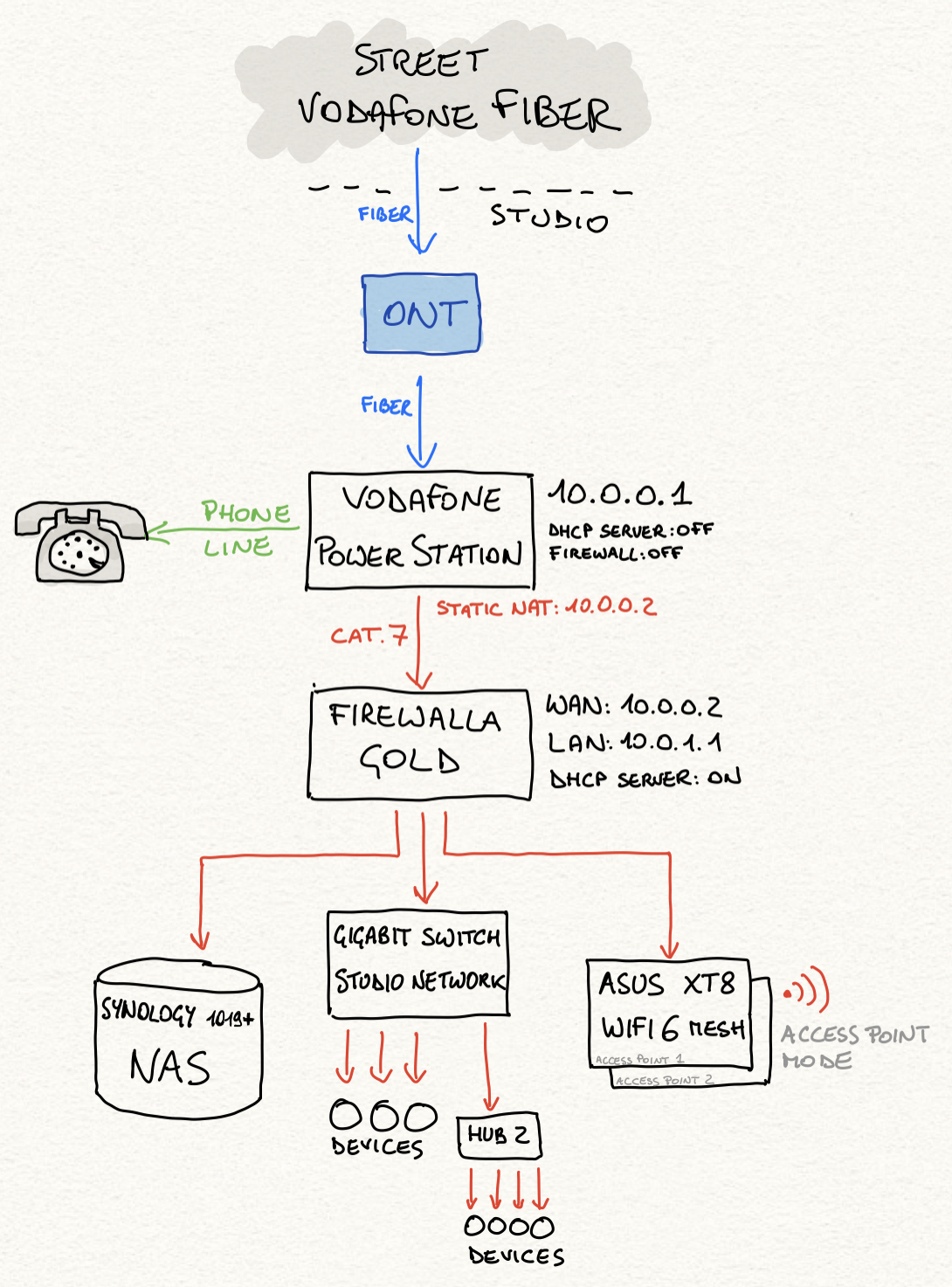
This is my network architecture.
Maybe the VF Power Station can slow a bit the incoming traffic? It should be a simple static NAT, that passes everything to the Firewalla, but... I'm not a network expert... All of my main cables are CAT.7 (even if not strictly required).
From street to Power Station nothing changed from my previous measurements.
-
Extra NAT should not cost that much unless the power station is very weak.
Here is a quick article we wrote on speed test https://help.firewalla.com/hc/en-us/articles/360056875493-Speed-test-and-Speed-Optimization-on-Firewalla
This article has tips on small things such as using the right cable, and where to test ... also some tips on how to test LAN speed as well. And also try to run the speed with different servers and at different times.
If you want, we can help you do an inside firewalla test and see how fast firewalla sees the network. (email help@firewalla.com)
-
one thing to try to compare apples to apples so to speak is to use the same computer you used to connect straight into the power-station with a cat7 ethernet cable and then connect it directly to one of the port of the firewalla, bypassing everything else, and have no other cables connected to the firewalla:
baseline test:- PC (ip=10.0.0.2 netmask=10.0.0.255, gateway=10.0.0.1)->(10.0.0.1)
- Power-station
- ookla
firewalla-test (without anything else, just the wan and the pc):
- PC(ip=10.0.1.2 netmask=10.0.1.255, gateway=10.0.1.1)
- firewalla(LAN:(ip=10.0.1.2 netmask=10.0.1.255) WAN:ip=10.0.0.2 netmask=10.0.0.255, gateway=10.0.0.1)
- Power-station
- ookla
-
Dear Firewalla friends and FF,
thanks for the replies:
(1) I'll give a look to the article
(2) Comparing apples w/apples: absolutely correct. My previous testings were done in the baseline/firewalla test configurations, with only one exception. The rest of the network was not detached.
I know other devices might deteriorate the general traffic, yet I desired to review the two scenarios in working conditions (yet with no streaming or backup activities ongoing, only "standby traffic").
I did replicate many times the same test (with firewalla), even a few minutes ago, and they are consistent across 3 days: always appx 580 down / 180 up. And nothing, in terms of devices (or their traffic) has changed before and after.
Internal LAN traffic, from same testing Macbook is: 830 down 760 up (via HTTP://10.0.1.1:8833/ss/ nice app... and this shows, repeated many times, that internal LAN traffic is - maybe - a little slower than the 960 I was obtaining from outside/web).
Nonetheless... as soon as I have a minute, I'll try detaching everything but the testing Macbook Pro and retry. AND I'll try the internal / SSH WAN traffic test, that should anyhow bypass all my rest of network...
Thanks
-
@Dave, what kind of issues are you running into? Did you take a look at the article here https://help.firewalla.com/hc/en-us/articles/360056875493-Speed-test-and-Speed-Optimization-on-Firewalla
-

I have a fiber ISP with 500 Mbps up and down. I noticed that my Firewalla Gold started reporting Internet speed of only about 92 Mbps up and down for about the last two weeks. I called my ISP today and they tested the fiber and show that my firewalla is limiting to about 200 Mbps up and down. I used to see my Internet speed test showing the proper speeds. I rebooted my firewalla this morning and have run several tests again. They all still show the 92 speed. I am wired directly to my firewalla via CAT6 and it is wired directly to the fiber coming in on the same type of cable.
-
Did you try the article from above, it has many tips on optimizing https://help.firewalla.com/hc/en-us/articles/360056875493-Speed-test-and-Speed-Optimization-on-Firewalla
If your WAN is less than 100mbits, check and make sure your ISP modem is running gigabit.

Please sign in to leave a comment.
Comments
20 comments