Migrating to Firewalla from Watchguard Firebox

Our company would like to migrate away from a Watchguard Firebox to a Firewalla. We currently have a Firewalla Gold Plus (We have Pre-Ordered a Gold Pro). We would like to slowly move networks over to the Firewalla but we still need to have access to both sides while testing and moving things over. We need to add a new VLAN to our Network and figured this would be a good Opportunity to put the Firewalla in place.
Here is a very High Overview of our network,
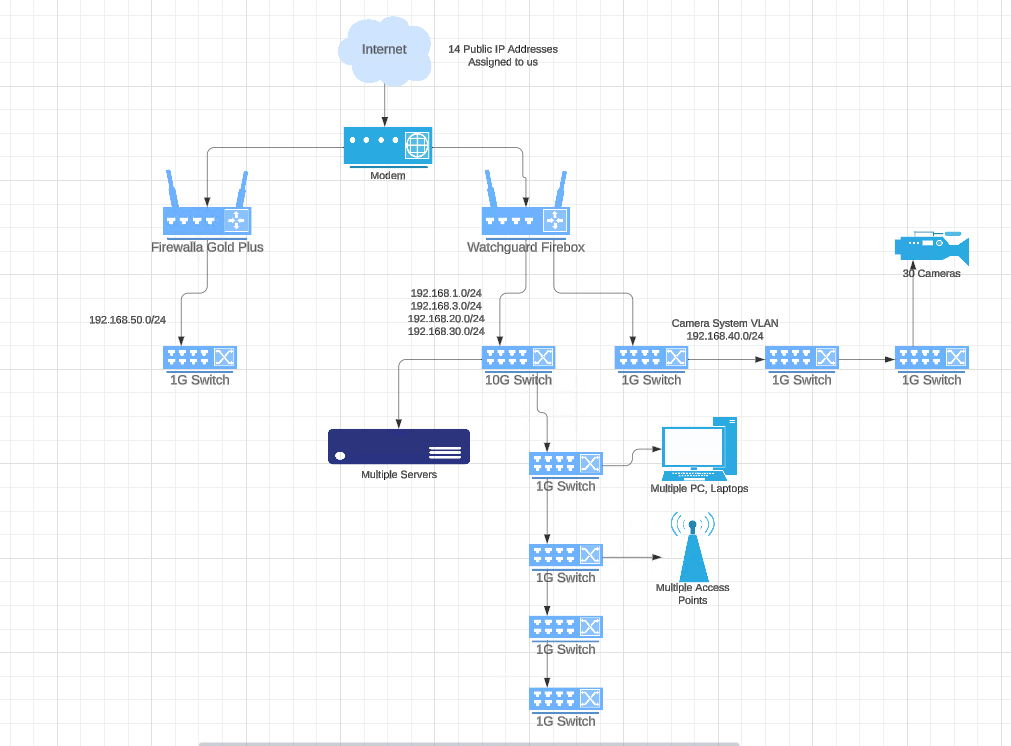
Am I able to bridge the two Networks together with a physical cable?
The Firewalla will hold the 192.168.50.0/24 network as a "Untrusted" network. It will not be able to talk to any other Internal Network, but the 192.168.1.0/24 network will be able to access it.
We would like to start moving some other networks to Firewalla and see how it handles it, but we need to move them slowly, and possibly start by moving a switch over one by one. We have multiple 24/48 port switches that we could move over one at a time until we eventually have everything moved to the Firewalla.
Thoughts? Suggestions?
-

One way is to configure the Gold / Pro in bridge mode, this way, you can have it inserted, without doing the layer 3 part. https://help.firewalla.com/hc/en-us/articles/1500012304202-Firewalla-Transparent-Bridge-Mode
-
But in bridge mode, it is still under the Firebox and will still go though the firewall on the Firebox. We want to start seeing how the Firewalla will preform in Router mode. We have a Public VLAN that we might transfer over, only issue, it's on all the Access Points that are on the main Lan Trunk that goes into the Firebox.
We have a "Trusted" internal VLAN that we use, could I create a VLAN on the Firewalla that does not issue DNS or DHCP that can be connected to the Switch? Assign it a IP address from the Trusted VLAN (From the Firebox) which I could then route traffic that needs to access the 50 subnet to route though that trusted VLAN?
-
Both,
For the Lan/Vlan 500 that will be running on the FWG+ it will be the router for that network. The other networks for now will still reside on the Firebox. I would like to be able to contact the VLAN 500 that is on the FWG+ from the Firebox. If I can create a link like this between the two networks (Same physical location), then this will allow us to Test and Move networks slowly, without disrupting the clients/computers on the Firebox.
My Computer has an IP of 192.168.1.118 which resides on the Watchguard Firebox. I will need to access a server that is on the FWG+ in the .50.0/24 network. I'm wondering, if I create a VLAN 200 on the FWG+ that has an IP address of 192.168.20.5 set (with DHCP on that VLAN on the FWG+ turned off) and I connect that port to my Watchguard Firebox (which already has VLAN 200 set up), and I set a static route in the Firebox that says, anything for the .50.0/24 network to route through .20.5 will that work?
Once/If I get this setup working, we could move our VLAN 300 which is currently set up through the Firebox over to the FWG+, then I could in theory do the same as I am doing with the VLAN 500 .....
This way, I can slowly move devices / networks to the FWG+ and eventually unplug and remove the Watchguard Firebox completely.
-

This workaround is doable as long as Firebox can route the traffic to FWG+ without NAT. FWG+ won't block local traffic across VLAN. No more rules required on FWG+. Some suggestions may make the process more smooth:
1. Before adding the physical connection, turn off the DHCP server for VLAN 200 on the FWG+.
2. Before adding the physical connection, double-check and make sure FWG+ has an IP different from your Firebox in VLAN 200. FWG+'s IP is configurable in Firewalla App.
3. DNS can't be turned off for specific networks on FWG+. But if your device gets IP from Firebox, there is no chance that FWG+ will get DNS queries. One thing to bear in mind: you might need to access .50.0/24 via IP from Firebox when FWG+ can't see DNS queries.
During the slow migration, you can also tune the route in Firebox to have FWG+ handle more traffic.
-
In case anyone comes looking for something like this. We are able to route traffic between the two different firewall's.
Our current setup is
FWGPro
Networks
LAN 1 (192.168.61.0/24)
Link (192.168.60.0/24 VLAN) [Link to the WatchGuard Firebox]
Servers (192.168.62.0/24 VLAN)Watchguard Firebox
Networks
Primary (192.168.1.0/24)
Chatt (192.168.3.0/24)
Private Wifi (192.168.20.0/24 VLAN)
Public Wifi (192.168.30.0/24 VLAN)
Camera (192.168.40.0/24 VLAN)We have a physical cable that connects from the FWGPro to the Watchguard. The FWGPro has static routes in place that route all Watchguard Networks to the "Link" network with a NextHop of 192.168.60.1
Same in place on the Watchguard. It has static routes to forward all FWGPro subnets so the Link network with a NextHop of 192.168.60.2
We now have two different Networks in the same Physical Location and we have been slowly moving computers from the WatchGuard Network to the FWGPro network. Right now, we are operating with about 50% of our computers on the FWGPro and so far all tests have been positive. The people that are on the FWGPro network have noticed a big increase in speed (LAN and WAN) and we have even been able to block some Malware and Phishing attempts because of the device being on the FWGPro.
Please sign in to leave a comment.
Comments
8 comments