Network Topology & Firewalla Product Selection

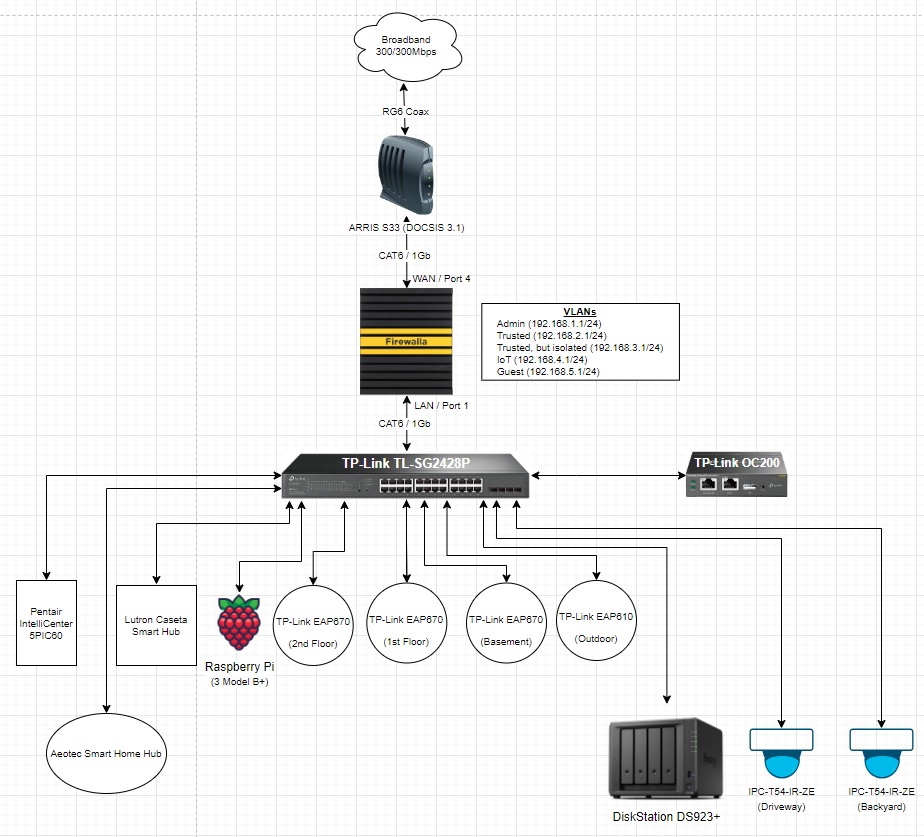
Hi All - I've attached a copy of my network for reference, but in short there's 30-35 clients and ~10 of these connected directly to the switch. This is all conceptual right now as nothing has been purchased. My thought is I should get the Firewalla first and configure everything before on-boarding all my network components? As you can see, my Firewalla will act as the router.
Reviewing the Product specs it seems Gold SE is more than adequate for my network. VPN use will be very limited. I don't see us going over a 1 Gb connection any time soon as 300 Mb is fine for us right now. Anything you're seeing that would lead you to lean towards the Gold or Gold Plus?
If you see any other topology issues, please let me know. Outside the VLANs I think it's pretty basic. Thanks in advance for any help/support!
-

If your switch supports it, you can set up a LAG between the Firewalla and the port using Firewalla ports 1-3 and trunk all the VLANs over it. That might give you more performance, and will give you some redundancy in case one of the switch ports, Firewalla ports, or network cable fails.
-
Hi David - Thanks for chiming in as I hadn't considered this before.
Forgive my ignorance, but if I aggregate 3 ethernet ports and assign the LAG to Firewalla's WAN Connection wouldn't I also need 3 ports on the modem too?
I also thought Firewalla doesn't allow VLANs on WAN LAGs? If true, I wouldn't do this as I want FWG to manage all the rules/routing.
-

@ED
David R. is talking about adding two additional ports off the TP-Link switch and attaching them to the Firewalla Ports 1 & 2. Then configuring them as a 3-port LAG for more bandwidth when routing between VLAN's (i.e. admin to trusted). This has nothing to do with the WAN (Port 4) which goes to your service provider.

Please sign in to leave a comment.
Comments
7 comments