Help us make the Firewalla AP

Pinned Featured

Comments

648 comments

  • Avatar
    Alec Sutherland

    My guess would be most Firewalla customers would want a ceiling or wall mount AP, but you could add a little stand for table tops!

    0
    Comment actions Permalink
  • Avatar
    Firewalla

    Although it is possible to use ceiling mount AP on a table, it is really the antenna radiation that's different between the desktop version and ceiling mount. (one is radiating all sides, and the other is focused down)

    0
    Comment actions Permalink
  • Avatar
    gripper.grantor0o

    I sure hope the ceiling mount doesn't primairily radiate down! 

    0
    Comment actions Permalink
  • Avatar
    MGJ

    @Alec Sutherland, my guess is the exact opposite.
    How many home users are able to pull wires through the ceiling without redoing the drywall and paint? Almost none.

    0
    Comment actions Permalink
  • Avatar
    DummyKid

    my house is not wired, so I am not going to pay thousand dollars to run cables through the ceiling for new APs. I would rather spend more on desk units. Labor in the Bay Area California is expensive, if I want to put new cables, I would just pull the cable to each room, then I am talking about a lot of money on labors.

    0
    Comment actions Permalink
  • Avatar
    Andre

    I live in the area where airplanes sometimes turn around for landing on to local airport, although the airport itself is far from my home, if I’m using WiFi routers with omnidirectional antennas like desktop units some people want, part of 5GHz spectrum is blocked automatically to avoid interference with airplanes landing radar systems, and because of that most neighbors WiFi radios are crowded on frequency’s not affected by this restrictions, so because of that the 5GHz spectrum is used inefficiently. But with ceiling WiFi access points, with antennas with signal radiation predominantly downwards, I don’t have this problem and I can utilize those frequencies without restrictions.

    Thats why I need a ceiling unit 

    0
    Comment actions Permalink
  • Avatar
    Firewalla

    You are likely talking about DFS. I don't think it is related to AP radiating up or down; it is only triggered when radar signals are detected, automatically kicking devices off the DFS channels.

    0
    Comment actions Permalink
  • Avatar
    Firewalla

    By the way, the survey you see at the beginning of the thread is meant to help us decide what's important to the community. For example, most of the surveyed are interested in a desktop unit, and next is a ceiling mount, followed by a wall mount. 

    This is the reason we are releasing the ceiling mount two to three months after the desktop unit. 

    0
    Comment actions Permalink
  • Avatar
    Andre

    And my previous message is Pending approval

    0
    Comment actions Permalink
  • Avatar
    DummyKid

    I am living next to the SFO, and I have WIFI6 with UNII-4 wireless backhaul, NO issue on DFS coz UNII-4 channels are excluded from DFS.( channel 149 to 177). just wish WIFI7 won't have this issue


    0
    Comment actions Permalink
  • Avatar
    Andre

    Yes it is related to AP radiating up or down. When I rotate my AP facing up it is detecting radars signal, and when I turn my AP facing down it is not detecting those radars signal, believing or not.

    0
    Comment actions Permalink
  • Avatar
    peter Davies

    Hello,

    I have absolutely no interest in Wifi7, mostly because it's worthless, it's nothing more than a chipset change. I've been sitting in on a number of seminars and Wifi7 workshops and there's nothing that excites me here. First, nothing in the home network, at current, can support the speeds. Second, The bottleneck is at the RG and ISP. Third, with exceptions, most residential customers are not going to purchase of even understand the concept of Wifi7 and won't purchase the equipment necessary to overcome the speed limitations of the rest of the home network.

    Firewalla, I would wait for Wifi7 to become a little more "baked" and sorted out before you jump on the bandwagon. And besides, Wifi8-9 and, dear god, 10 is on the horizon.

    0
    Comment actions Permalink
  • Avatar
    DummyKid

    @Peter Davis

    I am on board with you, but I am only interested in the WIFI7 MLO and AFC because it can do wireless backhaul with all the radios. HOWEVER, non of the companies can fully cook the MLOP and AFC feature (Asus, UNIFI, ORBI etc). yea, probably I am the only person who is interested in the wireless backahaul. 

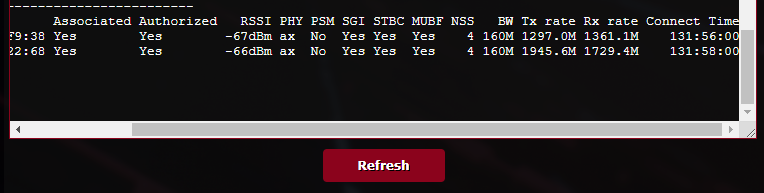
    Right now I am using Asus Routers with UNII-4 channels (channel 149 to 177) for wireless backhaul and MESH speed is stable above 1200Mps/1200Mpbs between 3 units. ( main unit in my office, 1 unit in my garage 30 ft away, another unit is at the end of the house, 30 ft away, with mutiple walls)
    0
    Comment actions Permalink
  • Avatar
    Firewalla

    There are two parts to the Firewalla WiFi 7 AP.

    1. The software integration with the Firewalla. And all the fun things that come with it (layer 2 + layer 3)
    2. And all the cool things WiFi 7 hardware has to provide. (Yes, it is fast ... )


    1
    Comment actions Permalink
  • Avatar
    ejfahs

    Any update on approximate timelines? So far I’ve ripped and replaced wifi7 AP’s from ASUS, TPLINK, and Ubiquiti. Would love to see this come to fruition sooner than later. Also happy to beta test for ya.

    0
    Comment actions Permalink
  • Avatar
    Firewalla

    If we sign the contract this month, the early access units may arrive in late December (in limited quantity). We may do a quick early access sale where the hardware is production quality and the software may be 'early access.'

    From software perspective, we already have something running for a while now. Most of our team members have been using it for a while. The 'firewalla' magic still need a few more touch-ups and cleaning

    2
    Comment actions Permalink
  • Avatar
    Andre

    Firewalla

    December 2024 ?

    0
    Comment actions Permalink
  • Avatar
    Firewalla

    Yes, December 2024 (desktop version, USA only). We are pretty excited, as this 'side' project has been around for so long! We started playing with WiFi 6, then 6E, and now 7 is more real :)

    (disclaimer: not finalized date, and not official date)


    0
    Comment actions Permalink
  • Avatar
    Andre

    Will come with internal antenna or external? I meant the desktop version.

    0
    Comment actions Permalink
  • Avatar
    Firewalla

    Sorry, no hardware details until we sign the contract ... otherwise, I may disclose the wrong thing

    0
    Comment actions Permalink
  • Avatar
    thernus

    Looking forward to this, I have tired a bunch of WiFi AP and Routers (as Access Points) over the years.

    Unifi, Asus, Synology, Orbi Pro and got rid of them all as they just don't compare at all to a pair of Alien Routers I got back in 2020 along with the FWG (now a FWG-Pro)

    Desktop units in the cylindrical format would be my preference, like the Alien with at least tri-band (quad-band with two 5Ghz radios would be great though!) Ceiling mounted units just don't have the range like desktop units do.

    Little disappointed US only at first though :(


    0
    Comment actions Permalink
  • Avatar
    Firewalla

    USA only is due to certification timing (FCC certification) and later CE (two months later)

    1
    Comment actions Permalink
  • Avatar
    thernus

    @firewalla

    I guess I will have to wait then ha!

    Might of missed it but will the units have all the 2Ghz and 5Ghz bands available? I have the Wi-Fi SD and it only has 2Ghz up channel 11 and 5Ghz no DFS

    0
    Comment actions Permalink
  • Avatar
    John

    @firewalla, do you have an expected range for a single unit (in square footage I assume) at this point? Wondering if that is known, or at least if it’ll be part of the spec when it’s released.

    0
    Comment actions Permalink
  • Avatar
    Firewalla

    I personally don't like to quote 'square footage' + wifi. Here is the logic, are you happy with 20mbit/s? or 200mbit/s? And that really governs how many units you need. If you need gigabit every where, you need more units, if you are okay with 10mbit, you need lesser. 

    0
    Comment actions Permalink
  • Avatar
    John

    While that makes sense, too many meshed units can be detrimental. It’s a bit more difficult to return a few too many firewallas vs a couple extra eero.

    0
    Comment actions Permalink
  • Avatar
    Firewalla

    Yes, too many AP's if not deployed correctly can be an issue as well; my suggestion is to start slow and optimize.  

    If you are playing with APs now, the firewalla WiFi test can help a lot. And once that tool integrates with firewalla AP (of the future), it will be a bit easier to measure coverage. 

    0
    Comment actions Permalink
  • Avatar
    John

    Thanks. I would love to ‘get it right’ during the first iteration, because in theory I’ll be completely replacing my home’s WiFi. It sounds like it’ll be a limited run, so if I don’t order the correct number off the bat it may mean subpar performance with no way to address in the short term. That’s not a good spot to be in!

    0
    Comment actions Permalink
  • Avatar
    DanM

    Is there any possibility the Hold Pro update will provide ability to interact / configure an existing Omada managed switch or AP’s? I assume no, but wanted to ask.

    0
    Comment actions Permalink
  • Avatar
    Firewalla

    @john, do you have a sense on what kind of performance you are looking for? That usually dictates the number of AP's you need. For example, I am fortunate enough to have 3 Firewalla AP's running and I place them so I can get a minimum 50mbit at the worst spot in the house + at least 20mbit in the yard. 

    0
    Comment actions Permalink

Please sign in to leave a comment.