DHCP Options 66 & 67

Hello,
I'm trying to setup my FWG with DHCP options 66 and 67 to setup a FOG imaging server. Although it allows me to add these options they do not appear to be working correctly as clients cannot boot. They get a TFTP Timeout error. For purposes of testing, I turned off DCHP on my FWG and setup a separate DHCP server (dhcpserver.de) with the exact same DHCP options and clients can boot and receive the tftp file no problem.
I found an old post, but not sure if it still applies. Is this a bug? Any way I can get this to work with my FWG?
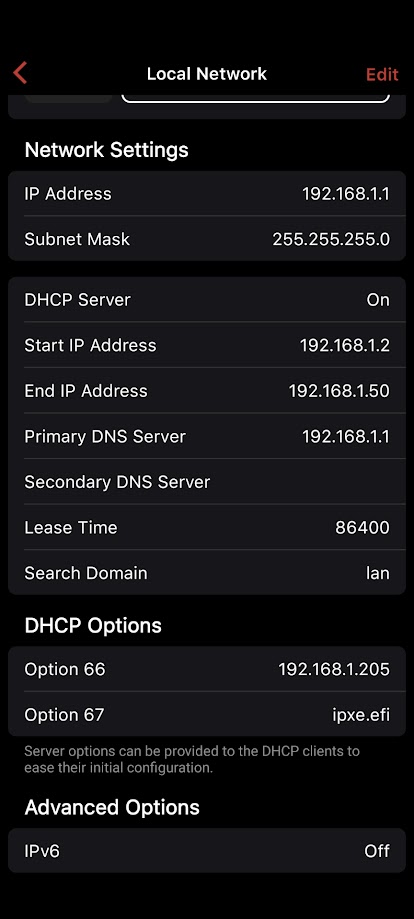
-

@Robert Thank you so much for your feedback. A bug has been found that is causing issues with DHCP options 66 and 67. I've forwarded this post to our development team, they are actively working on this issue. If you don't to wait until the next box release, please send us an email at help@firewalla.com, and our support team will help you fix the issue on your box directly.
-

Hi Support,
Any update on this Netboot DHCP options issue ? I have the same issue and I noticed that the DHCP option 67 is working but not option 66. It doesn't honor the IP address I have provided and it keeps connecting to the DHCP Server. For example
DHCP Server: 172.100.16.1
Netboot Server: 172.100.16.2
Netboot file: netboot.xyz.pxeWhen booting from a VM, i saw it is trying to connect to tftp://172.100.16.1/netboot.xyz.pxe instead of 172.100.16.2
-
Hi, sorry for the inconvenience. The issue has already been fixed on box version 1.978 and is now in the Early Access stage. If you can't wait to try it out, please join our Early Access program.
More information about this new release can be found here: https://help.firewalla.com/hc/en-us/articles/22912094066707

Please sign in to leave a comment.
Comments
5 comments