Firewalla Gold - VPN setup to treat identically to onsite

I have a Firewalla Gold running in Router mode and I am trying to figure out how to setup the VPN Sever (wireguard, or OpenVPN) so that it acts identically to me being on site.
I have both OpenVPN and WireGuard running right now, but it doesn't act the same as being on site in the ways described below.
Config:
Firewalla Gold in Router Mode
Networks:
LAN (10.16.0.1/22)
OpenVPN (10.50.105.1/24)
Wireguard (10.200.92.1/24)
Issues:
My LAN has DHCP DNS server 10.16.0.1, I cannot ping the DNS server
I have local servers that I cannot access using DNS names, only via IP when connected via VPN. When Local I can access by typing server.lan vs 10.16.0.22
Are there settings I can change to make this work? I tried adding rules to allow VPN to communicate to/from LAN
Thanks,
Andy
-

For the VPN Connections, are you tunneling all traffic through the VPN or is it split-tunnel?
Example, I have WireGuard set up. I have my phone set up to route all traffic when I leave my network. I use a windows dns server (192.168.2.2) but my DHCP is the Firewalla (192.168.2.1). I can access devices I have set up in my DNS by name (I haven't quite figured out how to get the Firewalla [DHCP server] to update my Windows DNS with the device names yet). I had to manually edit the WireGuard config and adjust the DNS setting to point to my DNS server.
Another device I have set up as split-tunnel. Meaning all normal traffic is not routed through the VPN, only the IP addresses I've specifically added into the WireGuard Config (under AllowedIPs directive). Again I had to update the DNS setting in the WireGuard Config to point to my DNS Server.
From what I've ready, you can supply the "search domain" in the list of DNS parameters. I don't have mine set this way, but from the WireGuard manual it would be DNS=<ip_address>, <search_domain> for example in my case it would be `DNS=192.168.2.2, jameswillhoite.com`
Hope this helps
-
For simplicity I have all traffic through the VPN, no split-tunnel.
I edited the WireGuard configuration to point the DNS at the Firewalla DNS server for that intended LAN. I am unable to perform any Pings of IP addresses on the LAN when VPN'd in.
For example,
Firewalla LAN 1 DNS is 10.1.1.1
Local file server is 10.1.1.12
When I VPN in, I cannot ping 10.1.1.1 or 10.1.1.12
It seems like Firewalla makes Wireguard VPN a separate network (WireGuard 10.12.1.1) and I can't find a way to alter that or create the appropriate tunnels to allow it to act like I'm on site.
-

Have you checked the WireGuard VPN server "port forwarding"? And see if it is setup correctly?
Next, you said the problem only happens on site? can you check the IP numbering on your Firewalla and your LAN (where you VPN from) and make sure they don't clash? (we see many people use 10.x.x.x/8)
-
The problem happens when I am offsite and VPN to onsite. It doesn't appear to be an IP address issue, my work networks are all 10.16.x.x, Wireguard is 12.138.x.x and my home networks are all 192.168.x.x. Hotspot also has no luck.
How should I configure port forwarding to support? I have the default WireGuard VPN server settings (UDP 51820 port forwarding). Are there other rules that should be in place to allow it direct communication with my local network?
LAN1 is the local network I want access to (10.16.x.x).
After no success to begin with, I added the following rules which didn't help.
1: Allow Traffic from & To Wireguard on Network LAN 1 Always
2: Allow Traffic from & to LAN1 on Network Wireguard Always
-
You said you are routing all traffic through the VPN. When you are connected and you go to whatismyipaddress.com it should show you the Public IP address of your Firewalla Gold. Does it?
If so then you have a connection to the Firewalla Gold, and are able to get to the Outside World. WireGuard will show as connected even if it doesn't actually have a "link". I've run into this a few times even on cellular data. My WireGuard on my iPhone will show connected, but it doesn't actually have a connection. Happens to me all the time at an amusement park called "Kings Island" in Ohio. For some reason I have to turn my WireGuard off when I'm there (5G and 5gUW). If I switch to LTE it works fine.. Their Wifi must block the WireGuard VPN protocol.
You are trying to ping the router (FireWalla Gold) do you have ping enabled? In the Firewalla app hit the cog (gear icon) in the upper right corner, then Configurations, Block ICMP (Ping), if any of these are turned ON then it will block the ping request to the .1 ip address. Turn OFF to ALLOW ping request.
Depending on if the device you are trying to ping is a Windows 11 computer, you might need to make sure that the computer allows ping request too. I think by default it is turned off. (Quick google finds this page as top hit https://www.wintips.org/how-to-allow-ping-in-windows-firewall/)
One last thing to check, if you changed the DNS in the WireGuard Server (The Firewalla App) after you created the Client Config file, then you will need to make sure the Client Config has the new DNS server to be used. Make sure they match.
-
Below VPN refers to WireGuard VPN
Fixed a couple issues but not all the way there.
ICMP was blocked on Wireguard, so turning that on allowed me to ping the FIrewalla Lan1 DNS (10.16.0.1)
mDNS was disabled on Wireguard, so turning that on allowed me to access the server using "server.lan" instead of its IP address.
whatismyipaddress verified that I am tunneling all traffic through the VPN tunnel, it shows as my work location when VPN is ON and my home location when VPN is OFF.
My remaining issue is that the software license manager I'm trying to access wants to communicate with port123@DESKTOP-1234 which is on LAN1. Over VPN I still can't ping DESKTOP-1234 or DESKTOP-1234.lan
I have rules setup to allow port123 and port124 to have bidirectional communication between LAN1 and Wireguard, as well as general bidirectional communication between LAN1 and Wireguard.
I am not well versed in NAT or other port passthrough protocols, that may be where I need to look next. Any ideas?
-
Good to hear you got the other parts to work. As for the last requirement, is the VPN.client1 a Domain Computer? When the computer is connected to VPN, open a terminal and type in `nslookup DESKTOP-1234.lan" and see what it comes up with ..... it might not know to look through the VPN for the DNS.
Here is an example. From my Work Computer (VPN is Split-Tunnel) if I do `nslookup ubuntu.jameswillhoite.com` it returns my Public IP Address because I own the domain jameswillhoite.com. My Work computer used it's own DNS to do the lookup, now if I specify that nslookup is to use my DNS at home via the command `nslookup ubuntu.jameswillhoite.com 192.168.2.2` then it returns the internal IP address of the computer.....
In otherwords, make sure the DNS on VPN.client1 is pointing/using the WireGuard DNS (Or whatever DNS you have set up in the WireGuard Server).
-
I started with getting the DESKTOP-1234.lan Ping to function. This was easy, just fully disabled windows Firewalla on DESKTOP-1234.
It now responds to a CMD line "ping DESKTOP-1234.lan" request, but it does not respond to "ping DESKTOP-1234"
CMD line nslookup for DESKTOP-1234.lan is successful and returns the IP address from LAN1 DNS (10.16.0.1), but nslookup for DESKTOP-1234 is not successful.
I updated DNS to enable unbound DNS, and added a static route for "DESKTOP-1234" to its static IP. I can now receive the correct IP address when using nslookup DESKTOP-1234, however ping DESKTOP-1234 and the actual license retrieval still fail.
-
This is expected. You are on a totally different Network. It is looking for DESKTOP-1234 on the WireGuard Network, which doesn't exist.
Does the licensing server/softwre not allow for a FQDN? Can you not put in DESKTOP-1234.lan into the configuration?
Otherwise if you can edit the host file on the computer to make sure that DESKTOP-1234 always translates to IP 1.2.3.4
If on Windows open up Notepad in Administrator Mode, then open the file located at C:\Windows\System32Drivers\etc\hosts
Then put in the IP Address of the DESKTOP-1234 so the entry will look like
1.2.3.4 DESKTOP-1234 DEKTOP-1234.lan
This way you can put in DESKTOP-1234 or DESKTOP-1234.lan and it will always translate to that IP Address. Just confirmed this by adding a computer/ip for my home network on my work computer, went to command prompt and typed in `ping dper710` and it was successful to ping a ip address that is on a completely different network that when through the VPN.
-
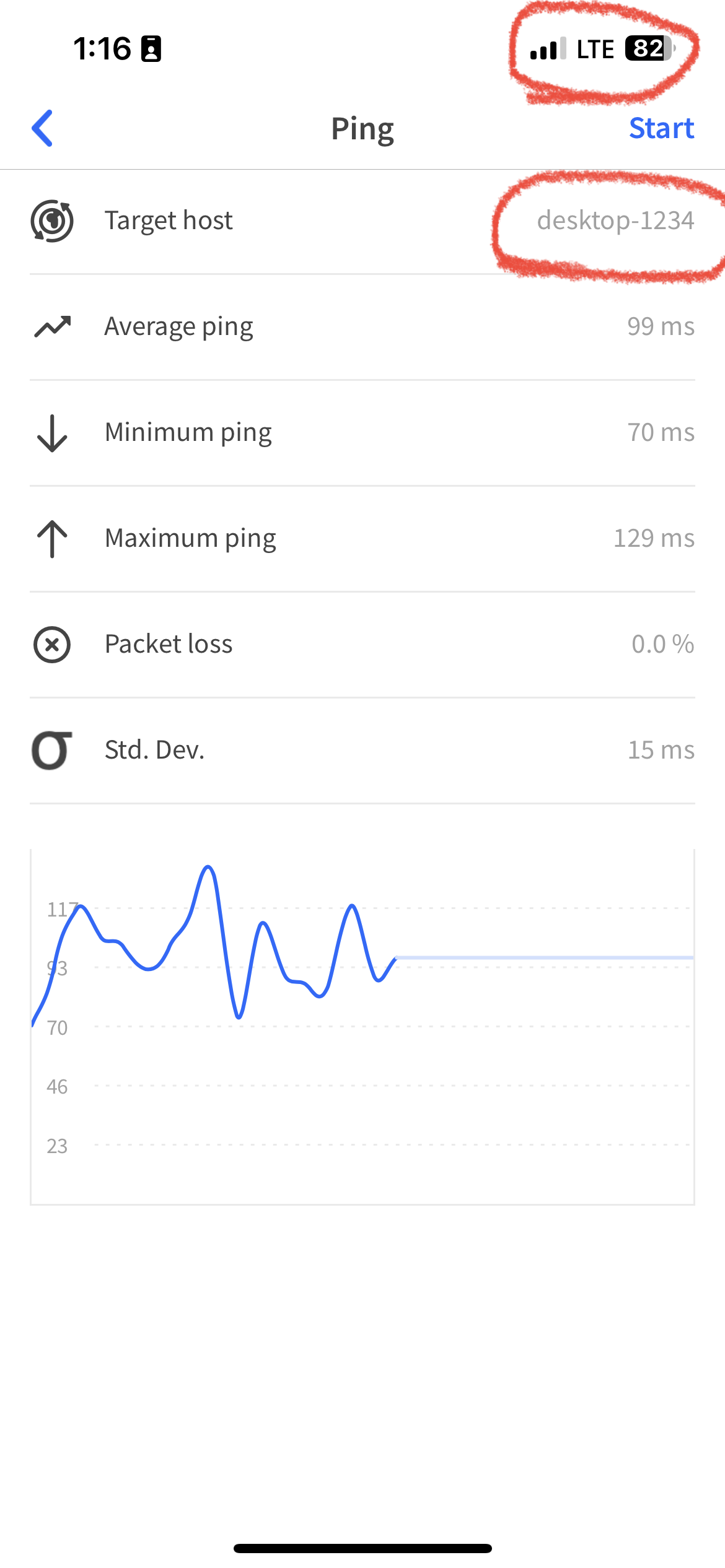
Try this, I just went into my Firewalla UI, go to "DNS Service" then "Custom DNS Rules" then "Add Custom DNS Rule" and for the "Matching" Domain type in DESKTOP-1234 (It will warn that there is not a public domain and are you sure, say yes) then type in the IP address of DESKTOP-1234, then save.
I tried this and it was successful on my iPhone that was on Cellular and had ALL traffic going through the VPN tunnel.
-
The CustomDNS in Firewalla didn't fix it. I tried that earlier and tried it again with no luck.
Modifying the "hosts" file fixed the issue. Thanks. I was hoping for a more global solution, but this isn't too bad and it works. If anything, it will help me control who has access to this software.
The license server is unfortunately very buttoned down by the company whose software it is distributing. I can't make updates there.
Thanks again for your help.
Please sign in to leave a comment.
Comments
14 comments