Minecraft Server Disconnect

I'm trying to run a Minecraft Server (MCS) locally for my kids and their friends. MCS is running on a Mac Mini as latest v1.20.1 and I'm trying to access it on the same network via Minecraft (MC) on an iPad. I'm running Firewalla Blue+ with latest v1.54.1 (1).
Problem is I can't access the server after trying many paths. I have to assume Firewalla is the primary culprit since its controlling the devices on the network.
The iPad MC simply shows a red dot for ping or an endless set of bars cycling so no connection at all regardless. If I hit the connect button, it tries for about 15 secs and gives up. This seems odd because all the tutorials I've found make it look so simple and there seem to be few forum entries about problems like this.
Things tried:
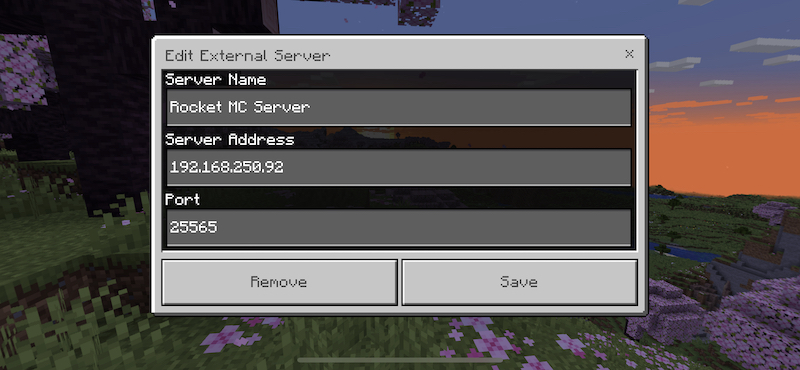
1) Tried running MC on iPad, then hitting Play button > Servers > create profile with the matching name of the MCS instance (the name entered after "server-name=" in the server.properties file for the Java server), "localhost" for server address, and matching recommended port of 25565.
2) Similar to above except used IP of the Mac Mini as shown in Firewalla.
3) Tried opening TCP port forwarding on 25565 for the Mac Mini via Firewalla (also tried the same for UDP).
4) Set Mac Mini's MacOS firewall to off in the Security & Privacy system settings.
5) Matched versions of MCS and MC running on iPad.
6) Tried turning monitoring off in Firewalla for both the Mac Mini and iPad devices.
7) Many MCS Java restarts after any server.properties updates, plus Mac Mini/iPad reboots and WiFi on/off ad nauseam.
I tried a couple things on my modem like similar port forwarding, but it's not part of a local network access scenario (as far as I know). I'm running mesh wireless nodes but it's in bridge mode and is only providing WiFi for Firewalla to set device IPs for devices on a secondary network (primary network is 192.168.1.x while the secondary is 192.168.250.x).
If I remember correctly, I could only get the Firewalla Mode to work in DHCP Mode. Simple and Experimental Simple wouldn't work for whatever reason. it's been a couple years though so it's hard to remember exactly why or what led me there.
Any help or clues to what to try are much appreciated!
-

If you are running in dhcp mode, you will need to port forward traffic from your Mac mini. See this https://help.firewalla.com/hc/en-us/articles/360017789393-Create-Port-Forwarding-on-Red-Blue-Blue-Plus
-
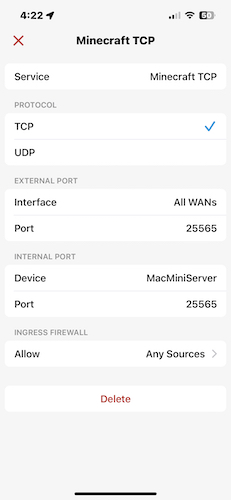
Thanks for the speedy reply (as usual :)! Pretty sure I've tried this as mentioned in 3) above. Part I'm not sure about is internal vs external ports. Since the Minecraft Server is set to use port 25565, wouldn't I use the same number for both int and ext ports when port forwarding on Firewalla for the Mac Mini? See attached image for forwarding setup.
-

hmm so you cant ping it, your pad is on a mesh network, assuming separate network.. Can you ping any device from the 2 networks?
How is your purple wifi configured?? I can only find how to set it up as a new network on my end.. I could be missing something tho... If that is the case you will need to build a static route from 1 network to the other. (I think)
-
If port forward is correct, please see this https://help.firewalla.com/hc/en-us/articles/360055686674-How-to-see-if-you-have-a-public-IP-address-
In case you don't have a public IP
-
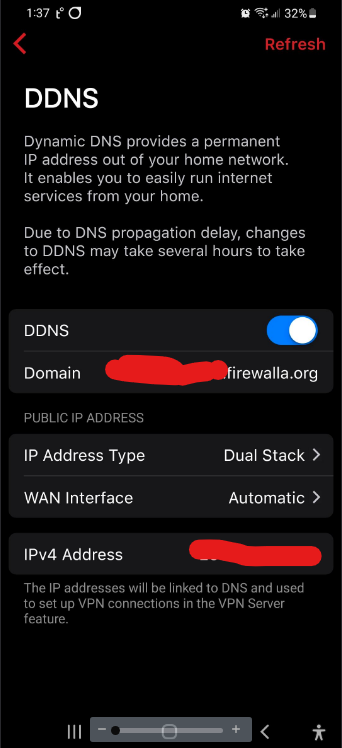
DDNS and the how to public IP doc above are concerning access from outside the network though, right?
That's a next step I'm assuming should not affect accessing the server from a node within the local network. Or does it?
Using a network util app I can ping the Mac Mini running the Minecraft Server from the iOS device running the Minecraft app. Both devices are on the same wireless network via a mesh system in bridge mode on the same ...250.x pool given by Firewalla via a Blue Plus.
If I can get it all running, I'll ethernet the server Mac Mini to keep it reliable. For now it's more convenient to run both over WiFi. -
Like to add that I mentioned in 1) in my first post here that setting "localhost" as the Server Address in the Minecraft client app is supposed to work when accessing a MC server on the same network.
So, even though I can ping the server from multiple devices, neither explicitly setting the server's local IP number or "localhost" works from the client MC app on my iOS devices. -
Both the versions of MCS and MC are running same 1.20.1 (I think I read somewhere that this is required).
Java v17.0.7 is current as far as I know (at least for what's available on a Mac running older MacOS 10.13 High Sierra).
MC Server properties (note that I tried explicitly setting server-ip=192.168.250.92 at one point but it didn't help):
#Minecraft server properties
#Sat Jun 24 14:21:26 PDT 2023
enable-jmx-monitoring=false
rcon.port=25575
level-seed=
gamemode=adventure
enable-command-block=false
enable-query=false
generator-settings={}
enforce-secure-profile=true
level-name=world
motd=Rocket Minecraft Welcomes U
query.port=25565
pvp=true
generate-structures=true
max-chained-neighbor-updates=1000000
difficulty=easy
network-compression-threshold=256
max-tick-time=60000
require-resource-pack=false
use-native-transport=true
max-players=20
online-mode=true
enable-status=true
allow-flight=false
initial-disabled-packs=
broadcast-rcon-to-ops=true
view-distance=10
server-ip=
resource-pack-prompt=
allow-nether=true
server-port=25565
enable-rcon=false
sync-chunk-writes=true
server-name=Rocket MC Server
op-permission-level=4
prevent-proxy-connections=false
hide-online-players=false
resource-pack=
entity-broadcast-range-percentage=100
simulation-distance=10
rcon.password=
player-idle-timeout=0
force-gamemode=false
rate-limit=0
hardcore=false
white-list=false
broadcast-console-to-ops=true
spawn-npcs=true
spawn-animals=true
function-permission-level=2
initial-enabled-packs=vanilla
level-type=minecraft\:normal
text-filtering-config=
spawn-monsters=true
enforce-whitelist=false
spawn-protection=16
resource-pack-sha1=
max-world-size=29999984 -
Unfortunately none of these changes to the server.properties file had any effect.
One interesting thing I noticed about Firewalla's port page on the Mac Mini server is 5 items not forwarded that I didn't add:
- microsoft-ds TCP 445
- kerberos TCP 88
- rfb (remote frame buffer) TCP 5900
- Unnamed TCP 49152
- Unnamed TCP 49165
I tried allowing them to forward but, again, nothing changes and I can't get the client MC apps to connect to the MC server.
-
if playing locally, port forwarding (normally) has nothing to do with LAN traffic. Its for WAN to Device Traffic.
soo lets rehash things.Your have 2 devices on same network, not one on hardwire, and 1 wireless correct?
You have disabled your macmini firewall, what about the tablets? Is it a apple, windows based, android? Does it have any antivirus or firewall. Does you macmini have a security suit maybe with a 2nd firewall?
You can PING each device. Can you log into your own server with same device for MC? what im saying is you macmini is running the server, have you loaded MC on it and tried to connect with localhost? or 127.0.0.1

Please sign in to leave a comment.
Comments
18 comments