Routing subnets statically connected

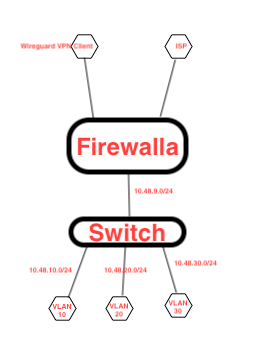
-

My requirement is
-
Everything below the firewalla should use wireguard VPN client for internet.
-
When I am connected to 10.48.9.0/24, I can go to internet via wireguard, but not from vlan 10, 20 and 30.
I'm not clear on your requirement. These seem contradictory. Are you saying:
- Devices connected to 10.48.9.0/24 use WireGuard to connect to Wireguard?
- Devices from VLANs 10,20,30 access Internet via WAN, not WireGuard?
- Devices from VLANs 10,20,30 cannot access Internet at all?
-
-
All the devices should take WireGuard VPN connection to go internet. But only 10.48.9.0/24 network routes through WireGuard and other network Vlan 10, 20 and 30 are taking my ISP.
Unless I am not understanding your requirement, this is a contradictory statement.
10.48.9.0/24 is a subset of all devices. So all devices are not going through the VPN. I think what you are saying is:
- All devices on 10.48.9.0/24 go through WireGuard VPN Client
- All devices on VLANs 10, 20, 30 must use ISP.
Is that correct?
-
Hi Vamsi,
In your Network Manager you do you have the following?
- VLAN A 10.48.10.0/24,
- VLAN B 10.48.20.0/24,
- VLAN C 10.48.30.0/24,
- LAN 10.48.9.0/24
If so, then you should be able to add three routes:
- Matching: Internet
ON: VLAN A 10.48.10.0/24
Interface: VPN Client - Matching: Internet
ON VLAN B 10.48.20.0/24,
Interface: VPN Client - Matching: Internet
VLAN C 10.48.30.0/24,
Interface: VPN Client
I don't think adding a route for 10.48.9.0/24 will be necessary because that is the default.
-
Hi Michael,
I am sorry, you are not following my question.
VLAN 10, 20 and 30 are not directly connected to the firewalla. These are in Cisco switch. 10.48.9.0/24 is directly connected between firewalla and switch. And I have static route to VLAN 10, 20, 30. I dont have any issue reaching these VLAN's from firewalls because I have static routes configured on firewalla to reach these VLAN's.
I am starting to understand, with firewalla we can only manage directly connected networks and not learned networks (static routes). Or may be I am missing something here. If this is true, I will need to move SVI's to firewalla.
-

Are you running it as a 'switch' or router?
For example, you have the .10.x address, is that defined in Firewalla? or it is defined in the cisco switch? if it is defined on the cisco switch, then you are running another router after firewalla. Can you confirm this?
Most of the time, firewalla will need to see the devices directly to manage it better.
-
Dear Firewalla,
I am not sure why are you not understanding the issue. I mentioned multiple time that my switch is doing inter vlan routing. I even attached the diagram in my post. Please read my post and commends. If firewalla contact manage static networks, it’s not not going to work for me. This is very simple network functionality easily doable by any firewall.
-

This is not supported yet. The reason is devices under .20/30/40 are not recognized as devices in Firewalla, so WireGuard VPN can not be applied to these devices. (It has to be a valid network/device in Firewalla app so that VPN can be applied to them)
The workaround, which I don't think it can apply to your use case, is to create NAT on the switch that all of them will appear like a single .9.x device in the app (the .9.x IP of the switch), then you can apply VPN on that IP.
Please sign in to leave a comment.
Comments
12 comments