Firewalla doesn't seem to really support routing

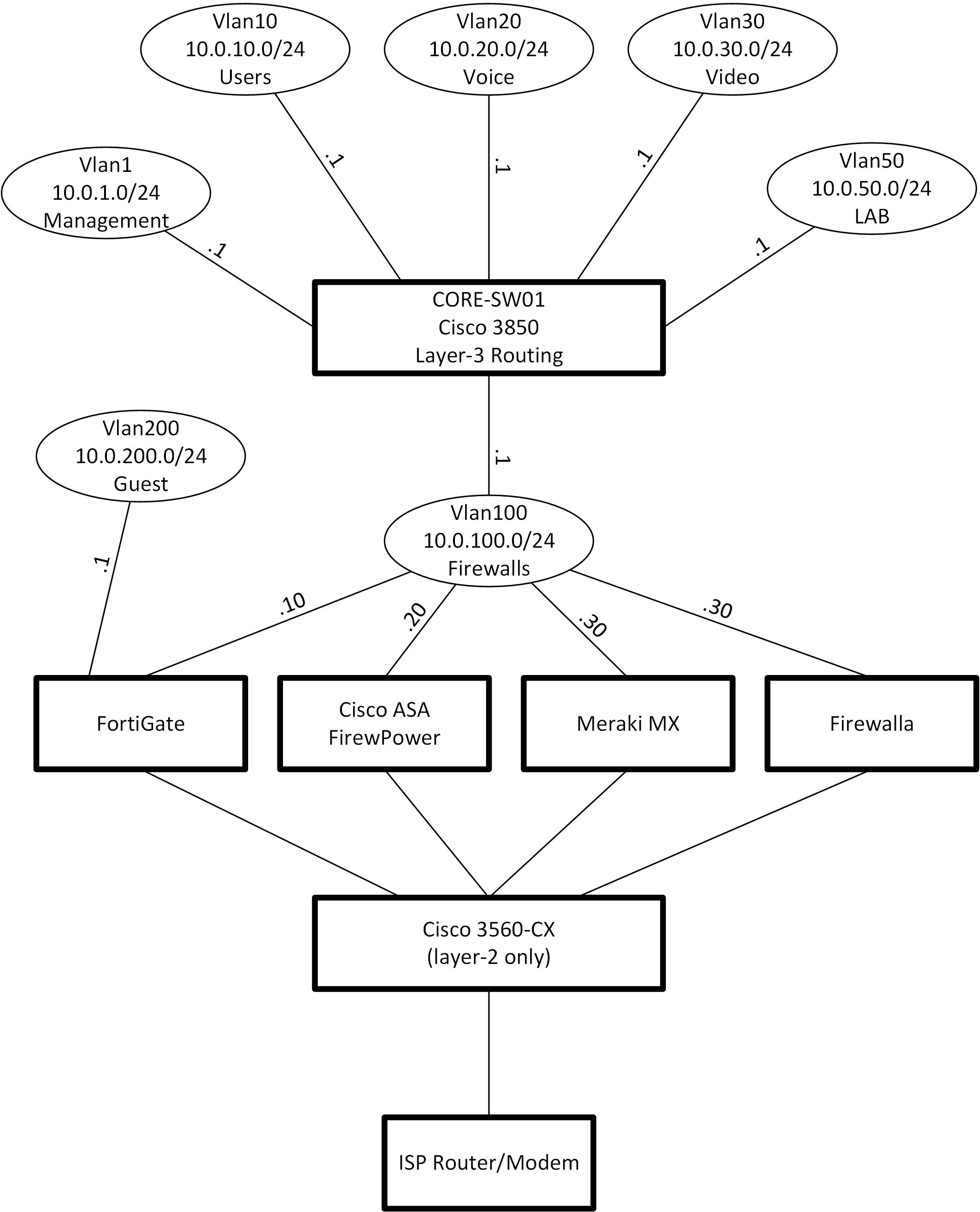
Just got a Firewalla-Gold (Rev B). I do networking for a living (Cisco, Fortinet, PaloAlto, CheckPoint, HP, Juniper, etc). My home network has several Vlans, all connected through a layer-3 switch. I have several Firewalls that I can switch through by just changing the default route on my core switch to point to this firewall or that.
I figured out how to add a route on the Firewalla to point back to my core switch, but there doesn't seem to be a way to add objects, like Vlans or subnets that I want to then allow through the Firewalla. What is the point of allowing routes to be configured if you cannot configure firewall policy for anything but what is directly connected to the Firewalla?
Requiring your users to connect all their Vlans directly to the Firewalla is a VERY limiting restriction. I am just looking for a firewall that can allow anything I put behind it to access the Internet, not just 1 subnet, directly attached to the firewall.
And for your firewall rules, you only allow the specification of "Matching". You can specific a subnet there, but is that the source or the destination? You don't seem to want to allow any source IP address except for what is connected directly to an interface so I have to assume that is the destination. Why would you build something so limited? I've got a 10 year old NetGear firewall that is more flexible than that.
I mean how can there not be an option to just add a "device" that would let you create an object for an internal subnet. Then create a rule to allow traffic on the LAN1 port, from that object, to some destination, for some service. This is firewall basics 101...
Very disappointed.
-
Typically on most firewall platforms I would configure objects (devices) for all the subnets on my network that I want to allow access to the Internet. Then in the firewall rules, I would specify those objects as the source, and "ANY" as the destination.
I could forgive a vendor for selling a product for $100-200 that is limited to allowing only what you connect directly to it. But there are a number of firewalls on the market for $500 that don't have such a restriction. I admit most of them are going to require you to pay for anual support to keep the features running, but that is why I wanted to give Firewalla a try.
I am also really confussed why you have the ability to configure routes on the Firewalla, if you cannot configure firewall rules to allow traffic from the sources you would be creating the routes for. If that is just to create a default route to point to your ISP, then why not just give a field where users can specify the destination gateway for a default route?
I added a route for 10.0.0.0/16. and pointed it to my core switch (10.0.100.1). So the Firewalla can send traffic towards my Core switch for my other subnets, but that would never happen because the firewall policy on the Firewalla will never allow traffic from any source except 10.0.100.x


Please sign in to leave a comment.
Comments
6 comments