FYI - Bell Fibe (get rid of the Bell Router)

Anyone in Canada with Bell Fibe (im running the gig version) if you want to get rid of the clunky router, all you need to do is tag your WAN port as Vlan 35, also there is the Tripple Play, so if you have all the services I suppose that will work also.
In my case, I could not negotiate with the media converter at gig, it would only lock in at 100MBs, so I used a couple of switch ports on a managed switch, tag those as Vlan 35 and you are all set.
Seems the Firewalla didnt like the Bell media converter auto neg, so the above works nicely.
I am getting pretty much wire speed.
PS) to Firewalla - would love the ability to static the WAN port to gig so I dont need to lay a managed switch in between (but love the device) - keep up the great work.
-
I most certainly did. Changed all layer 1, all i could get was 100mbs. The device im connected to is some sort of fiber gateway where bell splits the various services off into Phone (Pots), data (internet tagged to vlan 35), TV if I had it
I think the problem is in the auto-negotiation. Sure auto/auto is considered standard today, but i come from the old school networking where you static certain uplinks etc, to ensure there are no auto renegotiations on the fly, creating drops etc.
My managed switch is a Cisco SG200 series, and the ports to the bell fiber gateway are auto, and auto to firewalla - so definitely an incompatibility on either the bell or firewalla.
Just figured I would post, just in case others were trying to get rid of the bell router and go as direct as they can.
-

I have the Bell Hub 2000 here in Canada and I just ordered a Firewalla Gold and I want to make sure it will work when it gets here.
Can you provide more detailed step-by-step instructions on how to connect it to my office network?
I do have the Bell Hub 2000 going into a switch (HPE OfficeConnect 1820 48G Switch (J9981A)
Thank you
Jaime
-
Mine is a bit different as it is the business fibe, but I just setup a Firewalla on a Bell Hub....just get Bell to flip that into Bridge mode...when they do that, their box becomes a "dumb device" all their wireless and the rest is off. This is the best method, because then you avoid any double NAT
They will provide you with your PPPoE account and password.
Configure that as your WAN on the firewalla, and you are good to go.
-
I would highly recommend going bridge mode, and add your own wifi device. Trust me, the wifi in those routers are very basic...and with double NAT in place, you introduce complexity on the firewalla side if you need to open up ports to servers, VPN, etc...
The only way to get bridge mode is to call Bell, it is pretty quick. They have to flip something in the router which the average person cannot.
Then all you need is the PPPoE
If you are looking for good wireless, move away from the typical consumer grade stuff...I went Ubiquiti on the AP's, and have been really impressed. I was able to trunk some VLAN's off the firewalla, into some wireless networks and segment things like IoT, kids, personal.
There is some learning involved, so i would put this at about a 7-8 out of 10 on the technical scale....whereby being your average consumer-grade wifi device is like a 3.
Totally worth doing the above....otherwise you kind of lose some of the great features the Firewalla has to offer.
-
I would wager you do not, because the tagging is happening on the switch ahead of the modem. I have now been able to tag directly on the firewalla, so no need to have anything ahead of it. I go straight into the Bell switch, tag my WAN side at the firewalla, and done. Simple, clean.
-

Hi @Dave Komaromi - What exactly do you ask for when calling Bell to get them to put the gigahub into bridge mode? there's entire threads on the Bell website forums about how they cannot and do not support true bridge mode on it.
is there different services for business fibre and consumer plans?
-
I am running Bell Fibe, and have had it for a while, so cant say what the difference is on the residential side. If the box has the fiber directly into it, and nothing like my picture below, you may be out of luck - or really need to talk to bell and say put my router into bridge mode, then you need your PPPoE user name and password, and tagging to vlan 35.
the picture below would be traditionally ahead of the bell router, which in my case is not used, still sitting in a cardboard box.
The red cable goes directly into my Firewalla, which is tagging as vlan35, with PPPoE authentication.
So this Nokia box, essentially acting as a media converter. But obviously if I wanted a phone line, they would come off the POTS, and from my understanding if I wanted TV, would come off the Data into a TV converter, probably tagged as another vlan.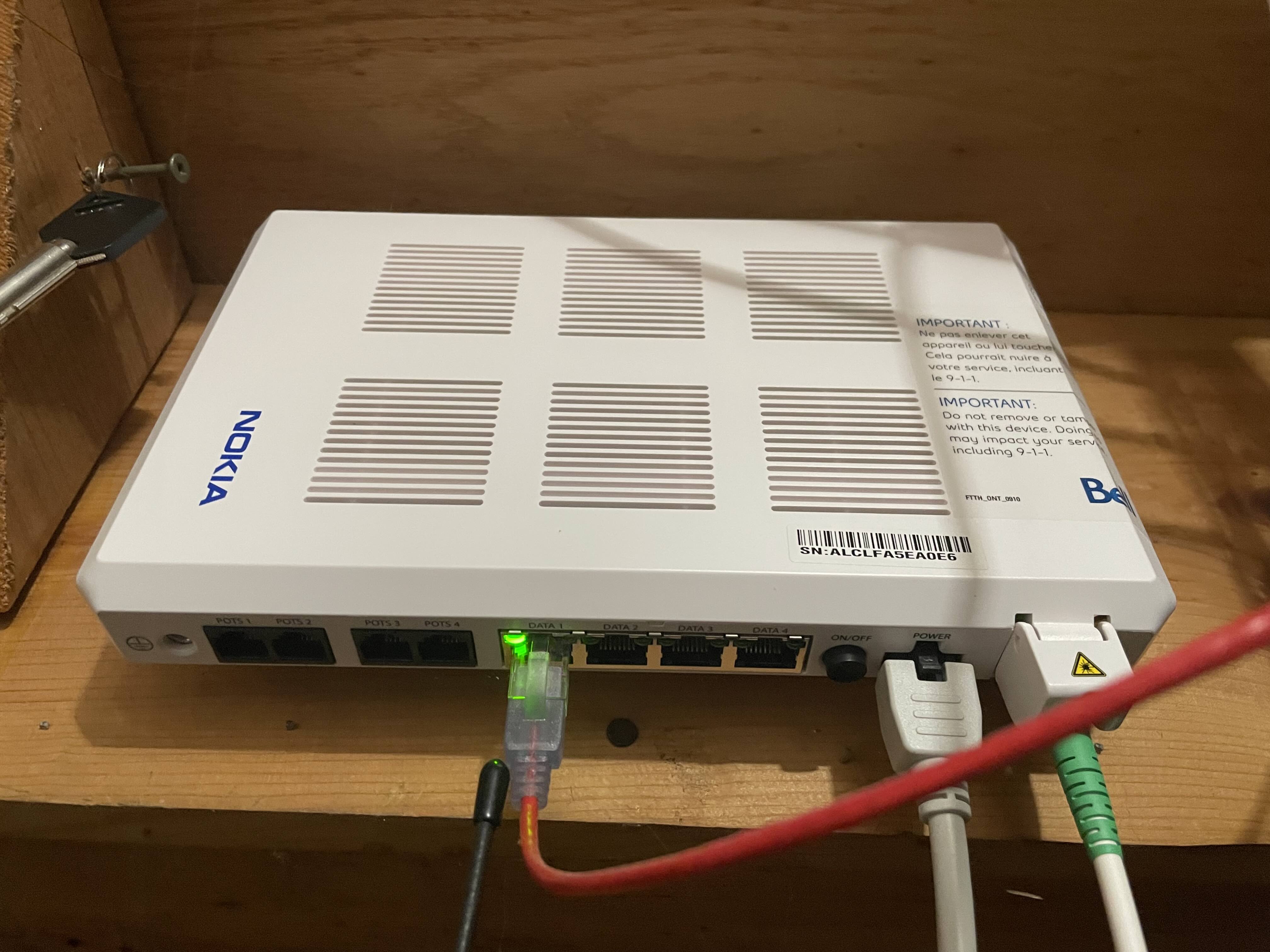
-
Ah, okay yes - the new box is different. Looks like you have had the service for quite some time!
The new Gigahub has an SFP module built right into it - making it harder to fully bypass without something like the WAS-110, which you need to Masquerade as the gighub.
Bell does support PPPoE Passthrough which doesn't need VLAN35 tagged to authenticate. however - it's not proper bridge mode as other services like TV and phone are still active in the Bell gigahub.


Please sign in to leave a comment.
Comments
11 comments