NGINX Proxy Manager - Docker Setup on FWG
Pinned
NGINX Proxy Manager is a fantastic and easy to use tool that enables you expose web services (such as Home Assistant, Sonarr, SABnzbd etc) on your network to the Internet using free auto-updating SSL certificates with Let's Encrypt, all via a shiny Web UI.
Running it on Firewalla is a perfect solution.
----
I have nothing to do with the project, but I’ve been able to get this working on my Firewalla Gold using the docker-compose.yaml I put together here.
Updated with learnings on how to control WAN viewable ports. LAN port (81 for management) is available without a route table command.
1. SSH into your Firewalla Gold and change directory to:
cd /home/pi/.firewalla/run/docker/
2. Create a folder nginxproxymanager :
mkdir nginxproxymanager
then:
cd nginxproxymanager
3. Create a docker-compose.yaml file containing the below.
I use:
sudo nano docker-compose.yaml
to create and edit this file.
version: '3'
# docker-compose.yaml file for NGINX Proxy Manager on Firewalla Gold
# More info at https://nginxproxymanager.com/
services:
  app:
    image: 'jc21/nginx-proxy-manager:latest'
    ports:
# Change 443:443 below to WAN ports you want to use for SSL connectivity
      - '443:443'
    environment:
      DB_MYSQL_HOST: "db"
      DB_MYSQL_PORT: 3306
      DB_MYSQL_USER: "npm"
      DB_MYSQL_PASSWORD: "npm"
      DB_MYSQL_NAME: "npm"
    volumes:
      - ./data:/data
      - ./letsencrypt:/etc/letsencrypt
    networks:
      default:
        # static IP address for nginxproxymanager
        ipv4_address: 172.16.0.2
  db:
    image: 'jc21/mariadb-aria:latest'
    environment:
      MYSQL_ROOT_PASSWORD: 'npm'
      MYSQL_DATABASE: 'npm'
      MYSQL_USER: 'npm'
      MYSQL_PASSWORD: 'npm'
    volumes:
      - ./data/mysql:/var/lib/mysql
    networks:
      default:
        # static IP address for database
        ipv4_address: 172.16.0.3

networks:
  default:
    driver: bridge
    ipam:
     config:
       # your chosen docker network here
       - subnet: 172.16.0.0/24
4. Further steps taken here to setup Firewalla docker and network connection:
cd /home/pi/.firewalla/run/docker/nginxproxymanager
sudo systemctl start docker
sudo docker-compose pull
sudo docker-compose up --no-start
sudo ip route add 172.16.0.0/24 dev br-$(sudo docker network inspect nginxproxymanager_default |jq -r '.[0].Id[0:12]') table wan_routable
sudo docker-compose up --detach

#
# Default NGINX Proxy Manager user/password (change on first use)
#

Email: admin@example.com
Password: changeme
5. Persistence! Make sure Docker and your container(s) load after Firewalla restarts. Note: Not sure if this works... a few times it hasn't loaded automatically.
Create file /home/pi/.firewalla/config/post_main.d/start_npm.sh
sudo systemctl start docker
sudo systemctl start docker-compose@nginxproxymanager
sudo ipset create -! docker_lan_routable_net_set hash:net
sudo ipset create -! docker_wan_routable_net_set hash:net
sudo ipset add -! docker_lan_routable_net_set 172.16.0.0/24
sudo ipset add -! docker_wan_routable_net_set 172.16.0.0/24
6. Make the new file executable: sudo chmod +x start_npm.sh
7. Test it runs by issuing: sudo bash start_npm.sh
Note: I use Cloudflare DNS-01 request for Lets Encrypt to avoid having to have port 80 open. This requires you to use a docker or similar DDNS updater that can keep your Cloudflare DNS up to date. Setup instructions for this are here: https://help.firewalla.com/hc/en-us/community/posts/1500001199002-Cloudflare-DDNS-Docker
Thanks,
Shane.
-

"I've noticed Purple works better if you put larger docker images on an SD card."
I use docker, but I'm not an expert on where it stores its images/containers, etc. However, I was going to ask exactly that. I installed a 64Gb SD Card and I'd prefer to use that space for all non-critical development. I invested in a SanDisk MaxEndurance because even when they aren't the fastest, they should resist more rewrites than the cheaper/faster models. However, I want to know were to store stuff before starting to use it. Don't plan to install anything beyond the NPM docker image, however.
-

Thanks for the great instructions.
I was able to follow them and get everything set up, accessed the web UI, added proxy host for a website and everything works great. However, when I try to add another proxy host for another site I'm getting a message that "mywebsitename.com is already in use" and it won't let me create another forward. Both sites are set up exactly the same and I can't find anything on the web regarding what causes this message. Any suggestions?
UPDATE. Problem solved. The other website was showing up as a "redirect host" this morning. Deleted the redirect and added to proxy host successfully!
-
Okay, I fixed the "already in use" issue above and also had to sort a couple of other things and now have a new issue.
I have 2 NGINX servers running on my network to act as web servers. One, we'll call it website1.com is on a Raspberry Pi and has the IP 192.168.30.171 while website2.com is 192.168.30.114 running on Ubuntu on a Mac mini. In NPM I have 2 Proxy Hosts set up, one for each.
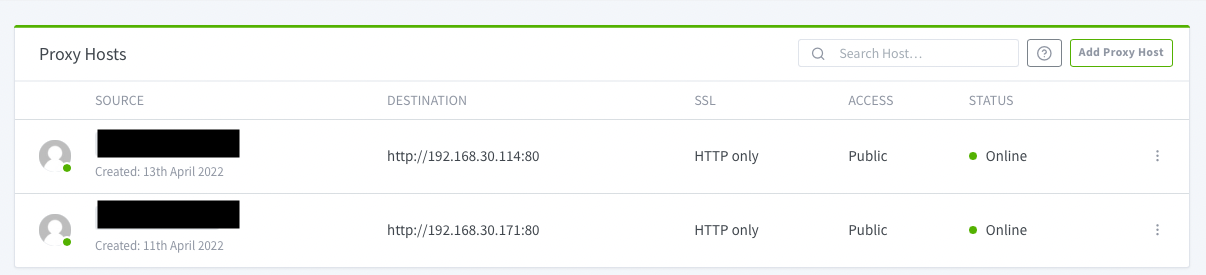
Both sites work correctly if I enter the local IP address into my web browser. If I enter the URL then website1.com takes me correctly to website1.com. However, when I enter website2.com it also takes me to website1.com, not website2.com.
Both domains are Google domains and I'm using ddclient on both the Pi and the mini to handle the Dynamic dns duties and point the url to my homes IP address.
Both devices have the same port forwarding on my FWG.
I'm pretty new at all this so I'm not sure if this is the best way to set everything up but if it works for one site and the second site is set up exactly the same I can't tell why it doesn't work for the second.
Any suggestions?
UPDATE: This still has me baffled.
I checked with my registrar and both domains correctly point to my residential ISP provided IP address. Both sites work great if I go directly to the local IP addresses on my home network. Because of this the disconnect seems to be in my Firewalla Gold settings, either in the Nginx Proxy Manager or in my port forwarding?
Here is what happens:
If I enter www.website1.com into my browser then it correctly goes to www.website1.com/Natalia/Welcome (the correct landing page as defined in my index.html file on that server for that website).
If I enter www.website2.com into my browser it goes to www.website2.com/Natalia/Welcome and serves up the website1 homepage (even though it has website2.com in the URL). Website2's landing page is actually www.website2.com/Welcome and if I enter that into my browser it does in fact take me to the correct website 2 landing page.
This is really bizarre to me since the websites are physically located on 2 different computers yet somehow files from one server are showing up in the URL for the other.
I've tried everything I can think of and absent any additional input I'm thinking my next step is to completely purge Nginx Proxy Manager from my FWG and start from scratch.
-

Hi Ron, a lot of red flags with your set up.
Why do you have ddclient on more than one machine? Its purpose is to update your domain to your public ip address. Running it twice seems redundant.
Both domains? Normally you'll want to have a single domain, then use npm to do sub domains. I.e. Mywebserver1.mydomain.com, Mywebserver2.mydomain.com
Both devices have ports forwarded outside the network? That's a big no, no. Npm proxies the traffic for you. You don't need to forward ports for the individual Web servers.
All you need is npm ports 80 and 443 exposed through docker -
Thanks Joshua, the reason for 2 instances of ddclient is that they are not sub domains, rather they are different websites for different purposes (one is a simple website for my niece's ballet choreography consulting business while the other is a simple 1-page website for my son's bounce house rental business). Since they are different domains I'm assuming I need to use ddclient to update the dns pointing each of those domains to my residential IP address.
My understanding was that NPM would take the incoming traffic, look at the incoming info, discern if it is asking for one domain or the other and then point the traffic to the correct IP on my home network.
I got rid of the open ports from the individual devices so only NPM has them exposed but still having the same behavior.
-

Hi Guys,
First of all great instructions, I was able to setup with no issues, but then I left if for a while and I believe FWG was upgraded to new code and was restarted. I can no longer access my proxy server at http://172.16.0.2:81/ I tried running the command again sudo bash start_npm.sh but still I don't see the nginx login page.
-

I already have NPM running on another RPi and can reach it using port forwarding in my Purple. Im considering moving it to the Firewalla with this guide.
However, can I still limit the incoming traffic to the exposed 443 port by country in this setup? Currently I can do that using the Firewalla rules on my other RPi which is running NPM.
-

Hey there,
Caveat - I'm not an expert with Dockers, but I challenge myeslf and did ok with Pi hole.
Im getting the following error I the 4th step of the second part (after docker-compose - before persistence):
sudo docker-compose up --no-start
where I get the following error:
Creating network "nginxproxymanager_default" with driver "bridge"
ERROR: Pool overlaps with other one on this address spacewhen I run: sudo docker ps, I get:
CONTAINER ID IMAGE COMMAND CREATED STATUS PORTS NAMES
54fdd5e33582 oznu/cloudflare-ddns:latest "/init" 7 seconds ago Up 5 seconds cloudflareddns
39d647aa7404 oznu/homebridge:ubuntu "/init" 31 seconds ago Up 30 seconds homebridge
123c6d38bfdf pihole/pihole:latest "/s6-init" 5 hours ago Up 5 hours (healthy) 53/udp, 53/tcp, 80/tcp, 67/udp pihole
6e38c2737b84 cloudflare/cloudflared:2020.12.0 "cloudflared --no-au…" 5 hours ago Up 5 hours cloudflaredIsn't this thing telling me that I am trying to the bridge to the IP as Pi-Hole? Or am I I missing more than that.
Help would be appreciated very much (detailed if possible - this stuff is not my Forte)
If there is no easy fix, then undoing this and the cloudflare DDNS Dockers without breaking Pi, would be less disarming the resetting all Dockers, so if I'm in over my head, detailing that as last resort would be reassuring.
Thanks!
Edit: with a bit of though, since my pi hole is using port 443, there is a conflict, my question, how do I map this compose file and anything else that requires editing, to an unused port, or is it possible to use a different segment? Or I am missing something else. thanks.
-

I see this thread hasn't been updated for a while, but hoping I can find some help. Didn't have any luck on the reddit thread.
I had NPM up and running on my Pi previously and wanted to move over to the Firewalla. I stumbled across a few of the previously mentioned pitfalls, but managed to get up and running. But the issue that @Jay Carter raised I still can't solve.
I have no probs logging into the UI or setting up the host proxies. The IP addresses work internally.
I am testing with DuckDNS and a no-ip DDNS name as well, but I get a "mydomain.duckdns.org refused to connect" / connection refused error. When I try to request a new cert, I get the "Internal Error" message. I'm not able to connect with SSL set as HTTP only either.
I have turned off ad blocking and family protect in case those were blocking the DDNS. I assumed that after having it work on the Pi that my settings would all translate, but don't know where to begin troubleshooting from here.
-

I got everything set up and able to reach the GUI login but when trying with default credentials, i get "bad gateway" ? Is this a matter of time fix like some here are showing?
https://github.com/NginxProxyManager/nginx-proxy-manager/issues/310
logs show:
2024/02/14 08:17:34 [error] 176#176: *1 connect() failed (111: Connection refused) while connecting to upstream, client: 192.168.169.53, server: nginxproxymanager, request: "POST /api/tokens HTTP/1.1", upstream: "http://127.0.0.1:3000/tokens", host: "172.16.2.2:81", referrer: "http://172.16.2.2:81/login"version: '3'
# docker-compose.yaml file for NGINX Proxy Manager on Firewalla Gold
# More info at https://nginxproxymanager.com/
services:
app:
image: 'jc21/nginx-proxy-manager:latest'
ports:
# Change 443:443 below to WAN ports you want to use for SSL connectivity
- '443:443'
environment:
DB_MYSQL_HOST: "db"
DB_MYSQL_PORT: 3306
DB_MYSQL_USER: "npm"
DB_MYSQL_PASSWORD: "npm"
DB_MYSQL_NAME: "npm"
volumes:
- ./data:/data
- ./letsencrypt:/etc/letsencrypt
networks:
default:
# static IP address for nginxproxymanager
ipv4_address: 172.16.2.2
db:
image: 'jc21/mariadb-aria:latest'
environment:
MYSQL_ROOT_PASSWORD: 'npm'
MYSQL_DATABASE: 'npm'
MYSQL_USER: 'npm'
MYSQL_PASSWORD: 'npm'
volumes:
- ./data/mysql:/var/lib/mysql
networks:
default:
# static IP address for database
ipv4_address: 172.16.2.3
networks:
default:
driver: bridge
ipam:
config:
# your chosen docker network here
- subnet: 172.16.2.0/24 -
@Lynk - Not sure I picked up the info, but updating the yaml to this fixed my bad gateway problem
db:
image: 'jc21/mariadb-aria:latest'
environment:
MYSQL_ROOT_PASSWORD: 'npm'
MYSQL_DATABASE: 'npm'
MYSQL_USER: 'npm'
MYSQL_PASSWORD: 'npm'
volumes:
# original - ./data/mysql:/var/lib/mysql
# fixed bad gateway error
- /var/docker/mariadb-aria/data/mysql:/var/lib/mysql
networks:
default:
# static IP address for database
ipv4_address: 172.16.0.3 -
Thanks Corey, tried the change but same 'bad gateway' when trying to login with same error log message above but i also see this single error as well:
*934 open() "/var/www/html/login" failed (2: No such file or directory), client: 192.168.169.53, server: localhost-nginx-proxy-manager, request: "GET /login HTTP/1.1", host: "172.16.2.2"
My config now: (tried uncommenting 'depends on' part and no change either)...
Irritatingversion: '3'
# docker-compose.yaml file for NGINX Proxy Manager on Firewalla Gold
# More info at https://nginxproxymanager.com/
services:
app:
image: 'jc21/nginx-proxy-manager:latest'
ports:
# Change 443:443 below to WAN ports you want to use for SSL connectivity
- '443:443'
environment:
DB_MYSQL_HOST: "db"
DB_MYSQL_PORT: 3306
DB_MYSQL_USER: "npm"
DB_MYSQL_PASSWORD: "npm"
DB_MYSQL_NAME: "npm"
volumes:
- ./data:/data
- ./letsencrypt:/etc/letsencrypt
# depends_on:
# - db
networks:
default:
# static IP address for nginxproxymanager
ipv4_address: 172.16.2.2
db:
image: 'jc21/mariadb-aria:latest'
environment:
MYSQL_ROOT_PASSWORD: 'npm'
MYSQL_DATABASE: 'npm'
MYSQL_USER: 'npm'
MYSQL_PASSWORD: 'npm'
volumes:
# original - ./data/mysql:/var/lib/mysql
# fixed bad gateway error
- /var/docker/mariadb-aria/data/mysql:/var/lib/mysql
networks:
default:
# static IP address for database
ipv4_address: 172.16.2.3
networks:
default:
driver: bridge
ipam:
config:
# your chosen docker network here
- subnet: 172.16.2.0/29 -
@Lynk - The whole thing is irritating. I wish @firewalla would jump in here and help update this tutorial. It seems that changes in Docker plus changes in FW have made this guideline no longer current. And it seems that the updated edits dont always apply.
I'm not sure why I am running into such trouble here, either. This is my only docker container on my FW. There shouldn't be any conflicts.
I tried asking FW support for help, but was told "This is something beyond our support scope. You can ask the community to see if other users have encountered the same problem."
I tried the FW reddit and the Nginx Proxy Manager reddit and got crickets. I'm ready to give up and put this all back on my Pi.
-
Hmm this may be something i try this weekend for possible fix
https://www.reddit.com/r/docker/comments/hu01ly/i_cant_solve_http_502_bad_gateway_problem_when/ -
Hi,
I tried setting up the original docker-compose, and got the same "bad gateway" error, with log showing that nginx isn't reaching DB endpoint, with DB process not locating files and issues with authorization.
I was able to fix it by starting from scratch (stopping the container, running docker prune --all --foce, deleting the files and directories created under the /NGINXProxyManager directory (the new format does not map to a "data" sub directory any more) and adds volumes depdant on DB, some of the changes I applied. I added the static IPS and subnet, and this is the new compaose file that works:
version: '3.8'
services:
  app:
    image: 'jc21/nginx-proxy-manager:latest'
    restart: unless-stopped
    ports:
      # These ports are in format <host-port>:<container-port>
      - '80:80' # Public HTTP Port
      - '443:443' # Public HTTPS Port
      - '81:81' # Admin Web Port
      # Add any other Stream port you want to expose
      # - '21:21' # FTP
    environment:
      # Mysql/Maria connection parameters:
      DB_MYSQL_HOST: "db"
      DB_MYSQL_PORT: 3306
      DB_MYSQL_USER: "npm"
      DB_MYSQL_PASSWORD: "npm"
      DB_MYSQL_NAME: "npm"
      # Uncomment this if IPv6 is not enabled on your host
      # DISABLE_IPV6: 'true'
    volumes:
      - ./data:/data
      - ./letsencrypt:/etc/letsencrypt
    depends_on:
      - db
    networks:
      default:
        ipv4_address: 172.16.0.2

  db:
    image: 'jc21/mariadb-aria:latest'
    restart: unless-stopped
    environment:
      MYSQL_ROOT_PASSWORD: 'npm'
      MYSQL_DATABASE: 'npm'
      MYSQL_USER: 'npm'
      MYSQL_PASSWORD: 'npm'
      MARIADB_AUTO_UPGRADE: '1'
    volumes:
      - ./mysql:/var/lib/mysql
    networks:
      default:
        ipv4_address: 172.16.0.3

networks:
  default:
    driver: bridge
    ipam:
     config:
       - subnet: 172.16.0.0/24
Rerference: https://nginxproxymanager.com/setup/#using-mysql-mariadb-database
-

So I am not an nginx expert, by any means, but the first thing I notice is the paths for the volumes are probably not good choices for firewalla. They might work fine on another machine, but firewalla has limited space so it matters where you put things. Best to use the /data for personal data like this. Using the modified compose file below I was able to get enginx up on a Firewalla:
version: '3'
services:
  app:
    image: jc21/nginx-proxy-manager:latest
    ports:
      - '443:443'
    environment:
      DB_MYSQL_HOST: "db"
      DB_MYSQL_PORT: 3306
      DB_MYSQL_USER: "npm"
      DB_MYSQL_PASSWORD: "npm"
      DB_MYSQL_NAME: "npm"
    volumes:
      - /data/nginx/app:/data
      - /data/nginx/letsencrypt:/etc/letsencrypt
    networks:
      default:
        ipv4_address: 172.16.0.2
  db:
    image: jc21/mariadb-aria:latest
    environment:
      MYSQL_ROOT_PASSWORD: 'npm'
      MYSQL_DATABASE: 'npm'
      MYSQL_USER: 'npm'
      MYSQL_PASSWORD: 'npm'
    volumes:
      - /data/nginx/db:/var/lib/mysql
    networks:
      default:
        ipv4_address: 172.16.0.3

networks:
  default:
    driver: bridge
    ipam:
      config:
        - subnet: 172.16.0.0/24
Next I went to
http://172.16.0.2 and got a page that showed life,

The tutorial says, go to:
http://172.16.0.2:81/login
Voila!
I'm not sure if nginx requires more ports be added to the compose file e.g. port 80 or not.. that's beyond my current knowledge of nginx. But enginx works with the config I modified with the other instructions unchnaged.
If there's any interest, I suppose I could turn this into a nice installer like I did for homebridge and unifi controller.
One side note. I don't think there should be any expectation that Firewalla can or should necessarily spend a lot of time on making random docker containers run just becasue they enable docker on their box. They are nice people and they like to help customers, but I know of no router company that does that kind of support for free. This kind of stuff is a DIY thing, "for experts" as some of Firewalla's guides say. It is asking a lot to expect firewalla to maintain guides for software that isn't there's, that may change at any time, and that has nothing directly to do with their product.
-

I was wondering why a mysql database is used here, since the nginx proxy manager by default has sqlite implemented. Reading the specs it seems that up to 50 domains can be handled with ease with the default. It seems a bit overdimensioned and complex to me, especially if we keep in mind that whe have limited capacity on the Firewalla. The default solution would then look like:
version: '3'
services:
  app:
    image: jc21/nginx-proxy-manager:latest
    ports:
      - '80:80'
      - '443:443'
    volumes:
      - /data/nginx/app:/data
      - /data/nginx/letsencrypt:/etc/letsencrypt
    networks:
      default:
        ipv4_address: 172.16.0.2
networks:
  default:
    driver: bridge
    ipam:
      config:
        - subnet: 172.16.0.0/24

Please sign in to leave a comment.
Comments
51 comments