OpenVPN Connects But Can't Access NAS On Home Network

The OpenVPN on my Firewalla Blue was easy to set up and log into (to a point), but once logged in, I can't access the Synology NAS on my home network with my MacBook Pro. I've tried:
smb://ServerName
smb://ServerName._smb._tcp.local.
smb://192.168.1.2
Are there any tricks to getting access on my local network?
-
I have verified that I'm connected to my home network because my external IP address changes. The NAS IP address on my home network is correct. This is the error I get when trying to connect.

Ping returns the same positive result whether I'm connected via OpenVPN or not.
PING 192.168.1.2 (192.168.1.2): 56 data bytes
64 bytes from 192.168.1.2: icmp_seq=0 ttl=64 time=3.670 ms
64 bytes from 192.168.1.2: icmp_seq=1 ttl=64 time=4.010 ms
-

Your problem is likely the subnet that you are VPN out to is the exactly same as your home network. Meaning the 192.168.1.2 you are accessing is local to you. (you can try arp 192.168.1.2, if it comes back with a MAC, your talking locally)
To fix this, you need to either change your local subnet or force all traffic to the VPN tunnel, you have to consult your VPN client.
-

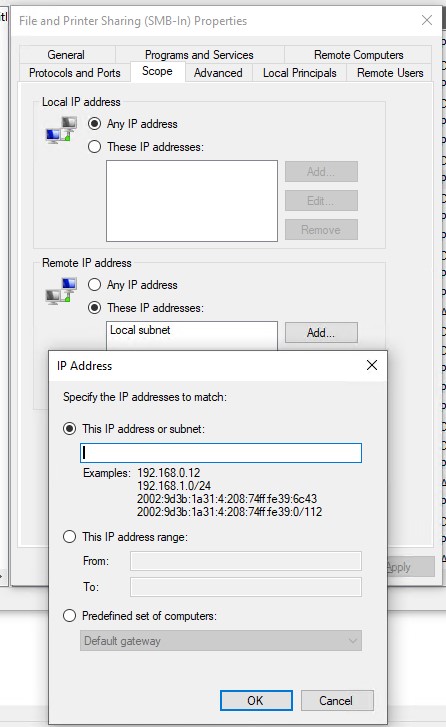
To add to this - it appears like windows 10 based smb shares don't have "smb from vpn client" enabled if you are using windows firewall - the issue is the windows PC recognizes the connection from a VPN IP address as at "Remote IP Address".
If you have "print and file sharing" enabled on your private network - you will have "local subnet" in your "remote ip address" for scope.
Local Subnet will not cover the VPN traffic. You will need to add the VPN networks to the rule.
While you could say "all ip addresses" - this is not as secure - I would recommend getting your VPN server network ip scope - viewable in "network manager" on the firewalla phone app - something like 10.90.100.0/24 and add it to the "These IP Addresses" Section as showed below:
Please sign in to leave a comment.
Comments
6 comments