How do I access/control wireless AP after connecting to Firewalla Gold?

Hello,
Following instructions, but tried several different configs as I couldn't access my TPLink C3200 after turning it into an AP (192.168.0.2), turning off DHCP and connecting the FW Gold Lan to TPLink C3200 Lan as instructed:
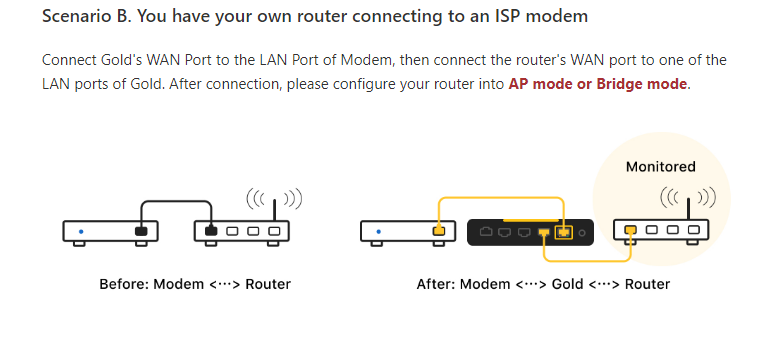 Specifically: Modem --> (WAN) FW Gold (LAN) <--> (LAN) TPLink C3200 wireless AP
How do I access the wireless AP to control/adjust WIFI access, SSIDs and its passwords?
-

Very good question!
it actually depends on your Router-reconfigured-as-AccessPoint...
- some devices allow you to pick the new IP address of your appliance when you decide to switch from Router to Access Point (in my case for instance, the internal IP as a router was 192.168.0.1, and when I changed the config to access point, I chose to use a static IP: 192.168.0.2)...
- worst case scenario, if your Router-reconfigured-as-AccessPoint doesn't give you a choice and automatically picks an IP over DHCP, you should be able to find it quickly from the firewalla app notifications as a newly added device as soon as you connect it... one thing to consider if you have a lot of devices behind your AP, you might want first to disable wireless on the AP first so you don't get confused between the newly added AP vs devices behind the AP itself...
You might also want to write down the mac address of your Router-reconfigured-as-AccessPoint first and use a tool to scan the local network like "advanced IP scanner" as it does a much better job at identifying devices by name than firewalla...
note: it is a good idea to pick a static IP for your AP and instruct firewalla as well to mark it reserved.
-
Thank you, FF...
I'm still trying to figure out what I'm doing wrong. There's no automatic AP/Bridge mode. I have to change the LAN IP address manually:
- I picked a static IP, 192.168.0.2, but can't log into it after hooking it up, disabling DHCP and reboot.
- Firewalla assigns it as 10.10.0.179, but I can't reach it that way, either...
- How do I instruct Firewalla to mark it as reserved?
There's conflicting information about connecting wireless routers as APs... whether to use the wireless router's (new AP) LAN port, or WAN port as Firewalla suggests in the graphic above.
Or... plugged into the wireless router's WAN port for configuration of the LAN IP address to static 192.168.0.1, and disabling DHCP... do I then switch the connection to the (wireless router) AP's LAN port?
-
oh ok.... so there are 2 things you probably need to check/adjust...
1) in my example I am setting the IP of the AP to 192.168.0.2 because my firewalla LAN IP=192.168.0.1/netmask=255.255.255.0 and dns=192.168.0.1
But it looks like your firewalla is using a different LAN configuration: probably gateway(aka firewalla's lan IP)=10.10.10.1/netmask=255.255.255.0 and dns=10.10.10.1)... in that case you want to setup your AP to an IP in the same subnet something like IP=10.10.10.2 ... with subnet=255.255.255.0, default_gateway=10.10.10.1 and dns=10.10.10.12) if that's still doesn't work, some routers with multiple ethernet ports, require you to plug the cable coming from the router(aka firewalla) into one of the LAN port of the router if you want to run in AP/bridge mode (usually you have 1 WAN port and 1 or more LAN ports) so double check that as well... BTW, if you have separate options for AP only or Bridge, stick with AP only
-
Thank you, FF - I got it to work!
Changed my old wireless router's IP to 10.10.0.2, saved config, turned off DHCP, rebooted and connected it by Lan to Firewalla LAN.
I'm able to log into my newly designated wireless AP, modify SSIDs, passwords, etc, as I think it should be working, hooked up to a Firewalla.
Now, I have to understand how these parental rules work / don't work....
Please sign in to leave a comment.
Comments
4 comments