FWG + Ubiquti Switch 48 500W POE with VLANs

Hello,
Recently i bought switch Ubiquiti Switch 48 500W (US-48-500W). Current setup is:
ISP - FWG (Router Mode) - > Netgear switch 24 mannaged - > Netgear switch PoE 8 mannaged
I wanted to change from Netgears into one bigger.
Already in my netowork there are U6 UAPs from Ubiquti, and there are 3 vlans lan (home) id1 192.168.88.1, guest id7 192.168.96.1, iot id14 192.168.105.
I have read this:
Everything works properly. When i plug Ubiquiti switch to Netgear (port set as trunk on vlan1 and untagged on other vlans in netgear) it shows properly, adopts well and everything s fine - uaps gets proper ip address and broadcast 3 wifis with diffirent vlan and ip ranges. When i connect US48 directly from FireWalla it doesn't show up at all ( neither in docker unifi controller on FWG)... Even after restart (FWG or US48) or factory reset US48 still nothing.
Whats wrong ? what am i missing... i would like to connect only FWG to Ubiquti switch (get rid of netgears switches) with management from vlan1 and all other vlans to some aps...
-
Actually there is no trunk/tagged and untagged ports in Ubiquiti hardware.
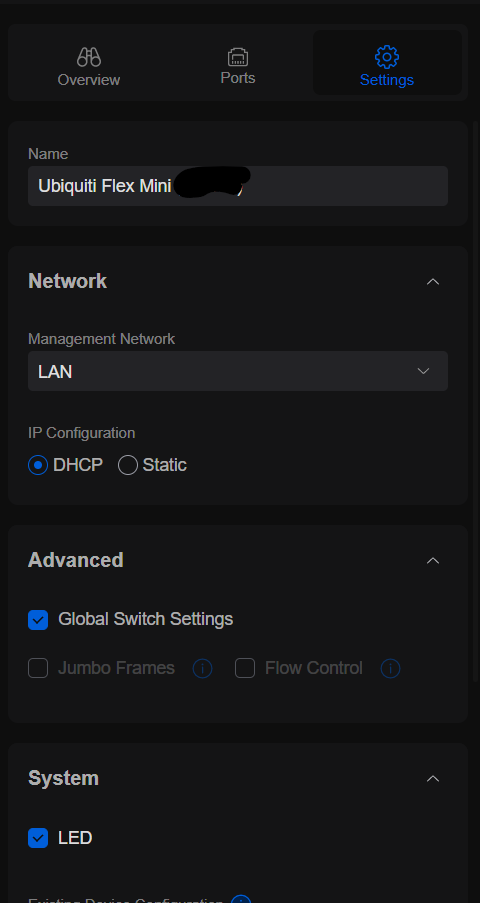
Currently Ubiquiti Console (software) gives possibility to set what Network (their name for VLAN - in Networks tab you can set VLAN + DHCP related to it and name it ie LAN or IoT) is for managing - i would see that as Tagged port, like below:
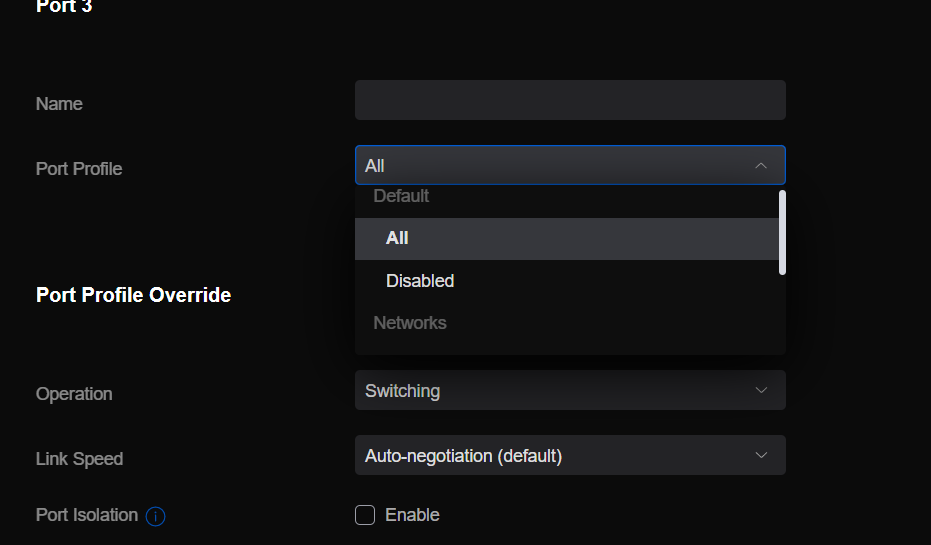
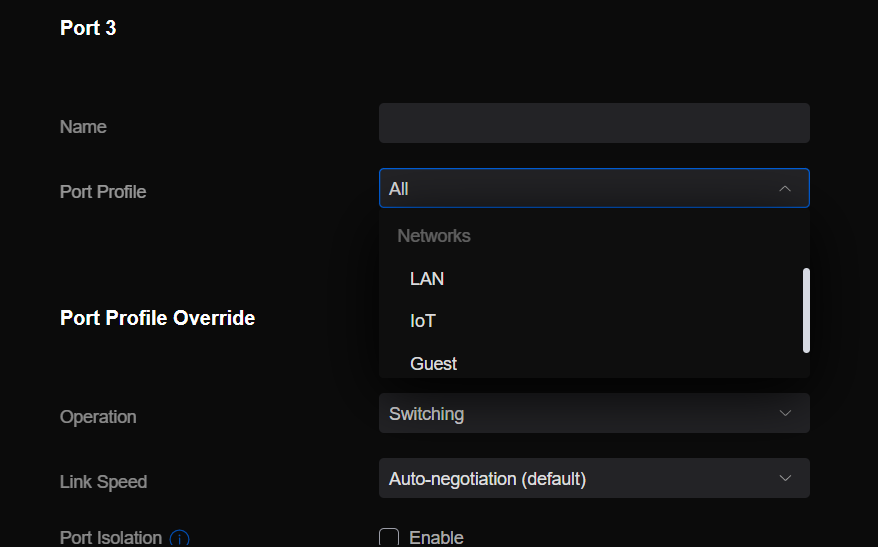
And in every prot you can set Port Profile which is also related to ALL - untagged on every VLAN/"network" or turned off or untagged on specified VLAN/"Network", like below:
-
Ok, i've tested more cables (wiring also cinfirmed by tool) and also more ports - nothing helped.
Also tested:
1. if on port 2 (direct connection to US48) is set only network LAN VLAN1. - didn't helped.
2. after connecting to netgear, adopting, set some ports to Network LAN (VLAN1), then connected to them - didn't helped
3. after point 2 - tried to connect to ports where profile was set as ALL - didn't helped
4. after point 3 - set static ip configuration pointing proper ip, subnet mask gateway and primary DNS (same as gateway) - didn't helped
After every step i have rebooted both devices to be sure is somehow related to not aplying new rules.
So for now i see no possibility to connect to FGW any Ubiquiti Switch (with up to date firmware), when there are VLAN set on FGW. I also noticed that on FGW in app when i unplugged connection thru netgear and plugged direct to FGW cable name of device "Ubiquiti" has swiched to "Unknown". Of course in Unifi app switch went offiline and aftre some time also in FireWalla app this device went offline.
Please help.
I feel it is related to that i can't set on FGW VLANs are those ports tagged/untagged or none. Is it possible to add this in some quickfix? Or maybe its something else, im not IT guy so please guide me how to troubleshoot that. Maybe its need to be untagged ?
-
Problem solved.
First network for Ubiquiti devices such as switches gateways, directly connected UAPs etc. HAS to be type LAN - not VLAN1. If it will be set as type VLAN with its ID, Unifi products won't recognize it during setup. Later under switch settings it is possible to set Native Network - same as first one set on FWG and other networks - different vlans. -

Hi Jan,
Jan, can you perhaps explain a bit more on how you solved your problem?
I'm have a similar problem - FWB and want to setup two VLANS (ID 10 & 20) on FWG port #1. I then have a Unifi USW-90 switch connected to the FWG.
Problem is that when FWG is setup as VLan with ID 10 there is no connection at all with the Unify Switch!
All work well when FWG #1 Interface setup as LAN - then all devices connect and get IPs etc.

Please sign in to leave a comment.
Comments
9 comments