Gold Plus: Connections Stop and can't print -- these to start with

A short background. I'm the IT guy for an extended family living in a big Victorian home. I have purchased FWGP to replace our TZ400. I was going to do this over some time, so I could learn how the FWGP works. I TZ400 has a heat issue; works fine as long as there is an ice pack on top. So, I rushed the FWGP into our network over this past weeked (Feb 4/5). Cable Modem/Router is an ARRIS DG2470. The connection went from the ARRIS to the TZ400, to a Zyzel MG-108 backbone. The Ethernet spreads out over the 4-story home with 3 more Zyzel switches. These are unmanaged switches. We use eero Wifi APs. The issue right now is with the wired Ethernet.
When I first dropped the FWGP in place of the TZ400, all seemed to work fine. After about 24 hours, some of the family could not get out to the Internet (Windows 10, machines). There DHCP addresses had been set to a subnet starting with 169.254.*.* --- Initially rebooting seemed to fix the problem. Then not. I found the devices in the app and set them to Emergency access. That seemed to work for a while. Then the not. Then this afternoon, the biggest insult was not being able to get to our printers. A Lexmark 3426adw and an HP P3005. I can ping both printers, but we can't send anything to print.
So, my learning curve has been pretty steep. People here work from home. So, I'm in trouble :-) My two main problems: (1) How to keep all the Windows boxes on-line and (2) how to get the printers working again.
-

I dont think the issue is just the Firewall... things should not work for a while and then not (emergency access or no ) + emergency access bypasses all of the rules which leads me to believe there is something more fundamental going on ( at the communications level ) ... is the FW set up to be the networks router and is the eero network set up in bridge mode?
-
Good People, thank you for your replies. Just your reply has made me feel better.
Firewalla - At this point, I have not added any rules or regional blocks to the FWGP. Please remember, I basically opened the box and dropped the Firewall Gold Plus in to replace a dying TZ400.
When I look under Rules, there are 3 rules (1) BLOCK Traffic from the Internet, All Devices, Always; (2) Active Protect Rules: Default Bundle; (3) Active Protect Rules: cpi-offers.com
The FWGP is in Router Mode. The LAN was not and is not segmented. The current subnet is 192.168.171.*Okellyro - I also have trouble believing I am having these issues. This morning my wife couldn't get on the Internet. We just rebooted her computer (HP Zbook) and she had connectivity again. This same thing happened with my brother yesterday (Dell ???)
I have shut down the eero WiFi network for now, until I get wired LAN working in a sane fashion again.
To answer your questions: The FWGP is set in Router Mode. The eero is in bridge mode, has been since the beginning.PRINTING - We still can't print. I can successfully ping both printers. I can connect to the Lexmark printer and log on to the embedded web server used to manage the printer. So, I can get to the printers, we just can't send any jobs to print.
Thank you again for your help.
Daya
-

Would it be possible to share a small diagram of your network?
For example, the printing issue, if the printers are on the same LAN as the PC/MAC, then traffic will never go to Firewalla ... meaning, something is wrong with the LAN or WiFi. (Or the PC is filtering)
Also, I just remembered, that some PC don't like being probed, see if you can disable its firewall or anti-virus momentarily and see if it will get better.
-
So, here's a Network Block Diagram.
Regarding your query about PC not liking to be probed, I'm the only on in the house running Windows 11. I also have HP Wolf Security running, with Webroot Security Anywhere. I'm not seeing any complaints. One of my brothers has Kaspersky running. He was seeing complaints about scans coming from 192.168.171.1. There is a way to set exceptions, which he did. His Windows 10 on Dell tower has not seen the connections issues of my wife, and another brother.
Regarding the printers, those of use trying to get to the printers are all on the 3rd floor and so are the printers.Again, thank you for your help.
Daya
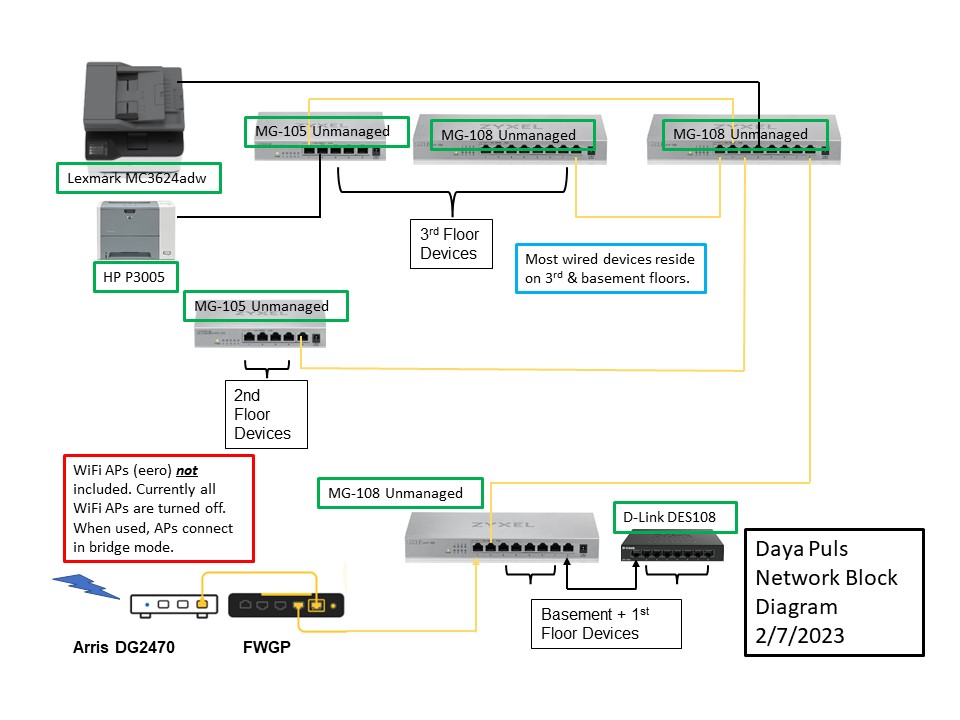
-
1. The problem relating not getting an IP address, is that via ethernet? or eero? does both have the same issue?
2. Not able to print, I don't think your "printing" traffic will ever go to the Firewalla. They are likely switched ... should be LAN only... have you tried to reboot these switches?
-
Hi Firewalla - Then you for your reply.
Your first (1) question above, I think is referring to the following that I wrote in my first contact:
"After about 24 hours, some of the family could not get out to the Internet (Windows 10, machines). There DHCP addresses had been set to a subnet starting with 169.254.*.* --- Initially rebooting seemed to fix the problem. Then not. I found the devices in the app and set them to Emergency access. That seemed to work for a while. Then the not. "
This was happening on the wired Ethernet. I had taken down the WiFi (eero) to simplify troubleshooting.
Windows machines appear disconnected from the LAN, as they can't get to anything on the Internet (web or app) unless the machine is rebooted. This happens to my wife's machine, if she leaves it for a while, she can no longer reach the Internet. If we reboot the machine, the is internet connection. Again, I have set most machines into Emergency access.Your second question (2), above: I thought about your reply. It seems logical, since these printers are set up using IP-addresses and I have reserved the addresses assigned by FWGP. Our machines and printers all are on the same subnet (192.168.171.*). These Zyxel switches are unmanaged switches; so, its hardware doing all the work. I have some ideas to try based on this question, but people are working now, and I don't want to disconnect them. Here are my troubleshooting ideas: (1) As you suggested I will power cycle all the switches in the whole network and see if that makes a difference. (2) If the printers still don't print, I will isolate the third floor by disconnecting the trunk from the basement (btw all the cabling in the walls is CAT6). Then reboot my machines on the 3rd floor and the printers. Then see if they print. If you have some other troubleshooting suggestions, please share.
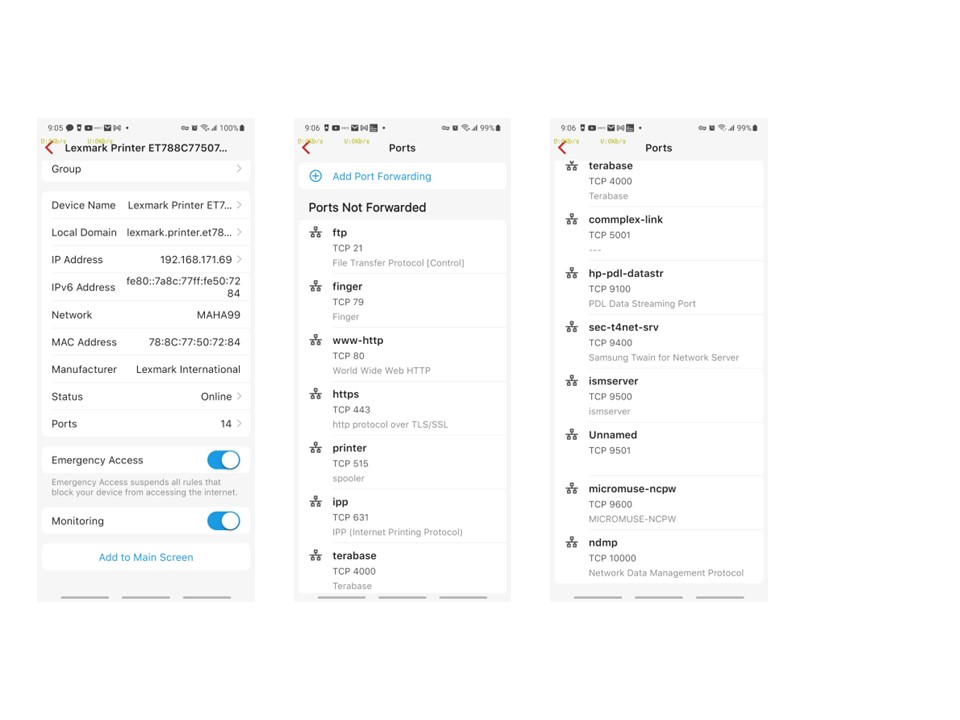
I have a question regarding the port forwarding associated with each device. The Lexmark Printer (MC3426adw) has associated with it 14 ports. The title above the ports list is "Ports Not Forwarded." My understanding is that these are ports that WILL NOT be forwarded off the subnet. Is this correct? Please see the image below.
Thank you good people a lot for your patience.
Daya
-
the emergency mode will NOT help with getting an IP, since DHCP is a basic function, we do not have anything to block it. I still suggest double check windows firewall (defender) or antivirus, and make sure it is not overreacting. Usually, launch firewalla app then settings->features->device port scan-> turn it all off, or off the windows machines. We've seen similar things happen with port scan on. (I suggest turn off all port scans to all devices)
As for the port forward, or open ports, these are Local scans, you should never need to do anything with them. Most of the time, this is just for your information only.
-
Hi Firewalla - First, thank you for all your help. I checked Windows Defender Firewall (WDF). Unfortunately, the WDF comes with logging disabled. I looked through Event Viewer but did not find anything specific to WDF. I gave up looking for evidence and took your advice to disable scanning. Observable consequences is that none of the Windows systems have needed to reboot. I will remove Emergency Access from my computer and see if there is any issue.
The printers are all now working again. I isolated my computers and the printers to one of my spare Netgear 5-port switches. As you already pointed out, the firewall was not the issue. I still could not get to the printers. Instead of talking time to dig through the details, I deleted the printers and reinstalled using their IP-addresses. The IP-addressed had been assigned by FWGP and Reserved. Both printers worked after that. I put the printers and my computer back on the whole LAN. The printers still worked. I reinstalled the printers on my wife's computer, and they worked. I know what works and that's what I am running with.
Since the LAN appears to be stable, my next step is to reintegrate the eero WiFi mesh back onto the LAN.
The eero WiFi mesh connects to the LAN in bridged mode.Thank you all very much for your patience and help.
-

Just for fun, try setting your speed/duplex to gig on your PC's, printers. I looked up your switches and they can do up to 2.5gig, which may be part of the problem.
Since they are not (managable switches) you may have an issue where the machines start up faster than the port is ready to accept packets (still trying to negotiate, look for loops, etc)....as an old school network guy, we had issues like this with various devices. The OS is up and ready, but no IP/DHCP.
Please sign in to leave a comment.
Comments
10 comments