Firewalla Gold - won't stay connected to the internet

I just reset my FWG (was using it in bridge mode - or whatever it is called before). I connected it to the modem and it went through the entire router setup and updated firmware. When it came back - it showed no internet. I rebooted the modem, but still nothing. I even tried to change it from DHCP to PPPoE with user/pass (that *I think* was correct). But DHCP should work. I kept trying, but eventually plugged back in my UDMP (Unifi Dream Machine Pro) to the modem - that is using DHCP and continues to work just fine.
Any ideas why FWG won't connect to the modem after the initial setup?
-

Did you fully power off your modem and on? this is the most common issue when changing routers. Also make sure your are DHCP ... or PPPoE, these two things are totally different ... since you are a user / pass, it does you are using PPPoE and I don't understand why the UDMP is working with dHCP ...
-
Yes, I fully powered off and on the modem 4 times. First time I setup I used DHCP and it didn't work. I rebooted the modem and set it up - it went through setup, firmware update, and then after it was completed with all of that - no internet. I powered off/on the modem again, still nothing.
This is when I tried PPPoE, which also didn't work even with modem power off/on.
So - yes, I know they are different.
Then I gave up and plugged the modem back into the UDMP and it works fine (otherwise I would not have been able to type this post).
-
so I left it for 45 minutes, still locked. Tried connecting, couldn't. Powered off, back on. Still nothing, can't connect with the app at all. Restarted the app itself and connected to it. Went to reset again (with shutdown) and got the following message:
"failed to reset device to factory defaults. You may check Firewalla's website for hard reset"
-
ok... sorry to keep posting. I powered down the FWG. Set it up again from scratch. It appears to be working (finally).
Now the only thing I need to do is enable SSH and then install the Unifi Controller as a docker image (with the guide). However - even with SSH enabled, I cannot connect. I get the following:
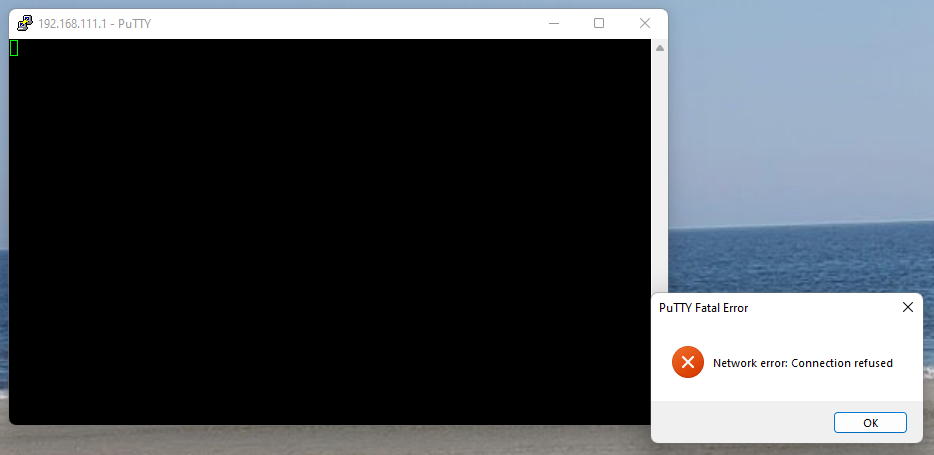
The app shows SSH Console available on LAN 1 (192.168.111.1) in the FW interface.
-
If you already turned on SSH on the LAN side. Please let me know (I will create a ticket for you). What I may need is to check your system remotely. (make sure you double check that there isn't anything in the middle that may be blocking ssh)
You should never need to turn SSH on WAN side.
-
Yes, I already turned it on - on the LAN side. Just couldn't connect there. There definitely isn't anything in the middle, it is set up like this:
Modem (DHCP) > FWG (router mode) > US-24 switch > My PCAnd I could SSH previously to my UDM Pro when I had that in the same spot as FWG, so there is no blocking from a hardware perspective and definitely none from softwar.e
Please sign in to leave a comment.
Comments
12 comments