New network half working

Network Hardware
- Router: FWG
- Main Switch: TP-Link TL-SG3452, lagged to FWG via 2 ports
- WAP(s): TP-Link EAP225
- Secondary Switch: TP-Link TL-SG108E
VLANs for: Business (20), Family (23), IoT (60), AV Devices (61), Guest (62)
SSIDs associated to each VLAN
Problem:
Devices (computers, etc.) connected to the main switch have internet access and get IPs for the proper VLAN assigned to the port.
Devices connected through the WAPs or the Secondary Switch can't get out. WiFi devices get a proper IP, devices on the secondary switch do not get an IP4 address. The secondary switch supports VLANs and I have the ports set properly (as far as I know). I'm thinking I have a configuration issue on the main switch and the incoming ports. Right now the ports (on the main switch) that the Secondary Switch and WAPs are connected to have a profile that tags all the VLAN IDs and the native network is the underlying primary LAN.
Maybe I need an ACL on the switch? Thought I had done everything 'correctly' so its a bit frustrating... :-(
-
Sorry I was not clear, the APs are connected directly to the main switch, as is the secondary switch.
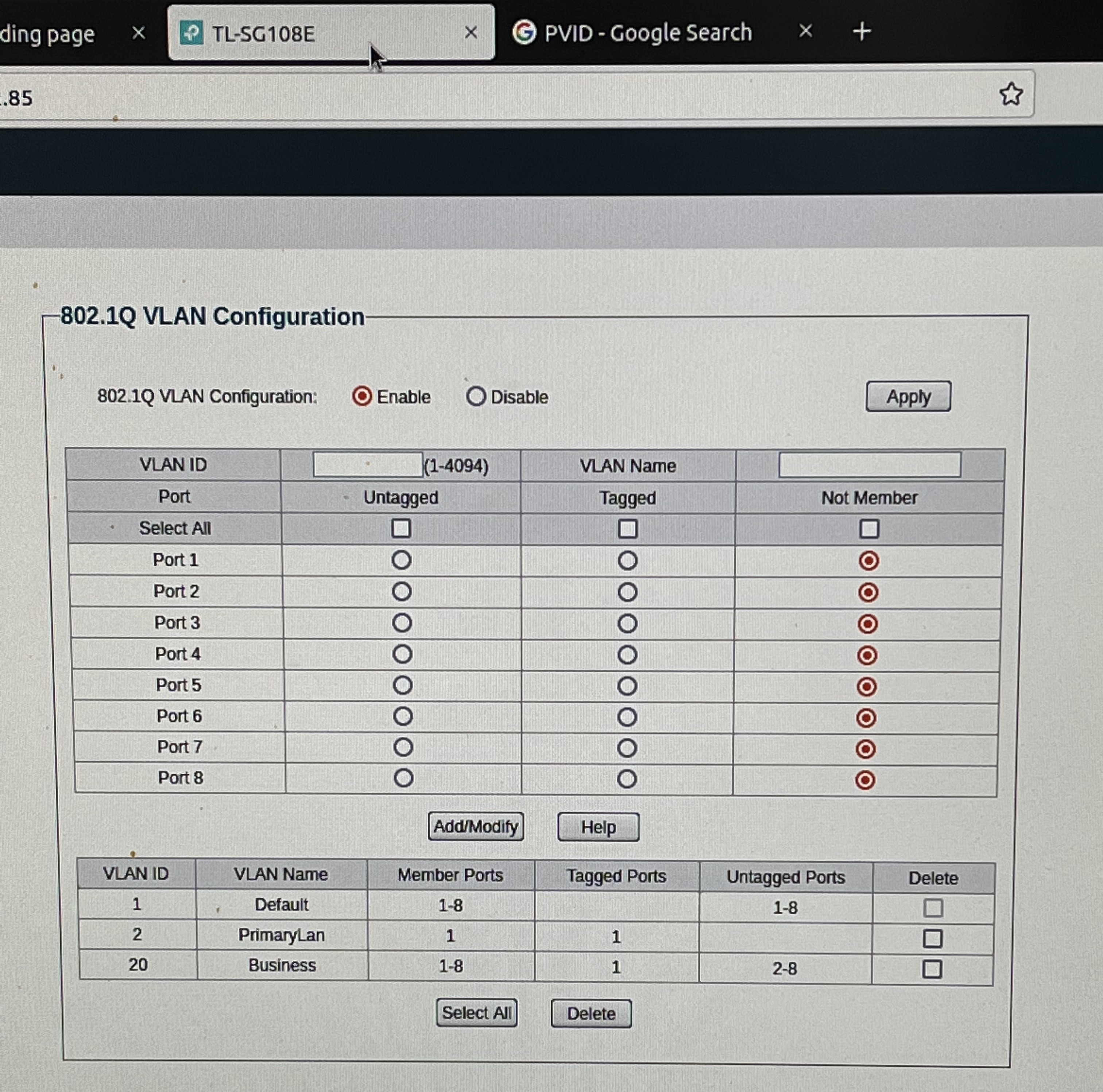
On the secondary switch Port 1 is connected to the Main. See image for current VLAN settings on the Ports. the PVID for 2-8 is set to 20, Port 1 is set to 2, the VLAN id on the main switch for the 'PrimaryLAN'.
-
One small update.
Solved the issue with my APs, I needed to implement specific AP ACLs for each SSID to the proper VLAN. Once those were created, WiFi started working just fine.
That leaves me with my biggest remaining issue is the secondary switch as above.
There are some smaller, device specific issues, but trying to triage and solve the 'big' problems first...
-

So if I understand it correctly, port 1 of the secondary switch is the “uplink” port to your main switch. Everything else on the other secondary switch ports tag incoming traffic with the appropriate vlan ID. If this is correct, port 1 should be the trunk port and all traffic between it and the main switch must be tagged. The main switch port connected the the secondary switch must also be configured as a trunk port. I don’t have this model of switch, so can’t comment on the correctness of the configuration in your comment.
Please sign in to leave a comment.
Comments
5 comments