Firewall Gold and TP-Link Managed Switch Configurations

I've found a couple of posts around this type of configuration, but still unclear why things aren't working for me. Hope I can explain this well enough
Currently, I have Port 1 of the FWG configured as a physical segment for my work systems. Port 2 is a physical port for my home network and NAS, and Port 3 is where the Unifi AP hangs off with VLAN 40 for Guest, 60 for IoT. Current layout is:

I've purchased a TP- Link 8-port managed switch for expansion and added capabilities and would like to have my network look more like this:
My Switch settings are: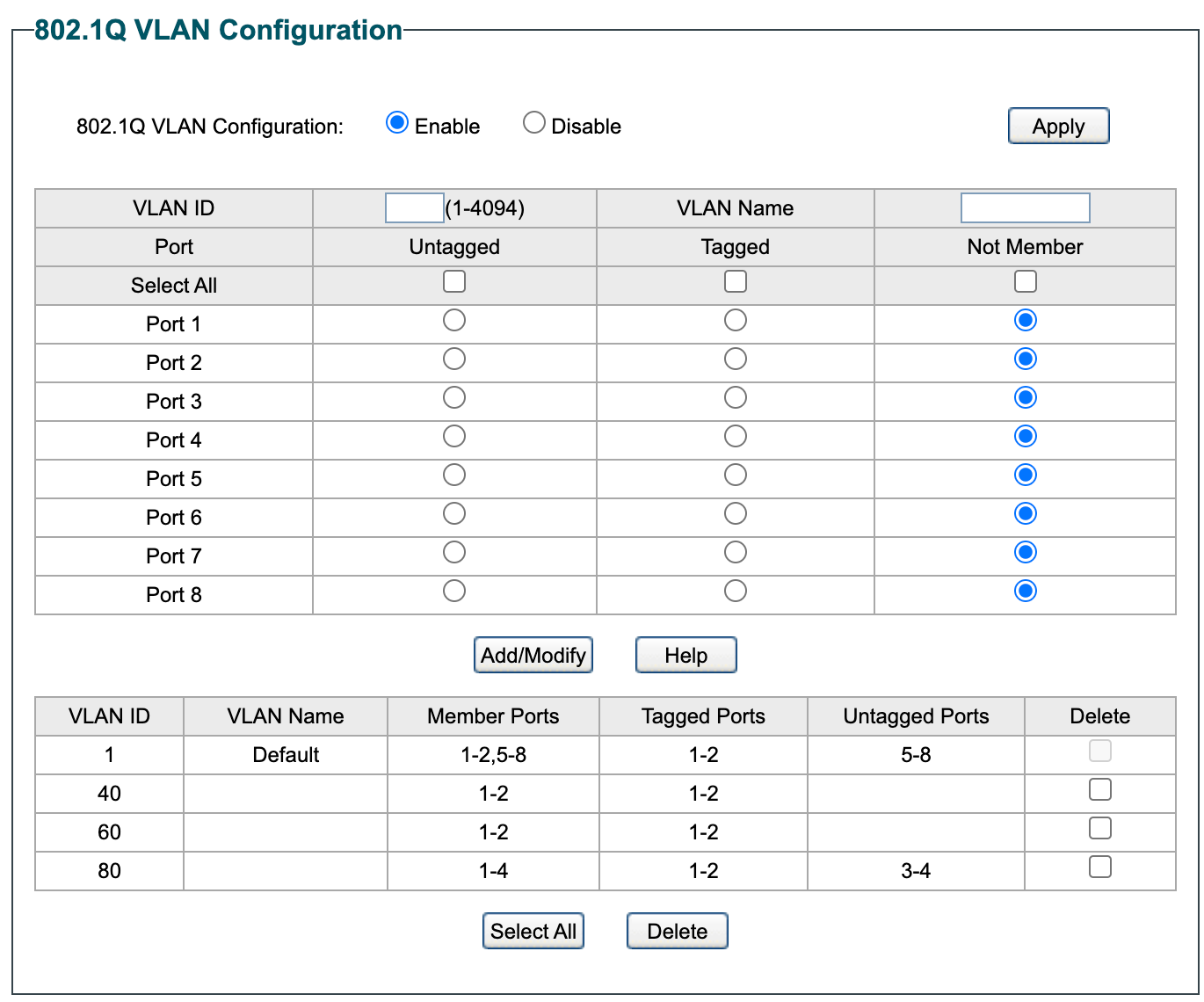
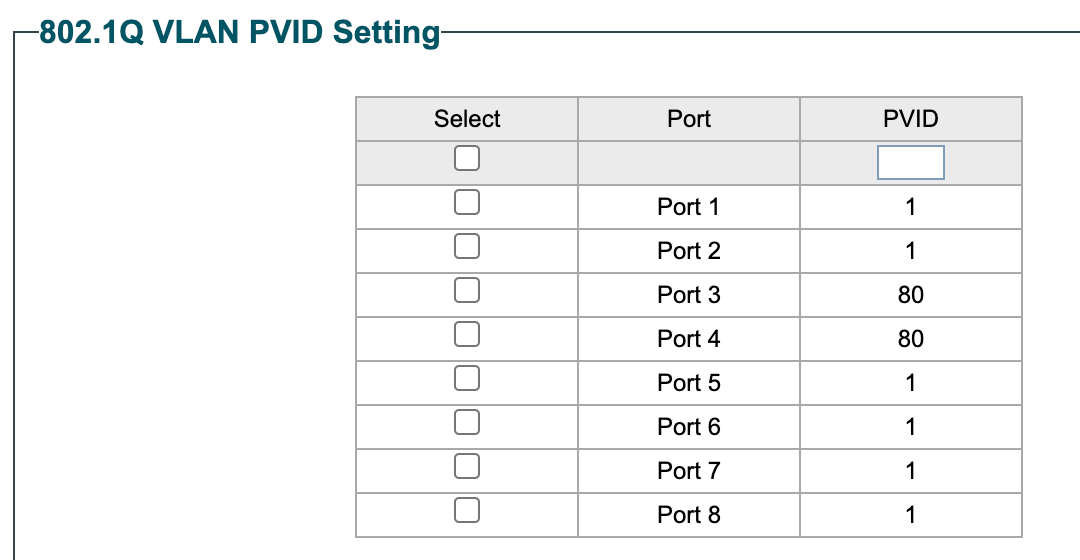
Not sure what I'm doing wrong, but with the current config, All devices on guest network, IoT and Work (wired and wireless on VLAN80) work, but my home network goes offline.
What am I doing wrong?
Thanks in advance.
-
With the two questions around VLAN ID and Unifi, I think I just figured out the issue. Firewalla is using a default LAN or Home, so not lining up with VLAN 1 on the switch. Not sure why I assumed 1 was just a default for everything unless otherwise defined. I also looked at my Unifi Console and while I have for SSIDs, I only have three networks defined. Home is assigned to default, so it's not explicitly defined as the others are.
I'll reconfigure and update. I bet that's it, but will be back to report either way. -
Well, that was certainly a complete disaster. Lost access to everything. Even the Firewalla changes took forever.
I changed my local LAN to VLAN 10, after defining a VLAN on the Unifi access point clicked save on both and lost all access, even after reboots. Had to set everything back to the way it was to regain access.
Unifi configurations are:Network
- Guest - VLAN 40
- Router - 3rd Party Gateway (only option)
- IGMP Snooping - Disabled
- DHCP Guarding - Disabled
- IoT - VLAN 60
- Router - 3rd Party Gateway (only option)
- IGMP Snooping - Disabled
- DHCP Guarding - Disabled
- Work - VLAN 80
- Router - 3rd Party Gateway (only option)
- IGMP Snooping - Disabled
- DHCP Guarding - Disabled
Created a new one for home which went badly - Currently not associated to anything on the Firewalla or Switch
- Home - VLAN 10
- Router - 3rd Party Gateway (only option)
- IGMP Snooping - Disabled
- DHCP Guarding - Disabled
Wifi
- SSID - Guest, Network - Guest, AP Group - All APs
- SSID - Home, Network - Default, AP Group - All APs
- SSID - IoT, Network - IoT, AP Group - All APs
- SSID - Work, Network - Work, AP Group - All APs
-

Yikes, you may have clipped access to the unifi management VLAN so you need to be careful about making changes.
I don't know why you only have 4rd party gateway as an option. I'm guessing some setting you have prohibits the Default option. I would set the Guest VLAN the same as the others and see if that changes anything.
I have:
- IGMP Snooping ON except for my Guest network.
- Multicast DNS off (because Firewalla takes care of that
- Router: Default for all networks
- Are you using a standard or Guest network?
-
I tried a couple of other things since....so close....
I updated the VLAN configuration to this: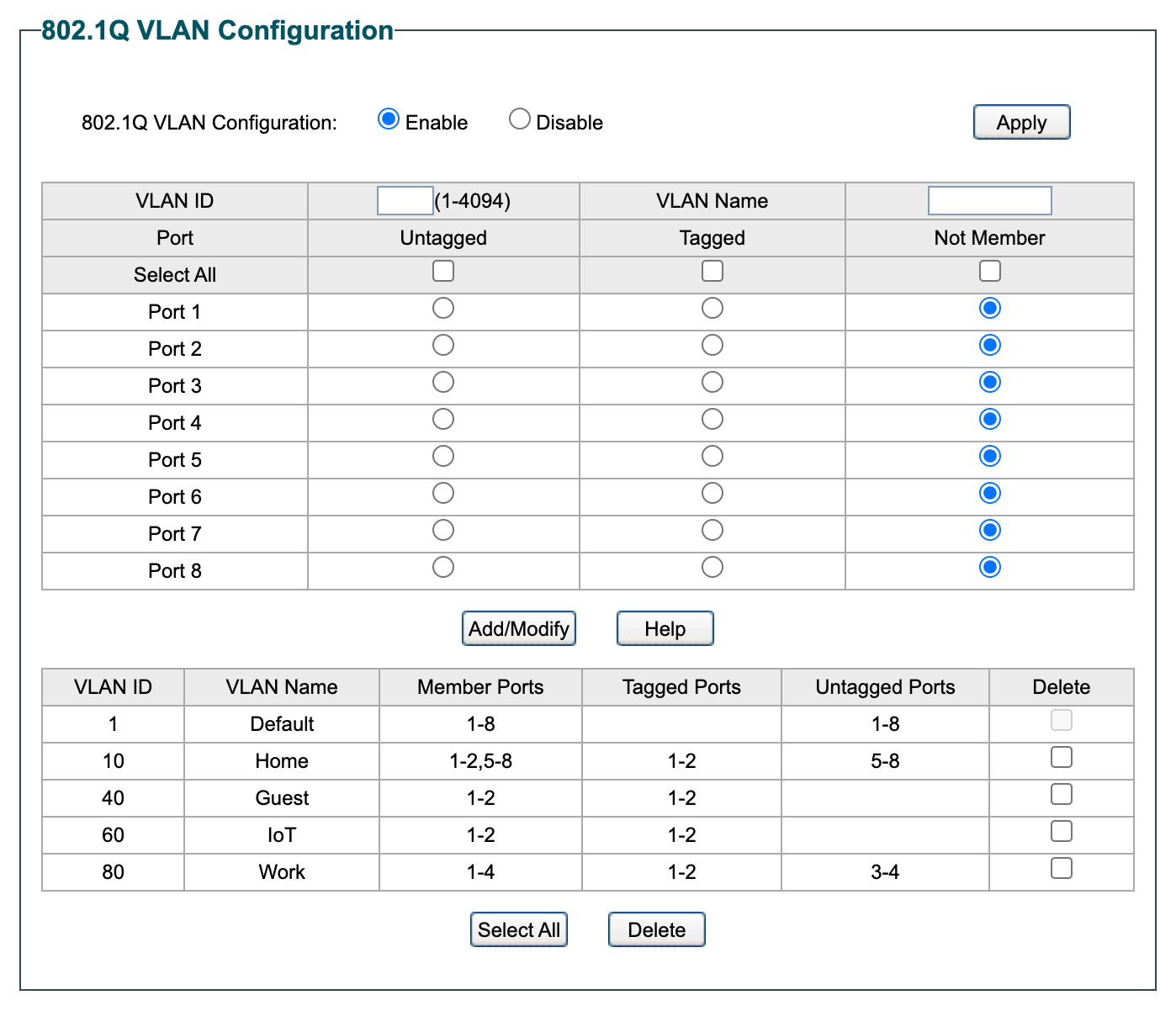
Then updated the PVID settings to:
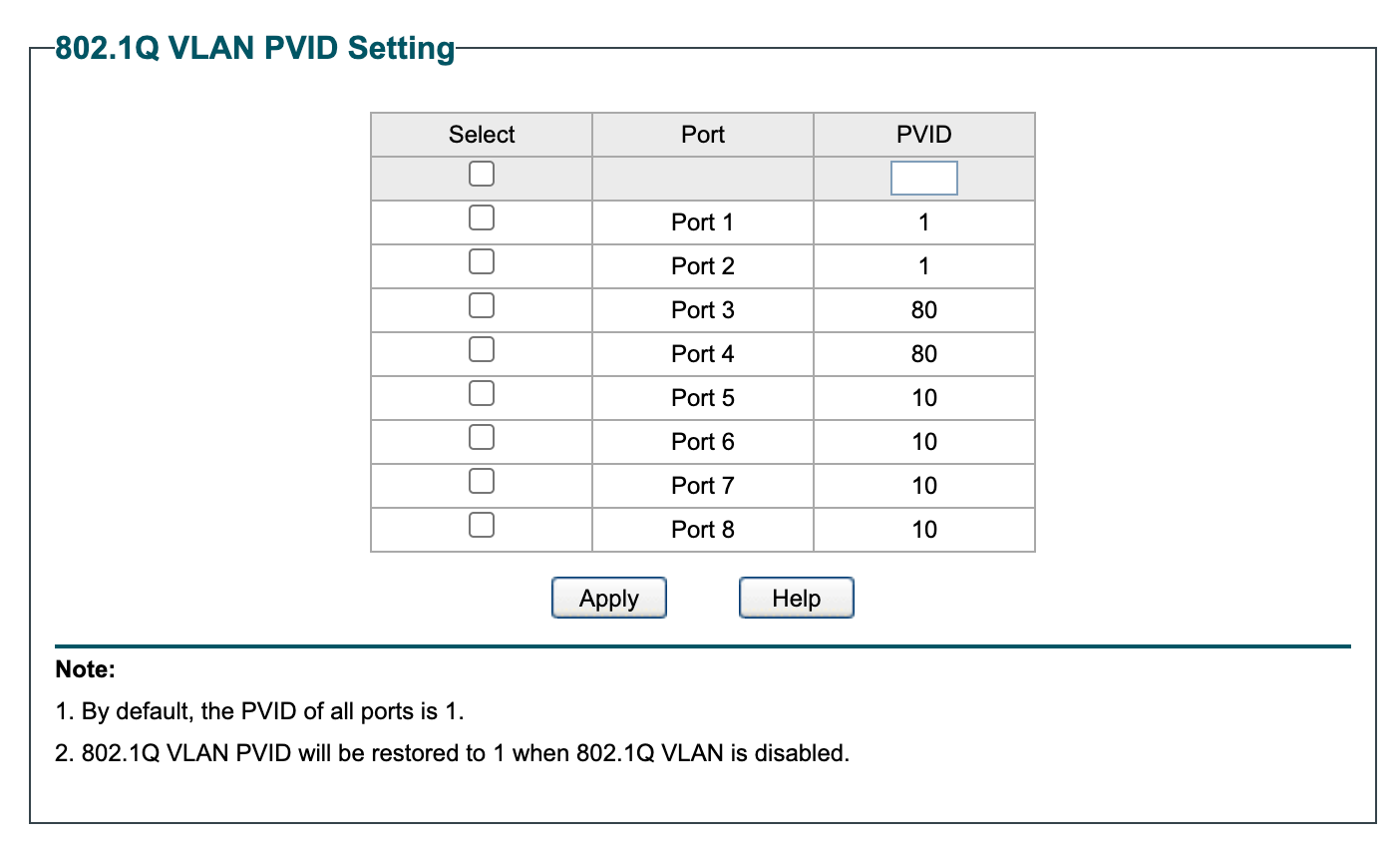
This may have been why things went bad the last time I changed the Home LAN to VLAN 10.
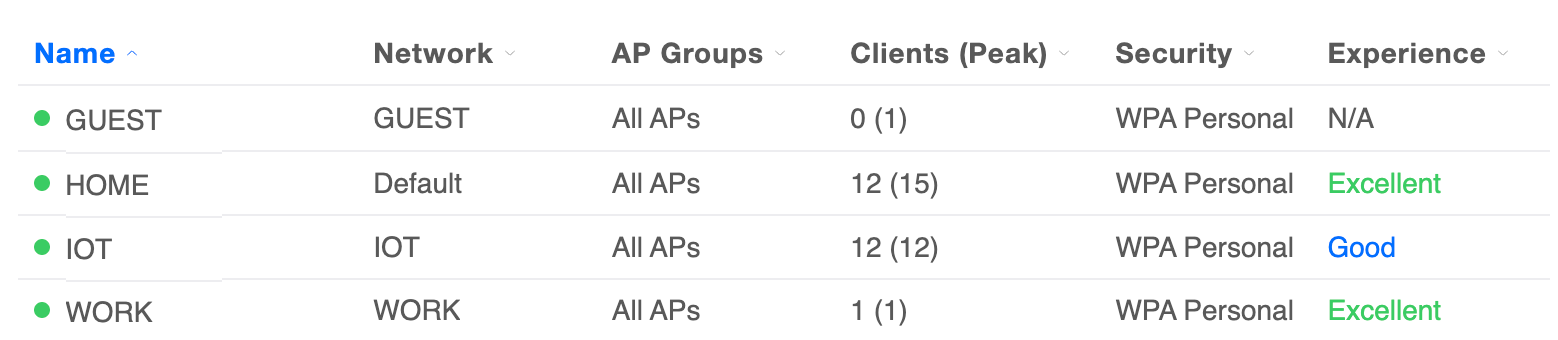 I then moved the Home SSID from default to the Home network created earlier and voila!
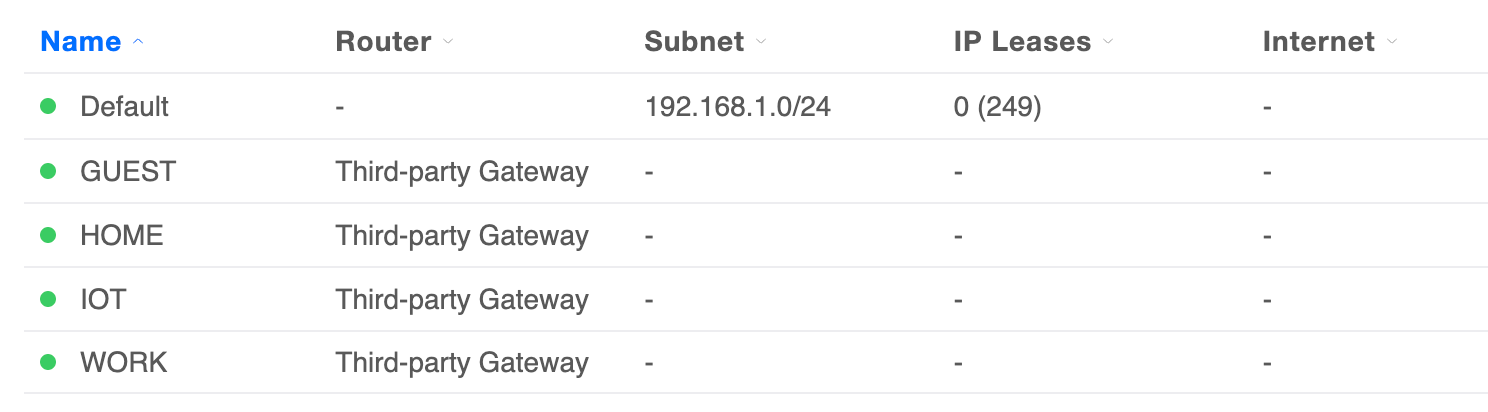 Well, almost!!! Absolutely everything worked as it was supposed to except the Unifi AP went to the 192.168 network above and while the SSIDs all worked, I got an AP Adoption failed notice in the console and lost access to it. I know at this point this isn't a Firewalla issue anymore, but any idea why the AP would get attached to the 192 network, instead of staying on the Home network?
 -

Well, almost!!! Absolutely everything worked as it was supposed to except the Unifi AP went to the 192.168 network above and while the SSIDs all worked, I got an AP Adoption failed notice in the console and lost access to it. I know at this point this isn't a Firewalla issue anymore, but any idea why the AP would get attached to the 192 network, instead of staying on the Home network?
I suspect you did not set the Management VLAN for the AP to VLAN 10, so the traffic between the AP and UNA is untagged. You could try changing the PVID for port 2 to 10 instead of 1. Hopefully, that will recover the AP. Then, you can set the Management VLAN for the AP to 10.
Please sign in to leave a comment.
Comments
12 comments