ddclient (dynamic DNS) install & run script for Firewalla Purple

Update: 2026-01-18
The script or ddclient caused my Firewalla to consume most of the memory and all the swap. I changed to using crontab to run a script using curl to update my DDNS provider. I will probably no longer use or update this script anymore.
Here's a script I wrote that will install, if necessary, and configure then run ddclient on Firewalla Purple.
The Ubuntu package does things a little differently than a manual ddclient install would, most notably using /etc/default/ddclient to control the service as far as running the program in daemon mode and its refresh interval.
Other configuration is like the standard ddclient, in /etc/ddclient.conf
I've been running this for about a week straight with no problems as far as I know.
Put the following script in your /home/pi/.firewalla/config/post_main.d/ directory (create the directory first if it doesn't already exist), and replace the values at the top of the script to match your DDNS provider's setup.
#!/bin/bash

DD_USE='if, if=eth0' # see ddclient docs for more
DD_USE6='if, if=eth0' # see ddclient docs for moreDD_PROTOCOL='PROTOCOL-HERE' # e.g. googledomains, dyndns2
DD_LOGIN='LOGIN-ID-HERE'
DD_PASSWORD='PASSWORD-HERE'
DD_HOST='DDNS-HOSTNAME-HERE'
DD_INTERVAL='1800' # seconds

INSTALL_IT=0
RUN_IT=0
# Look for the client sleeping shortened message
RUNNING=$(pgrep 'ddclient - sle')
INSTALLED=$(command -v ddclient)
echo
echo "RUNNING=${RUNNING}"
echo "INSTALLED=${INSTALLED}"
echo
echo $$
if [ -z "${RUNNING}" ] ; then
  if [ -z "${INSTALLED}" ] ; then
    INSTALL_IT=1
    RUN_IT=1
  else
    echo "----- ddclient is already installed -----"
    RUN_IT=1
  fi
else
  echo "----- ddclient is already installed and running -----"
fi

if [[ ${INSTALL_IT} = 1 ]] ; then
  echo "----- installing ddclient -----"
  #unalias apt-get
  sudo DEBIAN_FRONTEND=noninteractive apt-get -yq install ddclient
fi

if [[ ${RUN_IT} = 1 ]] ; then
  echo "----- configuring /etc/ddclient.conf -----"
  sudo bash -c "cat << EOF > /etc/ddclient.conf
ssl=yes
syslog=yes
#debug=yes
verbose=yes
quiet=no
usev4=${DD_USE}
usev6=${DD_USE6}
protocol=${DD_PROTOCOL}
#login=${DD_LOGIN}
password='${DD_PASSWORD}'
${DD_HOST}
EOF"
  # Update 2025-12-20:
  # Use 'here' document for this also
  echo "----- configuring /etc/default/ddclient -----"
  #sudo sed -i -e "s/run_dhclient=\"true\"/run_dhclient=\"false\"/g" -e "s/run_ipup=\"true\"/run_ipup=\"false\"/g" -e "s/run_daemon=\"false\"/run_daemon=\"true\"/g" -e "s/daemon_interval=\"[0-9]\+\"/daemon_interval=\"${DD_INTERVAL}\"/g" /etc/default/ddclient
  sudo bash -c "cat << EOF > /etc/default/ddclient
run_dhclient=false
run_ipup=false
run_daemon=true
daemon_interval=${DD_INTERVAL}
EOF"
  echo "----- enabling and starting ddclient service -----"
  sudo systemctl enable ddclient
  # Do 'restart' instead of 'start' because the latter doesn't pick up the new interval from /etc/default/ddclient
  sudo systemctl restart ddclient
fi
-

Been using Shane's method for DDNS w/Cloudflare here:
https://help.firewalla.com/hc/en-us/community/posts/1500001199002-Cloudflare-DDNS-Docker-Setup-on-FWG
Since this method with ddclient is not docker, any benefits noticed running this on FWG? -
@lynk
I figure that spinning up a whole docker container just to send ddns info is overkill. If it works for you, then I see no problem though.
Since Ubuntu has the ddclient package, I just used that. I already played with docker for home automation, so wanted to try a different method. -

I noticed my DDNS wasn't getting updated this morning and when I SSH'd into my firewalla I manually ran this script and got the following output:
----- ddclient is already installed -----
----- configuring /etc/ddclient.conf -----
----- configuring /etc/default/ddclient -----
sed: can't read /etc/default/ddclient: No such file or directory
----- enabling and starting ddclient service -----
ddclient.service is not a native service, redirecting to systemd-sysv-install.
Executing: /lib/systemd/systemd-sysv-install enable ddclient -
@david
Nope, it doesn't appear that I do have /etc/default/ddclient. Looks like I'm on Ubuntu 18.04.3 LTS. I actually just recently got my Firewalla a few weeks ago and when I added this script initially, my ddns was already pointing at my home IP, so I didn't notice any issues until that IP changed. My previous firewall had DDNS support for Google OOTB, so I don't really have much experience with ddclient and wasn't sure if I was just missing a step or something.
-
Well, the past 9 months everything's been running pretty smoothly, but yesterday I had a power outage and when everything came back on, I had a new external IP. That on it's own wouldn't normally be a big deal, but today I realized my DNS entries didn't update. I SSHd into my Firewalla, and it looks like the script is still working right, but when I ran:
sudo ddclient -query
I get the following error:
FATAL: Error loading the Perl module JSON::Any needed for cloudflare update.
I realize this likely isn't an issue with the script so much as with either DDClient or maybe the Firewalla OS, but I was curious if anyone else using DDClient on their Firewalla has experienced this recently.
-

Hi David Koppenhofer
Thanks for you script, I've been using it since setting up my Firewalla Purple in Sept 2024.
I don't often have any power outages or downtime due the UPS keeping the Firewalla running. However whenever there is a planned outage, I find that once Firewalla is back online ddclient is no longer installed (tested with sudo ddclient -query) and so my DDNS stays offline until I run the command via SSH to reinstall it.sudo ./ddns_script_firewalla.sh
How can I ensure ddclient stays installed when Firewalla has a power outage?
Some people have mentioned installing ddclient prior to running your script, is this the method or is there a setting I am missing to ensure ddclient continues to work after power outage/power cycling?
My Firewalla purple is running 0.092209 build (Ubuntu 20.04.3 LTS kernel:4.9.241-firewalla) -
Hi David,
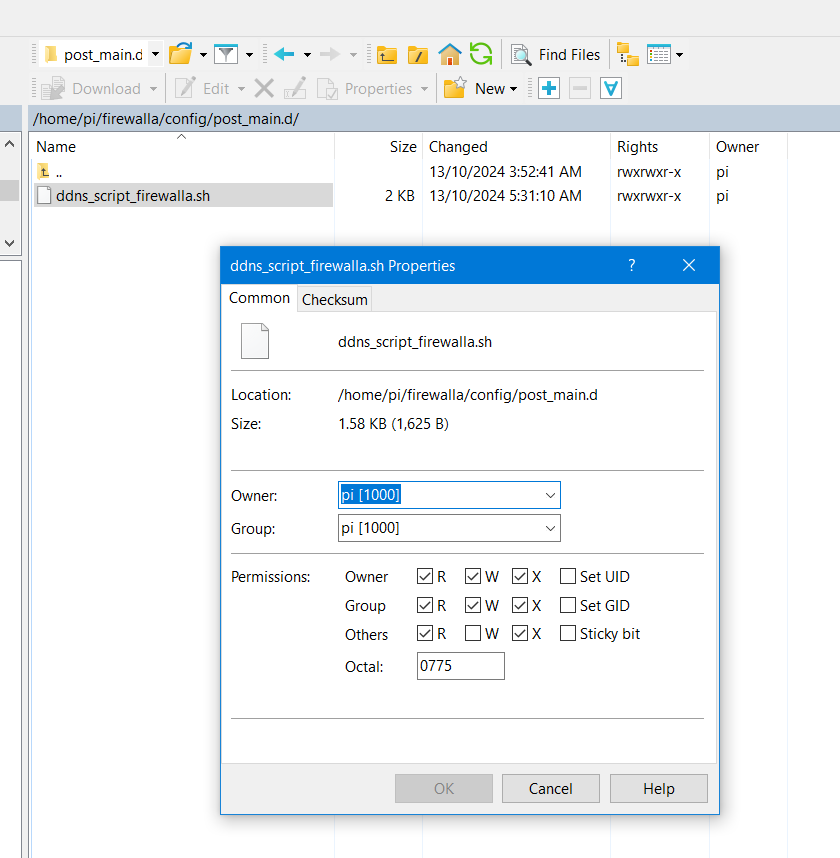
Yes, I have the script in the post_main.d directory see screenshot below.
Are my permissions set correctly?One thing that is different is you have dot '.' in front of your firewalla folder name.
Does this have any bearing on the result?
Does the script name matter?Thanks in advance
-
After some sleuthing I've read that the dot in front of the user profile is important as its used for startup scripts amongst other things.
I will let you know if this works.Update
Moved the script to the /home/pi/.firewalla/config/post_main.d/
with the dot in front firewalla path and the script now loads automatically on startup.Thanks David Koppenhofer


Please sign in to leave a comment.
Comments
26 comments