Firewalla Purple - slow upload from LAN side? 0.5-3Mbps vs 35Mbps

5/11/23 - 6 month update - all good on the replacement unit I was shipped.
##########################
I have the Firewalla Purple and my upload speed from the LAN side can be slower than it should be. If I run the speed test on the Purple itself, it's fine.
xfinity gig service - 1200 down/35 up
Speed test in browser to Ookla and local Comcast speed test server
PC<1g>Switch<1g>Firewalla<1g>Xfinity xb8 router - Result: 950 Mbps down / 0.5-3Mbps up
Speed test ran in Firewalla App
Firewalla<1g>Xfinity xb8 router - Result: 900Mbps down / 42 Mbps up
I had read that people have issues with their upload. Curious what troubleshooting steps they took to possibly resolve this? Should I try the beta build?
I've rebooted it a few times as well as disabled smart queue to no avail.
Box version - 1.9742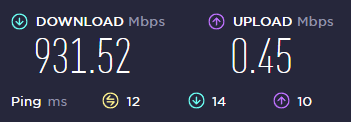
-

Hi Hans, I'm not sure why Firewalla doesn't have this issue pinned to the top of all the forums. I spent months banging my head over this only to recently find out that it's a known issue with certain Purple units that have manufacturing defects that do not show up until being in use for a while.
Here's a thread I opened months ago & eventually I found all this out.
https://help.firewalla.com/hc/en-us/requests/54759
If you open a ticket Firewalla support will work with you to test your unit then you can send it in for a replacement if needed. I just went through that process and received my new Purple unit.
Good luck...
-
I sent my old unit back and Firewalla is sending me a new unit. They logged into my unit using the remote option.
Fortunately I had my old UniFi USG unit which I was able to put back in place so my wife and I could work and my family could use the internet.
I too was frustrated because I thought my firewalla was solid and so I actually had Xfinity come out and test my line and replace my modem.
It's okay though with these things happen. I'm just happy we'll be back to normal here shortly.
Thanks for the reply about your experience. Firewalla customer service has been great to work with and very quick to respond.
-
Circling back on this... I'm good again on a new firewalla purple unit.
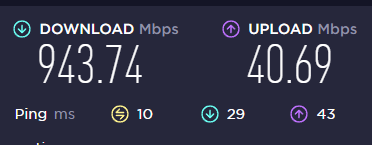
They sent me a new unit. Migration of the settings from my old unit to the new one was quick and painless. The phone app had a backup of my settings so I just went to add a new unit and was prompted if I was replacing an old unit or adding a new one. Clicked replacing an old one and was prompted to use my old settings backup and was good to go quickly.
Stoked to be back up to full speed.
-

Unfortunately, it seems to be a chronic issue with the Purple: https://www.reddit.com/r/firewalla/search/?q=slow%20upload&restrict_sr=1&sr_nsfw=
I had mine replaced after 7 months, and while the new one has been good since (month or so), I'm assuming I'll have the issue again. It's very odd in that going beta<->stable seemed to "fix" it for a little bit, and people report dropping the port speed to 100Mbps "fixes" it (though limits you to that speed), but according to Firewalla it's a hardware/manufacturing (cold solder) issue.
-
I thought it was a hardware issue or manufacture defect identified in some of the Purple units and the newer ones do not have that issue. It would terrible if this was still reoccurring for those of us that had our Purple's replaced under warranty. I don't think this has anything to do with the new firmware.. I thought the same thing when my Purple had this issue last year, but it was unrelated.
-

How do I drop the port speeds to 100mbps? I’ll give anything a try to allow me to stop tethering from my phone when I need to get online via my computer.
Firewalla support was very prompt, but they couldn’t remote in (not surprising, it barely has any connectivity), so I’m waiting for the next steps. I’d be fine with returning this and purchasing a Gold if that doesn’t have this issue. It is a bit disappointing that after only five months (not three as previously stated) it already has broken.
-

This is a repost to change the WAN Port setting. I did this to mine and it fixed the issue immediately. (Limited to 100 Mbps of course)
The issue reappeared for me today as well.
After reading Kerr's comment I did some testing as well, the only thing that worked for me was reducing the WAN port (eth0) to 100 Mb/s Full Duplex, changing the link speed of eth1 with or without the WAN link speed change made no difference at all for me.
After the change to the WAN port, I will get 80 Mb/s instead of 100 down and 30 Mb/s up instead of 0.2.
I ran this command via SSH to temporarily change the WAN link speed (name of WAN link might be different)
"sudo ethtool -S eth0 speed 100 duplex full autoneg off"
The configuration only lasts till reboot though. -
I made this change last night and it solved the usability issues. Also solved the horrible packet loss I was having. At least now I can use internet at home until the new purple arrives. Unfortunately it took a long time with Firewalla to get a new unit shipped, and I had to buy the new unit and then they will refund me when I send back the old unit. Given how common this issue seems to be, they need to get an expedited replacement process in place.
-

Same issues starting with mine last week. Uploads are fine then now are 1/100 of what it should be.
https://help.firewalla.com/hc/en-us/requests/59385 -

Just wanted to add for anyone else seeing similar, Both myself and a coworker bought Firewalla Purples and after almost exactly 7 months of use both of our Purples experianced the same issues descibed above. For no appearent reason, upload speeds on the LAN side would be crippled to 0 or close to 0mbps. I was lucky and had my old router still that i could put back in place, my co-worker did not and we both ended up sending units back to be replaced after troubleshooting. The upload speeds from the Firewalla test were normal but all downstream LAN devices were limited on upload.
I just got my relpacement device plugged in. Eveything is happy and working again. But we worry we are playing a waiting game for this issue to happen again. Especially with so many reports over the last several months. I really like the Purple but this absolutely needs to be fixed.
-
I also worry that in 7 months again I will have the same problem. One thing I did notice, and perhaps it can be used as a precursor to failure, is that I was getting some packet loss (1-2%) rather consistently with the old Purple. Once I got the new one, I always see 0% packet loss.
-

Thanks firewalla team! Also for everyone else on this post, I had my original 2 purples I bought at the same time have the issues but, I contacted support, and 2 new ones were shipped out as soon as I sent them tracking. They both showed up in a timely manner and I am off to the races at full gig speed again.
-

I had the exact same problem with my Purple purchased in Jan 2022. A month ago I had the "up" speed drop to .4 to 2mb... depending on the time. Checked Comcast and they had a "service interrupt" on their map for the whole town. After checking for almost two weeks, that warning was gone but still my up speed would be so slow I could not send E-mail attachments. Had the Comcast guy come and he replaced a "filter" that was added on to my cable back in the early 1990 when they added Internet to my system. Also make a new connection end. He tested my line with his box and was getting 1mb down and 45mb up. Then connected to my SB8200 and 920mb down and 34mb up. Fine. He left and tested my PC, still .8mb up. I was already in contact with Firewalla. I then removed the Purple and changed my wireless back to router mode. BING 350+ down and 24mb up. A few calls and the Firewalla team had me send back my old Firewalla and they sent a new one when I gave them my tracking number. Just installed it 2-6-2023. Instructions did NOT include to "first" reset your wireless to AP mode again. But in 15 min I was back up again. Mine was one of the "pre-releases" I had their "BLUE" but Comcast upped their speed last year (just to show the FCC how wonderful they are) to 1.2Gb. Then they said my SB8200 was "to slow" for my speed, I should get a new one, nice of them. Comcast is going to allow higher speeds up and down with their "special" $25 per month rental modem. Then a year or so later allow "customer" modems to get the higher speeds. I'll wait to replace my modem at that time.
-

Have the defective Purple's been isolated to a certain batch.. or all purple's before a certain purchase date that would be affected? I purchased mine September 2022 and have had zero issues using as my router. I am just starting to investigate packet loss issue that started yesterday.. but my upload speed is normal, download is degraded which seems to be the reverse of the primary symptoms for this defect.
-

I've tossed many routers and modems in the trash... and unfortunately looks like my beautiful little Purple is destined for the basket. I had high hopes for it like the others. I am shocked at how much time me and my wife and our tech guys at work spent\wasted trying to figure out what was the exact problem.
Dear Firewalla,
Can I please trade this little Purple for a Gold SE?
Best,
Bob Goguen
-

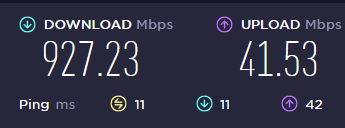
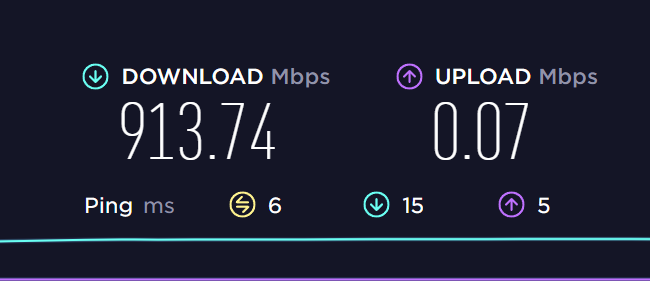
Well tonight I join the club! My Purple is getting 20 mbps upload speed WAN. Test it via the app and it says 20 mbps. Plug an Ethernet cable into the output LAN port and I'm getting 0.1 mbps upload speed.
Download speeds stayed the same on WAN and LAN, this is just an upload speed issue.
I'm in the process of submitting a ticket. I'm probably going to get asked to turn it off and on again, then get told to check the cables... FML


Please sign in to leave a comment.
Comments
31 comments