Recommended managed 8 port switch and setup for VLAN with firewalla purple?

I have a new firewalla purple connected from a 1 GB fiber access point, through a CAT8 cable, to the new firewalla purple, to an eero pro 6 mesh base unit. For redundancy, I have an unused second CAT8 cable also running from the fiber access point, to the location of the firewalla purple and eero pro 6 base unit, but is is just there in case I ever need it. The eero pro 6 base unit then connects to a switch, which connects to a previous firewalla blue, and a T Mobile Cellspot that gives us good signal via wifi for our phones. At present, the eero base unit connects via wifi to 3 satellite eero pro 6 nodes, and to 2 satellite eero 5 nodes.
I installed the firewalla purple in router mode between the fiber access point via the CAT8 cable, and then to the eero pro 6 base unit. Then I migrated all the settings from the old firewall blue to the new firewalla purple. I’m not sure if this is the best way to set it up, but otherwise it might have been quite a while for the new firewalla purple to find everything on our network.
My questions are,
What managed 8 port switch would you recommend to set up a VLAN for the following proposed system?
Also, how should connect the switch?
Here is the proposed arrangement from the switch:
From the purple, I would like to set up a VLAN through a managed 8 port switch, hard wired to the following with CAT8 cables,
1. to a satellite eero pro 6 at our computer station,
2. to another eero pro 6 in our living area,
3. to another eero pro 6 in a tenant’s apartment,
4. to an eero 5 connected to our solar inverters, and
5. to an eero 5 connected to a hub for our security cameras.
My thought is to separate via VLAN into the following 3 separate sections:
1. the computer station and living area nodes,
2. the solar inverters and security cameras
3. the tenant apartment.
There are a number of other things I thought I would just leave connected through wifi for now. I might try setting wifi VLAN’s for some things later?
Thank you for any help and suggestions!
-

I'll let someone else make switch recommendation as I have limited experience. I've had netgear, tp-link and d-link and never had issues with any of them, but I don't have much of a sample size. Currently I have two 8-port, one netgear gs908e, one d-link (dgs-1100-08v2), both cheap, support VLANs and work well.
With the VLANs, I think what you list will work and could be split however you want as each eero is hardwired, but I think you'd set them up as separate networks, so they wouldn't all be one big mesh. The computer station and living area eeros could be in a mesh (one AP one satellite), and solar inverters and security cameras in a mesh (one AP one satellite) and then the tenant apartment as a standalone AP.
Setting up WiFi VLANs separate from the hardwired VLANs would require the eero's to support VLAN tagging of the wireless SSID, which I don't think it does, but if you do it like above I believe anything connecting wirelessly will go in it's areas vlan (so tenent vlan hardwired or wireless would be in that vlan).
-

I'm curious why keep the Blue or is that just temporary?
What managed 8 port switch would you recommend to set up a VLAN for the following proposed system?
Personally I like ui switches, but many people like TP-Link or other brands.
I would do this:
fiber ONT > CAT 8 > Purple (WAN)
Purple (LAN) > managed switch >
> eero 1 > eero 2 ...
> other devices...
How you split up the devices is a personal choice. Geographically is not typically very useful. Though, for example a guest house that you want EVERYTHING separated from the rest of your network does make sense and is easy to do. Using a VLAN (configured on Purple and the switch) the tenant apartment can be separated into a separate network.
However, eero doesn't support VLANs. So you can't separate devices on eero beyond using the eero guest network. so you are going to be limited here unless you don't use eeros in mesh but set them up as separate independent APs. In that case, then each can be a separate VLAN (e.g. one for IoT, one for cameras, etc.)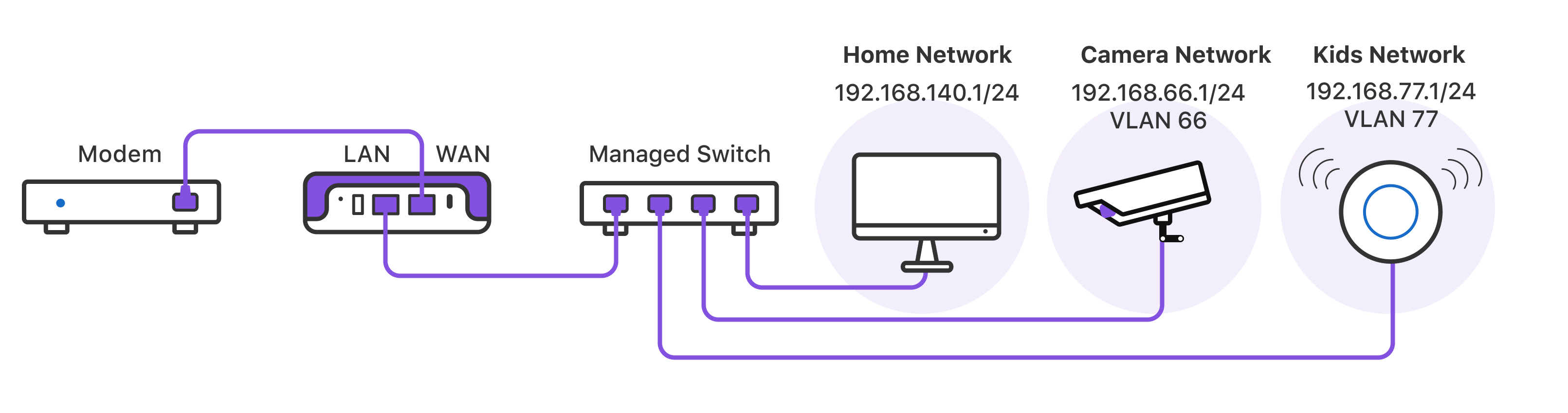
see https://help.firewalla.com/hc/en-us/articles/4408644783123-Building-Network-Segments for details.
Do not do this:
fiber ONT > CAT 8 > Purple (WAN)
Purple (LAN) > managed switch >
> eero 1
> eero 2 ...
> eero 3...Eero does not support this configuration. One eero must be physically in front of all other eeros on the network. If you use a wireless backhaul that's fine the one wired one is good like that.
-
Thank you so very much Rich!
Thank you so very much Michael!
I appreciate any and all help!
I only left the blue there because it was already in the system. Not thinking it has to stay.
I haven’t yet tried to set any VLAN up. I first wanted to get advice on what will work best, what 1 GB 8 space managed switch will best do the job, and so on. I don’t think I need POE, as from the switch I’m only running CAT 8 cables to other eero satellite nodes.I had been thinking placing the FWP -> eero gateway -> switch -> to each of the satellite Eero’s. So CAT 8 from the switch to the remaining Eero’s.
So you feel I should place the managed switch before the eero’s? What advantage is there to place the FWP-> switch -> eero gateway? In this placement, would I then run the CAT 8 cables from the switch to the remaining Eero’s? Or how do I wire CAT 8 from the switch to the satellite nodes? I have some idea of why you suggest that. Not questioning it, just want to understand. I’m pretty tech capable, but this area is relatively new for me, and I really appreciate any and all help!
-
You have purple so you only have 1 port to work with. I also assume that a switch is good at one thing: being a switch.
I'm not sure if you "pass through" the eeros in bridge mode what happens to the VLANs. Easy enough to look up or try but if it doesn't work don't waste time. That's the issue. IF so, I wouldn't put the eero first because this allows you to have VLANsl if not now, in the future.
This also allows you to reboot the eeros without losing your ethernet connections. All Wifi needs to be rebooted occasionally. So if I were in your shoes, I would go Purple > Switch > eero1 > eero 2... This makes sure your eero topology is correct. I prefer wired backhaul when possible.
Please sign in to leave a comment.
Comments
4 comments