VPN issues

I'm hoping someone can help here. I think I'm close but could use confirmation.
I have two golds at different sites. When I set up the VPN server on the new gold (FG2), it tells me port forwarding requires manual setup. The first Gold (FG1) is working and has worked without issue for a long time
When I try to connect point to point (FG1<-->FG2) or via a wireguard client into the VPN server on FG2 I hit the wall. I suspect I've got a double NAT issue of some sort and could use some help.
Background - The site has copper incoming with two VoIP lines as well from the provider. The provider has a modem to facilitate, and we have a static IP. In the modem, DHCP is turned off, but the FG2 has a static IP allocated (192.168.1.4, where the modem is the .1 gateway). FG2 is the router (192.168.40.1) for the LAN.
Here is the 'network' detail from the ISP modem: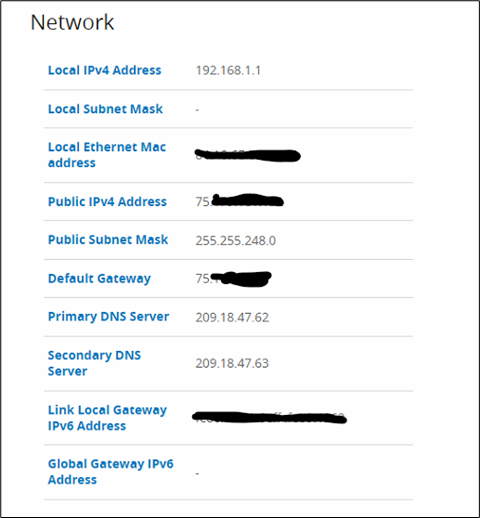
Of note is that that public IPv4 address is not what you see externally (you see our static IP).
Here is the DHCP page from the modem, showing DHCP off and the static reservation for FG2: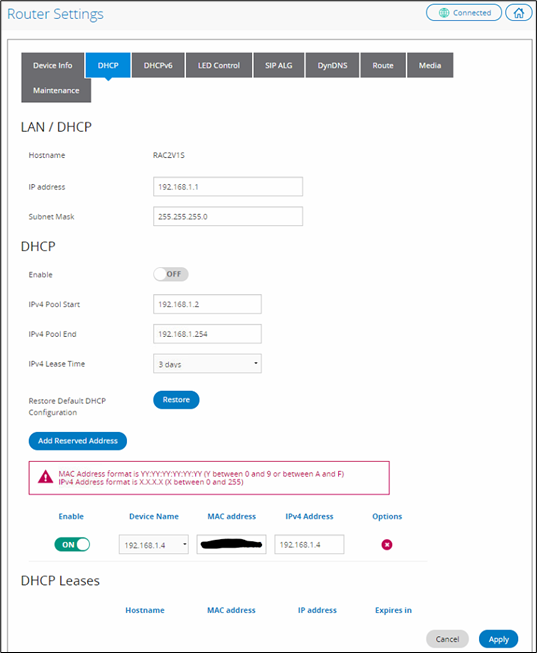
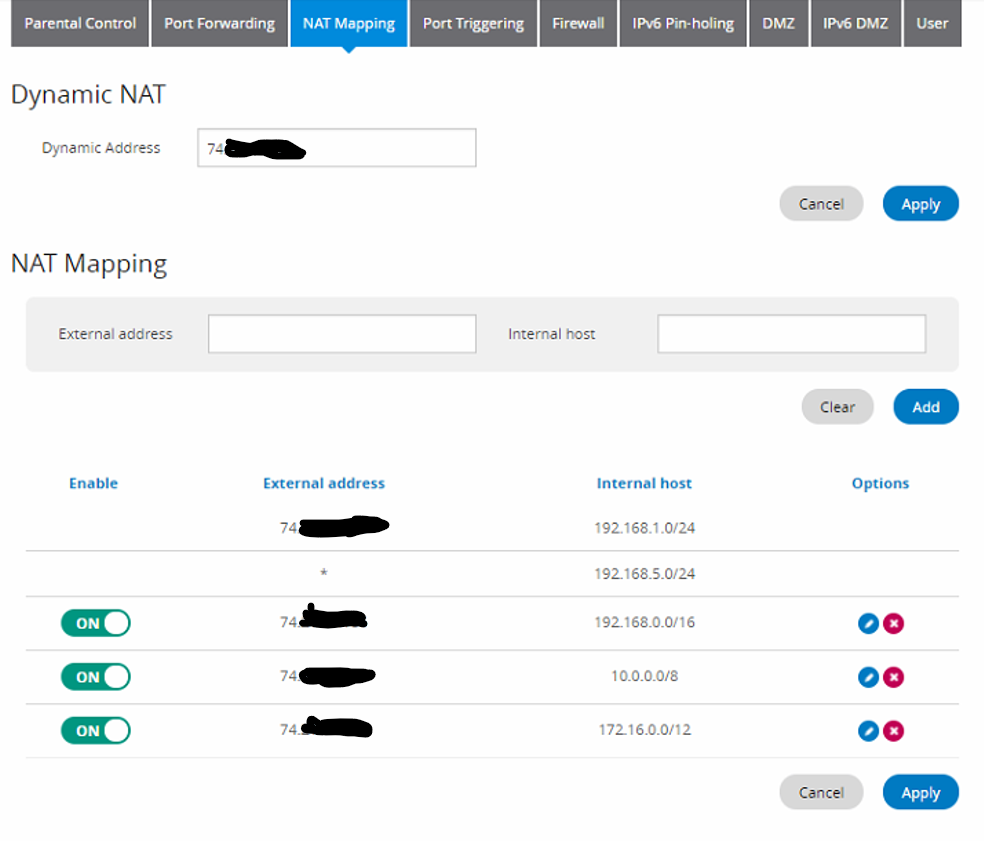
Here is the NAT mapping settings reflecting my public IP and the associated internal IP ranges:
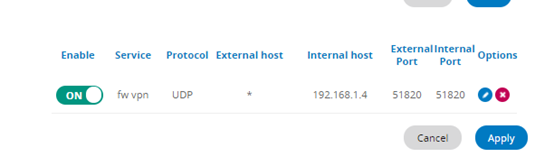
And here is the port forward I set up to attempt to get through the apparent double NAT issue:
Here is the wan connection details for FG2: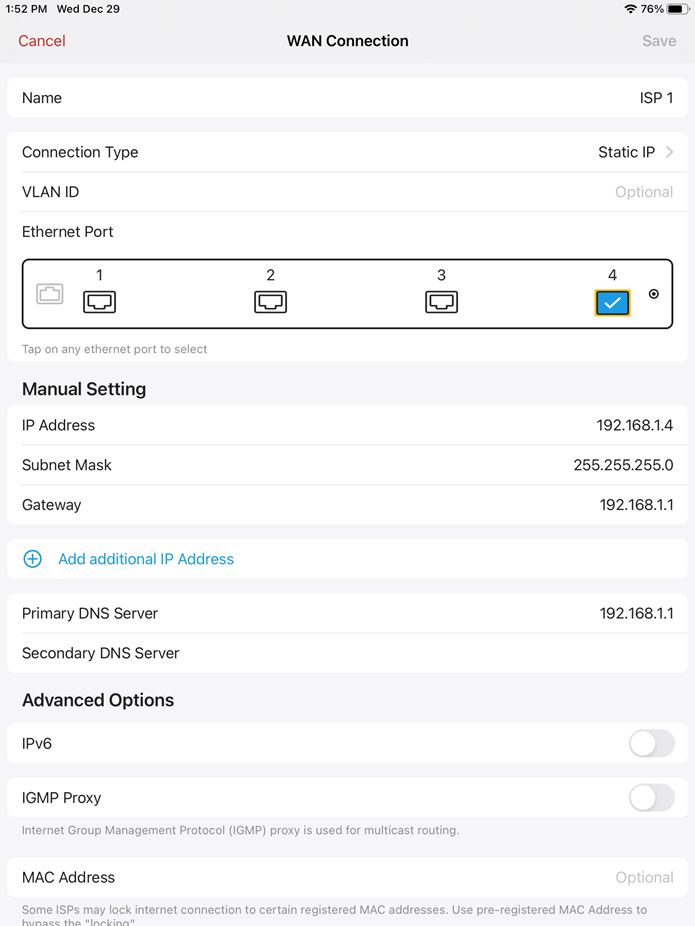
Here is an excerpt of wireguard logs trying to connect into the VPN server:
Starting WireGuard/0.5.3 (Windows 10.0.19042; amd64) Starting UI process for user [I AM THE USER] for session 9 [fw] Starting WireGuard/0.5.3 (Windows 10.0.19042; amd64) [fw] Watching network interfaces [fw] Resolving DNS names [fw] Creating network adapter [fw] Installing driver 0.10 [fw] Extracting driver [fw] Installing driver [fw] Creating adapter [fw] Using WireGuardNT/0.10 [fw] Enabling firewall rules [fw] Interface created [fw] Dropping privileges [fw] Setting interface configuration [fw] Peer 1 created [fw] Setting device v4 addresses [fw] Interface up [fw] Sending handshake initiation to peer 1 ([EXTERNAL SERVER IP]:51820) [fw] Setting device v6 addresses [fw] Startup complete [fw] Handshake for peer 1 ([EXTERNAL SERVER IP]:51820) did not complete after 5 seconds, retrying (try 2) [fw] Sending handshake initiation to peer 1 ([EXTERNAL SERVER IP]:51820) [fw] Handshake for peer 1 ([EXTERNAL SERVER IP]:51820) did not complete after 5 seconds, retrying (try 2) [fw] Sending handshake initiation to peer 1 ([EXTERNAL SERVER IP]:51820) [fw] Sending handshake initiation to peer 1 ([EXTERNAL SERVER IP]:51820) [fw] Handshake for peer 1 ([EXTERNAL SERVER IP]:51820) did not complete after 5 seconds, retrying (try 2) [fw] Sending handshake initiation to peer 1 ([EXTERNAL SERVER IP]:51820) [fw] Sending handshake initiation to peer 1 ([EXTERNAL SERVER IP]:51820) [fw] Handshake for peer 1 ([EXTERNAL SERVER IP]:51820) did not complete after 5 seconds, retrying (try 2) [fw] Sending handshake initiation to peer 1 ([EXTERNAL SERVER IP]:51820) [fw] Handshake for peer 1 ([EXTERNAL SERVER IP]:51820) did not complete after 5 seconds, retrying (try 2)
The handshake failures repeat until I manually end it.
I think the answer should be obvious to me. I have a feeling it will be in retrospect but for now I'm hoping someone can assist and kick me in the right direction.
Thanks in advance!
-

I have a feeling it is a double nat issue. Is your modem also a firewall?
I like to use
to test for open ports. Is it actually open?
-
It doesn't appear to be open externally when I scan for it.
Here is the port routing rule in the modem:
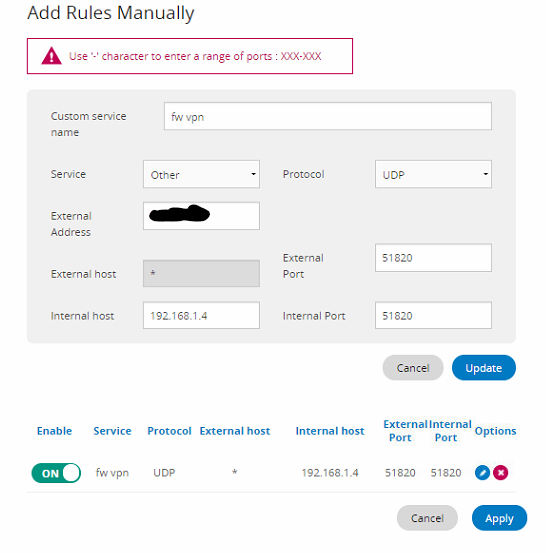
The redacted address is my static IP.
The modem appliance does have an onboard firewall, but the settings are such that it is disabled (though you can't actually turn it off):
 It seems like everything is in order. I can't figure out why I can't make the handshake. Any ideas appreciated. :)
 -
If you open a port (any tcp port) can you access it externally?
I have a workaround I’m doing to connect my parents house to my network. The have “internet” but it is a provided that is basically cellular, but not. They receive internet wirelessly. Their modem allows you to expose ports, but it is a double nat situation so it is actually not exposed. They could do port forward but it cost an additional $20 per month per port. Wonder if that is your situation? I have been able to get it to work with Wireguard, but it is all terminal work and not accessible via the UI.
Please sign in to leave a comment.
Comments
3 comments