VPN client connection Leaks to WAN When turbo DNS is enabled, requiring DNS caching, ad block and family protect to be disabled among others. Period.

It’s very serious issue comes after it’s taking me forever to get acknowledged and then VPN fails in cases where the system crashes or reboots, One of several serious bugs I have encountered in the general sense is that Firewalla Support doesn’t care about fixing problems that are fundamental End it could impact a lot of others
So now It appears that any VPN client device With DNS turbo on, is completely unprotected and should expect issue of leaks to increase over time. Nns cashing simply overrides routing through the tunnel despite Killswitch and DNS force over VPN being enabled. When I was trying to persuade multiple times that there was an issue and no real killswitch, I realized that anything stopping traffic was only that all DNS via vpn And otherwise if that is not enabled killswitch would not prevent tunnel dropping from all traffic flowing to the WAN, but it is a fact (Switching off VPN client, not forcing all traffic, and as you now realize that fire Walla rebooting the system, leak to wan and that is all because the only thing that blocks the traffic is that DNS resolution
Unfortunately It appears that any VPN client device With DNS turbo on, is completely unprotected and should expect issue of leaks to increase over time. Nns cashing simply overrides routing through the tunnel despite Killswitch and DNS force over VPN being enabled. When I was trying to persuade multiple times that there was an issue and no real killswitch, I realized that anything stopping traffic was only that all DNS via vpn And otherwise if that is not enabled killswitch would not prevent tunnel dropping from all traffic flowing to the WAN, but it is a fact (Switching off VPN client, not forcing all traffic, and as you now realize that fire Walla rebooting the system, leak to wan and that is all because the only thing that blocks the traffic is that DNS resolution
What is concerning is that this rule does not have precedence over DNS turbo, which means that more fundamentally firewalla Dns Resolver And the idea that all traffic going through it looks the same and comes from the same source so as not to expose specific clients, does not have a mechanism for doing this and many of the firewall actions such as DOH, Parental control, and ad blocking Without bypassing VPN client rules and routes. That is some thing clearly illustrated in the screenshots and into the video below that I think others should be aware of or they could suffer the same Unpleasantness that I did without going into detail. “
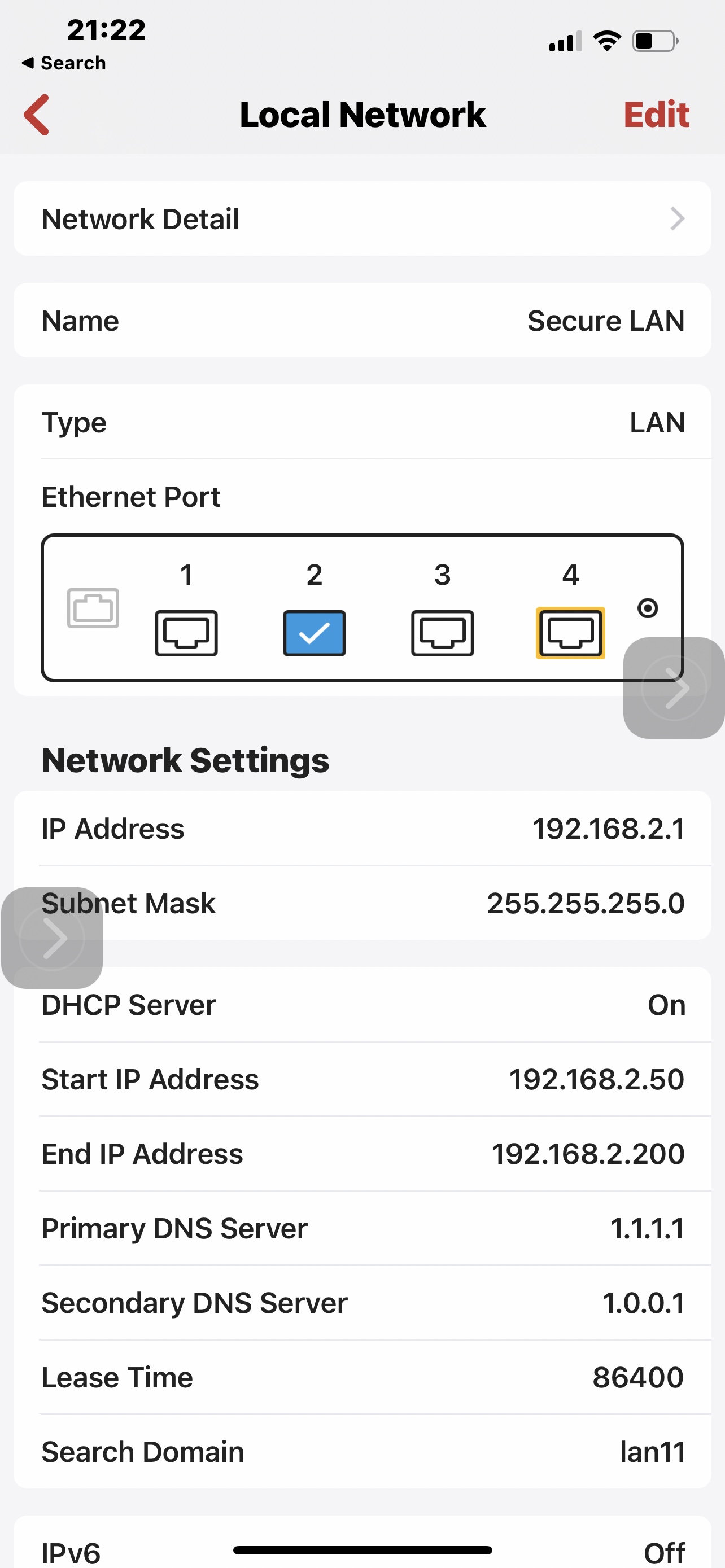
The results vary based on how the specific Netwerk DNS is configured. that DNS will run as if there was no VPN. If the DNS for the sudden it is it’s gateway and it’s using the default WAN in my case ISPDNS which I was somehow under the impression it was only for firewalla internally and not external resolution mistakenly. In this case leagues would be directly to DNS servers of ISP. If the interface or segment is configured differently, Such as cloudflare (1.1.1.1 and 1.0.0.1) It was in the attached video, then the liquid simply show up in the first stop along the way where there is a local 1.1.1.1 instance. Even using in my case Nord vpn Proprietary DNS server doesn’t help And it’s imperative at this point to disable turbo DNS for anything that is going to be on VPN and fix it, as well as make sure the interface has DNS configured which cannot leak if passed on through the tunnel. And this is something others should be aware of before it is fixed. And I factory reset my system, only to find out the beta features Such as configured VPN clients it took me a long time to locate the correct ones, do not survive the restoration, Which to me counters that logic behind beta being more susceptible to issues that would warrant extreme measures not this is the essential thing here.
The fact is that if you have a multiple clients and multiple routes that use VPN then you would have a heterogeneous subnet environment, we’re not necessarily you would want all clients on VPN or on the same configuration. That is definitely true in my case where I wonder with some devices such as my phone between different networks. At the same time I don’t want all my networks to have the same DNS configurations, Are all devices that need VPN to give up not just the speed related to caching, What features like ad block, In some cases definitely DOH where I use my phone on a secure at work or I don’t need VPN but I cannot have it because I have to configured VPN client for my device to move with me to a Smart DNS Proxy Segment words the opposite and I have to be with a VPN and other devices not.
Here are some screenshots :
.screenshots:
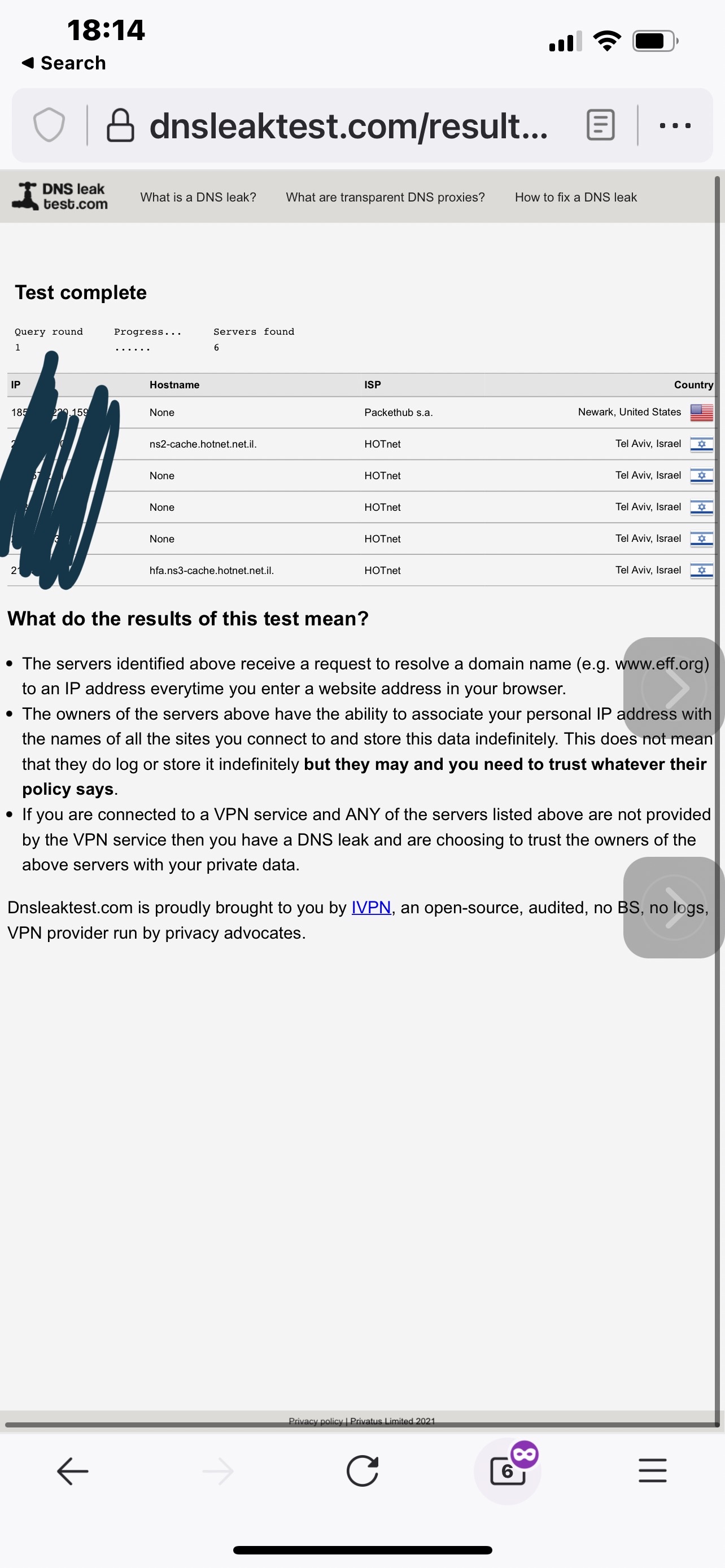
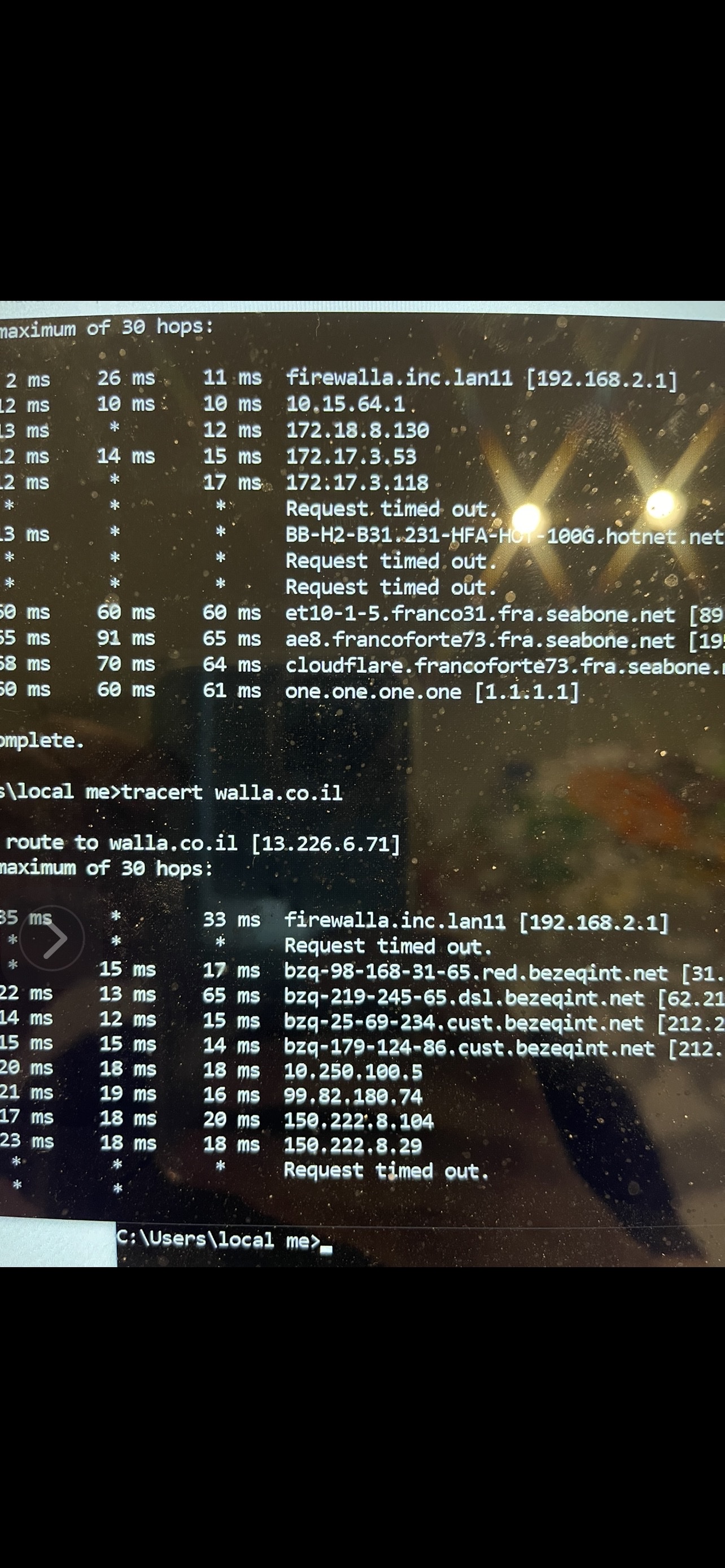
1. IP of VPN client configured with Killswitch on a Dns to VPN on of course. I lan Interface DNS in this case is the gateway IP of the lan, And DNS booster is on.
The result is (2)that DNS booster overrides the vpn rule, and resolves wt least in a way that the isp DNS is passed, as can be seen
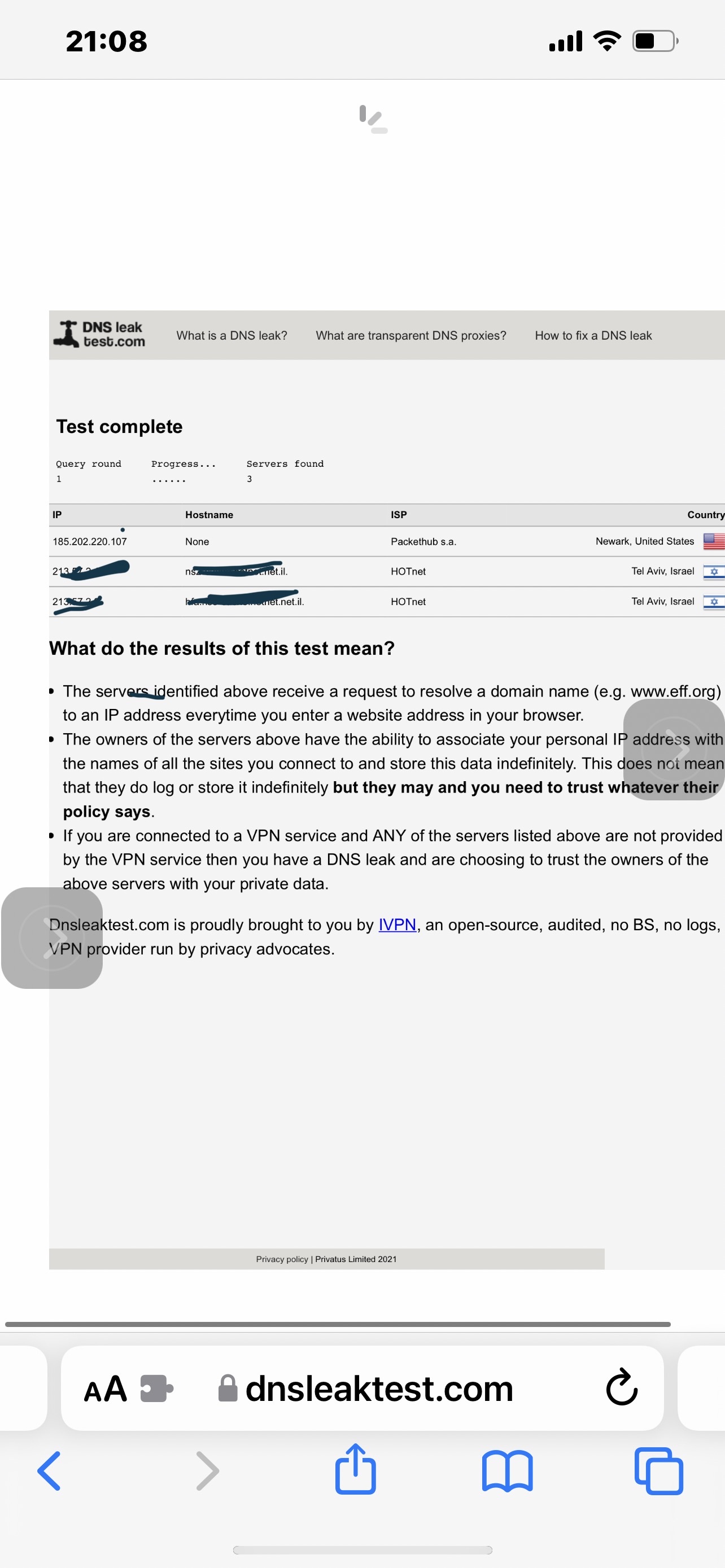
. 3 is when cache is cleared on firewalla then it would look like and
4 If the subnet is configured with its own DNS then it would change the route so you will not see isp servers, but will see the leak down the way. That is presented in 5
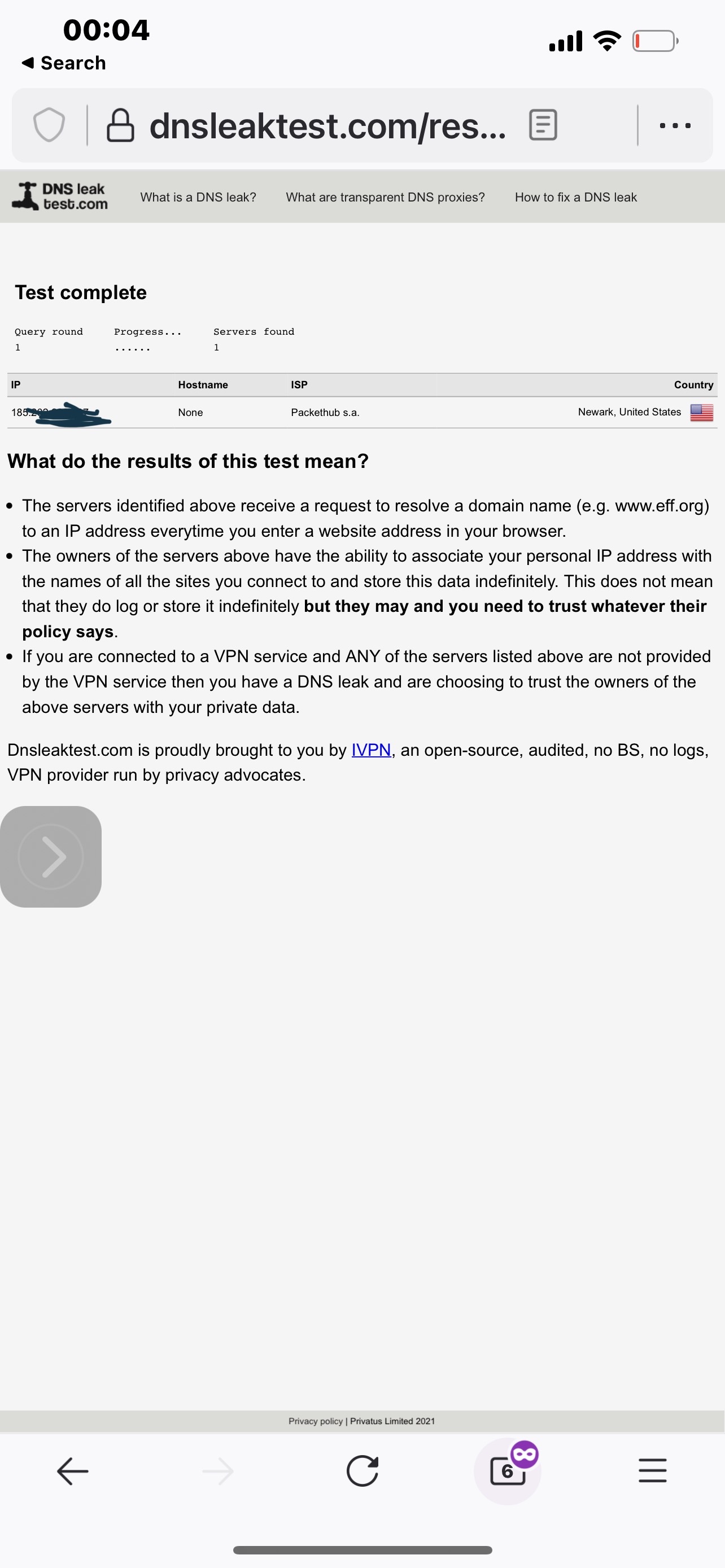
6 is the only Achieved its caching in with it multiple other features are disabled, and only then assuming all traffic is pushed to the VPN and all goes well otherwise then it doesn’t leak.
7 shows what a reboot does a very clear way when caching is disabled And DNS is forced and Killswitch etc. are all there. I’m sending it because I wasn’t able to get it acknowledged an issue for a very long time and I’m not exactly sure how much of a concern it is even now. Suddenly I don’t see how it can be compared to future features
I am concerned becauseI’ve run into quite a few security issues without being any expert and often in a very non-academic way, and my sense is that There is I pushed by the wayside often Edit best compared to cool features, and I don’t think this At all possible. Anyway people that rely on these kinds of features should watch out.


Please sign in to leave a comment.
Comments
0 comments