Blocked Connections Skyrocketing

Literally overnight, I've gone from a normal blocked connections of around 16K per day to over 1.1MM blocked connections. Figure my IP address must be on a list somewhere...
Most connections are against WAN port with destination of anything in the ephemeral range but still the same characters trying to hit ports 22, 23, 5555 and so on.
Last night I noticed many of the IP's trying to hit me (Canada, China (blocked), USA, etc....were source porting from 10001. Which I thought was odd. While that was the source (on their network), the destination was still in the ephemeral range. 10001 is an old Ubiquity backed port from what I can see. Probably means nothing.
My question is, has anyone found a way to search outbound contact with particular IP addresses so I can discern whether I have something on the internal network communicating to these IP addresses which is then blocking the response from those same external IP addresses? I've SSH'd in and blocked ICMP responses on my WAN interfaces to try and cut some external exposure...
The only thing I've done in the past 24 hours is fired up a few new Wyze Cameras. I've always had half a dozen, but added a few more over the weekend. I've shut down external NGinx proxy so nothing exposed allowing inbound except Firewalla VPN.
Gotta be a way or a log file to scour for all communication with an external IP....
-
Oh, one important fact. 99% of the inbound traffic is UDP....
TimestampSourceDestinationDestination PortUploadDownloadStatus8:36 AM 23.82.78.39WANUDP 43830 - - Blocked 8:36 AM 37.120.216.82WANUDP 43830 - - Blocked 8:36 AM 144.48.104.74WANUDP 43830 - - Blocked 8:36 AM 23.82.75.184WANUDP 50183 - - Blocked 8:36 AM 192.99.4.226WANUDP 50183 - - Blocked 8:36 AM 172.107.198.122WANUDP 50183 - - Blocked 8:35 AM 23.82.78.39WANUDP 58118 - - Blocked 8:35 AM 37.120.216.82WANUDP 58118 - - Blocked 8:35 AM 144.48.104.74WANUDP 58118 - - Blocked 8:35 AM 45.134.144.11WANUDP 5060 - - Blocked 8:35 AM 103.145.13.243WANTCP 5038 - - Blocked 8:35 AM 23.19.219.123WANUDP 33131 - - Blocked 8:35 AM 192.99.7.194WANUDP 33131 - - Blocked 8:35 AM 172.107.198.98WANUDP 33131 - - Blocked 8:35 AM 23.82.78.39WANUDP 43830 - - Blocked 8:35 AM 37.120.216.82WANUDP 43830 - - Blocked 8:35 AM 144.48.104.74WANUDP 43830 - - Blocked 8:35 AM 23.82.75.184WANUDP 50183 - - Blocked -
I guess part of my concern is that it's valid traffic that the firewalla needs to broker between the source and destination and that the connections aren't being honored. If a device on my internal network reaches out to an external device and that device spins up a UDP connection to further interact with the internal device.
-
Thanks James. So do you find your ports are UDP and high in the range like mine shown above? 5 digits? If so, I wouldn't call it scanning, i'd call it something is blocking normal UDP usage.
Many IP addresses I see are from my webcam vendor, Wyze. And it's as if when my camera tries to connect to their services, they need to connect back over a UDP port in that high ephemeral range but cannot.....as Firewalla is blocking it.
-

I noticed with one of the last updates that the port forward is only allowing incoming traffic. My Webserver allows port 80 and 443 to come in, but when it is going out (system software updates, etc) then Firewalla is blocking those outbound connections. For instance I use LetsEncrypt. My certificates were expiring because the Firewalla blocked those outbound connections. I had to specifically list the ip/domain for lets encrypt to allow to be able to communicate with them.
When I look at the Network flow for that device and open up one of the blocked connections and clicked on "Why is this blocked" it doesn't list anything. I just noticed the Port and the Direction. Then noticed under the rules that "Traffic from internet, Local Port 80, Inbound only, Always".
-

The open port rules should be in both directions if you use port forwarding and tap on "automatically open port on the firewalla". Did you do that? If you did, then please send help@firewalla.com and we can help you.
-
These were set up when I first got my Firewalla Gold (over a year ago). I went to Network > NAT Settings > Port Forwarding > "Add Port Forwarding"
Your logic put those rules in place. Maybe need to remove and reapply? Like I said, those rules have been in place since I first put the Gold into production and have not had any issue. It's even gotten down to some local devices get blocked from accessing port 80 or 443 on that device. Not all devices though, just a select few and the Diagnose does not produce any results.
-

@James,
Are there any other rules added to web server recently? This port forwarding rule should only impact inbound traffic only since the beginning. There may be other rules related to the outbound blocking issue.
If you send email to help@firewalla.com and share us remote support, we can remotely debug the issue.
Thanks,
-

I'm seeing inbound IP blocks to my firewalla from 108.181.24.49 to random UDP ports on my WAN but always with a source port of 10001. In any given 24 period, I'm seeing over 500k blocks. Another IP of 192.99.160.133 has had over 200k blocks in the same period. Same random UDP port and source port of 10001. It's basically a DDOS attack without the distributed part. And it's causing issues on my network. This has been happening for weeks and maybe months. Any idea what's happening here?
-

https://help.firewalla.com/hc/en-us/community/posts/4409204278547/comments/20285295146131
I'm having a similar issue.
-
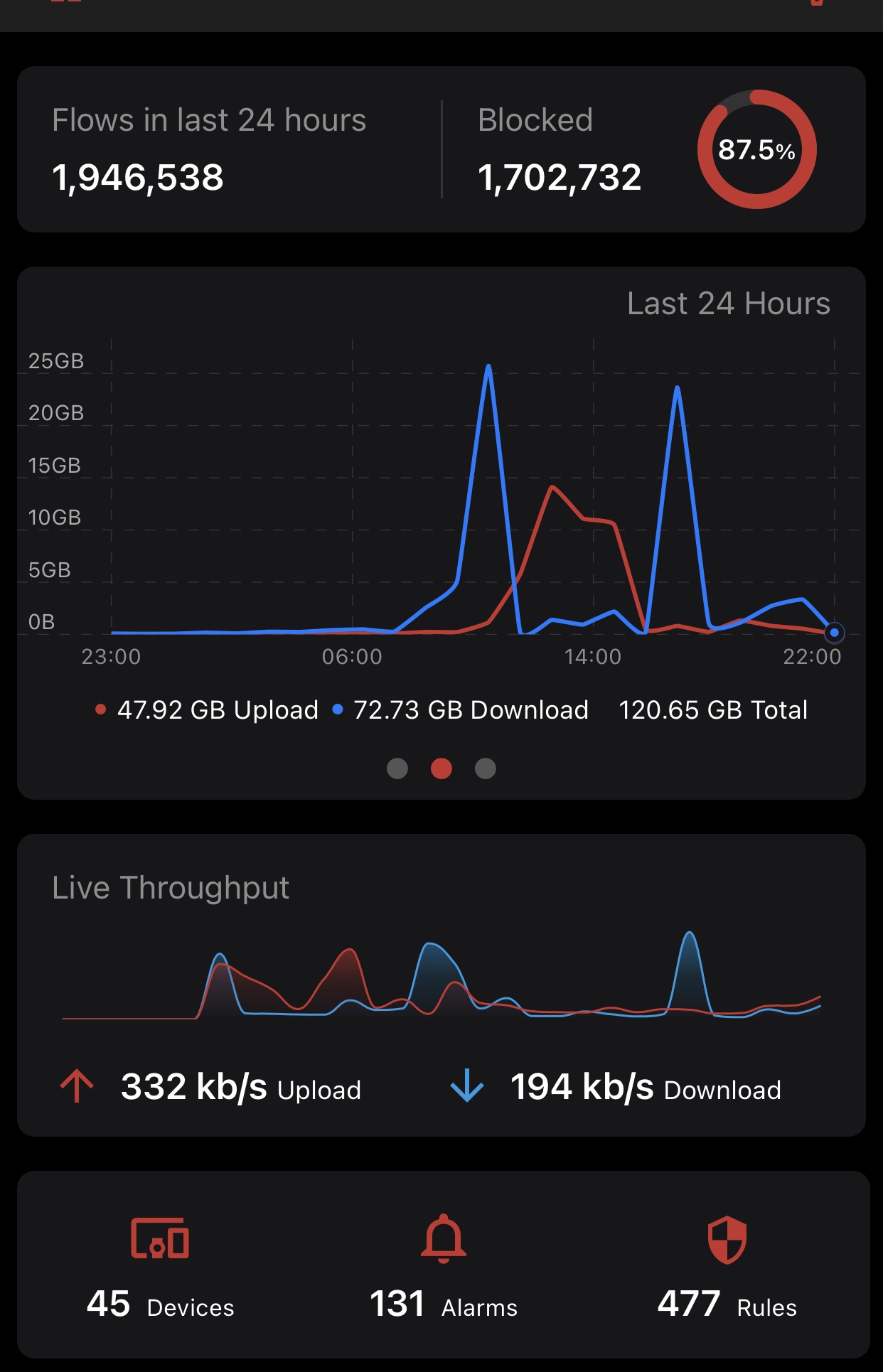
I've been seeing this for months too. 95% of my traffic being blocked. Have three cams.
https://forums.wyze.com/t/udp-packet-flood-from-wyze-ip-addresses/222071/3

Please sign in to leave a comment.
Comments
26 comments